Imagine you're working on an assignment and come across a YouTube video that explains your topic better than anything else you've read.
Maybe it's a science lesson that finally makes a difficult concept clear, a documentary with useful facts, or an expert interview that supports your argument.
You take notes, find the perfect information to include in your paper, and start writing.
But then you realize something: How do you cite a YouTube video correctly?
You know you need to give credit, but should you mention the person speaking, the YouTube channel, or both?
And how do you turn those details into a proper citation?
The answer depends on the citation style your teacher or university requires.
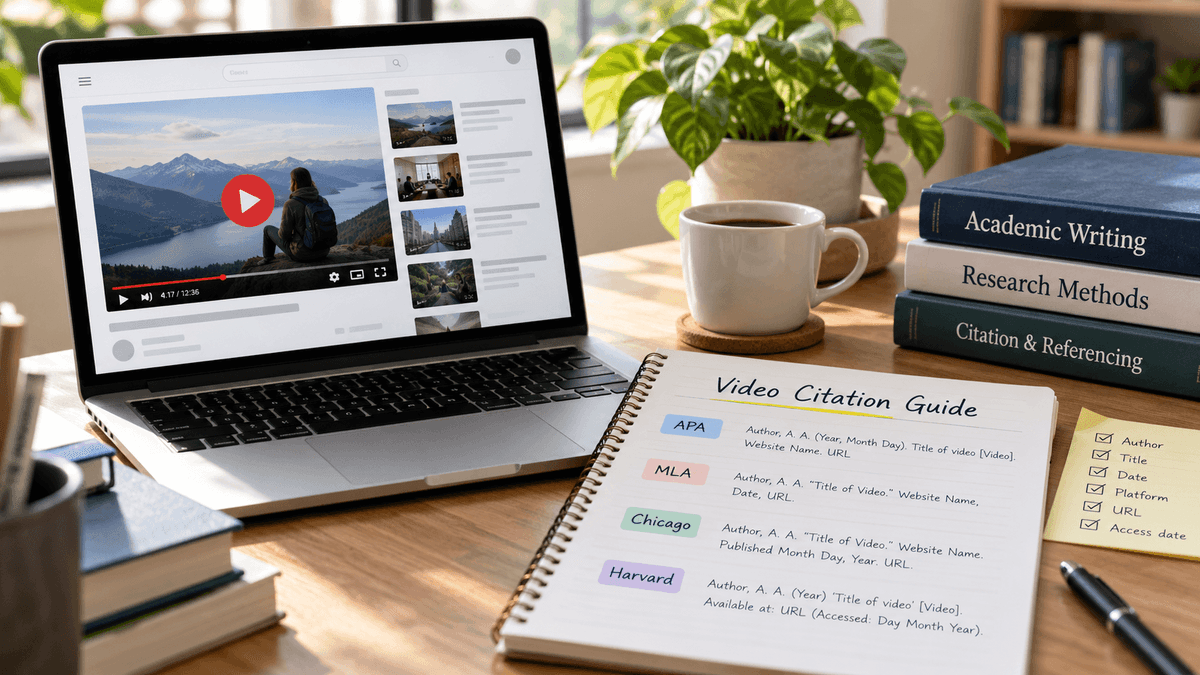
Whether you're using APA, MLA, Chicago, or Harvard, you'll usually need the video's creator or channel name, title, upload date, and URL.
The difference is how each style arranges that information.
Don't worry, though. We'll go through each style with simple formats and examples.
You'll also learn how to cite specific timestamps, YouTube Shorts, interviews, transcripts, and videos with missing details.
But first, let's make things easier.
If you already know which citation style your assignment requires, the quick comparison below will help you find the right format before we walk through the details -
YouTube Video Citation Formats at a Glance
Before we get into each citation style, let's look at how YouTube video citations are formatted.
Although APA, MLA, Chicago, and Harvard use much of the same information, they don't arrange it in the same way.
For example, APA places the publication date near the beginning, while MLA puts the video title before the date.
Chicago may also include the video's total length, and some Harvard styles require the date you accessed it.
These differences might seem small, but they matter when you're preparing an assignment or research paper.
So, which format should you follow?
That depends on the citation style your teacher or university has asked you to use.
The table below gives you a quick comparison of the four major styles.
Find yours to see the basic format, and we'll walk through each one with examples in the next sections.
| Citation Style | Basic Reference Format |
|---|---|
| APA 7th | Uploader. (Year, Month Day). Video title [Video]. YouTube. URL |
| MLA 9th | Creator. “Video Title.” YouTube, Day Month Year, URL. |
| Chicago 18th | Creator. “Video Title.” Channel or publisher. Publication details. YouTube video, duration. URL. |
| Harvard | Creator. Year. Video title. [Online]. [Accessed Day Month Year]. Available from: URL. |
The Harvard example follows the University of Leeds version.
Other universities may use slightly different formats.
Remember: A complete reference identifies the video. An in-text citation or footnote shows readers exactly where you used its information in your writing.
Let's start by collecting the details you need.
What Information Do You Need to Cite a YouTube Video?
Now that you know how the citation formats differ, the next step is to collect the information you'll need.
The good news is that most of these details are already available on the YouTube video page. You just need to know where to look.
Before writing your citation, open the video and check these five details.
They'll help you create an accurate reference, no matter which citation style you're using.
| Information | Where to Find it | Why it Matters |
|---|---|---|
| Creator or channel name | Below the video title | Identifies the source |
| Video title | Above the video player | Tells readers which video you used |
| Upload date | Video description or details | Shows when that version was published |
| Video URL | Address bar or Share button | Helps readers find the original video |
| Timestamp | Video playback bar | Identifies the exact moment you quoted |
Keep in mind that you won't need every detail for every citation style.
For example, Chicago may include the video's full running time, while APA normally doesn't.
Similarly, timestamps are mainly useful when you're quoting or referring to a specific part of a video.
But before deciding which details to include, you need to find them first.
Let's see where you can locate this information on YouTube.
Where to Find the Video Title, Date, and URL
Now that you know which details are needed for a YouTube citation, let's look at where you can actually find them.
The good news is that you don't need to search through different websites or tools.
Most of the information is available right on the YouTube video page.
Whether you're using APA, MLA, Chicago, or Harvard, the process of collecting these details is almost the same.
Here's how to find everything you need:
- Open the YouTube video you want to reference.
- Copy the full video title as displayed on the page.
- Check the channel name below the title.
- Open the description to find the upload date and any creator information.
- Click Share and copy the video URL.
For a direct quotation, pause the video where the relevant statement begins and write down the timestamp.
Quick Tip: Use the upload date of the YouTube version you watched, not the date a video was originally filmed. If you're citing a historical speech or older film, some styles allow or require additional information about the original work.
Now that you've gathered these details, there's one more thing to figure out before creating your citation: who should you give credit to?
You might notice that the person speaking in a video isn't always the same person or organization that uploaded it.
So, whose name should appear in your citation?
Let's clear that up.
Should You Cite the Creator or the YouTube Channel?
This is where many students get confused.
Imagine watching a TED Talk featuring a scientist.
The scientist gives the presentation, but the TED channel uploads the video.
Who should receive credit?
It depends on your style:
- APA: Usually credits the person or organization that uploaded the video.
- MLA: Can begin with the primary creator and separately identify the uploader.
- Chicago: Identifies the creator or person primarily responsible for the content and supplies the relevant publication details.
- Harvard: Often uses the channel or username, depending on your institution's guidelines.
The distinction matters because the speaker and the person responsible for publishing a recording are not always the same.
Now that you've collected the details, you're ready to format your first citation.
How to Cite a YouTube Video in APA Style (7th Edition)
APA is commonly used in psychology, education, nursing, and other social science subjects.
To cite a YouTube video in APA 7th edition, you need the uploader, publication date, video title, a description of the source, the platform name, and its URL.
If you're already familiar with citing a website in APA style, you'll recognize the author-date structure.
The main difference is that YouTube references include a description such as [Video] to identify the source.
APA 7 YouTube Video Reference Format and Example
APA reference format:
Uploader's Last Name, Initials. [Channel name]. (Year, Month Day). Title of video [Video]. YouTube. URL
If the uploader is an organization or only a username is available, use that name without the square-bracketed channel information.
Example:
TED. (2014, June 27). How to speak so that people want to listen: Julian Treasure [Video]. YouTube. https://youtu.be/elho2SOZahl
Notice three details:
- The uploader, TED, appears first.
- The video title is italicized and written in sentence case.
- [Video] identifies the type of source.
You don't need to add an access date for an ordinary YouTube video reference in APA 7.
This example follows the video-reference guidance published by Curtin University Library.
So, you've now seen how to format a YouTube video in your reference list.
But what happens when you use information from that video in your essay or research paper?
That's where in-text citations come in.
They help readers connect the information in your writing to the full reference you've provided.
Let's see how to write them correctly -
APA In-Text Citation for a YouTube Video
Your reference list tells readers which video you used.
Your in-text citation tells them where you used its information.
APA uses the author-date system, which means including the uploader's name and publication year.
Parenthetical Citation:
(TED, 2014)
Narrative Citation:
TED (2014) published a talk about how people can communicate more effectively.
Both are correct. The difference is whether the source is mentioned as part of your sentence.
For a direct quotation, include the timestamp where the words begin.
Example:
(TED, 2014, 2:15)
Here, 2:15 is an illustrative timestamp showing the correct citation format, not a verified quotation location.
For APA, adding a timestamp helps readers locate the exact spoken words, since videos don't have page numbers.
Now that you know how to cite a video in your text, there's one more detail worth checking -
What If the Channel Name Is Different from the Creator's Name?
Suppose a researcher gives a lecture, but a university uploads it.
For an ordinary APA YouTube citation, the university or account that posted the video is generally credited as the author of that upload.
If the uploader's real name is known and differs from the channel name, APA can include both:
Format:
Last Name, Initials. [Channel Name]. (Year, Month Day). Video title [Video]. YouTube. URL
If only the channel name is known, use the channel name as the author.
If you're also using a professor's slides or notes alongside the video, our guide on how to cite lecture notes explains how those sources differ from recorded lectures.
APA is fairly straightforward once you know who uploaded the video.
But what if the person who created the content isn't the one who uploaded it?
That's where MLA handles things a little differently.
Unlike APA, MLA allows you to give credit to the original creator while also mentioning the YouTube channel that uploaded the video.
Let's see how this works and how to format a YouTube video citation in MLA style -
How to Cite a YouTube Video in MLA Style (9th Edition)
MLA is commonly used for literature, language, history, and humanities assignments.
Unlike APA, MLA YouTube citations usually emphasize the creator and video title rather than beginning with a publication date.
MLA YouTube Video Works Cited Format and Example
Basic MLA format:
Creator's Last Name, First Name. “Title of Video.” YouTube, Day Month Year, URL.
If the creator cannot be identified, begin with the video title instead.
For example, the official MLA Style Center provides a YouTube citation where the uploader is known, but the original creator isn't.
Works Cited example:
“Capybara Eat Huge Pumpkin.” YouTube, uploaded by Alex Smith, 12 Jan. 2021, www.youtube.com/watch?v=8YNwxZnABzA.
Notice how this differs from APA.
The title comes first because the creator isn't identified. The uploader is credited separately, and the date appears after the platform information.
MLA also uses quotation marks around the title of a typical individual video, while YouTube is italicized as the container.
Interesting Detail: The MLA Style Center explains that you can begin with the primary creator when that person is clearly responsible for the work. Otherwise, starting with the title may be more appropriate.
This helps avoid giving creative credit to someone who merely uploaded another person's video.
MLA In-Text Citation for a YouTube Video
MLA in-text citations usually use the creator's surname, or a shortened title when no author is given.
Since YouTube videos don't have page numbers, you can include a timestamp when referring to a specific moment.
For the capybara example, a general citation could look like this:
General reference:
("Capybara Eat Huge Pumpkin")
Reference to a specific moment, using an illustrative timestamp:
("Capybara Eat Huge Pumpkin" 0:45)
If the title is already mentioned in your sentence, you don't need to repeat it unnecessarily in parentheses.
Similarly, if the author appears in your sentence, you can provide just the timestamp when a precise location is needed.
So far, we've looked at how MLA citations work when the video's creator is known or when only the title is available.
But what happens when the person who created the video isn't the one who uploaded it?
This is common with interviews, lectures, and speeches shared by universities, news channels, or other organizations.
In these cases, it's important to know who deserves credit and how to include both names in your citation.
Let's see how MLA handles this -
What If the Video Creator and Uploader Are Different?
Imagine a journalist interviews a famous author, and a television channel uploads the recording to YouTube.
You have two people or organizations involved:
- The interviewee, who provides the information.
- The channel, which publishes the recording.
MLA can identify the interviewee as the author of the interview and the channel as the uploader.
For example, if you're working with an interview rather than a standard video, the rules for citing an interview can help you understand how the interviewee, interviewer, and publisher fit together.
The important thing is to credit the actual source of the information, not automatically assume the uploader created everything in the video.
Next, let's look at Chicago, where you'll often encounter footnotes rather than parentheses -
How to Cite a YouTube Video in Chicago Style (18th Edition)
Chicago style is commonly used in history, publishing, and some humanities subjects.
It has two citation systems:
- Notes and Bibliography: Uses footnotes or endnotes, usually with a bibliography.
- Author-Date: Uses citations in parentheses and a reference list.
Your instructor should tell you which system to use.
Chicago Notes and Bibliography Citation
Suppose you're citing a recorded public speech uploaded to YouTube.
The Chicago Manual of Style provides an example involving a 2019 New York City State of the City address.
Footnote:
- Bill de Blasio, “Mayor de Blasio Delivers State of the City Address,” NYC Mayor’s Office, streamed live on January 10, 2019, YouTube video, 1:22:40, https://youtu.be/aZZYlpfZ-iA.
Bibliography entry:
de Blasio, Bill. “Mayor de Blasio Delivers State of the City Address.” NYC Mayor’s Office. Streamed live on January 10, 2019. YouTube video, 1:22:40. https://youtu.be/aZZYlpfZ-iA.
The bibliography begins with the author's last name, while the footnote uses the normal name order.
Also, 1:22:40 here means the full video duration, not the moment a quotation appears.
If you want to cite a specific passage, you can provide its timestamp in the note.
Source: The Chicago Manual of Style, YouTube Citation Guidance.
Chicago Author-Date Citation
Chicago also allows an author-date system, which looks more like APA.
Basic reference-list Format:
Creator's Last Name, First Name. Year. “Video Title.” Channel or publisher, Month Day. YouTube video, duration. URL.
In-text Citation:
(Author Year)
For a specific point in the recording, include a timestamp where appropriate.
Example using the speech above:
(de Blasio 2019, 15:30)
The timestamp is illustrative.
It shows how a precise location would appear, not a verified quotation from the speech.
If you're unsure which Chicago system to use, check your assignment instructions first.
Mixing author-date citations with notes-and-bibliography references can make the final paper inconsistent.
This is one of the problems covered in our guide to common citation mistakes, which also explains how to spot mismatched authors, dates, and in-text references.
How to Reference a YouTube Video in Harvard Style
Harvard referencing is common at universities around the world, particularly in the UK and Australia.
There is one important difference from APA, MLA, and Chicago: Harvard doesn't have a single universal style manual.
Universities may have their own Harvard referencing rules.
For this example, we'll follow the University of Leeds.
Harvard YouTube Reference Format and Example
Leeds Harvard format:
Screen name or username. Year. Video title. [Online]. [Date accessed]. Available from: URL.
Example:
Common Craft. 2008. Twitter in plain English. [Online]. [Accessed 19 August 2019]. Available from: http://www.youtube.com/watch?v=ddO9idmax0o
This is an example published by the University of Leeds, including its original access date.
In-text Citation:
(Common Craft, 2008)
Or, when mentioning the creator:
Common Craft (2008) explains the topic through a short animated video.
Unlike APA's standard YouTube format, Leeds Harvard includes the date the online video was accessed.
Other universities may prefer Available at: instead of Available from: or use different punctuation.
Before submitting your assignment, check your institution's referencing guide.
Source: University of Leeds: Harvard Referencing for Online Videos.
Now that we've covered APA, MLA, Chicago, and Harvard, you should have a clearer idea of how to cite a YouTube video in each style.
But here's something we haven't explored in detail yet.
What if you're using just one sentence or a short explanation from a 40-minute YouTube video?
Your readers shouldn't have to watch the entire video to find the part you're referring to.
That's where timestamps come in.
They help you point readers to the exact moment you quoted or discussed.
Let's see how to include them in your citations -
How to Cite a Specific Part of a YouTube Video Using Timestamps
Imagine watching a 50-minute documentary for your research paper.
At 12 minutes and 30 seconds, the narrator explains something important.
You want to quote that statement in your assignment.
Your reader shouldn't have to watch the entire documentary just to find those words.
A YouTube citation with a timestamp points to the exact part of the video you're discussing.
How to Cite a Direct Quote from a YouTube Video
For example, suppose a fictional educational video published by an account called Science Lessons in 2024 contains a statement at 3 minutes and 20 seconds.
Here's how the timestamp could appear in different styles.
| Citation Style | Illustrative In-text Citation |
|---|---|
| APA 7 | (Science Lessons, 2024, 3:20) |
| MLA 9 | (Science Lessons 3:20) |
| Chicago Author-Date | (Science Lessons 2024, 3:20) |
| Harvard | (Science Lessons, 2024, 03:20), where required by the university |
These examples demonstrate formatting only.
They are not quotations from a real video, and the exact presentation may depend on your institution's rules.
How to find a timestamp:
- Play the YouTube video.
- Pause where the relevant statement starts.
- Look at the current playback time.
- Record that time in minutes and seconds.
- Add it to your citation using the correct style.
For long recordings, timestamps may include hours, minutes, and seconds, such as 1:12:35.
So, when you're quoting someone's exact words from a YouTube video, a timestamp helps readers find where those words were spoken.
But what if you're not using the exact words?
Maybe you've watched a video, understood an explanation, and written the idea in your own words.
Do you still need to include a timestamp in that case?
Let's look at -
Do You Need a Timestamp When Paraphrasing a YouTube Video?
Not always.
If you're discussing the main idea of a whole video, the creator and year may be enough in an author-date style.
But if you're referring to a particular statement, demonstration, or explanation, including a timestamp helps readers find it.
There's another important point here.
Changing spoken words into your own sentences doesn't make them your original ideas.
When you use another person's explanation, you still need to give credit.
You can use a paraphrasing tool to explore alternative wording, but make sure your final sentence accurately reflects the video and includes a citation.
If you're unsure whether changing the wording is enough, our guide on paraphrasing vs. plagiarism explains the difference with examples of properly credited ideas and problematic rewriting.
Remember: Quoting means using someone's exact words. Paraphrasing means explaining their idea in your own words. Both normally need citations.
Now that you know how to cite both direct quotes and paraphrased information, you might be wondering whether these same rules apply to every type of YouTube content.
After all, YouTube isn't just about regular videos anymore.
You might come across a YouTube Short, a recorded livestream, an interview, or even a video transcript while researching your topic.
Do you cite all of them the same way, or does the format change?
Let's go through these different types of YouTube content and see how to reference each one correctly -
How Do You Cite Different Types of YouTube Content?
Not everything on YouTube is a regular uploaded video.
You might use a Short, a recorded livestream, an interview, or even a transcript.
These sources can require a slightly different approach.
Let's go through the most common situations.
How to Cite a YouTube Short
A YouTube Short is still a video source, so you generally use the same citation rules as other YouTube videos.
For APA, that means the uploader, upload date, video title, [Video], platform, and URL.
APA Format:
Channel Name. (Year, Month Day). Title of Short [Video]. YouTube. URL
Use the Short's actual title and URL.
If you're quoting something from the Short, include the timestamp just as you would for a longer video.
You don't need to create a completely different citation style simply because the video is vertical or lasts less than a minute.
How to Cite an Entire YouTube Channel
Sometimes your research focuses on a YouTube channel rather than one video.
For example, you might be studying how a science channel explains complex topics across multiple uploads.
In that case, you're referencing a changing collection of content.
APA treats a YouTube channel differently from an individual video.
A channel reference can identify the channel's homepage or relevant tab and include a retrieval date because the content changes over time.
General APA Channel Format:
Channel Name. (n.d.). Home [YouTube channel]. YouTube. Retrieved Month Day, Year, from URL
If you only used one specific video, though, cite that video rather than the entire channel.
A direct video citation makes your evidence much easier to verify.
How to Cite a YouTube Livestream or Recorded Webinar
For a livestream that remains available as a recording, cite the version you watched.
Include the responsible creator, recording title, date, platform details, and URL as required by your style.
For example, Chicago may describe a speech as streamed live and include its running time.
But what if you watched the event live and there's no public recording?
You may need to treat it as a live presentation, personal communication, or another non-recoverable source, depending on your citation style.
For Harvard users, the University of Leeds webinar guide provides separate examples for recorded and unavailable webinars.
The key question is whether your reader can access the recording.
How to Cite a TED Talk or Interview on YouTube
A TED Talk is a useful example because the person speaking may not be the account that uploads the recording.
In APA, a talk posted on TED's own website can be credited differently from a version uploaded to YouTube.
For the YouTube version, the uploading account is generally used as the author.
In MLA, the speaker or interviewee may be identified as the primary creator, with the uploader listed separately when relevant.
Here's A Useful Rule: Cite the version you actually watched. Don't copy the reference for a TED website video when your source is a YouTube upload.
The same applies to interviews, lectures, and recorded panel discussions.
How to Cite a YouTube Video Transcript
YouTube transcripts can make note-taking easier, especially when you're working with a long lecture.
However, a transcript isn't always a separate source.
If you're reading YouTube's automatically generated transcript of a video, you'll generally cite the video itself.
If the transcript has been published separately by an organization or author, it may need its own reference.
Before quoting a transcript, check the recording.
Automatic captions can misunderstand names, technical terms, accents, and punctuation.
For example, a science lecturer might say "mitosis," but an automatic transcript could show an unrelated word.
Using that incorrect wording in your assignment could change the original meaning.
Watch the relevant part of the video and confirm the exact words before adding quotation marks.
These situations are manageable when the video is available, and its details are clear.
But that takes us to the next question -
What If a YouTube Video Has No Author, Date, or Working Link?
Maybe the video doesn't show the creator's real name, the upload date is hard to find, or the video you used has been deleted or made private.
These situations can make citing a YouTube video confusing, especially when you're trying to complete an assignment correctly.
The good news is that missing information doesn't always mean you can't cite the video.
Most citation styles provide ways to handle these situations.
However, you should never guess or make up details just to complete a reference.
The table below covers some common problems you might face and what you can do about them -
| Problem | What to do |
|---|---|
| No real creator name | Use the identifiable channel or username where the style allows |
| No publication date | Check the video details; use an accepted no-date format only when necessary |
| Creator differs from uploader | Follow your style's rules for primary creators and uploaders |
| Video has been deleted | Look for a legitimate archived copy or another accessible source |
| Video is private | Check whether your style treats it as an unrecoverable source |
| Title has changed | Use the details of the version consulted and verify against available records |
Let's start with the first situation, which is quite common on YouTube.
What if you find a useful video, but the creator's real name isn't mentioned anywhere?
You might only see a channel name or username.
Does that mean you can't use the video in your assignment?
Not necessarily. Here's how to handle it -
How to Cite a YouTube Video Without a Real Author Name
A channel doesn't need a publicly known personal name to be cited.
If a video is uploaded by an account called History Explained, for example, APA may use that channel name as the author.
In MLA, you can begin with the title if the creator isn't identifiable and include the uploader information where appropriate.
Don't guess the creator's legal name from their username.
How to Cite a YouTube Video Without a Publication Date
YouTube normally provides an upload date, though it may be harder to find on some devices.
Check the expanded description or the video's details before deciding that the date is unavailable.
If the date genuinely cannot be found, APA can use (n.d.), meaning “no date.”
Other styles have their own missing-date rules.
You shouldn't automatically replace an unknown publication date with the day you watched the video.
How to Cite a Deleted or Private YouTube Video
This is more complicated because readers may not be able to access the source.
First, check whether the video is available through the original creator's website, another official upload, or a reliable archived copy.
If you use a different available version, cite that version and its details.
When no recording is accessible, consult your style guide or instructor about treating the material as a non-recoverable source.
A working link is helpful, but it shouldn't lead you to create a misleading citation for a video that no longer matches the material you used.
By now, you've learned how to cite YouTube videos in different styles, include timestamps, and handle missing information.
But there's one more thing worth knowing.
Do you really need to format every YouTube citation by hand?
Not necessarily. If you're working on an assignment with several videos and other sources, writing each reference manually can take time.
A citation generator can make the process easier by helping you organize the source details and format your references.
Let's see how it works.
How to Create a YouTube Citation Without Formatting It Manually
By now, you probably understand the rules.
Still, entering every period, bracket, italicized title, and date by hand can get repetitive.
A citation generator can help you organize the details.
Here's a simple workflow:
- Copy the video URL or collect its title, channel name, and publication date.
- Choose your citation style, such as APA, MLA, Chicago, or Harvard.
- Enter or review the source information, correcting any missing fields.
- Generate the citation and check it against the rules for your style.
- Add it to your reference list and create the matching in-text citation or footnote.
A generated reference still needs a quick review.
Video titles, uploaders, and original creators can be confused, especially when content has been reposted.
If you're preparing a longer assignment, keeping your citations together also makes it easier to find and correct them before submission.
But even when you use a citation generator, small mistakes can slip through.
You might choose the wrong creator, leave out an important detail, or format something incorrectly without noticing.
So, before adding your citations to the final assignment, it's worth knowing what to look out for.
Let's go through -
Common YouTube Citation Mistakes and How to Avoid Them
Even when you have all the correct video details, small formatting mistakes can affect the reference.
Here are the ones worth checking before you submit your work.
| Common Mistake | Better Approach |
|---|---|
| Using the speaker as the APA author when another account uploaded the video | Follow APA's uploader attribution rules |
| Forgetting the in-text citation | Add a citation wherever you use information from the video |
| Using a timestamp as the upload date | Keep the publication date and playback timestamp separate |
| Italicizing the wrong element | Follow the title rules for your specific style |
| Leaving out the video URL | Include the direct link when the style requires it |
| Citing the original release date instead of the consulted upload | Identify the version watched and add original publication details when appropriate |
| Copying an unverified generator result | Check names, titles, dates, capitalization, and punctuation |
Some mistakes are harder to notice than others.
For instance, you might cite the original video correctly but forget to credit a specific idea you paraphrased.
That's why citation checking should be part of your final review.
You can use a plagiarism checker to help identify matching passages that may need attention.
A similarity result alone cannot tell you whether your citations are correct, so review the context yourself.
For a broader explanation of why correct attribution matters, it also helps to understand academic integrity.
If you're reviewing an entire assignment rather than just one citation, the guide on how to check a research paper for plagiarism also explains how to review quotations, paraphrases, references, and similarity matches together.
Now that you know which mistakes to watch out for, how can you make sure you haven't missed anything before submitting your work?
You don't need to go through every citation rule again.
A quick final check can help you catch missing details and make sure your references are complete.
Here's a simple checklist to use before you submit your assignment.
Final YouTube Citation Checklist
Before submitting your paper, take a moment to review your YouTube citations one last time.
Even if you've followed the correct format, it's easy to miss a small detail, such as an incorrect upload date, a missing timestamp, or a mismatch between your in-text citation and reference list.
Use this quick checklist to make sure everything is in place:
- The creator or uploader is credited according to your citation style.
- The video title and publication date are correct.
- The URL points to the source you actually watched.
- Your in-text citations, timestamps, or footnotes match the references.
- The final formatting follows your instructor's required style and edition.
If you've checked all five, your YouTube citations should be ready to include in your assignment.
And remember, a good citation isn't just about getting the format right.
It also helps readers find your sources, understand where your information came from, and gives proper credit to the original creators.
FAQs About Citing YouTube Videos
Can you cite a YouTube video in an academic paper?
Yes. You can cite YouTube videos in academic papers when they provide relevant information. Use the required citation style and evaluate whether the video is a credible source.
Do you need to cite a YouTube video if you paraphrase it?
Yes. Even when you explain a video's ideas in your own words, you must acknowledge the source. Paraphrasing doesn't remove the need for a citation.
Do YouTube citations need timestamps?
Timestamps are useful when quoting or discussing a specific moment. They are especially important for locating direct quotations, but may be unnecessary when discussing an entire video.
Do you cite the YouTube channel or the person speaking?
It depends on the citation style. APA generally uses the uploader, while MLA and Chicago can emphasize the primary creator or speaker, with additional publication details.
Do you need to include the video URL?
Yes, most citations for publicly available YouTube videos include the direct URL so readers can find the source. Follow your chosen style's rules for formatting the link.
Can you cite a YouTube video without knowing its author?
Yes. You may use the channel name, username, or video title, depending on the citation style. Don't invent an author's name when the identity is unknown.
Final Words
Citing a YouTube video isn't difficult once you know which details matter.
Start with the video title, creator or uploader, publication date, and URL.
Then follow the format for APA, MLA, Chicago, or Harvard.
If you're quoting a particular moment, include the timestamp where needed.
The most important thing is to make your sources easy to find and give proper credit to the people whose ideas helped your work.
And if you're working with several videos, articles, and books, you don't have to format every reference from scratch.
Make your next citation easier with CopyChecker.
Use the free CopyChecker Citation Generator to create references in APA, MLA, Chicago, or Harvard.
Enter your source information, choose your style, and review the result before adding it to your assignment.