Have you ever copied a website link into your reference list, hit submit, and then immediately wondered — did I even do that right?
Citing sources sounds too easy until you're actually sitting there staring at a URL, trying to figure out where the author's name goes, whether you need a retrieval date, or what to do when there's no date on the page at all.
It gets messy fast, and the stakes are higher than most people realize.
According to a 2021 study published in the Journal of Academic Ethics, over 60% of students make consistent citation errors in academic writing, with website citations being among the most frequently mishandled source types.
And unfortunately, it's not just students! In fact, researchers, content creators, and professionals cite online sources daily, often without a firm grasp of the rules.
Surely, a wrong citation format doesn't just cost you marks, but it simply chips away at your credibility.
Here's the thing to remind you that APA format for websites isn't as complicated as it looks, but all you have to do is understand the logic behind it.
Maybe right now you're wrestling with how to cite a website in APA with no author, figuring out how to APA cite a government website, or trying to nail the APA 7th edition rules for the first time, then you’re in the perfect place!
As this APA style referencing guide breaks it all down in simple terms.
No jargon. No confusion. Just clear, step-by-step guidance will also show you how to cite a website in APA format so you can get it right every single time.
Are you ready to stop second-guessing your references? Let's dive in then -
Key Takeaways
- A proper APA website citation includes five core elements: “author name, publication date, webpage title, website name, and URL,” and appears in both your reference list and in-text citations.
- APA 7th edition is the current standard. Drop "Retrieved from" before URLs, italicize webpage titles, and always use sentence case for titles.
- Whether you're citing a government website, company page, or university source, the core APA format stays consistent, with only a few small details shifting between source types.
What Is an APA Website Citation?

Think of an APA website citation as a return address for your information. When you pull facts, stats, or ideas from a webpage, your reader naturally wants to know where this comes from. Or maybe I can check it myself?
That's exactly what a proper APA citation for a website answers.
In simple terms, it's a formatted reference that credits the original online source and gives your audience everything they need to track it down.
Whether you're citing a website APA style for a college paper, a research paper after checking plagiarism, or a professional article before publishing, the goal is always the same: transparency and trust.
So, What Goes Into an APA Website Citation?
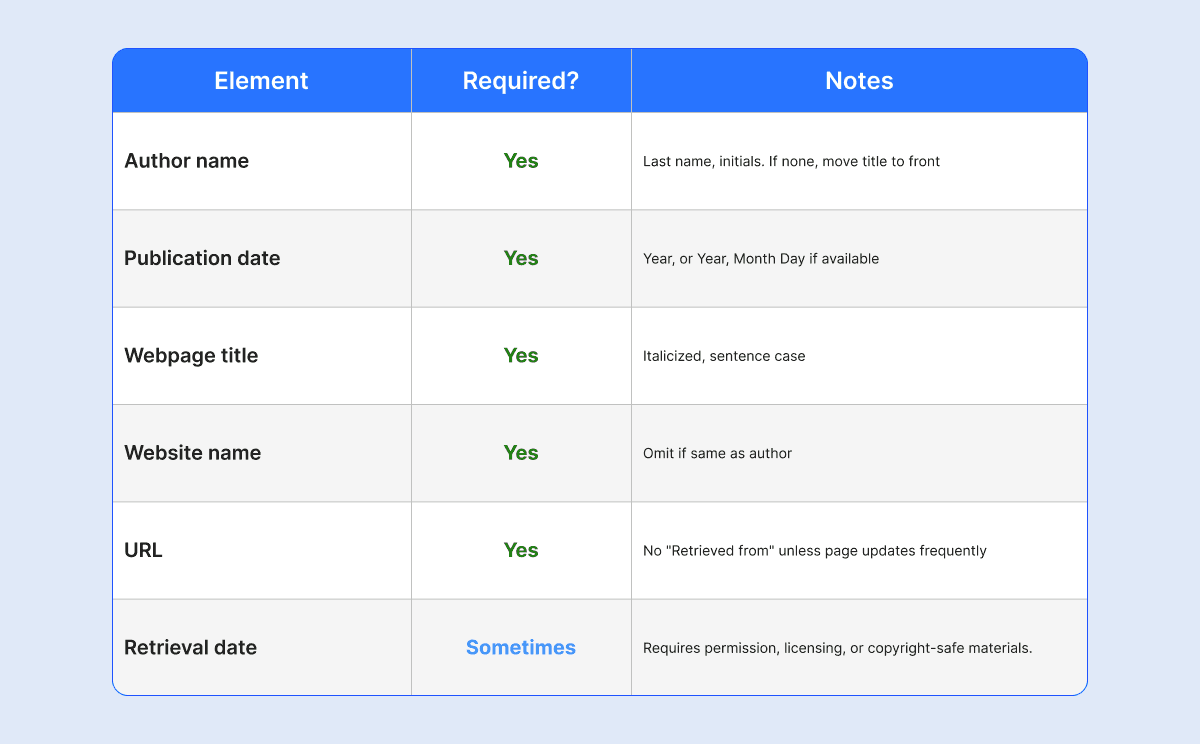
A standard APA web citation typically includes five core elements:
- Author name — who wrote the content
- Publication date — the year (and sometimes month and day) the page was published
- Webpage title — the specific title of the page, italicized
- Website name — the name of the platform or organization hosting it
- URL — the direct link to the page
These five pieces work together to create a complete, verifiable APA citation format for a website.
Miss one, and your reference starts to fall apart, which is why getting comfortable with this structure matters.
Where Does the Citation Actually Appear?
When you cite a website in APA, the citation shows up in two places, and don’t forget that both are equally important:
- The Reference List: This is the full, detailed version of your citation that appears at the end of your document. It's where you lay out all five elements in proper APA format.
- The In-Text Citation: This is the shorter version that lives inside your paragraph, right after the information you borrowed. It usually looks like (Author, Year) and quietly points readers toward the full reference list entry.
Together, these two work like a team as one flags the source in the moment, the other delivers the full details at the end.
Once you understand this system, the whole process of citing a website in APA starts to feel a lot more manageable.
Basic APA Website Citation Format
Understanding the basic APA format makes website citations much easier.
APA Website Citation Structure
Use this format when citing a webpage in APA style:
Author Last Name, First Initial. (Year, Month Day). Title of webpage. Website Name. URL
This is the standard APA citation format for websites in APA 7th edition.
APA Website Citation Example
Here is one of the simple APA format examples:
Walker, T. (2026, January 10). How students can improve research writing. Academic Writing Hub. https://example.com
This format works for most online sources, including blogs, educational pages, and company websites.
When to Include a Retrieval Date
Most APA website citations do not require a retrieval date. However, you should include one if the content changes frequently.
Examples include:
- Wikis
- Live statistics pages
- Dynamic online databases
Example:
Retrieved February 10, 2026, from https://example.com
If the webpage has a clear publication date, a retrieval date is usually unnecessary.
How to Cite a Website in APA 7th Edition
If you learned APA citation rules a few years ago and haven't revisited them since, here's something worth knowing.
The format has changed!
The APA 7th edition introduced several updates specifically for online sources, making the overall structure cleaner and easier to follow than in earlier editions.
Once you see the differences, you'll wonder why it wasn't always this simple.
What's New in APA 7th Edition?
Here are the key rules to keep in mind when building any APA website citation format:
- Drop "Retrieved from" before the URL: Unless the page changes frequently and has no fixed publication date, just place the URL directly at the end; no intro phrase needed.
- Italicize the webpage title: The specific title of the webpage gets italicized. Small detail, but it matters.
- Use sentence case for titles: Only capitalize the first word, and for others use small text generator, proper nouns, and the first word after a colon. Everything else stays lowercase regardless of how it appears on the actual page.
- Include website name when it differs from author: If a government agency publishes content under its own name, no need to repeat it. Keep the reference clean.
APA Website Citation Format With Example
The Structure for APA format is already familiar to you -
Author Last Name, Initials. (Year, Month Day). Webpage title in sentence case. Website Name. URL
APA citation website example:
Brown, L. (2026, March 2). Tips on online academic citation rules for research. Research Academy. https://example.com
Here's what each element does:
- Brown, L. → Author name, last name first
- (2026, March 2) → Full publication date
- Tips on online… → Webpage title, italicized, sentence case
- Research Academy → Website name
- URL → Direct link, no "Retrieved from"
Quick Reference on What to Include in an APA Website Citation -
Why the 7th Edition Matters
APA 7th edition is now the standard across most schools, universities, and academic journals.
Whether you're learning how to reference a website in APA, citing a company page, a government site, or a university resource, these rules apply consistently across all of them.
If you're still using 6th-edition formatting, there's a real chance your citations will be flagged. A quick update to your approach makes all the difference.
How to Cite a Website With No Author in APA
Sometimes a webpage does not list an author. In that case, start the citation with the webpage title.
Example Without Author
How to Prepare for College Interviews. (2026, January 5). Student Success Center. https://example.com
If there is no author, the title moves to the first position in the citation.
In-Text Citation Without Author
For in-text citations, use a shortened version of the webpage title in quotation marks. Example:
("College Interviews," 2026)
This helps readers connect the in-text citation to the correct source in the reference list.
How to Cite a Website With No Date in APA
Some online sources do not include a publication date. APA style uses “n.d.” in these cases, which means “no date.”
Use “n.d.” in APA Citations
Example:
Miller, A. (n.d.). Understanding online learning techniques. Study Skills World. https://example.com
The same rule applies to APA in-text citations:
(Miller, n.d.)
Always check carefully before assuming a webpage has no date. Many websites place the publication date near the title or at the bottom of the article.
How to Cite a Government Website in APA
Government websites are common sources in research papers because they often provide official statistics, laws, and reports.
To do the APA citation format for government websites, use the government agency as the author.
Example:
Centers for Disease Control and Prevention. (2026, February 2). Mental health statistics in the United States. https://www.cdc.gov
If the author and website name are identical, do not repeat them twice.
Government website citations should always include the direct webpage URL whenever possible.
How to Cite a Company Website in APA
Company websites are often used for product details, press releases, and business information.
Example:
Microsoft. (2026, January 18). AI tools for productivity improvement. https://www.microsoft.com
For company websites, the company name usually acts as both the author and the website name.
Keep the formatting simple and consistent with APA style guidelines.
How to Cite a University Website in APA
University websites are widely used for academic research and educational references.
Example:
Harvard University. (2026, February 12). Research writing strategies for students. https://www.harvard.edu
University website citations follow the same APA website citation format as other online sources.
How to Cite a Website Article in APA
Many people need to cite blog posts, online news articles, or educational webpages.
Example:
Johnson, P. (2026, April 5). How online learning affects student productivity. Education Weekly. https://example.com
For website articles:
- Include the article title or take help from any reliable title generator
- Include the publication date
- Add the full URL
Do not place a period after the URL.
How to Do In-Text Citations for Websites in APA
APA in-text citations briefly identify the source inside your writing. There are two common formats.
Parenthetical Citation
Example:
(Smith, 2026)
The citation appears at the end of the sentence.
Narrative Citation
Example:
Smith (2026) explains that citation accuracy improves academic credibility.
The author's name becomes part of the sentence itself.
In-Text Citation Without Page Numbers
Most websites do not contain page numbers. APA recommends using:
- Paragraph numbers, so it's best to use a solid paragraph counter
- Section headings
Example:
(Smith, 2026, para. 4)
This makes it easier for readers to find the referenced information.
Common APA Website Citation Mistakes That You Must Avoid
The truth is that most citation errors aren't due to laziness.
They happen because writers focus so hard on content readability and other related stuff that small formatting details quietly slip through the cracks.
And to be honest, in APA style, small details carry serious weight.
So, if you've ever lost marks on a paper and couldn't figure out why, there's a decent chance one of these mistakes was hiding somewhere in your reference list.
Missing or Incomplete Publication Dates
One of the most common slip-ups when creating an APA website citation is omitting the publication date or formatting it incorrectly.
In APA 7th edition, the date follows the author's name and should reflect exactly what's on the page. If the page shows a full date, include the year, month, and day. If only the year is visible, use just that.
And if there's no date anywhere on the page? Don't leave it blank; instead, write (n.d.), which stands for "no date."
Skipping this entirely is a mistake that jumps out to any instructor reviewing your APA citation format for a website.
Getting the Author Format Wrong
APA has a very specific way of handling author names: last name first, followed by initials (e.g., Smith, J. R.).
A surprisingly large number of writers either write the full first name or flip the order entirely without realizing it.
It gets trickier when you're figuring out how to APA cite a website with no author.
In that case, you move the webpage title into the author position so you don't have to leave a blank space and can hope for the best.
Broken or Incomplete URLs
Pasting a URL sounds simple. But broken links, shortened URLs, or links that redirect to a login page make it impossible for readers to verify your source.
Always test your URL before finalizing your reference. If you're working with a government or university website, this matters even more as those pages sometimes move or get archived.
Capitalizing Every Word in the Title
This one trips people up constantly, especially writers who are used to MLA and Chicago style.
In APA format, webpage titles follow sentence case, meaning only the first word, proper nouns, and the first word after a colon get capitalized.
So instead of writing: How To Cite A Website In APA Format
You'd write: How to cite a website in APA format
Forgetting to Italicize the Title
When writing an APA reference for a website, the title of the specific webpage should be italicized.
It's a small thing, one click in most word processors, but forgetting it signals to your reader (and your professor) that you haven't quite followed APA style correctly.
Still Using APA 6th Edition Rules
This might be the sneakiest mistake on the list. Many older guides, saved templates, and even some websites still teach the 6th edition format, which is now outdated.
The APA 7th edition made several meaningful changes to how website citations are structured, including dropping the "Retrieved from" label in most cases and updating the formatting of DOIs.
If you learned APA citation a few years ago and haven't revisited it since, it's worth a quick refresh.
The rules have changed, and submitting an APA 6th edition citation as if it's current is a very easy mistake to avoid once you know about it.
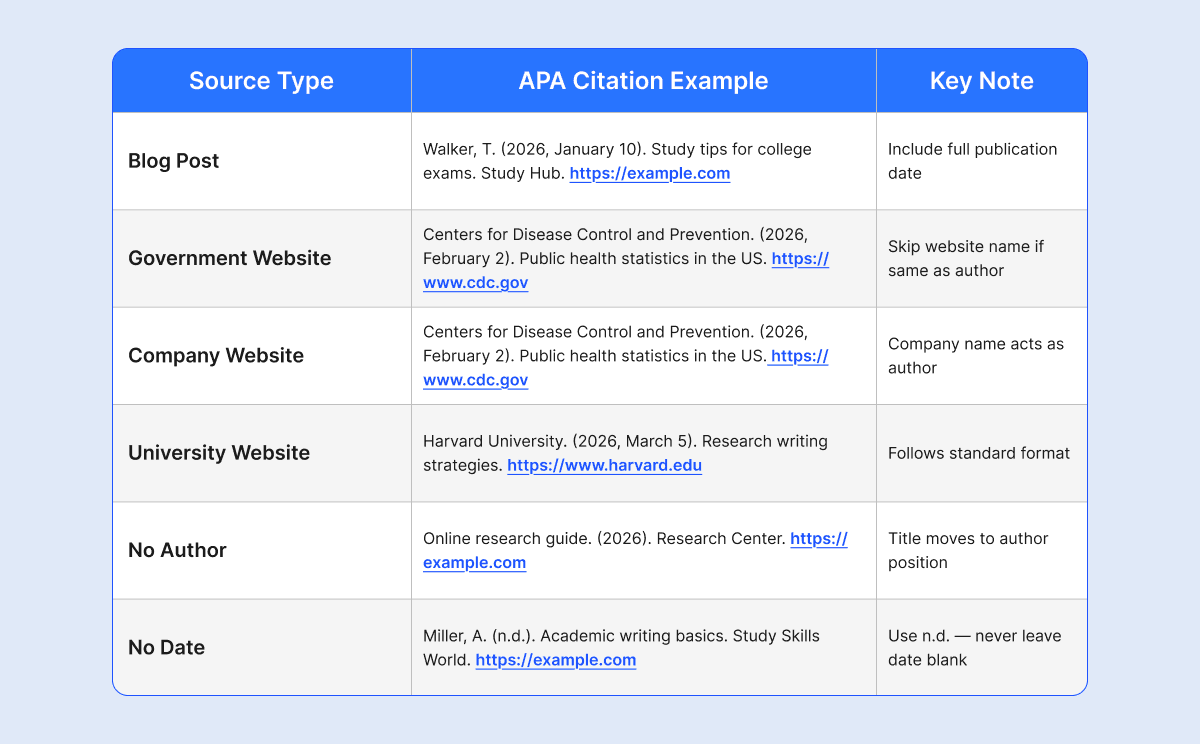
APA Website Citation Examples Table
To make citation formatting easier, the APA website citation with examples table below shows different website citation cases so you can quickly understand, compare, and memorize the correct APA format.
Use an APA Citation Generator to Save Time
Let's be real, manually formatting every single citation when you're juggling five, ten, or fifteen sources is exhausting.
By the time you're on your eighth reference, it's very easy to forget a comma, mix up the date format, or accidentally skip italicizing a title. That's just human nature.
This is where an APA website citation generator quietly becomes your best friend.
What Does a Citation Generator Actually Do?
A good APA citation generator doesn't just spit out a random reference; instead, it formats your source according to APA 7th edition guidelines automatically. You paste in the URL or enter the source details, and it handles the structure for you. If you want to cite any source perfectly, the most reliable tools will help you to do so by -
- Building accurate APA format website citations in seconds — So there will be no room for second-guessing the order of elements
- Generating in-text citations - Which basically match your reference list entries
- Compiling your entire reference list - As a result, things stay in one place, already perfectly formatted
- Cutting down on small formatting errors - Because all those are easy to miss but hard to recover from
For anyone working against a deadline, which, honestly, is most of us, that kind of time-saving matters.
Why Not Try CopyChecker's APA Citation Generator?
If you're looking for a tool that's straightforward, reliable, and actually built around APA 7th edition rules, give CopyChecker's APA Citation Generator a go.

Just drop in your website URL, and it pulls the details together into a properly formatted APA citation for a website.
It's particularly handy when you're dealing with trickier sources, like pages with no author, government websites, or university pages where the formatting rules feel less obvious.
Instead of spending ten minutes cross-referencing guidelines, you get a clean, structured citation in seconds and can put that time back into your actual writing.
One Thing You Should Never Skip, Though
Here's the part most people gloss over: always review the output before you use it.
Citation generators are incredibly helpful, but they're not flawless.
They can occasionally pull incorrect dates, misread author names, or miss a formatting nuance specific to the source type.
Think of the citation generator as a smart first draft; it does the heavy lifting, and you do the final quality check.
That combination is genuinely hard to beat. So, a quick 60-second review of each generated APA citation for a website can save you from an avoidable mistake in your final submission. Before submitting your paper, give the whole draft one final review. Check that your sources are cited correctly, your reference list is complete, and, if you used AI while writing or editing, check the draft with an AI detector to see if any passages may need a closer look.
FAQs
How do you cite a website in APA if there is no author?
If a webpage has no author, start the citation with the webpage title followed by the publication date, website name, and URL.
How do you cite a website in text?
Use the author’s last name and publication year in parentheses.
Example: (Smith, 2026)
How do I reference a website example?
This is how you can cite a website: Brown, L. (2026, January 15). Online learning methods. Education Center. https://example.com
How do you cite a URL in APA?
Include the full direct URL at the end of the citation, without adding a period.
How do you cite a website in APA with multiple authors?
List up to 20 authors in the reference list. For in-text citations, use: (Smith & Walker, 2026). For three or more authors, use: (Smith et al., 2026)
What changed in APA 7th edition for website citations?
The biggest changes: "Retrieved from" was dropped before URLs, sentence case was replaced with title case for webpage titles, and the website name was omitted when it matched the author.
Is APA 6th edition still acceptable in 2026?
Generally no. Most academic institutions now require APA 7th edition. Using outdated formatting can get your citations flagged or marked incorrectly.
Can I use an APA citation generator for websites?
Absolutely! Tools like CopyChecker's APA Citation Generator can format your reference instantly. Just always review the output before submitting.
What's the difference between a reference list and in-text citation in APA?
The reference list at the end contains full citation details. On the other hand, the in-text citation inside your paragraph is the short version, usually just (Author, Year), that points readers to the full reference.
Do you need a retrieval date for APA website citations?
Usually no. Only include a retrieval date if the page content changes frequently, such as on a wiki or a live statistics page.
How do you cite a Wikipedia article in APA?
Wikipedia content changes, so include a retrieval date. Use "Wikipedia" as the website name and link to the specific article page.
End Note
Learning how to cite a website in APA is an essential academic skill. Proper citations improve credibility, support original research, and help readers locate your sources easily.
Whether you are citing a government page, a company website, a university source, or a webpage with no author, following APA 7th edition guidelines ensures your references remain accurate and professional.
Using a trusted APA citation generator can also simplify the process and save time when working on large research projects.
You may also like