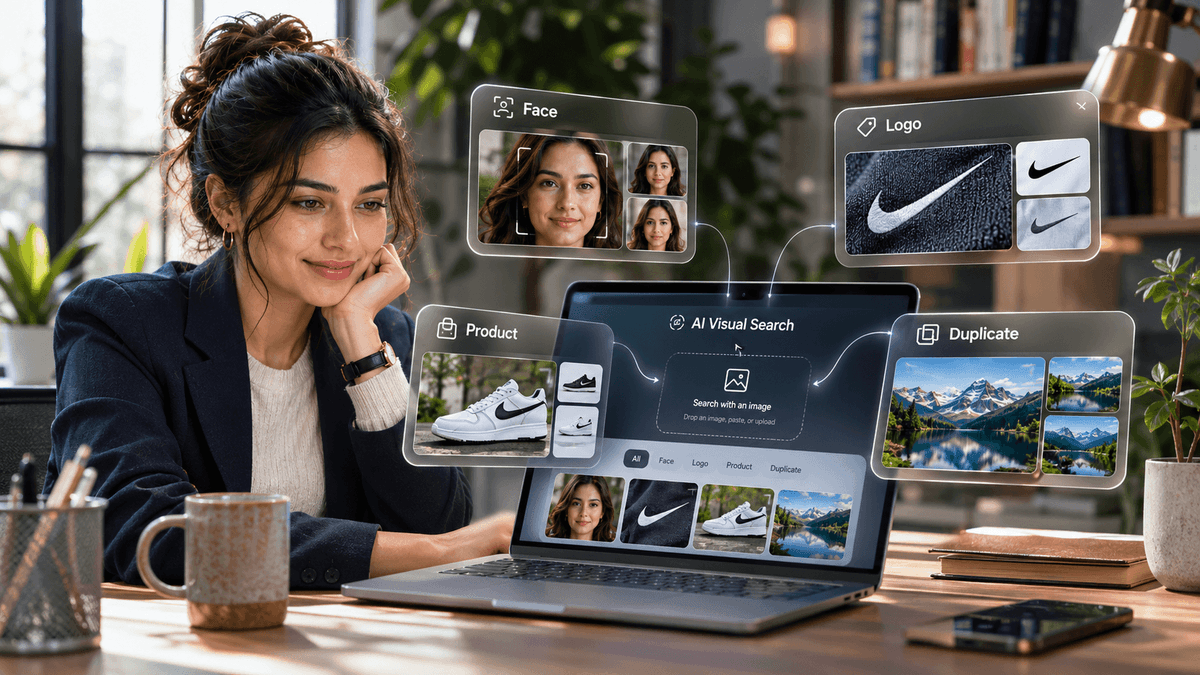
You spot a pair of sneakers in a vacation photo.
The brand logo is partly hidden, the shoes aren't tagged, and the picture itself looks strangely familiar.
Now you have three questions:
What shoes are those?
Which company makes them?
And has this photograph appeared somewhere else?
You could spend the next twenty minutes guessing search terms, scrolling through shopping results, and trying to describe a logo you can barely see.
Or you could search using the photograph itself.
AI image search works by examining visual features such as shapes, colors, textures, objects, faces, logos, and text, then comparing them with images in a searchable collection.
Depending on the system, it can help retrieve matching photographs, identify possible products or brands, and discover visually similar pictures.
But here's where things get interesting.
The same photograph can lead to completely different results depending on what you're trying to find.
One search might help identify the sneakers, another might recognize their logo, while a third could locate websites displaying the original photo.
And that raises an interesting question: how can a search engine find all these different things when you've only given it one picture?
The answer starts with understanding how searching with an image differs from the text searches we're used to.
What Is AI Image Search?
AI image search lets you search using a picture instead of describing it with words.
Imagine finding a lamp with a twisted wooden base.
You could search for "brown wooden lamp with curved base," but your description might overlook the one detail that makes it distinctive.
Uploading its photograph gives a visual search system information that may be difficult to express in a sentence.
Several related terms are worth distinguishing:
- AI Image Search: The broad use of artificial intelligence to analyze images and retrieve related information.
- Reverse Image Search: Searching with an existing image to find other copies, related pictures, or source webpages.
- Visual search: Finding content based on visual characteristics, often including objects and products.
- Face Image Search: Comparing facial imagery to retrieve potentially matching photographs from an available collection.
These methods overlap, but they don't always produce the same information.
For instance, a reverse image search might help you locate another website displaying that lamp photograph, while a product-focused visual search might suggest similar lamps available for purchase.
And there's more happening behind the scenes than simply comparing how two pictures look.
Some systems use computer vision alongside optical character recognition (OCR), which reads visible text in photographs.
Others may also consider detected objects, image metadata, webpage captions, or information from their search indexes.
For example, CopyChecker's AI Reverse Image Search publicly describes result categories including People, Logo, Face, Duplicates, Similar, and Related.
Each category can help you investigate a different aspect of the uploaded image.
But here's something worth considering: if a search tool returns a photograph that looks almost identical to yours, how does it decide that the two images are related?
And why might it recognize a product in one photograph but struggle with the same product from another angle?
To answer those questions, we need to look at what happens between uploading an image and seeing the search results.
The Basic AI Image Search Workflow
How does an AI image search system make sense of a photograph when you haven't told it what to look for?
Imagine uploading a picture of a red backpack resting on a park bench.
You can immediately recognize the backpack by its color, shape, pockets, and straps.
But an image search system needs to turn those visible characteristics into information it can compare with other pictures.
Depending on the technology, that process may involve preparing the photograph, locating important objects, extracting visual features, and searching for potential matches.
Let's follow the backpack through six common stages to understand what happens between uploading an image and receiving search results.
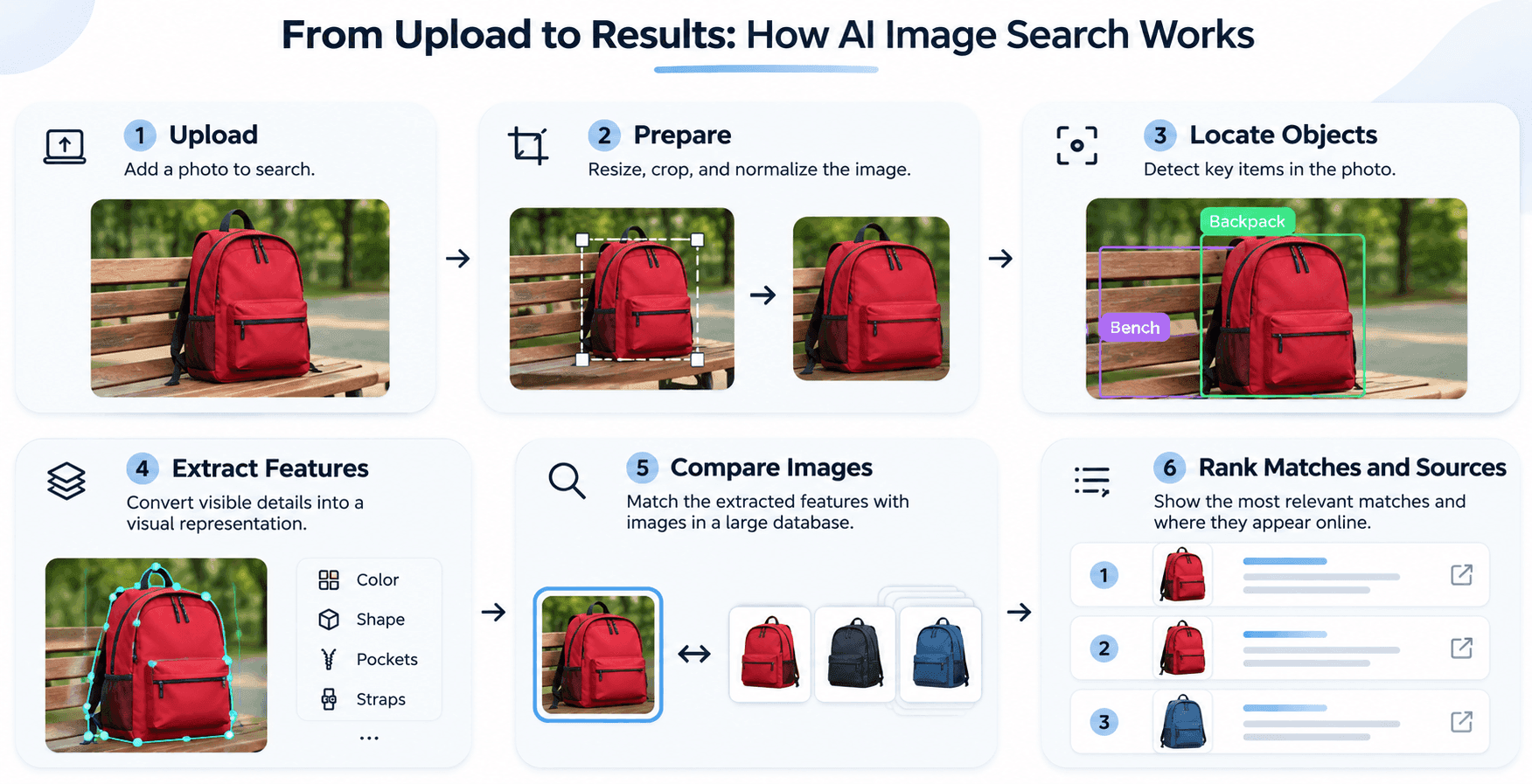
Figure 1: Six-Step AI Image Search Workflow
Step 1: Prepare the Image
The system receives the query image and may resize it, correct its orientation, reduce unwanted noise, or normalize its visual values into a consistent representation.
Normalization simply helps make image information more consistent for processing.
If the backpack occupies only a small part of a landscape photograph, cropping around it may provide a more focused query.
These operations vary by system and aren't guaranteed to improve every search.
Step 2: Locate Important Objects
A photograph may contain several subjects.
Imagine someone holding the backpack beside a car.
A system could detect the person, bag, and car logo as separate regions.
This is called object localization.
Detection tells you where a face, object, or symbol appears.
Identification attempts to determine which particular person, brand, or model it represents.
Recognizing that a photograph contains sneakers is much easier than establishing their exact product code.
Step 3: Convert Visual Features Into Numbers
Some AI systems create numerical descriptions known as embeddings.
An embedding represents patterns that a model considers useful for comparison, such as shapes, textures, arrangements, or other learned visual characteristics.
Picture the same backpack photographed indoors and outdoors.
The surroundings change, but distinctive details of the backpack remain.
A suitable model may represent those images as related even though their pixels aren't identical.
Step 4: Compare Against an Image Collection
The query is compared with reference images available to the search service.
Some approaches emphasize exact copies.
Others are designed to retrieve visually related objects, scenes, or photographs.
A crucial limitation is the available index: if a relevant photograph isn't accessible to the system, the search may not find it.
Step 5: Rank Potential Matches
Search results are usually ordered by relevance.
Depending on the system, ranking may reflect visual similarity, recognizable objects, textual information, or other matching signals.
Some interfaces show confidence or similarity scores.
These are model outputs, not conclusive evidence of identity, authenticity, ownership, or copyright status.
A high similarity score means the system sees a strong relationship according to its criteria.
It doesn't automatically prove that two items are identical.
Step 6: Connect Matches to Their Sources
Some search systems also return webpages containing matching or related images.
For example, Google Cloud Vision's documented Web Detection capability distinguishes full matching images, partial matching images, visually similar images, and related webpages.
That source information can be more valuable than a thumbnail alone.
A matching product photograph may lead to an official listing.
A duplicate image may lead to an older publication.
Both still require verification.
These six stages describe general computer-vision concepts, not CopyChecker's undisclosed internal architecture.
Try it yourself: Upload an authorized photograph to CopyChecker AI Reverse Image Search, run the search, and examine the available result categories.
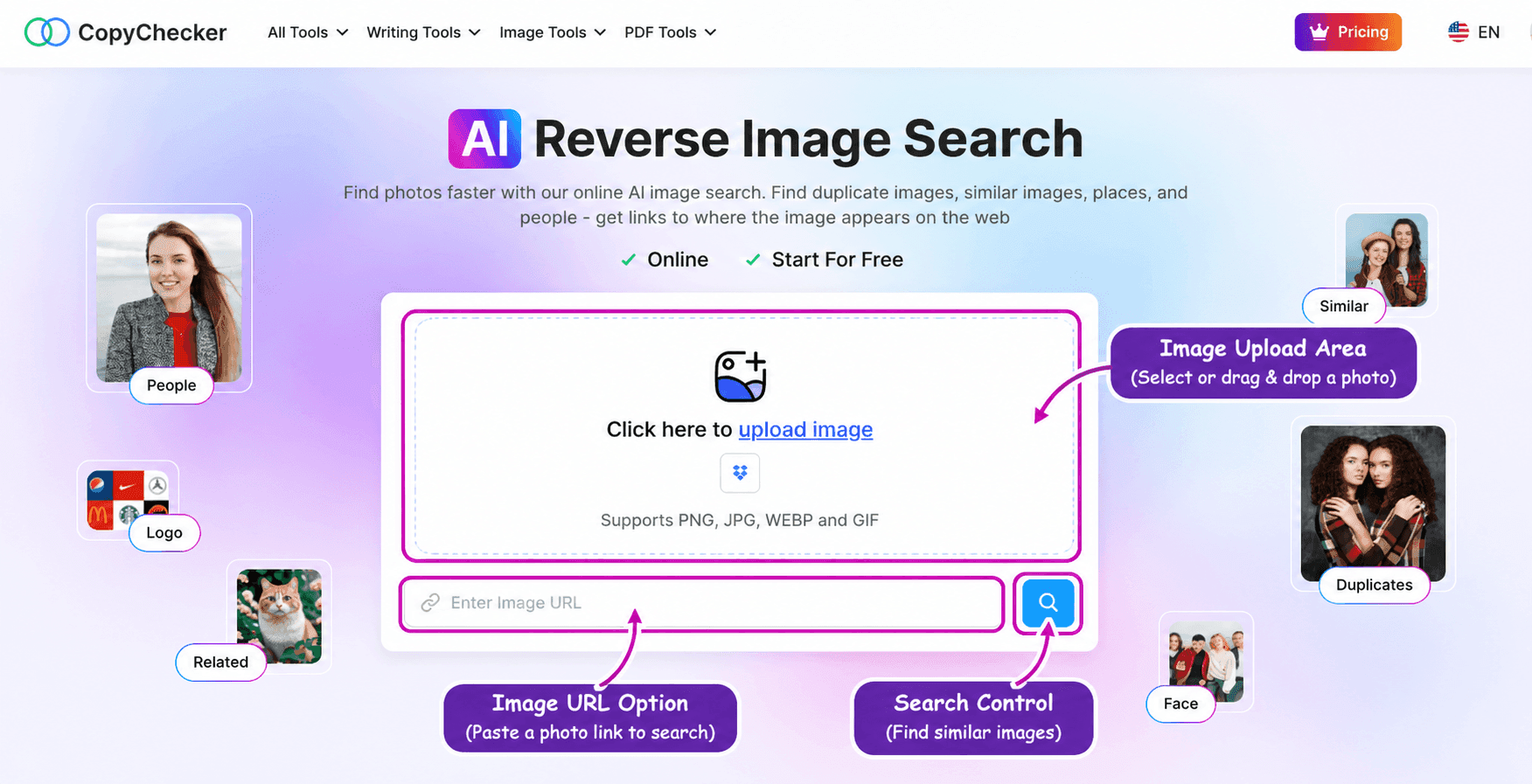
Figure 2: CopyChecker AI Reverse Image Search upload interface for starting a visual image search.
Now, here's where things get a little more interesting.
So far, we've looked at how a system can analyze an image and find related content.
But remember how a single photograph can contain several things worth searching for?
A person wearing a branded jacket, for example, gives you at least three possible search subjects: the person's face, the jacket itself, and the logo printed on it.
Although they appear in the same picture, recognizing each one involves different visual clues and matching challenges.
Let's start with the face, because it's a particularly good example of why detecting something in an image and identifying it aren't the same thing.
How AI Image Search Handles Faces
A face can be one of the most recognizable elements in a photograph.
It's also one of the easiest places to draw an incorrect conclusion.
Suppose a researcher has a licensed photograph of a conference speaker and wants to locate other pictures of the same event.
A face-focused search may help retrieve relevant imagery, but the process involves two separate concepts.
Face Detection vs. Face Recognition
Face detection locates a face in a photograph. Facial recognition or matching compares facial representations with available reference images.
A system can detect five faces in a group photograph without knowing anyone's identity.
Face-matching systems may analyze patterns associated with facial structure, spatial relationships, and other learned characteristics.
But visible image quality changes the task.
A well-lit frontal portrait usually offers more facial detail than a small side-profile image captured from a crowded event.
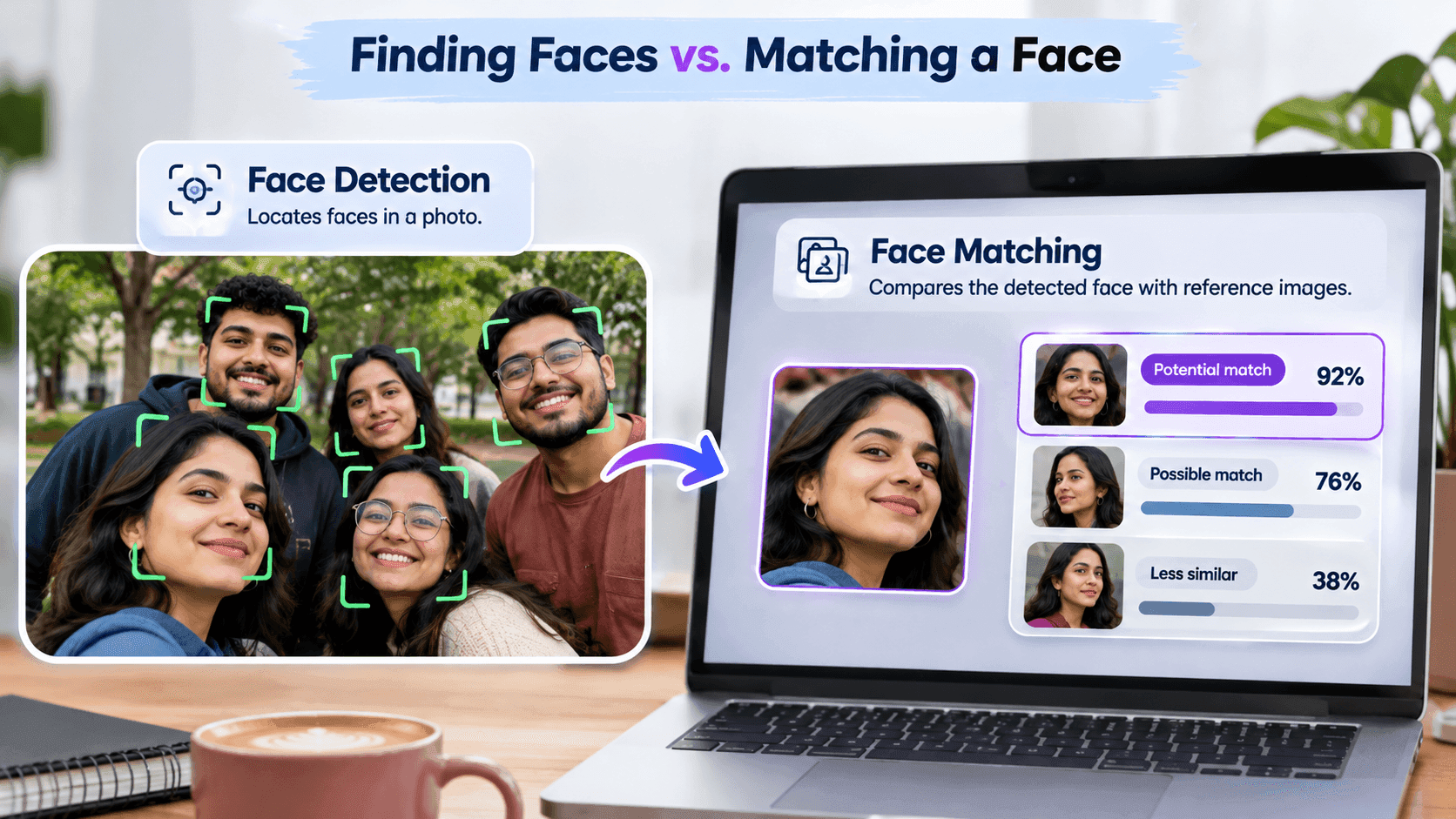
Figure 3: Face detection locates multiple faces in a group photograph, while face matching compares a selected face with reference images.
Why Do Facial Images Produce Different Results?
Imagine searching with two different facial photographs.
The first is a clear, front-facing studio portrait with a neutral background.
The second shows a woman outdoors, photographed from the side while wearing sunglasses.
Both images contain recognizable faces, but they provide different visual information.
In the first photograph, facial features are clearly visible.
In the second, the viewing angle and sunglasses obscure some of those details, while outdoor lighting and background elements introduce additional visual differences.
Factors such as resolution, lighting, head angle, facial expression, motion blur, and partial obstruction can all influence facial-image matching.
The search system's available reference images matter, too.
But how do those differences appear in actual search results?
To explore this, we searched both photographs using CopyChecker and examined the images returned.
Hands-On Test for Clear Portrait vs. Side-Profile Photograph
We conducted two searches using photographs with noticeably different facial conditions.
Rather than trying to establish anyone's identity, we focused on the visual characteristics of the returned images and how closely they resembled each uploaded photograph.
Clear Frontal Portrait Test
For the first test, we uploaded a sharp, front-facing portrait of a woman against a plain gray background.
The photograph clearly showed her facial features, with relatively even lighting and no major obstructions.
CopyChecker returned a collection of studio-style portraits, many featuring women with dark hair, similar facial framing, and neutral backgrounds.
Several results shared noticeable visual characteristics with the uploaded photograph, although the returned images depicted different-looking individuals.
The results demonstrated how a facial-image search can retrieve photographs that resemble the query in appearance and presentation without establishing that they show the same person.
Side-Profile Photograph With Sunglasses Test
For the second test, we uploaded an outdoor photograph of a different woman photographed from the side while wearing sunglasses.
Unlike the first portrait, this image contained more environmental detail, natural lighting, and partially obscured facial features.
CopyChecker returned photographs featuring women outdoors, including several wearing sunglasses or photographed at different angles.
The results showed similarities in hairstyle, eyewear, photographic setting, and overall appearance.
However, the returned photographs did not provide sufficient evidence to establish an exact identity match.
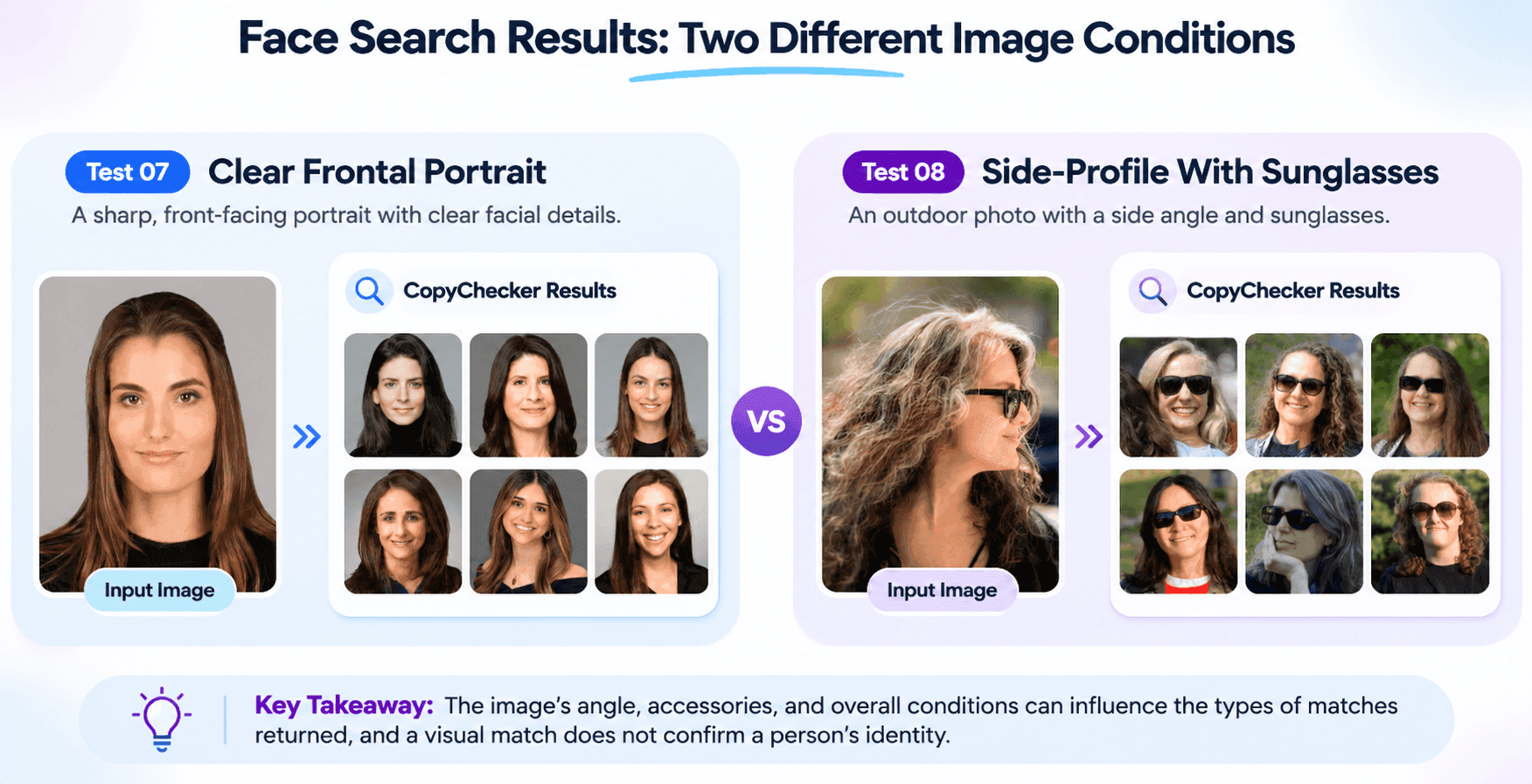
Figure 4: CopyChecker face-search results for a clear frontal portrait and an outdoor side-profile photograph, illustrating differences in the visual characteristics of returned matches.
What Did We Learn From These Tests?
The two searches produced noticeably different groups of visually related photographs.
| Observation | Clear Portrait Test | Side-profile Photograph Test |
|---|---|---|
| Input condition | Front-facing studio portrait | Outdoor side profile with sunglasses |
| Facial visibility | Most facial features clearly visible | Eyes partly obscured and face viewed from the side |
| Returned images | Primarily studio-style portraits | Primarily outdoor portraits, several with sunglasses |
| Noticeable similarities | Hair, facial appearance, framing, and lighting | Hair, sunglasses, viewing angle, and outdoor context |
| Identity confirmed? | No | No |
| Main limitation | Visual resemblance did not establish identity | Different subject and image conditions prevent isolating the effect of pose or obstruction |
The clear portrait search returned photographs with similar studio-style presentation, while the side-profile search returned more outdoor images featuring sunglasses and comparable visual characteristics.
This suggests that the uploaded photograph's appearance can influence the kinds of images retrieved.
However, because the tests involved different subjects, we cannot conclude that the camera angle or sunglasses alone caused the differences.
And that brings us to the most important takeaway: a visually similar face does not prove personal identity.
A photograph may resemble the uploaded image because of facial characteristics, hairstyle, accessories, lighting, or composition.
The original webpages and other reliable evidence must be checked before making any identity-related claims.
For more guidance, read our article on how to find a person online using a photo.
You can also explore authorized facial-image searches using CopyChecker Face Search.
Now, faces aren't the only recognizable features that can become more difficult to match when their appearance changes.
Think of a familiar brand logo printed on a T-shirt, a coffee cup, or product packaging.
You might recognize it immediately, even when it's photographed from an unusual angle or partly hidden.
But can an image search system do the same?
Let's explore how visual search handles logos, and why their shape, typography, visibility, and surrounding context can all matter.
How AI Image Search Handles Logos
A familiar logo is easy to recognize when it's displayed clearly.
But what happens when that same symbol appears on textured fabric, curved packaging, or a product photographed from an unusual angle?
Logo image search can help retrieve recognizable brand marks by examining visual features such as shapes, symbols, typography, colors, and surrounding context.
Imagine spotting a small logo on a sports cap.
Even if the brand name isn't written anywhere, the symbol's distinctive shape might provide enough information to find related images.
But recognizing the logo is only part of the challenge.
The way it appears in a photograph can also influence the kinds of results you get.
Which Details Help With Logo Recognition?
Some logos are recognizable because of their distinctive shapes. Others rely heavily on lettering, colors, or specific arrangements of symbols.
For example, a recognizable brand mark may remain identifiable even when its original colors are reversed.
Visible text can provide additional clues. Some image-search systems use optical character recognition (OCR) to extract readable brand names or product labels.
However, when a logo is photographed on clothing or packaging, the surrounding material introduces more visual information.
A logo printed on a folded shirt may appear distorted by the fabric, while a mark on a curved bottle might look different from its original flat design.
And if a logo is partly hidden or unfamiliar, the search system may have fewer recognizable details or relevant reference images to work with.
Does that mean a logo on a product will necessarily produce worse results than a clean, standalone graphic?
Not always.
To investigate how presentation affects the returned matches, we searched two images featuring the same Adidas 3-Bar Performance logo using CopyChecker.
Hands-On Logo Search Demonstration
For this demonstration, we compared a clear Adidas logo against a second photograph showing the same mark on textured black sportswear fabric.
Both searches were conducted using CopyChecker AI Reverse Image Search on November 24, 2026, and we examined the results displayed under the Websites category.
The purpose was to understand how the logo's presentation affected the types of retrieved images, rather than measure the system's overall logo-recognition accuracy.
Clear Adidas Logo Test
We started with a black Adidas 3-Bar Performance logo against a plain white background.
The complete symbol was visible, without any surrounding product details or distracting objects.
After uploading the image, CopyChecker returned numerous results displaying the same recognizable logo design.
Many results consisted of standalone Adidas logo graphics against white backgrounds, accompanied by webpages discussing, displaying, or distributing versions of the symbol.
This was a useful result for locating other appearances of the brand mark itself.
Adidas Logo on Textured Fabric Test
For the second test, we uploaded a close-up photograph of the white Adidas 3-Bar Performance logo printed on dark, textured fabric.
Unlike the first image, this photograph included visible stitching, a fabric pattern, and part of the product's construction.
The results were noticeably different.
Instead of returning mainly standalone logo graphics, CopyChecker displayed multiple photographs of Adidas sports accessories, particularly black caps featuring the same white logo.
Several results included product-related titles referencing Adidas training caps and similar merchandise.
This suggests the search retrieved visually related product photographs, not just isolated versions of the logo.
However, the results do not establish that the photographed fabric belonged to the exact same product models appearing in the search results.
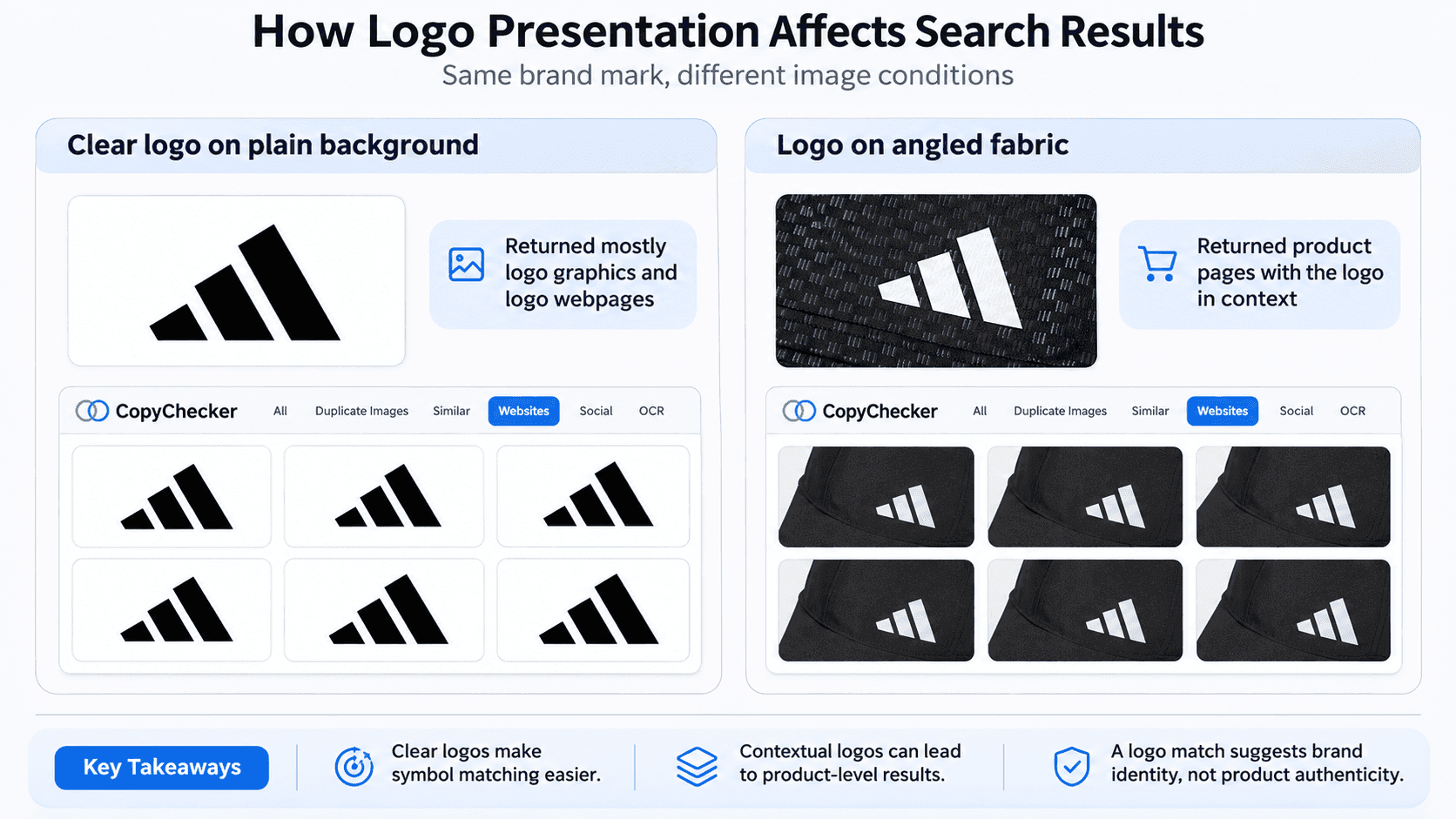
Figure 5: CopyChecker returned mostly standalone logo graphics for a clear Adidas symbol, while the logo on textured black fabric retrieved product photographs featuring similar Adidas branding.
What Did the Logo Searches Reveal?
Both searches returned relevant images featuring the Adidas brand mark, but the surrounding image context differed.
| Observation | Test with Clear Logo | Test with Logo on Fabric |
|---|---|---|
| Input image | Black Adidas logo on white background | White Adidas logo on textured black fabric |
| Logo visibility | Complete and unobstructed | Complete, but photographed on a product surface |
| Result category examined | Websites | Websites |
| Main results | Standalone logo graphics and logo-related webpages | Adidas product photographs, especially black caps |
| Brand relevance | Recognizable Adidas logos appeared | Recognizable Adidas branding appeared on products |
| Main limitation | Results primarily showed the logo itself | Results did not establish an exact product model |
The most interesting observation was that the more visually complex photograph still returned relevant Adidas imagery.
The clear logo search emphasized the symbol itself, while the fabric photograph returned more product-oriented results.
One possible explanation is that the second image supplied additional visual clues, including the material, texture, color contrast, and surrounding product details.
However, these two examples cannot establish which specific signals CopyChecker used internally or prove that adding product context always improves logo searching.
The important takeaway is that a clean logo and the same logo photographed on a physical product can lead to different kinds of useful results.
There's another distinction worth remembering, too.
Recognizing a logo doesn't prove that the product displaying it is genuine.
Counterfeit products can carry convincing brand marks, and visually similar symbols may appear on unrelated products.
A matching logo is therefore a useful clue for investigating a brand, not proof of authenticity, authorization, or official affiliation.
And this brings us to the next challenge.
Suppose an image search recognizes the Adidas logo on a pair of sneakers. You now have a potential brand identification, but you still don't know the exact shoe model.
After all, one brand can manufacture dozens of shoes featuring the same logo, sometimes with remarkably similar colors and designs.
So how does AI move beyond recognizing a brand symbol to finding a particular product?
That's where product image search becomes useful.
So, how does AI go beyond recognizing a brand symbol to finding a particular product?
That's where product image search comes into play.
How AI Image Search Handles Products
You've probably seen a product online and thought, "I know what it looks like, but I have absolutely no idea what it's called."
Recognizing the brand is a useful first step, but identifying the exact item requires more information.
A visual search system may analyze the product's shape, color, texture, patterns, components, labels, and distinctive design features to retrieve potentially matching products.
For example, two pairs of sneakers might display the same brand logo and share a similar color combination.
But their sole patterns, stitching, and overall construction could reveal that they're completely different models.
That's why recognizing a product category or brand isn't the same as identifying an exact product.
What Does AI Compare in Product Photographs?
The details that help identify a product depend largely on what you're searching for.
With running shoes, a system may compare the shape of the sole, stitching patterns, heel design, or placement of the brand logo.
For electronics, visible ports, button arrangements, and model numbers may offer more useful clues.
Clothing presents another challenge.
Two shirts might share the same color and overall style, but differences in fabric patterns, buttons, collars, or labels could help distinguish them.
And when a product has readable text, optical character recognition (OCR) may help extract a brand name, model number, or other identifying information.
However, not every distinguishing feature will be visible in a photograph.
A search might recognize the overall design while missing differences in size, material, or internal specifications.
So even after examining all these details, a search tool may return several products that look convincing at first glance.
The next challenge is understanding how closely those results actually match the item you're looking for.
Because finding the exact product, finding another version of the same model, and finding something that merely looks similar are three very different outcomes.
Exact Product vs. Variant vs. Similar Alternative
A product search may return several promising results, but they won't necessarily represent the same kind of match.
Imagine uploading a photograph of a particular pair of sneakers and finding three similar-looking pairs in the results.
They might fall into these categories:
- Exact model: The same product, verified through its model number and specifications.
- Same-model variant: The same product family in another color, size, or configuration.
- Similar alternative: A different product sharing some visual characteristics.
At first glance, all three could look convincing.
But the differences matter, especially when you're trying to identify or purchase a specific item.
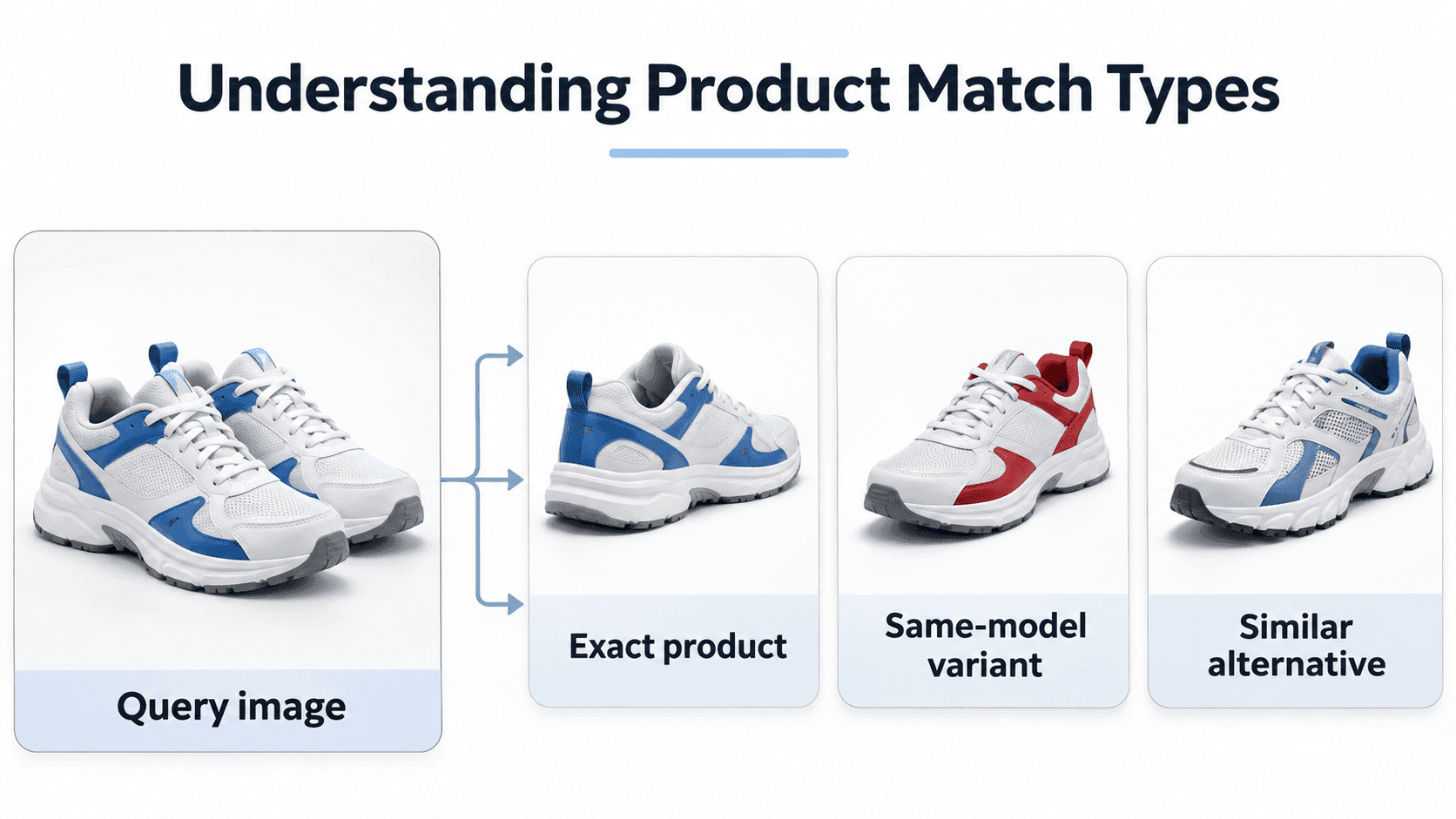
Figure 6: Comparison of three product image search results: an exact product match shown from a different angle, a same-model variant in another color, and a visually similar alternative with a different design.
Here's where product image search becomes interesting.
The correct product might appear in a photograph taken from a completely different angle, while a different model could look almost identical to your original picture.
So, how can you tell whether a search tool is finding the same product or simply returning something that resembles it?
One way to explore this is by testing two scenarios: searching for the same product from another angle and searching for a different product with a similar appearance.
Hands-On Product Search Demonstration
Finding a similar-looking sneaker is useful, but can an image search tool recognize the same model when it's photographed from another angle?
And what happens when we upload a different sneaker that shares several design features with the original?
To investigate, we conducted three searches using CopyChecker AI Reverse Image Search on November 24, 2026.
We used two photographs of the Nike Air Max 90, one showing the shoe from the side and another showing both shoes from behind.
For the third search, we uploaded a visually similar but different model, the Nike Air Max Excee.
We examined the results under CopyChecker's Websites category to see which product images and related webpages appeared.
Search 1: Nike Air Max 90 Side View
We started with a white Nike Air Max 90 featuring a black Swoosh, photographed from the side.
The shoe's profile, visible Air cushioning, stitching, and other design details were clearly visible against a plain background.
CopyChecker returned several photographs of the Nike Air Max 90 in similar side-view positions.
The results included webpages with titles referencing the Air Max 90, including product and sneaker-related listings.
Most of the visible matches shared the uploaded shoe's white-and-black appearance and recognizable Air Max 90 construction.
This made the search useful for finding related photographs and listings of the same product model.
Search 2: Nike Air Max 90 Rear View
Next, we searched using a rear-view photograph of a white Nike Air Max 90 pair.
Unlike the first query, this image emphasized the heel construction, Nike Air branding, and rear shape rather than the shoe's side profile.
The returned images were noticeably different from those in the first search.
CopyChecker primarily displayed rear-view photographs of Nike Air Max 90 shoes, including results linked to sneaker retailers and product-related webpages.
Several thumbnails closely resembled the uploaded photograph's composition, showing the shoes from behind with their heel branding visible.
This demonstrated that the search could retrieve relevant product imagery even when the same model was presented from another viewpoint.
However, the visible results alone don't establish that every listing represents the exact same SKU or product variant.
Search 3: Nike Air Max Excee, a Similar but Different Model
For the third search, we uploaded a side-view photograph of the Nike Air Max Excee.
Like the Air Max 90, this sneaker features a prominent Nike Swoosh, a layered upper, and visible Air cushioning.
However, its construction and design details differ from those of the Air Max 90.
CopyChecker returned multiple photographs resembling the uploaded Air Max Excee, including results from Spanish-language product webpages.
Several matches showed the same white, black, and cream color combination, along with the distinctive dark midsole section and Air Max branding visible in the query photograph.
One unrelated thumbnail also appeared among the visible results, showing that not every returned item was relevant.
Overall, the results were more closely related to the uploaded Excee design than to the Air Max 90 images used in the first two searches.
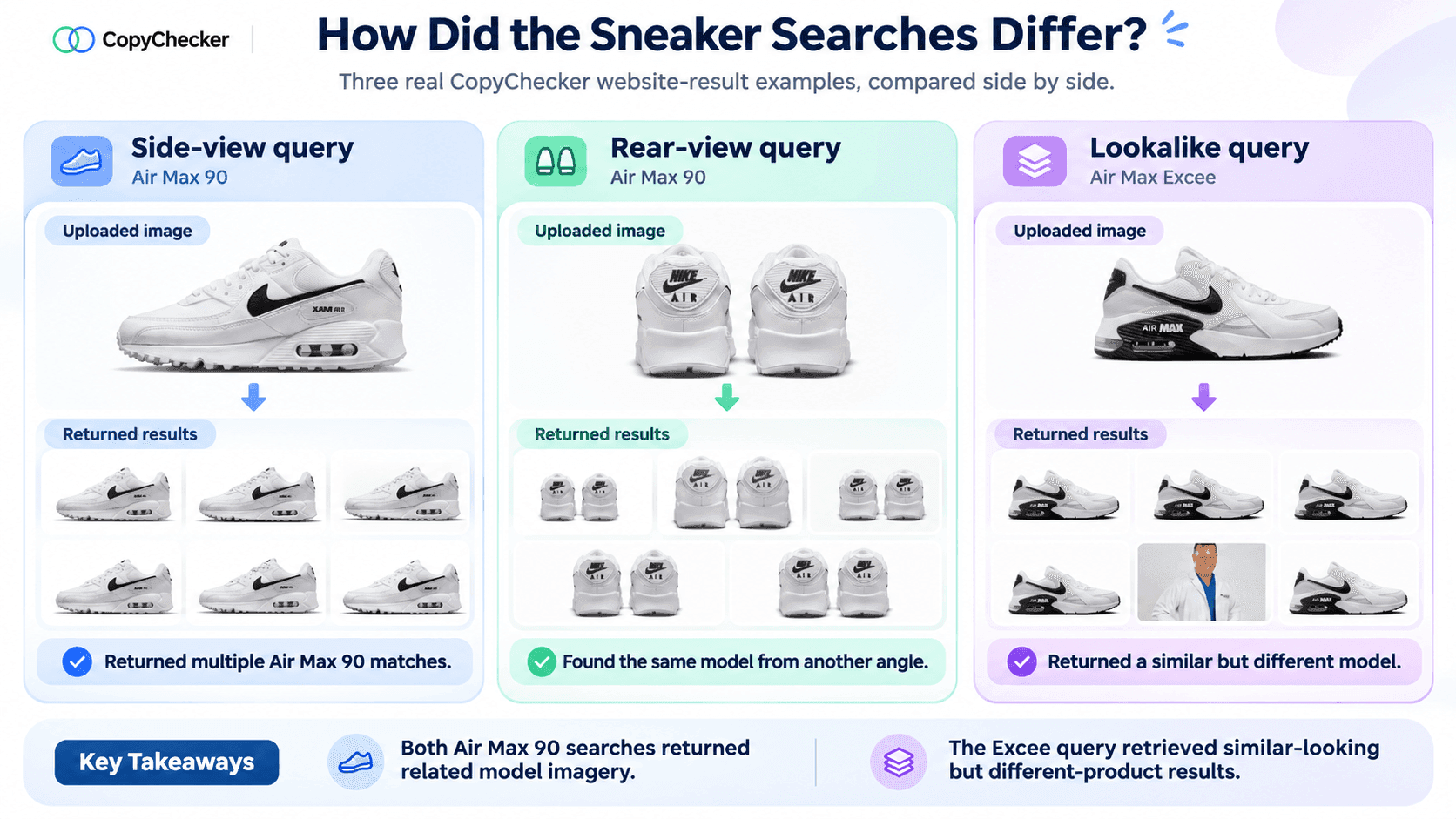
Figure 7: Three CopyChecker product searches showing how side-view and rear-view Air Max 90 photographs retrieved model-related imagery, while a visually similar Air Max Excee returned results featuring its different design.
What Did the Product Searches Reveal?
The three searches returned different groups of product photographs, largely reflecting the appearance and viewing angle of each uploaded image.
| Observation | Air Max 90 Side View | Air Max 90 Rear View | Air Max Excee |
|---|---|---|---|
| Input condition | Single shoe photographed from the side | Pair of shoes photographed from behind | Different sneaker model photographed from the side |
| Result category | Websites | Websites | Websites |
| Main results | Air Max 90 side-view images and related listings | Air Max 90 rear-view images and related listings | Air Max Excee-style images and product pages |
| Noticeable similarities | Shape, Swoosh, midsole, and color | Heel construction, branding, and camera angle | Swoosh, layered upper, dark midsole, and color combination |
| Model relevance | Results referenced Air Max 90 | Results referenced Air Max 90 | Results visually corresponded to the Excee design |
| Limitations | Exact SKU not independently verified | Exact SKU not independently verified | Some irrelevant results; exact SKU not independently verified |
The most interesting finding was that the viewing angle influenced the kinds of images returned.
The Air Max 90 side-view query produced mostly side-profile photographs, while the rear-view query produced results emphasizing the heel and rear branding.
Meanwhile, the Air Max Excee search returned images matching the different model's visible design, despite its similarities to the Air Max 90.
These observations suggest that recognizable product features and image composition can influence which photographs a visual search retrieves.
However, three searches aren't enough to establish how accurately a tool distinguishes product models across a larger collection.
There's also an important difference between retrieving a visually relevant photograph and confirming an exact product match.
Visual similarity alone isn't sufficient to verify a product's model number, SKU, or authenticity.
Before purchasing a product found through image search, compare its model number, colorway, materials, dimensions, and other identifying specifications against official manufacturer information.
Check the retailer, current price, and availability separately. A matching product photograph doesn't guarantee that the seller is trustworthy or that the item is genuine.
For a more detailed walkthrough, read our guide on how to search for a product using a picture.
So far, we've explored how image search can recognize what's inside a photograph, whether that's a face, logo, or product.
But sometimes, identifying the object isn't the goal.
Imagine finding that same sneaker photograph on another website.
You already know which shoes are pictured, but now you want to discover whether the photograph itself has been reused.
Perhaps another website has published the exact image, cropped part of it, or added a watermark.
The question is no longer, "What product does this photograph show?"
It's "Where else does this photograph appear?"
And answering that requires a different kind of image matching.
That's where duplicate image detection comes into play.
For a more detailed walkthrough, see our guide on how to search for a product using a picture.
So far, we've focused on recognizing what's inside a photograph, whether that's a face, logo, or product.
But sometimes, the object itself isn't what you're trying to identify.
Imagine you find that same sneaker photograph on another website.
You're no longer wondering which shoes appear in the picture.
Instead, you want to know whether someone has used the exact same photograph elsewhere, perhaps with a different caption, crop, or watermark.
That changes the search task entirely.
Rather than comparing individual products, the system now needs to look for another appearance of the photograph itself.
And that's where duplicate image detection becomes useful.
How AI Image Search Finds Exact Duplicates
Suppose you publish an original photograph on your website and later discover what appears to be the same image on another page.
Naturally, you'd want to know where else that photograph appears, whether someone has modified it, and which websites contain matching versions.
A duplicate image finder can help investigate these questions by searching for other copies of the same underlying image.
The simplest situation involves an unchanged photograph. If the exact same file appears on multiple websites, identifying the connection can be relatively straightforward.
But things get more interesting when someone resizes the photograph, adds a watermark, changes its colors, or crops out part of the picture.
The image might still look familiar to you, even though it's no longer technically identical to the original.
So, how does an image search system recognize that two files may contain the same photograph?
How Are Exact Copies Detected?
One approach involves creating a digital fingerprint of an image.
Think of it as a unique code calculated from the file's contents.
If two files have identical digital fingerprints calculated using the same cryptographic hash method, that's strong evidence that their underlying file data is identical.
However, even a small change to the file can produce a completely different fingerprint.
For example, downloading a photograph, resizing it, and saving it again might leave the picture looking almost identical to your eyes while changing its digital data.
That's why some image-matching systems use another approach called a perceptual fingerprint.
Instead of focusing only on the file's exact contents, perceptual techniques summarize aspects of the image's visual appearance.
This can help identify closely related images even after certain technical changes.
Other systems use more flexible visual representations to compare recognizable patterns and image regions.
But that raises another question.
If resizing or compression doesn't necessarily prevent a match, how much can a photograph be changed before the search system struggles to recognize it?
Can AI Image Search Find Edited Copies?
Some AI image search systems can find edited copies of a photograph, even when the image files are no longer identical.
Imagine a photograph of a red backpack. Someone removes its background, adjusts the colors, and adds a watermark.
Although the photograph has changed, distinctive features such as the backpack's shape, pockets, and zippers remain recognizable.
Depending on the matching technology, these details may help connect the edited version to its original.
However, heavy cropping, major alterations, and unavailable reference images can make matching more difficult.
Comparison between Original vs. Modified Image
To understand how this works, consider two searches using the same backpack photograph: one with the unchanged image and another with a background-removed, color-adjusted, watermarked version.
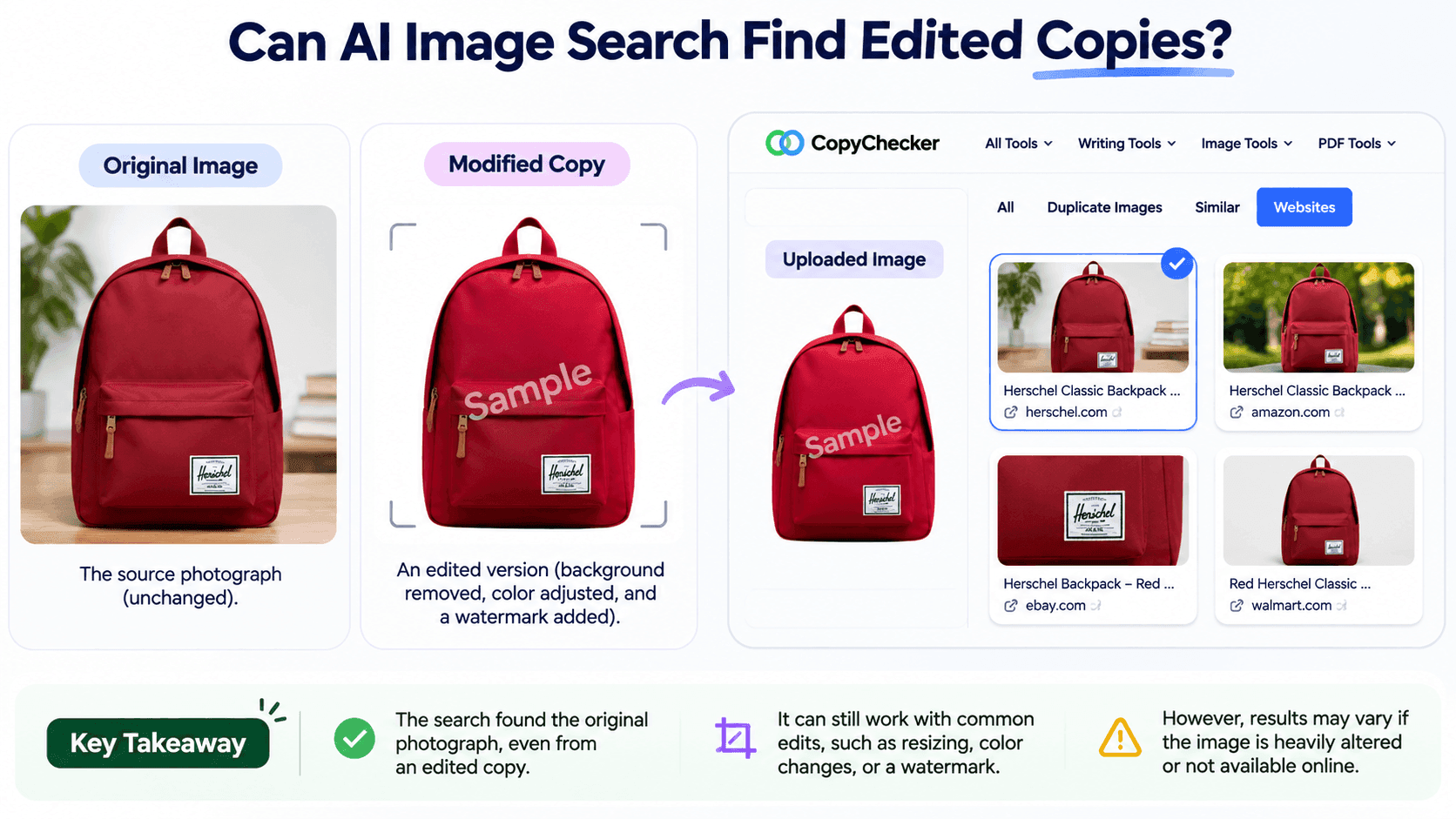
Figure 8. Illustration showing how an image search system might retrieve the same source photograph from both an unchanged image and an edited version.
The following table shows a hypothetical successful outcome, not results from a completed CopyChecker experiment.
| Observation | Original Photograph | Modified Photograph |
|---|---|---|
| Input | Unchanged image | Background removed, colors adjusted, watermark added |
| Potential match | Exact duplicate | Modified copy of the original |
| Original image found? | Yes | Yes |
| Source webpage found? | Yes | Yes |
| Main challenge | Finding an indexed copy | Recognizing shared features despite edits |
In this example, the search retrieves the source photograph in both cases, suggesting that recognizable visual details can survive certain modifications.
However, a matching image doesn't prove who created it or owns its copyright.
The earliest visible webpage may also be a repost rather than the original publication.
For more guidance, see how to find the original source of an image.
And what if a search returns another photograph of a similar red backpack rather than a modified copy of the original?
That brings us to the distinction between exact duplicates, modified copies, and visually similar images.
Exact Duplicate vs. Modified Copy vs. Similar Image
Two photographs can look almost identical without being copies of each other.
When AI image search returns matching pictures, it's important to understand whether you're looking at the same photograph, an edited version, or a completely different image with similar visual features.
| Match type | Meaning | Example |
|---|---|---|
| Exact duplicate | The same photograph without changes | An unchanged bicycle photograph appearing on another website |
| Modified copy | The same original photograph after editing | A cropped or watermarked version of the bicycle photograph |
| Visually similar image | A separate photograph sharing recognizable features | A different red bicycle photographed against a similar brick wall |
The illustration below shows how these differences might appear in practice.
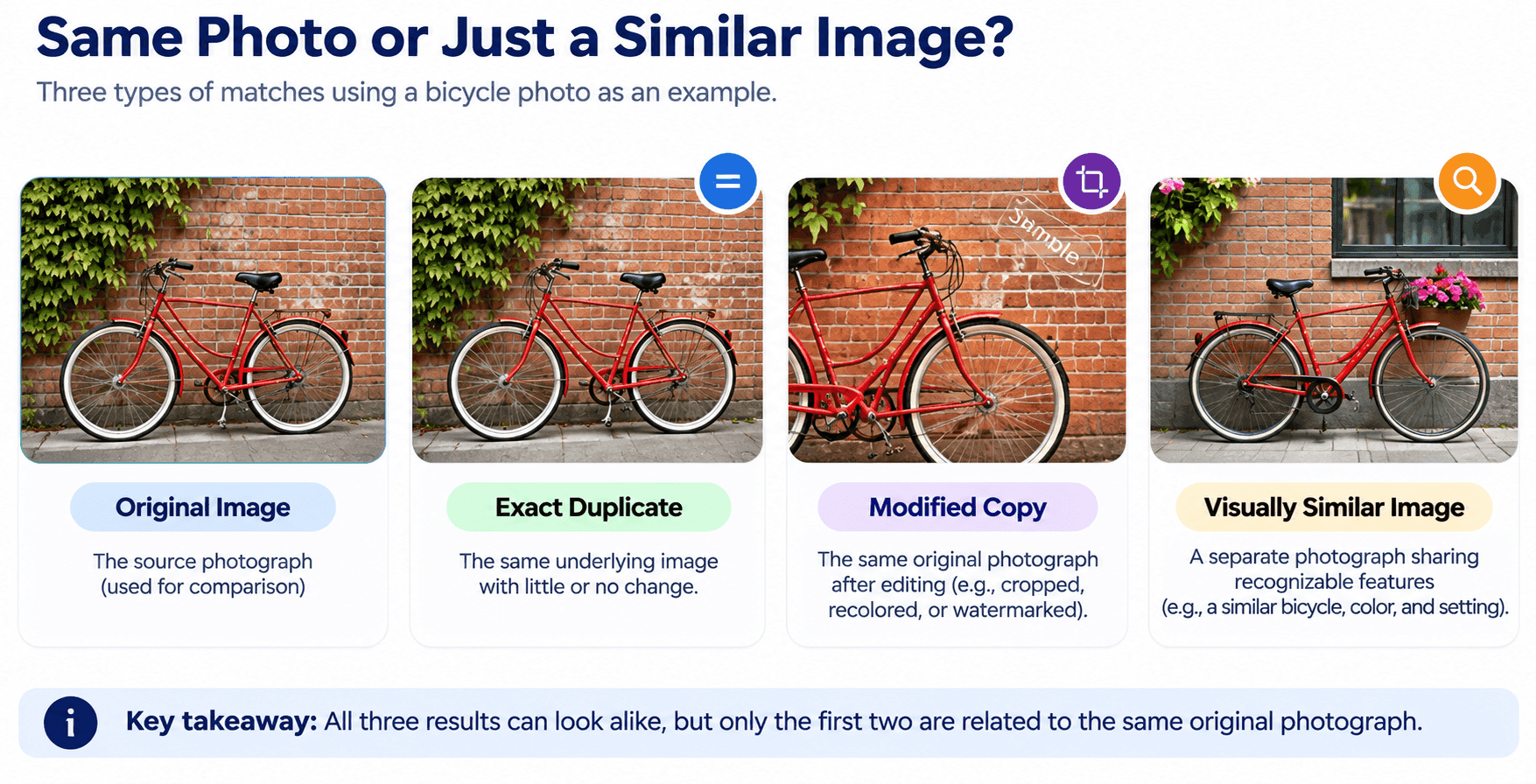
Figure 9. Comparison of an original red bicycle photograph, an unchanged duplicate, a cropped and watermarked copy, and a separate photograph featuring a similar bicycle against a brick wall.
Notice how the original photograph and its exact duplicate show the same scene, while the modified version retains recognizable details despite being cropped and edited.
The fourth photograph, however, shows a similar red bicycle in a different composition.
Although the images share colors, objects, and background features, they don't necessarily come from the same original photograph.
That's why visual similarity doesn't automatically mean an image has been copied.
If you're investigating image reuse, exact duplicates and modified copies are usually the most relevant results.
For design inspiration, alternative products, or related photographs, broader visual similarity may be more useful.
You can explore this further in our guide to finding similar images with AI.
But identifying the right type of match is only part of getting useful results.
Imagine searching with two photographs of the same bicycle.
One is sharp and well-lit, showing its frame, wheels, and other distinctive features.
The other is blurry, taken from a distance, with part of the bicycle hidden.
Even though both photographs show the same object, they may produce different results.
Image quality, camera angle, visible details, and reference-image availability can all influence what an image search system retrieves.
So, what makes one photograph easier to match than another?
Let's explore the factors that affect image search results.
What Makes an Image Easier or Harder to Match?
Not every photograph gives an image search system the same amount of useful information.
A clear photograph of a product against a simple background may reveal its shape, colors, labels, and distinctive features.
A blurry screenshot of that same product, taken in poor lighting or from an unusual angle, may hide several of those details.
That doesn't automatically mean the second image will fail.
Some search systems can handle difficult image conditions surprisingly well.
However, certain factors can influence how easily a system recognizes and compares visual information.
Resolution and Sharpness
A high-resolution photograph generally preserves more visible detail than a small, blurry thumbnail.
This can matter when the search depends on recognizing a product label, logo, texture, or other distinguishing feature.
For example, a clear photograph might reveal the model number printed on a pair of headphones, while a heavily compressed screenshot may make that text unreadable.
Crop and Amount of Visible Subject
Cropping can help when the object you're searching for occupies only a small part of the photograph.
But cropping too aggressively can have the opposite effect.
Imagine searching for a handbag.
A tight crop showing only its buckle might remove the shape, straps, and other features that help distinguish it from similar bags.
The goal is to keep the important subject visible without removing useful context.
Background Clutter
A photograph containing several people, products, or unrelated objects may create additional challenges.
If you're searching for a particular jacket worn by someone in a crowded street, isolating the jacket may help the system focus on the intended item.
However, the surrounding context can sometimes provide useful clues, so comparing the full photograph with a focused crop is worthwhile.
Camera Angle and Pose
The same object can look surprisingly different from another viewpoint.
A sneaker photographed from above may reveal its laces and upper design, while a side-view image emphasizes the sole and overall shape.
Similarly, facial photographs taken from different angles may contain different amounts of recognizable information.
Lighting and Color Changes
Strong shadows, reflections, unusual lighting, and color filters can alter how an object appears.
A dark blue shirt photographed under warm lighting might look almost black.
Some matching systems can tolerate these variations, but the changes may still influence which images appear in the results.
Partial Obstruction
When part of a subject is hidden, the system has less visible information to analyze.
A hand covering a logo, sunglasses obscuring facial features, or another object blocking a product label can make matching more challenging.
Distinctive Details and Visible Text
Some details are much more useful than others.
A unique stitching pattern, unusual shape, recognizable symbol, or readable model number may help distinguish an item from similar alternatives.
Visible text on packaging or labels can also support independent verification.
Availability of Reference Images
Finally, there's a limitation that has nothing to do with the quality of your photograph.
An image search system can only retrieve matches from the images and sources available to it.
Even if you upload a perfectly sharp photograph, the search may not return the exact item or original source if the relevant reference isn't accessible.
That's why a missing result doesn't necessarily mean the photograph is too difficult to recognize.
Sometimes, the information simply isn't available in the searchable collection.
Together, these factors explain why image search results can vary even when two photographs show the same subject.
But explanations are one thing.
What happens when we put these ideas to the test using real images?
To find out, we'll examine eight controlled examples involving duplicate photographs, modified copies, products, logos, and faces.
Each test focuses on a particular image condition, allowing us to observe what kinds of matches the search returns and where its limitations become apparent.
Eight Images Search Examples Across Four Tasks
So, what did our image-search comparisons actually reveal?
We examined eight image-search conditions across four tasks: face matching, logo recognition, product identification, and duplicate-image detection.
Six conditions were explored through real CopyChecker searches on November 24, 2026.
The remaining two use an illustrative backpack example to explain how unchanged and edited photographs might be matched.
The results show why finding a visually related image isn't always the same as finding an exact match.
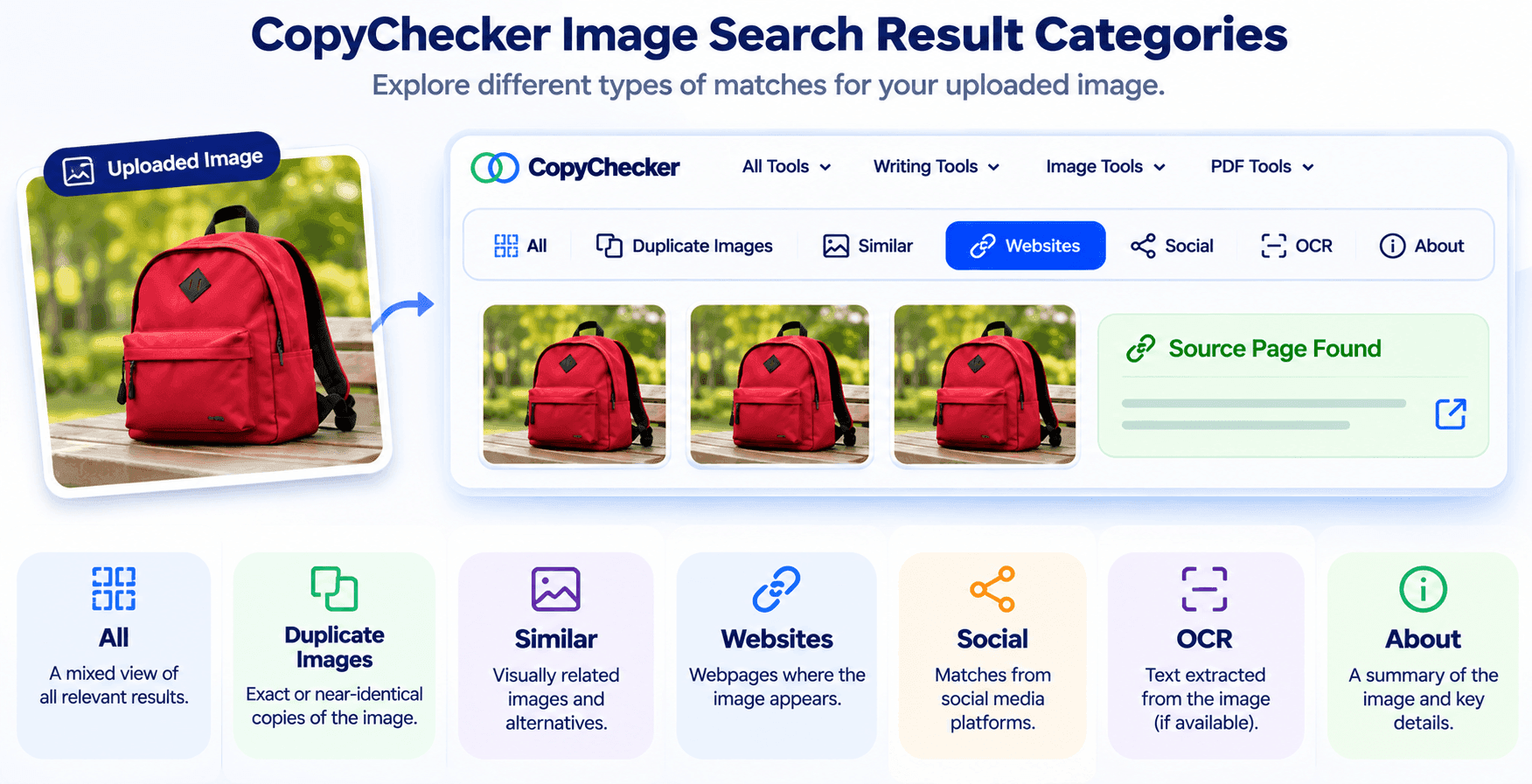
Figure 10: CopyChecker Result Categories
Summary of the Eight Image Search Conditions
| Image Condition | Observed or Illustrative Finding |
|---|---|
| Unchanged photograph | An unchanged backpack image could retrieve an identical photograph and its source webpage. |
| Modified photograph | A background-removed or watermarked version might still retrieve the original if enough recognizable details remain. |
| Same product, different angles | Side-view and rear-view Nike Air Max 90 searches returned relevant model-related photographs and webpages. |
| Similar but different product | The Nike Air Max Excee search returned visually related Excee-style product images, with an unrelated result also visible. |
| Clear logo | The standalone Adidas logo returned mostly matching logo graphics and logo-related webpages. |
| Logo on textured fabric | The Adidas logo on dark fabric returned photographs of branded products, particularly sports caps. |
| Clear facial portrait | A frontal portrait returned mostly studio-style headshots sharing visible characteristics. |
| Side-profile facial portrait | An outdoor portrait with sunglasses returned photographs sharing eyewear, hairstyle, and outdoor context. |
What Can We Learn From These Results?
The examples illustrate several useful distinctions.
- Faces: Similar-looking portraits don't establish that the photographs show the same person.
- Logos: A standalone brand mark and the same logo on a product can retrieve different kinds of relevant images.
- Products: Search results may reflect both the product's design and the viewing angle, but model numbers and SKUs still require verification.
- Duplicates: Exact and edited copies may be connected through shared visual features, although the illustrated examples don't establish CopyChecker's performance on those tasks.
These examples also show why the type of result matters.
A relevant product photograph isn't automatically an exact-model match.
A recognizable logo doesn't prove authenticity, and a similar face cannot confirm someone's identity.
Likewise, failing to find a duplicate doesn't establish that an image has never been reused.
The Takeaway: AI image search is useful for discovering visual connections and possible sources, but the returned information should be checked against reliable evidence before drawing conclusions.
Our examples also represent too small and varied a sample to calculate a meaningful accuracy percentage or determine which search conditions consistently perform best.
Still, they reveal something practical.
Think about the sneaker searches.
Changing the viewing angle influenced the kinds of images returned.
The logo searches also showed how surrounding product details can affect which results appear.
So, while you can't control everything a search system finds, you can make better choices about the photographs you upload and how you examine the results.
That brings us to the practical side -
How to Get Better AI Image Search Results
If your first search returns unrelated photographs, improving the input may help.
- Use the Highest-quality Original Available: A sharp photograph preserves details that screenshots may lose.
- Crop Around the Intended Subject: Remove unrelated objects without cutting off important identifying features.
- Try Both a Full Image and a Detail Crop. The full frame can preserve context, while the crop emphasizes the subject.
- Remove Unnecessary Overlays: App controls, borders, notifications, and unrelated captions may introduce distracting information.
- Try Another Angle or Video Frame: A different view might reveal a distinctive component, label, or logo.
- Search Visible Text Separately: Model numbers, product names, and readable packaging can support the visual search.
- Inspect More than One Result: Compare the actual items and open relevant source pages.
- Switch Search Modes when Necessary: Face-focused queries, duplicate investigations, and product searches benefit from different kinds of results.
When experimenting, try changing one thing at a time.
For example, compare a full photograph with a cropped version before changing the angle or image quality.
This makes it easier to understand which adjustments, if any, produce more useful results.
You can try these approaches using CopyChecker AI Reverse Image Search and compare the available result categories.
But here's something worth remembering: even a perfectly clear image and a carefully chosen search method can't guarantee an accurate answer.
A search might retrieve a convincing product photograph without identifying the correct model.
It might find a familiar logo on an unofficial product or return a face that closely resembles someone else.
In other words, improving your search can help you discover better clues, but it doesn't automatically make those clues reliable evidence.
So, where should you draw the line between what image search can suggest and what it can actually establish?
Let’s see -
What AI Image Search Cannot Reliably Prove
Even when an image search returns what looks like a perfect match, there's a difference between finding something visually similar and confirming that it's genuine.
Visual similarity provides clues, not conclusive evidence.
Here are some things AI image search cannot reliably establish on its own:
- A person's identity: Two people may share similar facial features, and a matching photograph doesn't necessarily show the same individual.
- Image authorship: Finding a photograph on a webpage doesn't prove that the website's owner created it.
- Copyright ownership: A visual match alone cannot determine who holds the rights to an image or whether infringement occurred.
- Permission to reuse: Just because a photograph is publicly accessible doesn't mean you're allowed to copy or republish it.
- Product authenticity: Counterfeit products can closely resemble genuine items, including their logos and packaging.
- Seller trustworthiness: A matching product photograph doesn't establish whether a retailer or listing is legitimate.
- AI-generated image status: Visual similarity alone cannot conclusively determine whether an image was created using AI.
- Complete web coverage: Image search tools cannot be assumed to index every photograph available online.
These limitations become especially important when inaccurate conclusions could affect someone's privacy, reputation, finances, or legal rights.
So, while AI image search can help you discover potential matches and sources, what you do with that information matters just as much as what the search returns.
That brings us to another essential part of image searching: using the technology responsibly.
Privacy, Consent, Copyright, and Responsible Use
Before uploading a photograph, consider where it came from, who appears in it, and whether you have permission to use it for the intended purpose.
This is particularly important with facial photographs, private images, or pictures containing identifying information.
Avoid uploading sensitive or intimate photographs without appropriate consent, and never use facial-image searches for harassment, stalking, doxxing, discrimination, or making high-stakes decisions about people.
Copyright investigations also require care.
Finding the same photograph on several websites doesn't automatically establish its original creator or licensing terms.
Check available credits, publication history, and licensing information before drawing conclusions about ownership or reuse.
For product searches, compare potential matches against official specifications and reliable retailer information rather than trusting the photograph alone.
A simple rule can help across all these situations:
Separate what the tool detected, what it matched, and what you independently verified.
For example, a system might detect a logo, retrieve photographs of products carrying that logo, and lead you to a retailer's webpage.
But confirming the exact product model or whether the seller is legitimate requires additional checks.
Keeping those steps separate makes your findings more reliable and reduces the risk of drawing incorrect conclusions.
Once you understand these boundaries, the next decision becomes much easier: which type of image search should you use for what you're trying to find?
Which Search Mode Should You Use?
Not every image search begins with the same question.
Sometimes you're trying to identify a product. Other times, you want to find another copy of a photograph, recognize a brand logo, or discover visually similar alternatives.
The most useful search approach depends on that goal.
| Goal | Recommended Search Approach | What to Verify |
|---|---|---|
| Find authorized matching facial photographs | Face-specific search | Source information and identity evidence |
| Recognize a brand symbol | Logo-focused image search | Official brand identity |
| Identify a product | Product visual search | Model, SKU, specifications, retailer |
| Find another copy of a photograph | Duplicate or reverse-image search | Matching content and publication context |
| Discover alternatives or inspiration | Visually similar image search | Whether the results fit your intended purpose |
You may also need to combine different approaches.
Imagine finding a photograph of sneakers with an unfamiliar design.
A broad image search might retrieve several similar shoes.
Examining the visible logo could help narrow down the manufacturer, while checking an official product listing may reveal the exact model number.
Each step contributes something different, and together they can lead to a more reliable answer than visual similarity alone.
For a closer comparison of available approaches, read our guide on AI Reverse Image Search vs. Google Lens or explore our roundup of AI reverse image search tools.
Ultimately, the best image search isn't simply the one that returns the most photographs.
It's the one that helps you find relevant information and verify what you've discovered.
FAQs
How does AI Image Search Work?
AI image search analyzes visual features and compares them with available reference images. It may return exact duplicates, modified copies, similar photographs, recognizable objects, brands, or related webpages.
How does AI recognize Faces in a Picture?
Face detection locates facial regions, while face-matching systems compare visual representations of faces. Lighting, pose, resolution, and obstructions can affect results. A face match does not prove identity.
Can AI Identify a Logo from an Image?
Yes. Some logo-search systems recognize distinctive symbols, typography, shapes, and colors. Results depend on visibility, image quality, and reference coverage. A logo match doesn't prove brand authenticity.
How does Image Search Find the Same Product?
It compares characteristics such as shape, pattern, color, components, and labels. Results may include the exact model, another variant, or a lookalike. Verify product details independently.
What is the Difference Between a Duplicate and a Similar Image?
A duplicate is another copy of the same underlying photograph. A similar image is a different photograph sharing visual characteristics. A modified copy is an edited version of the original.
Can AI Image Search Find the Original Source?
It can help locate webpages containing the image, including possible earlier publications. However, search results and dates alone don't conclusively establish the original photographer or publisher.
Does a Face Match Prove Who the Person Is?
No. Visual resemblance isn't sufficient identity evidence. Reliable independent sources are necessary before making identity-related claims.
Can AI Image Search Detect Edited or Cropped Copies?
Some systems can retrieve photographs after cropping, resizing, compression, or other edits. The outcome depends on the changes, matching technique, and reference collection.
Why does the Same Image Produce Different Results in Different Tools?
Search engines use different reference collections, visual analysis methods, ranking systems, and result categories. One tool may retrieve duplicates while another emphasizes similar objects or related webpages.
Final Thoughts
One photograph can lead to several different investigations.
You might want to recognize its logo, identify a product, find matching facial imagery, or discover whether the entire photograph appears elsewhere.
AI image search can help with each task, but the returned results don't all carry the same meaning.
A similar product isn't automatically the exact model.
A matching face doesn't prove identity.
And finding a duplicate doesn't establish who created the original photograph.
The most useful search result is one you can verify.
To investigate an image, test it with CopyChecker AI Reverse Image Search, examine the result categories, and review the relevant source pages.
For an authorized task specifically involving facial photographs, use CopyChecker Face Search.
Let visual search help you discover the possibilities. Let reliable evidence determine your conclusions.