Have you ever found a photo online and wondered where it originally came from?
Maybe you spotted a pair of shoes you wanted to buy, discovered your photograph on another website, or wanted to check whether a social media image had been reused.
The best AI reverse image search tools can help you investigate.
Instead of describing a picture with keywords, you upload it to search for matching photographs, similar products, faces, or webpages containing the image.
But the results can differ considerably. Some tools identify exact products, others recognize cropped photographs, and specialized platforms help monitor image reuse.
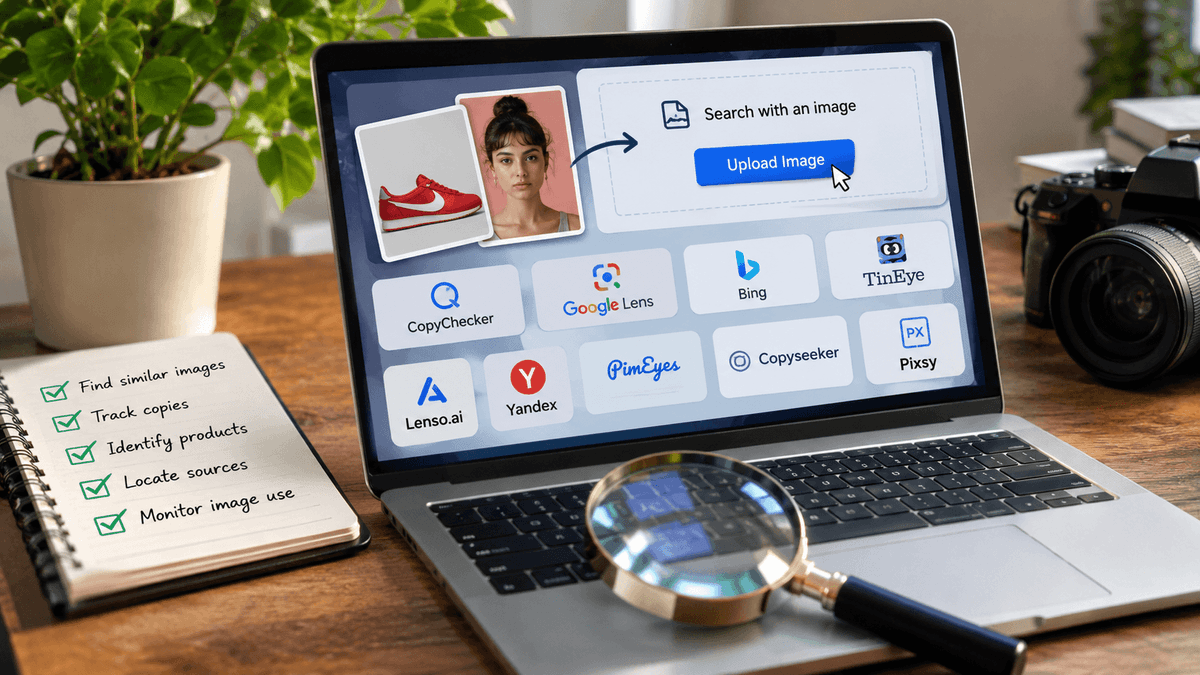
We explored nine tools using a Nike sneaker photograph and a portrait image.
This guide combines our actual findings with information about each service's features, limitations, and free access.
If you want to begin with a picture of your own, you can try CopyChecker's AI Reverse Image Search before exploring the alternatives below.
Best AI Reverse Image Search Tools at a Glance
There isn't one image search engine that works best for every task.
Your ideal choice depends on whether you need to identify a product, find an exact image, explore similar photographs, or investigate where a picture appears online.
Here is a quick comparison.
| Tool | Best For | Free Access | Main Limitation |
|---|---|---|---|
| CopyChecker | All-in-one image searching | Limited free searches | Advanced access requires payment |
| Google Lens | Products, objects, and landmarks | Yes | Not designed for copyright monitoring |
| Bing Visual Search | Shopping and similar products | Yes | Results may include different product models |
| TinEye | Exact and modified image copies | Free noncommercial use | Not intented for general visual similarity |
| Lenso.ai | Categorized image matches | Limited | Some source links require payment |
| Yandex Images | Finding similar photos | Yes | Results relevance varies |
| PimEyes | Searching for your own face | Limited | Detailed sources requires payment |
| Copyseeker | Finding webpages containing images | Free features available | Original publication may remain unknown |
| Pixsy | Image reuse monitoring | Free monitoring tier | Not intended for everyday product searches |
Quick Recommendation: Google Lens is a practical starting point for identifying products, while TinEye focuses on locating copies of a particular photograph. CopyChecker offers multiple search categories in one interface, and Pixsy is designed for ongoing image monitoring.
How We Tested AI Reverse Image Search Tools
A useful image search result isn't necessarily the one with the most pictures. What matters is whether it helps you answer your original question.
For example, someone searching for a particular sneaker may need its exact model number.
A photographer investigating image reuse needs matching photographs and source URLs instead.
To examine these different tasks, we used two types of test photographs: a red Nike sneaker and a portrait.
The sneaker was used to investigate product recognition, similar images, matching copies, and source information.
We also created a cropped version to examine whether TinEye could still recognize the photograph.
The portrait was used to explore facially similar results and image-source discovery.
What Did We Look For?
We considered these factors when examining the available results:
- Product identification: Could the tool identify the sneaker or provide useful model information?
- Exact and modified matches: Did it locate matching photographs after the image was cropped?
- Similar images: Were the results visually relevant to the submitted picture?
- Source discovery: Did it provide useful links to websites containing the image?
- Free access: Could users access meaningful information without paying?
- Result transparency: Did the tool explain or display enough information to evaluate a match?
We also recorded relevant restrictions, including source links locked behind payment.
These were practical searches rather than a comprehensive accuracy benchmark. Different tools were assessed on the tasks they support, and not every service received both test images.
Testing disclosure: The screenshots were captured during our November 2026 evaluation. Search results, free allowances, and pricing may change. CopyChecker is our product, and its results are reported alongside the other services without claiming an overall performance advantage.
What Is the Difference Between Exact, Modified, and Similar Image Matches?
Reverse image search results generally fall into three categories.
Exact match: The same photograph appears on another webpage.
Modified match: The photograph has been cropped, resized, recolored, or otherwise altered.
Similar match: Another photograph contains a related object or subject, even if it isn't the same image.
These distinctions matter. A visually similar sneaker may help you shop, but it doesn't prove that the photograph was copied.
What Did the AI Reverse Image Search Tools Find in Our Test?
Our searches produced different kinds of results, from identifying a sneaker's model number to locating matching photographs on shopping and social websites.
The table summarizes what appeared in the actual test screenshots
| Tool | Image Tested | Results Found | Key Finding |
|---|---|---|---|
| CopyChecker | Nike sneaker | Nike logos and similar sneakers | Returned brand-related websites and visually relevant shoe images |
| Google Lens | Nike sneaker | Nike Classic Cortez Stranger Things edition | Identified style code CK1907-600 |
| Bing Visual Search | Nike sneaker | Nike Cortez images and shopping pages | Returned retailer listings and related sneaker styles |
| TinEye | Full and cropped sneaker | 20 full-image results; 3 cropped-image results | Located matching shoe photographs after cropping |
| Lenso.ai | Nike sneaker | Duplicate and similar shoe images | Organized results by category, but source access was restricted |
| Yandex Images | Nike sneaker | Similar images and product pages | Displayed multiple image sizes and a listing with the model code |
| PimEyes | Portrait | 250 reported results | Displayed facially similar photographs; detailed source access required $14.99 |
| Copyseeker | Portrait | 144 reported results | Displayed potential image-source links across several websites |
| Pixsy | Nike sneaker | 4 matches | Provided URLs, country information, detection dates, and monitoring actions |
What Were the Key Findings?
Product identification: Google Lens returned the sneaker's Stranger Things collection name and style code. Bing displayed related shopping results, while Yandex provided similar images, alternative resolutions, and product-related links. CopyChecker and Lenso.ai also returned visually relevant sneaker images.
Cropped-image recognition: TinEye returned 20 results for the full sneaker image and three for the cropped version. The cropped search still located matching photographs on eBay domains.
Portrait searching: PimEyes reported 250 results featuring visually similar faces, while Copyseeker returned 144 image-search results. These are different result sets and shouldn't be treated as directly comparable accuracy scores.
Image monitoring: Pixsy found four sneaker-image matches and displayed the associated webpages, countries, detection dates, and management options.
The findings highlight an important point: a useful image-search result depends on your goal, not simply the number of matches returned.
1. CopyChecker AI Reverse Image Search: Best for an All-in-One Image Search Workflow
Website: CopyChecker AI Reverse Image Search
CopyChecker is designed for people who want to investigate different aspects of an image without switching between several specialized tools.
Its AI image-search interface supports uploads and image URLs.
Users can search for duplicate photographs, visually similar pictures, source pages, faces, logos, products, and places, depending on the available results.
For example, imagine finding a photograph of a distinctive chair in a design blog.
You might want to know whether the photograph appears on other websites, whether similar chairs are available for purchase, or whether the image belongs to a furniture brand.
CopyChecker provides a starting point for exploring these questions from one uploaded picture.
What makes CopyChecker useful?
The service organizes its image-search capabilities around several types of visual information.
- Duplicate and similar image discovery: You can look for copies of a photograph or other images that resemble the one you uploaded. These are separate goals, so examine the results carefully.
- Image-source discovery: Relevant links can help you investigate where an image appears online. Open those pages before drawing conclusions about its origin.
- Product and logo searching: A product photograph or branded object may lead to related products, brand information, or other relevant pages.
- Face and place searching: The interface also offers face-related and location-related image discovery. These features should be used responsibly, and a visual match should never be treated as proof of someone's identity or an exact location.
What Happened in Our Test?
We uploaded an image of a red Nike sneaker to CopyChecker's AI Reverse Image Search.
The tool recognized the Nike logo and displayed related results under the Websites tab.
The results included Nike.com entries featuring the brand's recognizable swoosh logo, along with visually matching red sneakers from other websites.
This shows how CopyChecker can connect an uploaded product image with its brand and related online content.
However, the screenshot doesn't establish whether CopyChecker found the exact product model or the original source of the uploaded photograph.
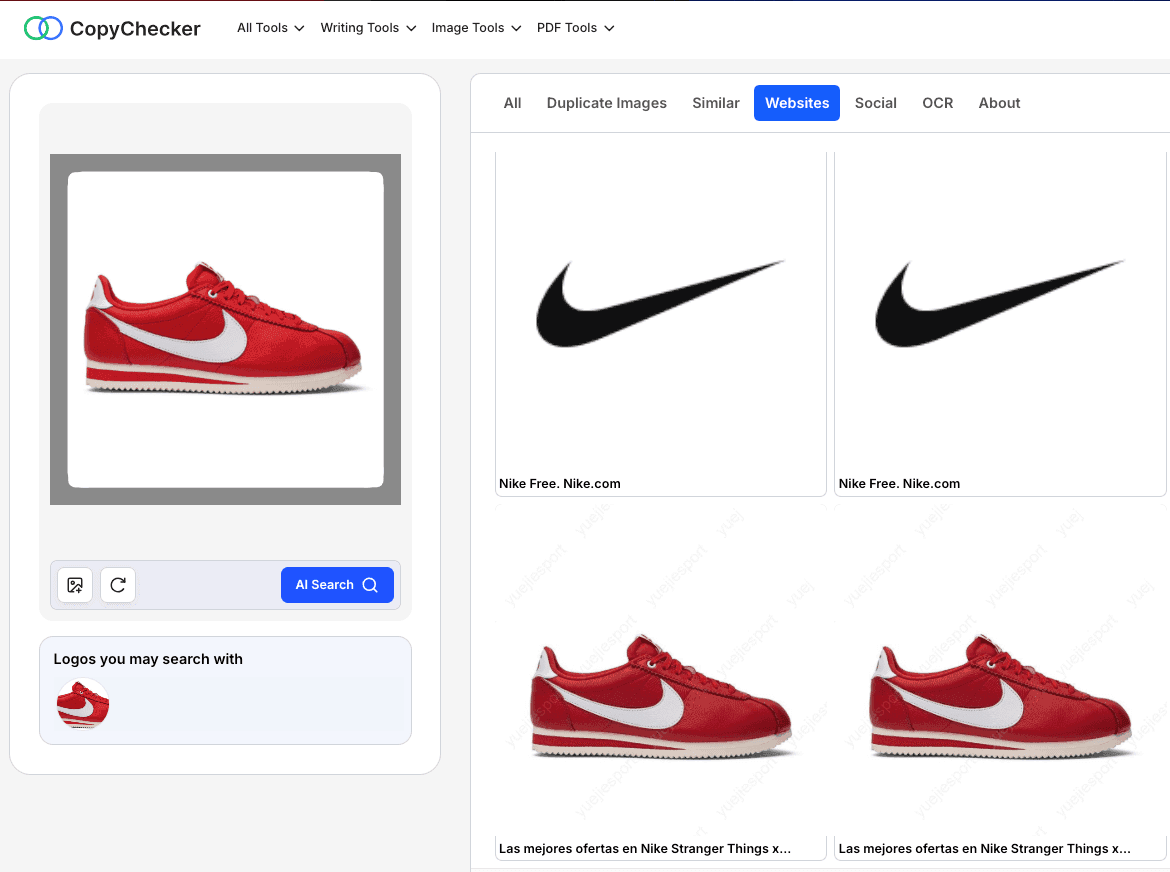
The results were useful for brand recognition and finding similar product images, but identifying an exact match would require checking the linked pages.
Is CopyChecker free?
CopyChecker's official website advertises three free image searches per month without registration, plus three additional searches after signing up.
Paid plans provide larger search allowances and advanced features.
The pricing displayed on the product page includes annual Pro and Ultimate subscriptions, with different credit allocations.
Users should compare the actual billing period, credits, and included capabilities before purchasing.
An advertised monthly equivalent for an annual subscription is not the same as a month-to-month payment.
Best for: Exploring multiple image-search categories through one interface.
Main limitation: Search results depend on available indexed content, and larger search allowances require payment.
2. Google Lens: Best Free Option for Everyday Visual Search
Website: https://lens.google/
Google Lens is particularly useful when you recognize something visually but cannot describe it accurately.
Perhaps you see a lamp in a hotel, a plant in someone's photograph, or an unfamiliar monument while traveling.
Instead of guessing search terms, you can use a picture to explore related information.
Google Lens supports image-based searching through the Google app and Chrome, along with other supported Google experiences.
Where Google Lens stands out?
Product discovery is one of its most practical applications.
Imagine uploading a screenshot of a handbag.
Google Lens may return similar bags, product listings, brands, and shopping information.
You can also refine certain visual searches using text.
For example, searching for a blue version of a bag pictured in brown can help narrow down shopping results.
Another helpful capability is text recognition.
If you take a picture of a sign in another language, Google Lens can help translate the text.
It can also extract written information from photographs and screenshots.
This makes it useful for everyday tasks that extend beyond traditional reverse image search.
What Happened in Our Product Search?
We uploaded the red Nike sneaker photograph to Google Lens, which identified it as the Nike Classic Cortez from the Stranger Things OG Collection.
The displayed information included the style code CK1907-600 and described the shoe as part of a 2019 release.
Google Lens also returned closely matching product photographs from StockX, Footshop, eBay, Pinterest, and other websites.
Several results featured the same red-and-white sneaker design, providing useful information for identifying the specific product and exploring related listings.
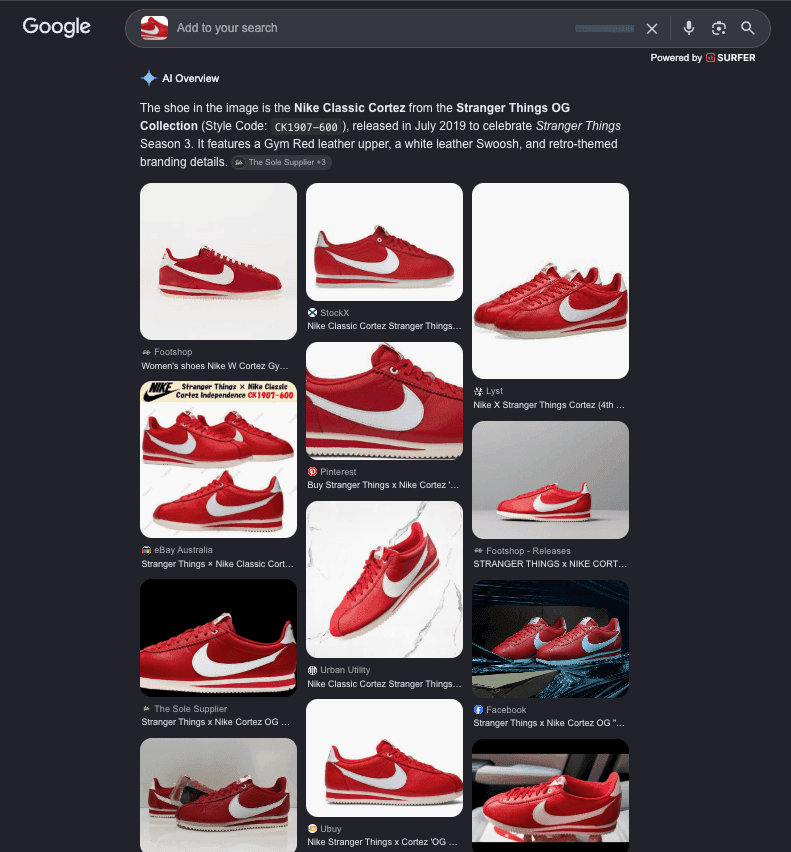
However, the screenshot didn't establish current stock availability, the best retail price, or the original source of the photograph.
What Are Its Limitations?
Google Lens may find photographs of the same subject without locating the exact image you uploaded.
Similarly, products that appear nearly identical can differ in size, materials, or manufacturer.
Best for: Everyday visual searches, shopping, landmarks, and objects.
Main limitation: It isn't a dedicated copyright-monitoring platform.
For a step-by-step explanation of image searching on mobile devices, you can go through how to do a reverse image search.
3. Bing Visual Search: Best for Product Discovery and a Second Opinion
Website: https://www.bing.com/visualsearch
Bing Visual Search provides another way to search using photographs instead of words.
Its results can include similar images, products, and webpages containing the uploaded picture.
This makes it useful when you want to compare the findings of two different visual-search engines.
When should you use Bing Visual Search?
Suppose you have a screenshot of a dining table but don't know the product name.
Bing Visual Search may return related furniture and shopping pages.
You can compare the results against the original photograph, focusing on details such as surface materials, leg design, and shape.
It is also worth trying when Google Lens returns incomplete results.
What Happened in Our Product Search?
We uploaded the red Nike sneaker image to Bing Visual Search, which recognized the shoe as part of the Nike Cortez Red collection.
The search displayed approximately 65,900 results, including Nike's official website, Amazon listings, and images of similar sneakers.
The results featured several red-and-white Nike Cortez variations, along with shopping-related suggestions such as where to buy the shoes and how to find lower prices.
This made Bing useful for exploring related products, comparing sneaker styles, and discovering shopping pages.
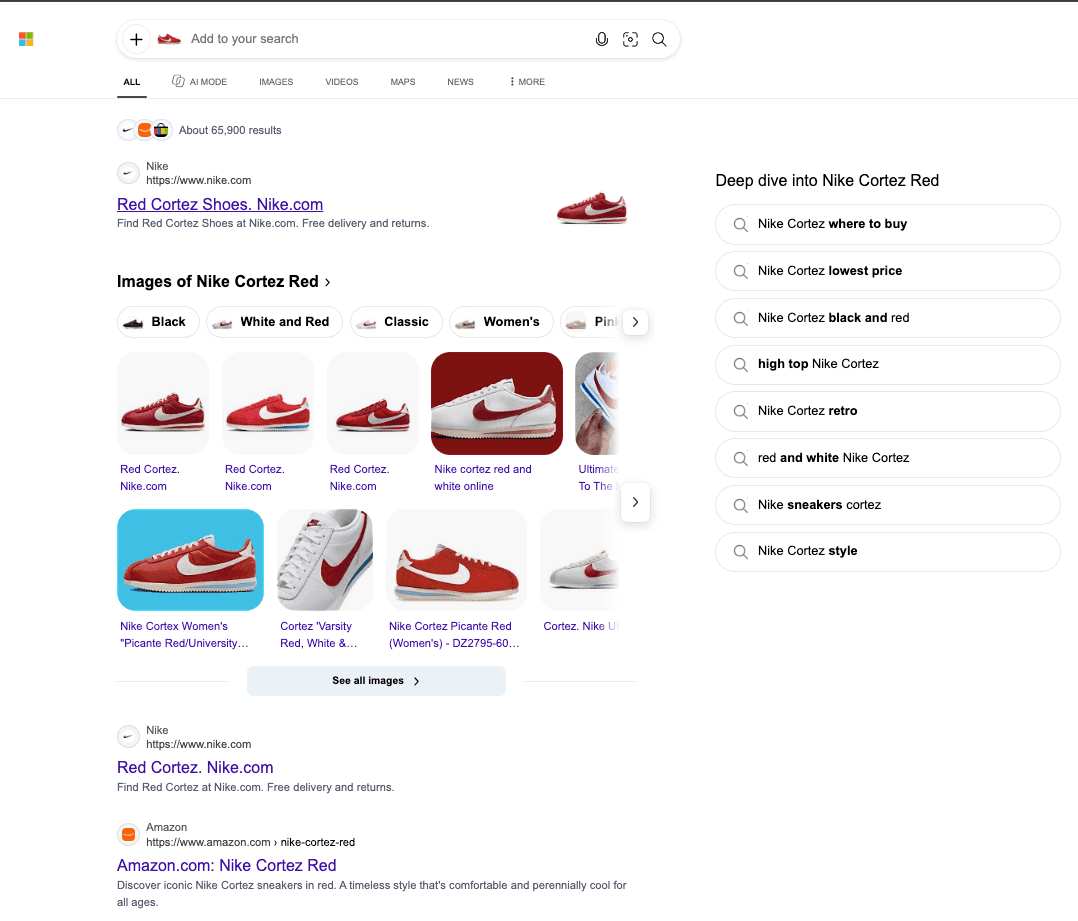
However, the results didn't clearly identify the exact Stranger Things edition or its product code.
The large result count also doesn't indicate how many listings matched the uploaded shoe precisely.
What are the Limitations?
Bing may return visually similar products rather than the precise item.
Microsoft's documentation also states that submitted photographs may be used to improve image-processing services.
Review its current privacy information before uploading sensitive images.
Best for: Shopping research and cross-checking another search engine.
Main limitation: Similar-looking results do not necessarily identify the exact product.
4. TinEye: Best for Finding Exact and Modified Image Copies
TinEye is more specialized than general visual-search services.
It focuses on locating matching photographs, including copies that have been resized, cropped, or edited.
This can be particularly useful when investigating where a specific photograph appears online.
How Does TinEye Recognize Edited Pictures?
TinEye uses image-recognition technology that compares a visual fingerprint against images in its index.
Imagine a photographer discovers that someone has cropped their picture and changed its colors.
TinEye is designed to recognize modified copies when matching versions are available in its indexed collection.
The service also provides sorting and comparison features that can help users investigate different versions of an image.
What Happened in Our Cropped-Image Test?
We uploaded a cropped version of the red Nike sneaker to TinEye to see whether it could still recognize the original image.
TinEye returned 3 results, all from eBay domains, showing that it was still able to match the cropped shoe image with visually identical or near-identical versions online.
This result suggests that TinEye can remain useful even when only part of the original image is available.
However, the cropped search returned far fewer matches than the full-image search, which indicates that cropping reduced the number of identifiable results.
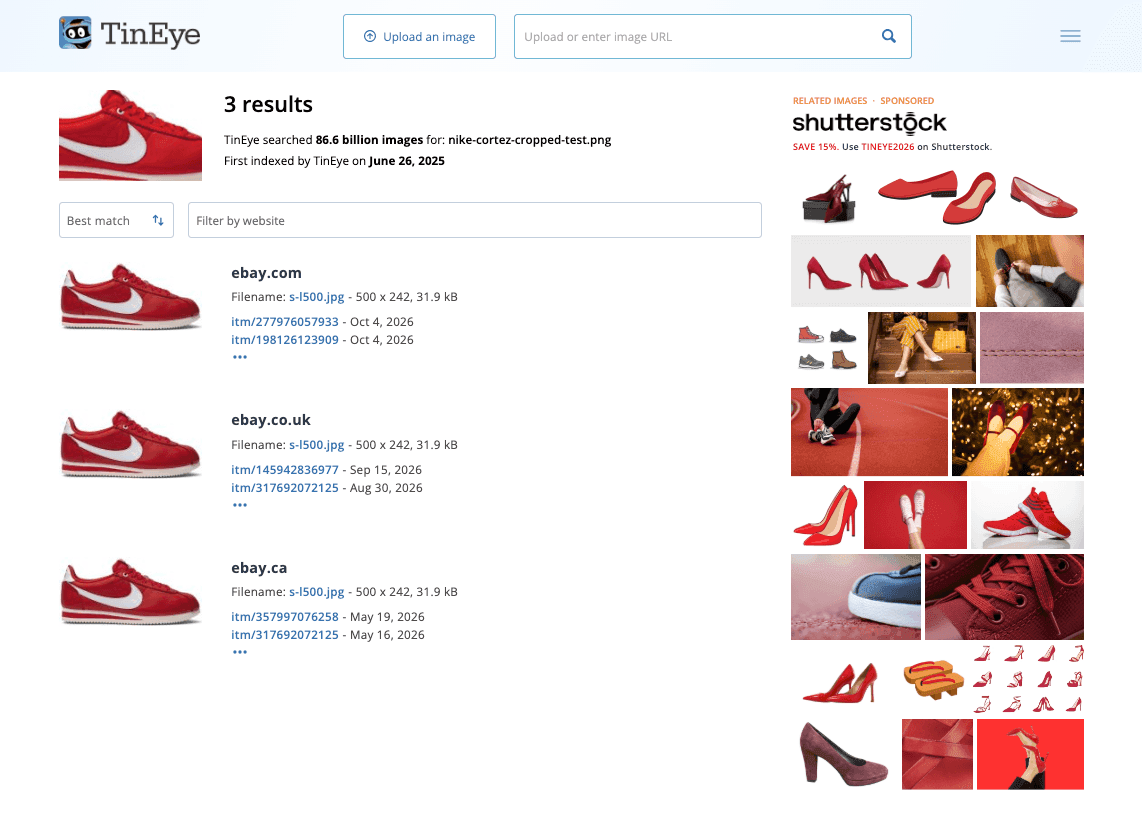
In this test, TinEye handled the cropped sneaker well enough to find relevant matches, but the smaller result set also shows that heavy cropping can limit how many copies the tool is able to detect.
Can TinEye find the original source?
TinEye may help you locate older copies and potentially useful source pages.
However, its oldest result reflects when its crawler discovered an image, not necessarily the first time the image appeared on the internet.
An earlier crawl date is useful evidence, but it is not definitive proof of authorship or original publication.
Best for: Exact matches, cropped or edited copies, and locating higher-resolution versions.
Main limitation: It isn't designed to find unrelated photographs showing the same person or object.
TinEye allows free searching for noncommercial use.
5. Lenso.ai: Best for Categorized Similar Images and Duplicate Results
Lenso.ai is an AI-powered reverse image search service that organizes results into visual-search categories.
It offers functionality for finding duplicates, visually similar images, places, and face-related results where available.
This can help users separate different types of matches rather than treating every result as an exact copy.
What Can You Find With Lenso.ai?
Imagine uploading a photograph of a historic building.
You might want to locate other pictures of that building, investigate where the photograph appears online, or discover places with similar architecture.
Lenso.ai provides categories intended for these different tasks.
For photographers, duplicate searching may help investigate repeated uses of a particular image.
For researchers and designers, similar-image discovery may be useful for finding visual references.
What Happened in Our Test?
We uploaded the red Nike sneaker image to Lenso.ai, which returned duplicate and visually similar sneaker images.
The results included closely matching red Nike Cortez shoes, along with variations in white, pink, and other color combinations.
Lenso.ai organized the matches into categories such as Duplicates, Related, and Similar, making it easier to explore different types of results.
However, many source details were blurred and labeled “Unlock Sources,” restricting access to the websites containing those images.
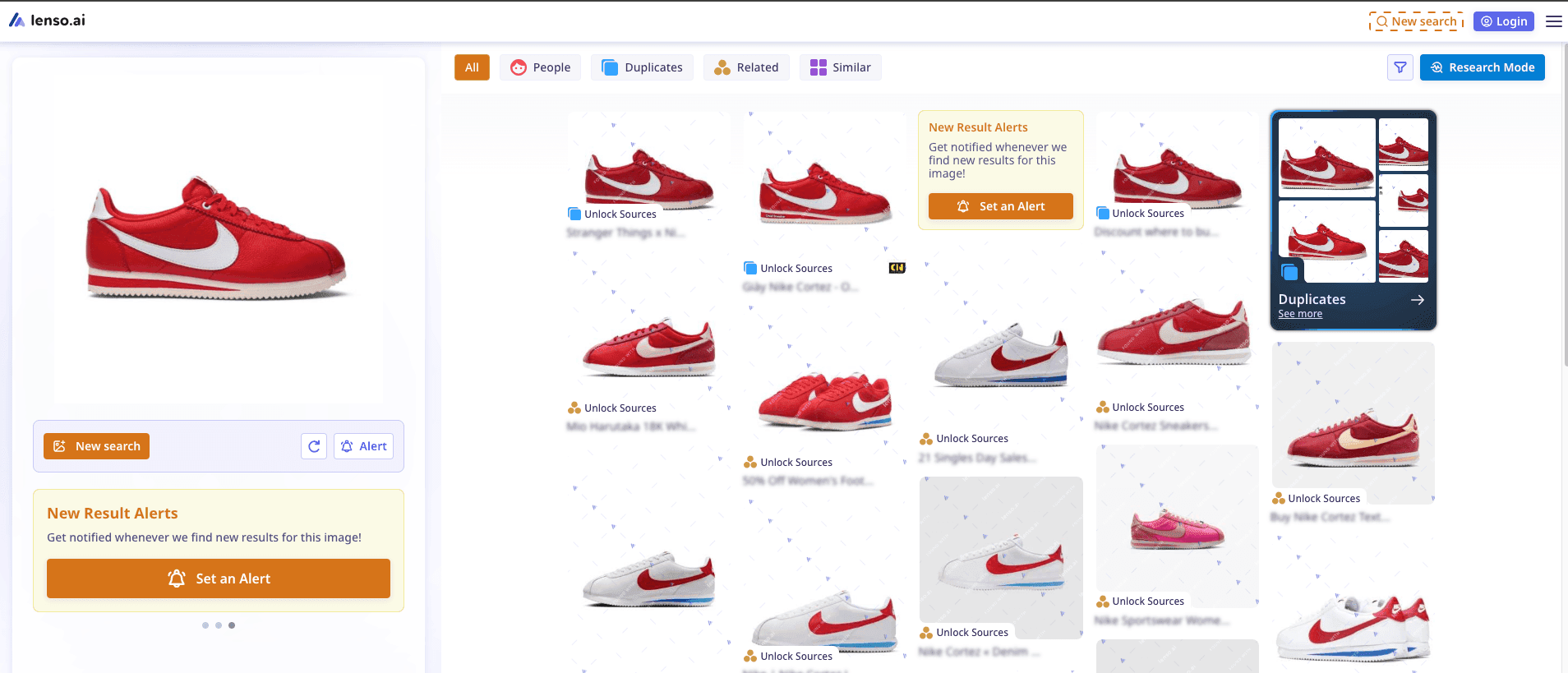
The test showed that Lenso.ai was useful for finding matching and similar product images, but its source-access restrictions made it difficult to verify where the photographs appeared without unlocking the links.
Is Lenso.ai Free?
Lenso.ai provides limited search access, while certain advanced functions and source links require paid subscriptions.
This distinction matters because seeing a matching thumbnail isn't always enough. If your goal is to locate the website containing an image, access to the source URL can be essential.
Best for: Categorized visual matches, duplicate searches, and deeper image research.
Main limitation: Some source information and advanced features require payment.
6. Yandex Images: Best for Exploring Another Image-Search Index
Yandex Images provides visual searching that can return exact copies and related photographs.
One reason to try another image-search engine is that providers use different indexes and ranking systems.
An image missing from one service's results might be discoverable through another.
When Is Yandex Useful?
Imagine finding a photograph of an unfamiliar building.
Your first search might return pictures of similar architecture without identifying the actual location.
Searching the same photograph through Yandex provides another collection of results to investigate.
This can be helpful when researching landmarks, illustrations, or images appearing on different websites.
What Happened in Our Test?
We uploaded the red Nike sneaker image to Yandex Images, which returned numerous visually similar Nike Cortez sneakers, including red-and-white variations and other color options.
It also suggested related search terms such as “Nike Classic Cortez” and displayed matching images in different resolutions.
The results included a shopping page identifying the shoe as the Stranger Things x Nike Cortez OG Collection, with the product code CK1907-600.
This made Yandex useful for exploring similar sneakers, finding different image sizes, and locating product-related websites.
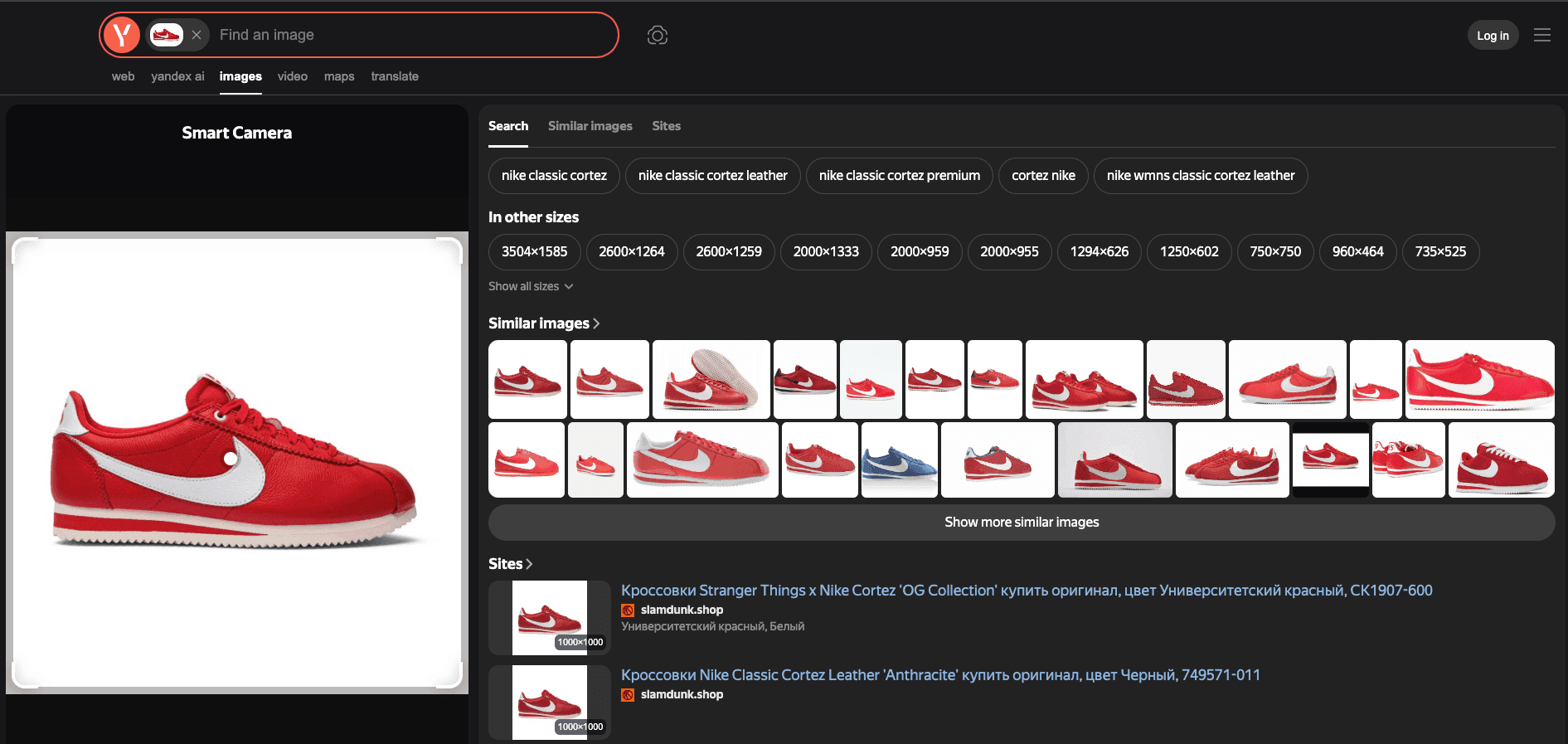
However, not every result showed the exact sneaker model, and some linked pages appeared in Russian.
The screenshot also didn't establish the original source of the uploaded photograph.
What Are Its Limitations?
Yandex may return visually related photographs that don't match the original image.
Search relevance can also vary by image, region, language, and indexed content.
Best for: Exploring additional image matches and getting a second search opinion.
Main limitation: Results do not automatically establish a photograph's original source.
7. PimEyes: Best Specialized Option for Searching Your Own Face
PimEyes specializes in facial similarity rather than general product or object searching.
Its service is designed to find publicly accessible photographs containing faces that resemble the one submitted.
For someone concerned that photographs of themselves may be appearing on unfamiliar websites, this type of search can be useful.
How Does PimEyes Work?
PimEyes compares facial information in an uploaded photograph with images available in its search index.
It may find photographs that differ in lighting, background, or camera angle.
However, facial similarity isn't proof of identity.
Two different people may have similar features, and search results can contain false matches.
What Happened in Our Portrait Test?
We uploaded a portrait photograph to PimEyes, which returned 250 results featuring the same or closely resembling face across different websites.
Many results showed the portrait with slight variations in cropping, background, and image quality, demonstrating the tool's ability to locate visually related facial images.
The results included website labels beneath the photographs, making it possible to see where potential matches appeared.
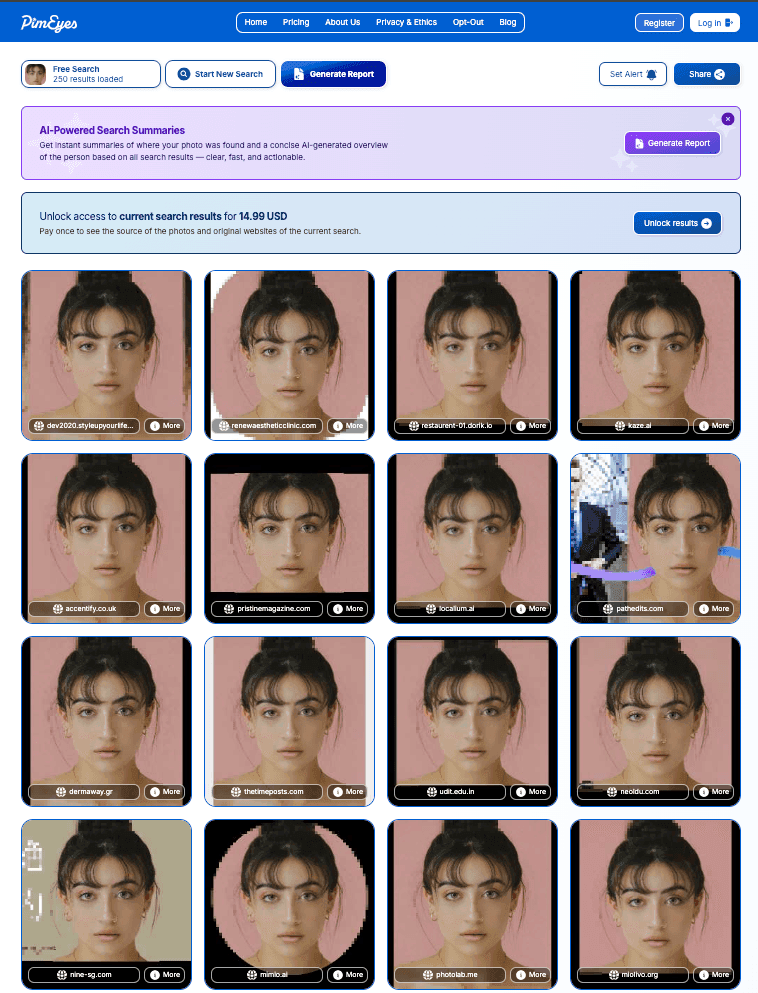
However, PimEyes required a $14.99 payment to unlock the source websites and access more detailed information about the results.
This test showed PimEyes' usefulness for discovering potential appearances of a portrait online, although the payment restriction limited source verification.
The visible facial similarities alone also cannot confirm the identity of anyone pictured.
What Should You Know Before Using It?
PimEyes states that its index doesn't include social media platforms.
A photograph that exists only on a social network may therefore be absent.
Some advanced results and monitoring features also require payment.
Use face-search technology for legitimate, lawful purposes, particularly when reviewing your own public photographs.
Best for: Investigating where photographs resembling your own face appear online.
Main limitation: It doesn't cover every website and cannot independently verify identity.
8. Copyseeker: Best for Investigating Image Sources and Reuse
Copyseeker provides reverse image search alongside additional image-analysis features.
Its website describes source discovery, visual matching, text extraction, and AI-image detection.
These capabilities may interest researchers and fact-checkers trying to understand a photograph's context.
When Can Copyseeker Help?
Suppose a photograph is being shared with a claim that it shows a recent event.
Finding an earlier appearance of the same image could help you determine whether the accompanying description is misleading.
Copyseeker offers image-source searching to assist with this type of investigation.
However, a reported source should still be checked manually. An older webpage may not necessarily be the photograph's first publication.
What Happened in Our Source Search?
We uploaded the portrait photograph to Copyseeker, which returned 144 results across different websites.
The visible matches included Facebook, Instagram, Google Play, and Medium, with several showing the same portrait or edited versions of it.
Copyseeker displayed website names, result previews, and links, making it useful for finding where a photograph appears online.
One Instagram result even referenced two different edits of the same photo, highlighting its potential for discovering modified image copies.
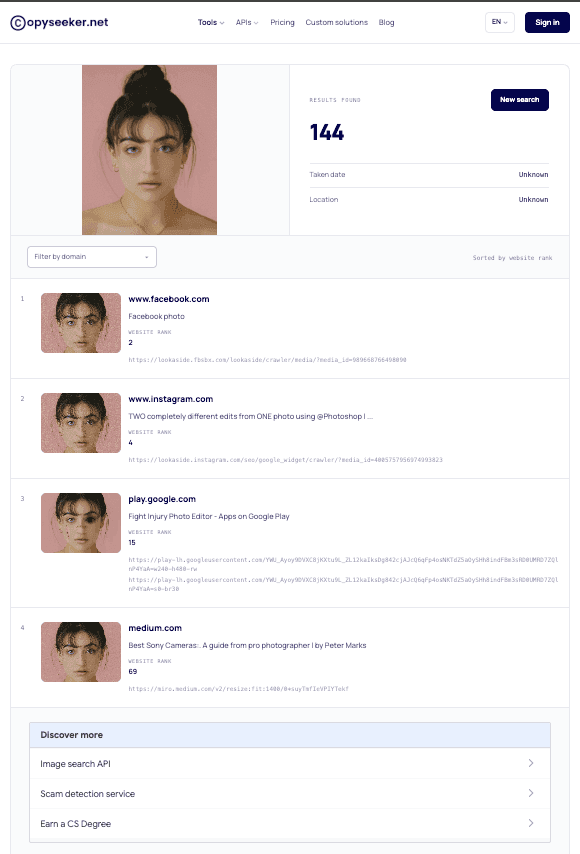
However, the tool couldn't determine the photograph's original date or location, marking both as “Unknown.”
Although it found numerous possible sources, the screenshot alone doesn't establish which website published the image first.
What Are Its Limitations?
Finding no copies of an image doesn't prove it was created using AI.
Likewise, an AI-generated-image detection result shouldn't be treated as conclusive evidence.
Best for: Investigating possible image sources and exploring related image-analysis features.
Main limitation: Reported source information and AI-detection findings require independent verification.
9. Pixsy: Best for Copyright Monitoring and Image Protection
Pixsy is designed for photographers, artists, and image-rights holders who want to monitor where their work appears online.
Unlike everyday visual-search engines, it combines image matching with copyright-management workflows.
How does Pixsy work?
Imagine a photographer publishing original travel photographs on a portfolio website.
Months later, one of those images appears in a commercial advertisement without an obvious license.
Pixsy's monitoring service may help discover a matching photograph.
The photographer can then check the webpage, review their licensing records, and determine whether further action is appropriate.
Pixsy also provides services related to investigating and resolving potential unauthorized image use.
What Happened in Our Monitoring Test?
We uploaded the red Nike sneaker image to Pixsy, which identified 4 matching results across different websites.
These included an eBay listing for the Nike Stranger Things x Cortez OG Collection and other shopping pages displaying the same sneaker photograph.
Pixsy provided more than image thumbnails.
Each result included useful details such as the website URL, country, page title, and first detection date.
The matches covered websites associated with the United States, Vietnam, and Bosnia and Herzegovina, showing how the photograph appeared across different online markets.
The results also included options to take action, flag, or ignore individual matches, making Pixsy useful for monitoring image reuse.
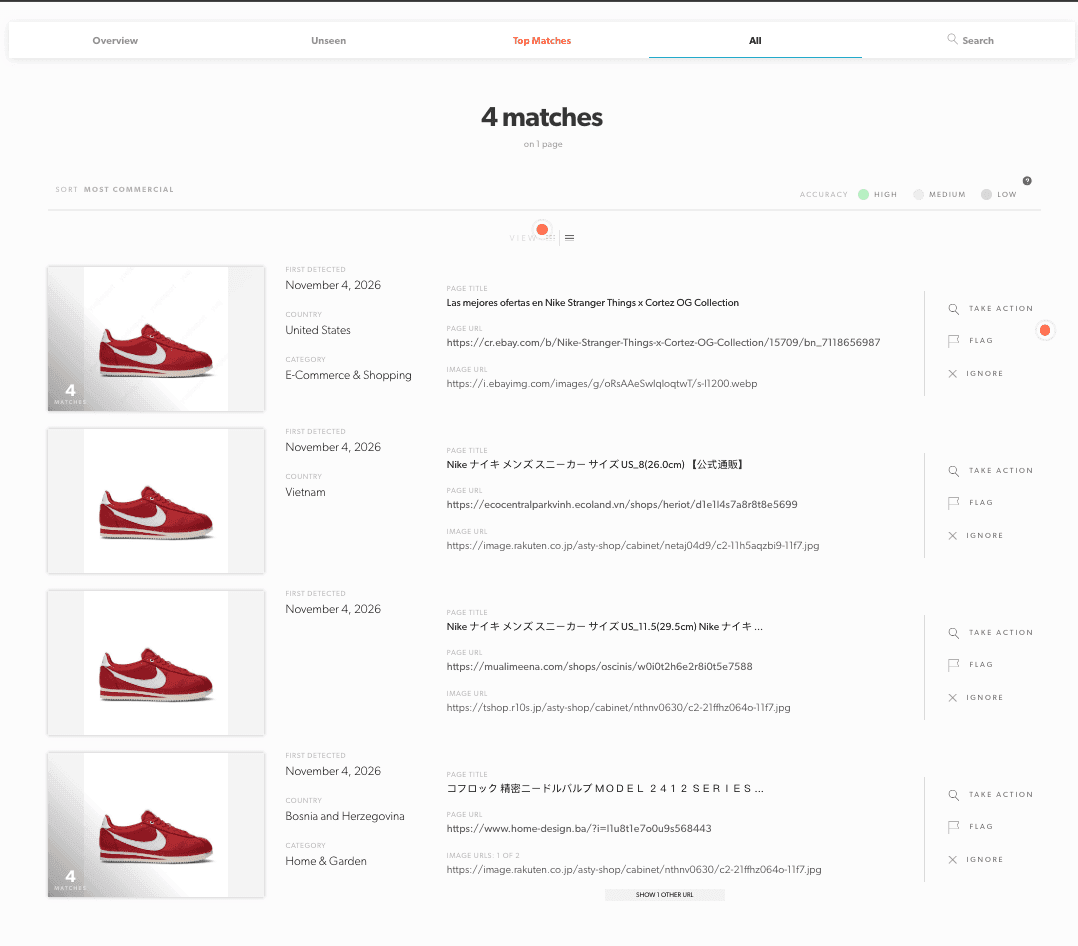
However, finding matching photographs does not automatically prove copyright infringement, and the first detection dates do not establish when the images were originally published.
Is Pixsy Free?
Pixsy advertises a free monitoring tier supporting up to 500 images.
Paid options support larger collections, and certain infringement-resolution services follow a recovery-based fee model.
Review the latest terms before subscribing or submitting a case.
Best for: Ongoing copyright monitoring and professional image-rights management.
Main limitation: It isn't intended for identifying everyday products or discovering general visual inspiration.
To investigate whether an image is available for lawful reuse, you can also explore any reliable Image Copyright Checker.
Remember that locating a copy or copyright-related information doesn't replace checking the applicable license or obtaining permission.
Which AI Reverse Image Search Tool Should You Choose?
The right AI image finder depends on what you're trying to discover.
If you need to locate an exact photograph, a specialized image-matching tool may be more helpful than a general visual-search service.
For shopping, product identification and retailer links are more relevant.
For photographers, ongoing monitoring may matter more than a single search.
| Your Goal | Start With | Why |
|---|---|---|
| Find an exact or edited copy | TinEye | Focuses on matching versions of the same image |
| Discover visually similar pictures | Google Lens or Lenso.ai | Supports broader visual discovery |
| Identify a product | Google Lens or Bing | Provides product-related search results |
| Search for your own face | PimEyes | Specializes in facial similarity |
| Investigate an image source | TinEye or Copyseeker | Provides image-match and source-investigation workflows |
| Monitor your photographs | Pixsy or Berify | Focuses on ongoing image reuse |
| Explore several image categories | CopyChecker | Combines multiple search categories |
| Get a second search opinion | Yandex Images or Bing | Uses a different image-search service |
These recommendations reflect documented capabilities and the observed searches. They aren't universal accuracy rankings.
What if Your First Search Finds Nothing?
A search with zero matches does not mean your image is original, privately owned, or absent from the internet.
Try another engine using the same original photograph.
If the picture has been heavily cropped, search a less-cropped version when available.
For product searches, focus on a recognizable object rather than uploading a screenshot with several unrelated items.
For image-source research, compare results across different services and inspect the linked websites.
A second search is often more useful than repeatedly submitting the same photograph to one provider.
You can also explore the different uses of reverse image search before deciding which method fits your task.
How to Use CopyChecker AI Reverse Image Search
CopyChecker allows you to begin searching with a photograph rather than a written description.
Here is the basic process.
- Open the tool. Visit CopyChecker's AI image search.
- Choose an image. Upload a supported photograph from your device or paste an image URL into the available field.
- Review the consent notice. Read and accept the required notice before starting the search.
- Start searching. Select the search action and allow the service to process your image.
- Explore the results. Examine the available matching, similar-image, product, logo, face, or source-related results.
- Verify useful matches. Open relevant websites and compare their information against the uploaded picture.
How Should You Interpret the Results?
Suppose you upload a photograph of a pair of headphones.
A result featuring headphones of the same color and shape might be useful for shopping research, but it does not necessarily identify the exact model.
Look for distinctive features such as branding, earcup design, controls, or visible model numbers.
For a photograph you believe someone copied, prioritize results showing the same image rather than merely the same subject.
If you want a broader search, a conventional reverse image search may provide another way to investigate.
If you're searching on a specific social platform, go through reverse image search on Pinterest to get how visual discovery works there.
How Can You Verify the Original Source of an Image?
Finding the same photograph on another website is a useful clue, but it doesn't automatically identify the original publisher.
A picture may appear on retailer websites, blogs, social platforms, and image-sharing services after being copied or licensed.
To investigate its source, follow these steps:
- Open the matching webpage. Confirm that it contains the actual photograph.
- Check credits and licensing information. Look for photographer names, copyright notices, and source references.
- Compare publication context. An earlier webpage can provide useful evidence, but it isn't automatically the original source.
- Search with another engine. Additional results may reveal a creator's portfolio, publication archive, or other authoritative source.
- Verify before reusing. Make sure the license or permission covers your intended use.
For artwork and illustrations, the process may also involve checking artist portfolios or image metadata.
Finding multiple copies doesn't mean those images are free to use.
Limitations of AI Reverse Image Search
AI-powered image searching can discover useful visual connections, but it does not provide a complete record of every photograph on the internet.
Understanding these limitations helps prevent incorrect conclusions.
Not every image is indexed
Private photographs, restricted websites, and recently uploaded images may not be available in a search engine's index.
Even publicly accessible content can be missing.
Image editing can affect matching
Cropping, mirroring, adding text, replacing backgrounds, or changing colors may make an image more difficult to match.
Some tools are specifically designed to recognize modifications, but results still depend on the image and matching system.
Similar images are not necessarily identical
Two shoes can look nearly the same while belonging to different brands.
Similarly, two portraits may contain people with similar facial features without depicting the same individual.
Search results do not prove ownership
A photograph appearing on several websites does not automatically establish which person created it.
Image credits, licensing records, publication dates, and other evidence may be needed.
If you are researching artwork, find this guide on how to find the original artist of an image to get additional context.
Results can change over time
A search performed today might produce different results next month.
Search engines update their indexes, webpages disappear, and new photographs become available.
For important investigations, save relevant URLs and document when the results were accessed.
Privacy and Ethical Use of Reverse Image Search
Before uploading a photograph, consider what information it contains.
A personal photograph may reveal faces, locations, license plates, private documents, or other sensitive details.
Even when a website provides a convenient upload box, you should review its privacy policy and understand how it processes submitted images.
Avoid uploading:
- Confidential business documents or photographs containing private records.
- Images of other people without an appropriate reason or permission.
- Sensitive family photographs to unfamiliar services.
- Pictures that could expose someone's private location or personal details.
Face-search technology requires particular care.
A visual match cannot establish a person's identity, and image-search services should not be used to stalk, harass, or expose private individuals.
Copyright also deserves attention.
Finding an image online does not mean anyone can legally reuse it.
Copyright ownership, licenses, permitted uses, and jurisdiction can affect what you are allowed to do.
Before publishing a photograph, learn how to check if an image is copyrighted.
Treat reverse image search as a research aid, not a final legal or identity-verification decision.
FAQs on
What is the Best AI Reverse Image Search Tool?
CopyChecker is useful for all-in-one AI image searching, Google Lens for products and objects, and TinEye for exact or edited image matches.
Is AI Reverse Image Search Free?
Yes. Google Lens, Bing Visual Search, and TinEye offer free searches, while CopyChecker provides limited free searches each month. Some advanced features require payment.
Can Reverse Image Search Find the Original Source of A Photo?
Yes, reverse image search can help locate earlier appearances and possible sources of a photo, but the oldest result isn't always the original source.
Can AI Reverse Image Search Identify A Person?
AI face-search tools like PimEyes can find visually similar faces online, but results cannot reliably confirm someone's identity.
Which Tool is Best for Finding Similar Images?
Google Lens, Bing Visual Search, and Lenso.ai are useful for finding visually similar images, while TinEye specializes in exact and modified copies.
Can Reverse Image Search Find A Product from A Picture?
Yes. Google Lens and Bing Visual Search can identify products or suggest similar items from an uploaded photo, often with shopping links.
Can AI Reverse Image Search Find Cropped or Edited Pictures?
Yes. Tools like TinEye can detect cropped, resized, or modified versions of images, although heavily edited photos may be harder to match.
Is it Safe to Upload A Personal Photo?
It depends on the platform's privacy policy. Use trusted services, check how images are stored, and avoid uploading sensitive or confidential photos.
Is Google Lens Better than A Dedicated Reverse Image Search Tool?
Google Lens is better suited to general visual searches, while specialized tools like TinEye and Pixsy focus on image matching and copyright monitoring.
Final Thoughts on Which Tool Is Worth Trying?
The right AI reverse image search tool depends on what you want to discover.
For products and everyday objects, start with Google Lens or Bing Visual Search.
For exact and edited copies, consider TinEye.
For ongoing copyright monitoring, explore Pixsy or Berify.
If your goal involves several types of visual information, CopyChecker offers a convenient place to begin.
For important source investigations, compare results from more than one search engine and verify the webpages yourself.
A matching image is a clue, not a complete answer.
Ready to investigate a photograph?
Try CopyChecker now!