You just got a new message. Before you even think about replying, you do what everyone does now, you check their profile.
The photo? Stunning. The bio? Warm, easy to like, almost too easy. And that's when it hits you: something about this feels a little too perfect.
Maybe it's a new follower who suddenly wants to be your best friend. Or maybe it's a "recruiter" dangling a job you never even applied for. Or perhaps it's a match on a dating app who's already falling for you, and it's only been three days.
Whatever it is, that little pause you just felt? Trust it.
Because if you're here wondering whether someone is really who they say they are, you're not overthinking it, you're paying attention, and that instinct is worth listening to.
So here's the truth -
Fake profiles aren't rare anymore, and honestly, they don't even look the way they used to. Between stolen photos, scripted messages, and now AI tools that can build a whole fake person in seconds, spotting one takes more than just a gut feeling.
That's exactly what this guide is for. No matter if you're dealing with a suspicious follower, a too-good-to-be-true match, or a "recruiter" who feels off.
You'll find everything you need right here, from classic red flags and newer AI reverse image search tricks that are fooling even careful people to platform-by-platform checklists and free tools that can confirm a suspicion in under a minute.
So, without any more delay, let's get into it -
Why Fake Profiles Are Everywhere Right Now
Fake profiles aren't a small corner-of-the-internet problem. They're baked into the scale of social media itself.
Think about how easy it is to make one. No ID check, no cost, no waiting period, just a name, an email, and a few photos pulled from anywhere on the internet.
Multiply that by billions of active users across dozens of platforms, and you get an environment where fake accounts aren't the exception.
They're basically a predictable side effect of how open and free these platforms are to join. Some of the following things have made the problem grow rather than shrink:
- Meta has reported that roughly 4–5% of its active accounts are fake, which works out to well over 100 million profiles across its platforms alone.
- In a single recent quarter, Facebook took action against over a billion fake accounts.
- The FTC reported that people lost $2.1 billion to scams that started on social media in 2025, about 8 times as much as in 2020.
- Nearly 6 in 10 people who lost money to a romance scam in 2025 said it began on a social media platform.
- Government data suggests Americans lost an estimated $3 billion to romance scams last year, up sharply from roughly $1.2 billion the year before.
- Researchers at Lancaster University found that everyday people could correctly identify a fake profile only 13-54% of the time, compared to 79–86% accuracy in spotting real ones. Basically, instinct alone isn't reliable, and everyone needs a system, not just a gut feeling.
As one FTC report put it, social media gives scammers "easy access to billions of people from anywhere in the world," which is exactly why this keeps growing every year rather than shrinking.
The takeaway isn't "trust no one." But it’s best to build a quick verification habit, just like you'd double-check a suspicious email before clicking a link.
Now that you know the current situation, let’s find out about -
The 7 Types of Fake Profiles You'll Actually Run Into
Not all fake profiles have the same goal. Knowing which type you're dealing with helps you know how seriously to treat it.
A brand-new account with a few spammy links is annoying, but it's not the same threat as someone who's spent three weeks building what feels like a real relationship with you. The red flags overlap, but the stakes and the playbook don't.
A bot trying to get you to click a link just wants a quick reaction. A romance scam operator is playing a much longer game, and it's built to feel personal on purpose.
That's why it helps to think of "fake profile" as an umbrella term rather than one single thing. So, the following are the seven versions you're most likely to actually run into, from the low-effort to the highly organized:
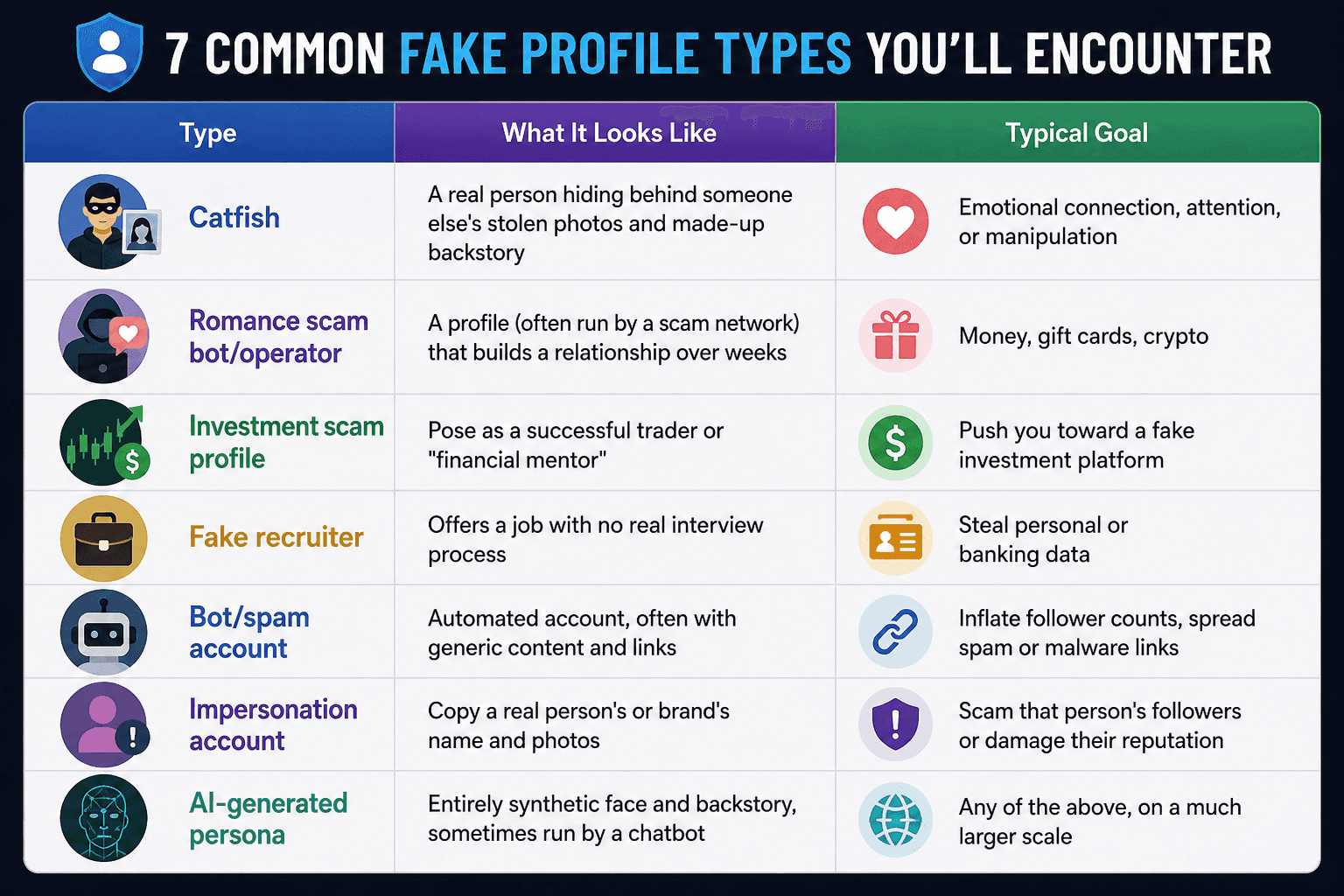
The Rise of AI Evolution as Fake Photo Generators
This is the part that's shifted the most over the last two years, and it's worth being upfront about it: some of the old advice no longer fully holds up.
For years, the standard playbook was simple.
Suspicious profile? Reverse image search the photo across different social profiles. Ask for a selfie holding a handwritten note. Hop on a video call and see who shows up. Those three checks used to be enough to catch almost anyone.
But they're not the same anymore. The same AI tools can now build a realistic photo of a face that has never existed, hold a natural conversation for weeks without a human typing a single word, and even mimic a live video call in real time.
The scammer on the other end doesn't need to steal someone else's identity. They can manufacture a brand-new one, custom-built to be exactly what you'd find convincing.
- Roughly 7 in 10 romance scam profiles now use AI-generated photos, according to FTC-linked data, which means the photo was never of a real person to begin with, and a reverse image search may return no matches at all.
- One security researcher summed up the old "gold standard" test bluntly for years, asking a match to send a selfie holding a handwritten note, which was considered solid proof. That test no longer works, since AI tools can generate a custom image like that in seconds.
- A biometric security survey found that 61% of people have already been deceived by a fake profile, or know someone who has, and 84% said AI-generated content has made it harder to trust people while dating.
- AI-powered chatbots can now run 50 or more conversations at once, remembering details, adjusting tone, and replying instantly without a human operator getting tired or slipping up.
- Independent testing found that only about 0.1% of people could reliably tell real photos and videos from AI-generated ones.
So what still works when photos and text can both be faked? Two things security researchers keep coming back to:
Initiate Video Calls with Movement
Ask the person to wave a hand quickly in front of their face or turn their head sharply to the side. Real-time deepfake filters still tend to glitch, flicker, or blur around fast motion. This is sometimes called the "physical occlusion test."
Meeting in Person, Sooner Rather than Later
It sounds old-fashioned, but it's the one thing AI genuinely cannot fake. If someone has strung along a conversation for several weeks with excuse after excuse about why they can't meet or video call, that delay is the red flag, not any single photo or message.
This doesn't mean a reverse image search tool is not the only solution. Honestly, it's still one of your best solutions, especially for the many scams that still use stolen real photos rather than AI-generated ones.
It just means it's one layer of a bigger checklist, not the whole answer anymore. Now let’s find out what you’re eagerly searching for -
The Fastest Way to Check a Profile Photo
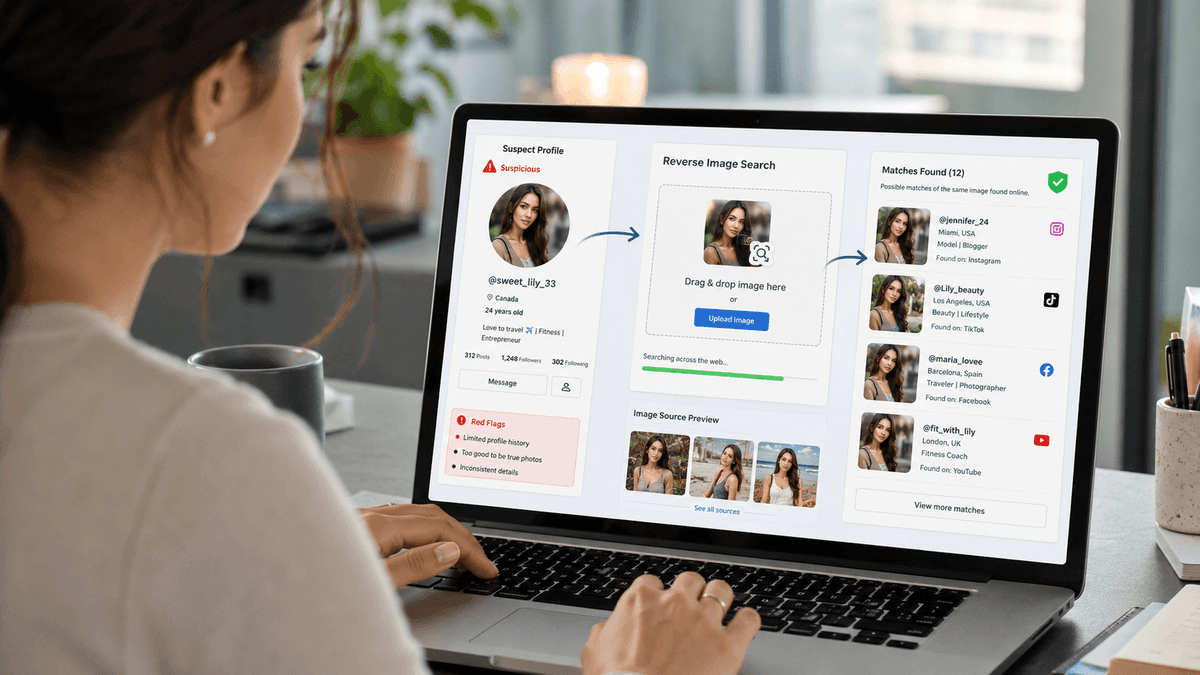
Even with AI in the picture, this is still where you should start. It catches the majority of fake profiles that still rely on stolen real photos because it's cheaper and faster than generating custom AI-generated images.
You don't need any special software or technical background for this, just the photo in question and a couple of minutes. The following is the step-by-step process to reverse image search with CopyChecker.
By the end of it, you'll know exactly where else that photo has shown up online, if anywhere at all.
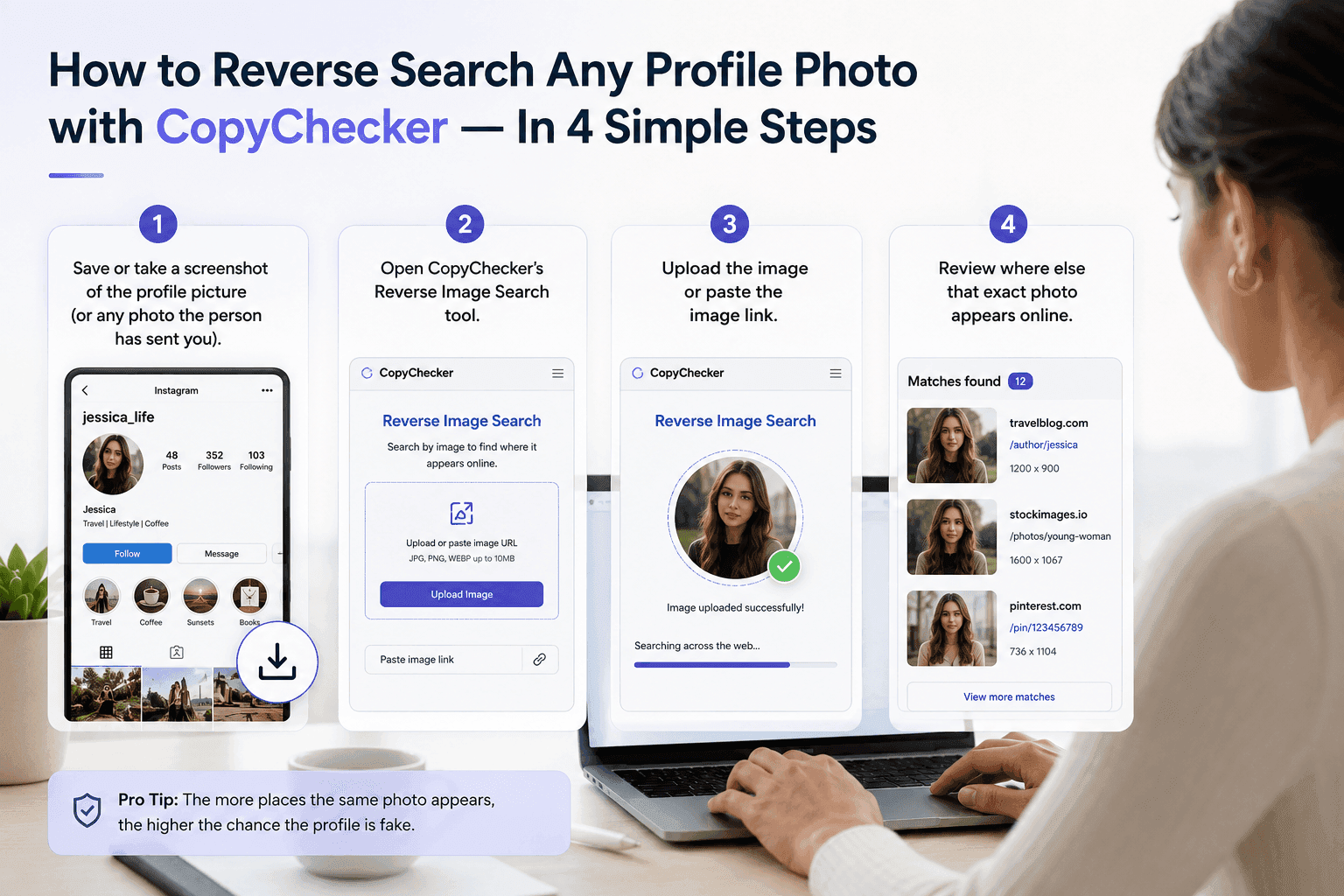
No account needed, no technical skill required, as the tool does the heavy lifting and shows you matching results in seconds.
After the analysis with the tool, if you find the same image on various platforms with different info, then the next section is definitely for you -
What It Means If the Photo Shows Up Elsewhere
Running the search is the easy part, but correctly interpreting the results is what actually protects you. A single match doesn't always mean the same thing, so it helps to know what you're looking at before you jump to conclusions:
- Same Photo, Different name: A strong sign that the profile is stolen or fabricated.
- Photo Linked to A Stock Photo Site or Modeling Portfolio: The picture was likely never of the real person behind the account.
- Photo Appears on A Scam-Alert or Catfish-Warning Forum: Other people have flagged this exact image before, one of the clearest red flags you'll find.
- No Matches at all: This doesn't automatically mean the profile is real anymore, especially with AI-generated photos in the mix, but it does rule out the most common (and laziest) kind of fake.
Running the CopyChecker Reverse Image Search tool before you share anything personal takes less time than reading this sentence twice, and it's still your highest-value single check.
To make things easier, below is a section that you might need at least once in your life -
12 Universal Red Flags of a Fake Profile to Identify
Think of this as your mental checklist. One red flag alone isn't proof. Three or more together? Now it’s time to reconsider and guard up your online scam protection mood -
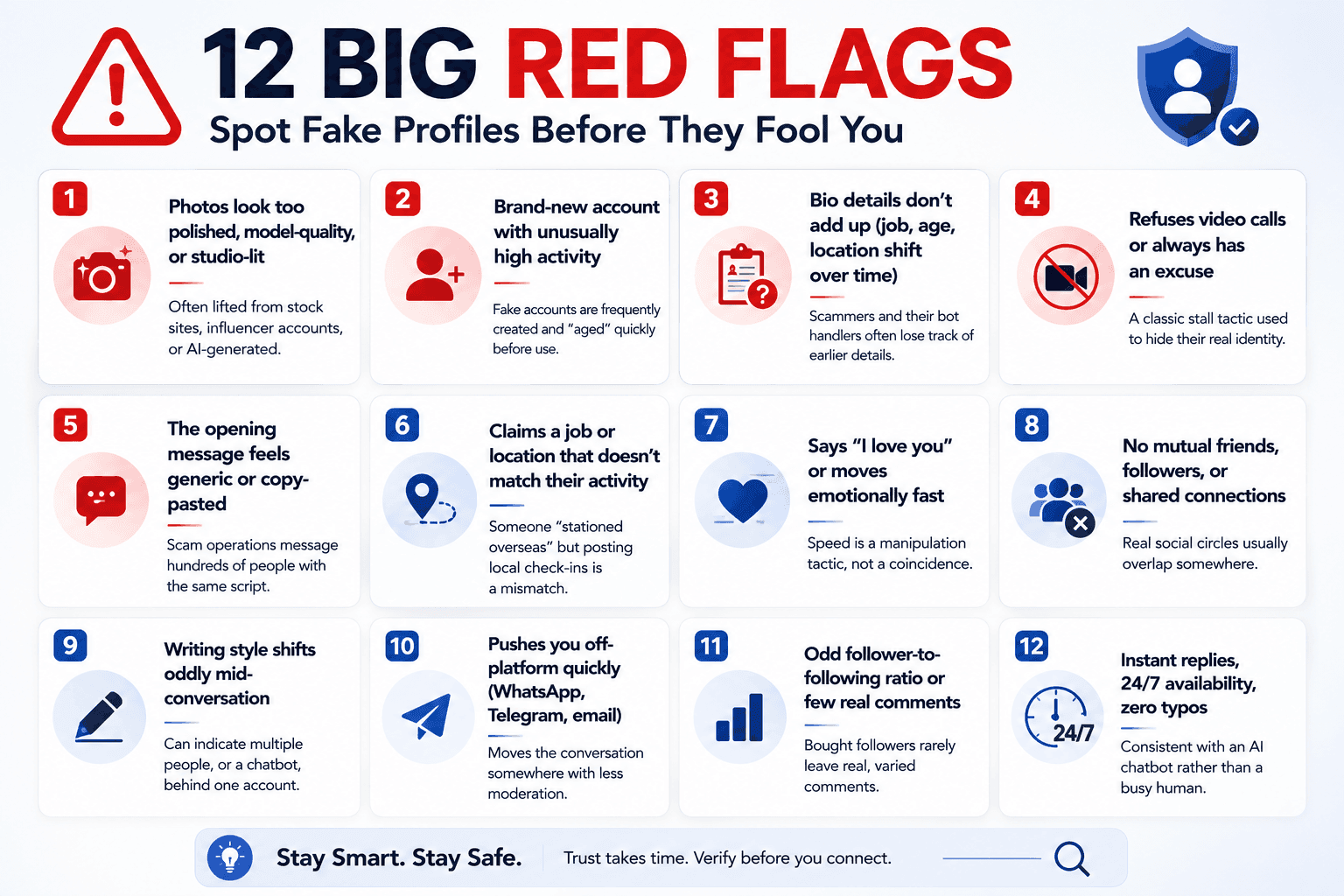
Nowadays, it's not always human-made fake profiles that are bothering people, but bots are there to make things more difficult, so let’s find out about -
Behavioral Red Flags for Spotting a Bot in Conversation
Since photos alone can no longer settle the question for scam prevention, pay close attention to how someone talks, not just what they look like -
Over-calibrated Empathy
Real people have mood swings, distractions, and off days. A match who is endlessly warm, patient, and emotionally perfect around the clock is worth a second look.
Zero Typos, Ever
Humans make small mistakes when typing quickly. Following flawless grammar rules in every single message, all day long, leans toward automation.
Instant, Round-the-clock Replies
A person with a job, sleep schedule, and social life can't realistically reply within seconds at 3 a.m. and again at 9 a.m.
Escalation without Depth
The relationship progresses emotionally (pet names, future plans, declarations of love) without ever getting more specific or personal about the details.
Avoids Specific, Checkable Facts
Ask about a specific local landmark, a recent local news story, or a detail from something they mentioned earlier. Real people reference real, specific memories; scripted responses tend to stay vague.
As you finally know how you can identify the red flags, now let’s know about -
Fake Profile Checklist by Social Media Platform
Fake accounts don't all look the same; basically, the tells shift depending on where you find them.
A fake LinkedIn profile is built to look credible to a recruiter or hiring manager, so it leans on job titles and connections.
Whereas a fake dating profile is designed to look attractive and available, it relies on photos and emotional pacing.
On the other hand, you might be searching for all those TikTok downloaders to download those famous videos so you can save them.
Turns out it was a fake TikTok account that is built to look popular, so it leans on follower counts and viral-looking content.
Same underlying goal, which is to trust you long enough to get something from you, but a different disguise for each platform.
That means the checklist you'd use on a dating app won't catch everything on LinkedIn, and vice versa.
Here's what to watch for, which you can use as your go-to social media safety tips:
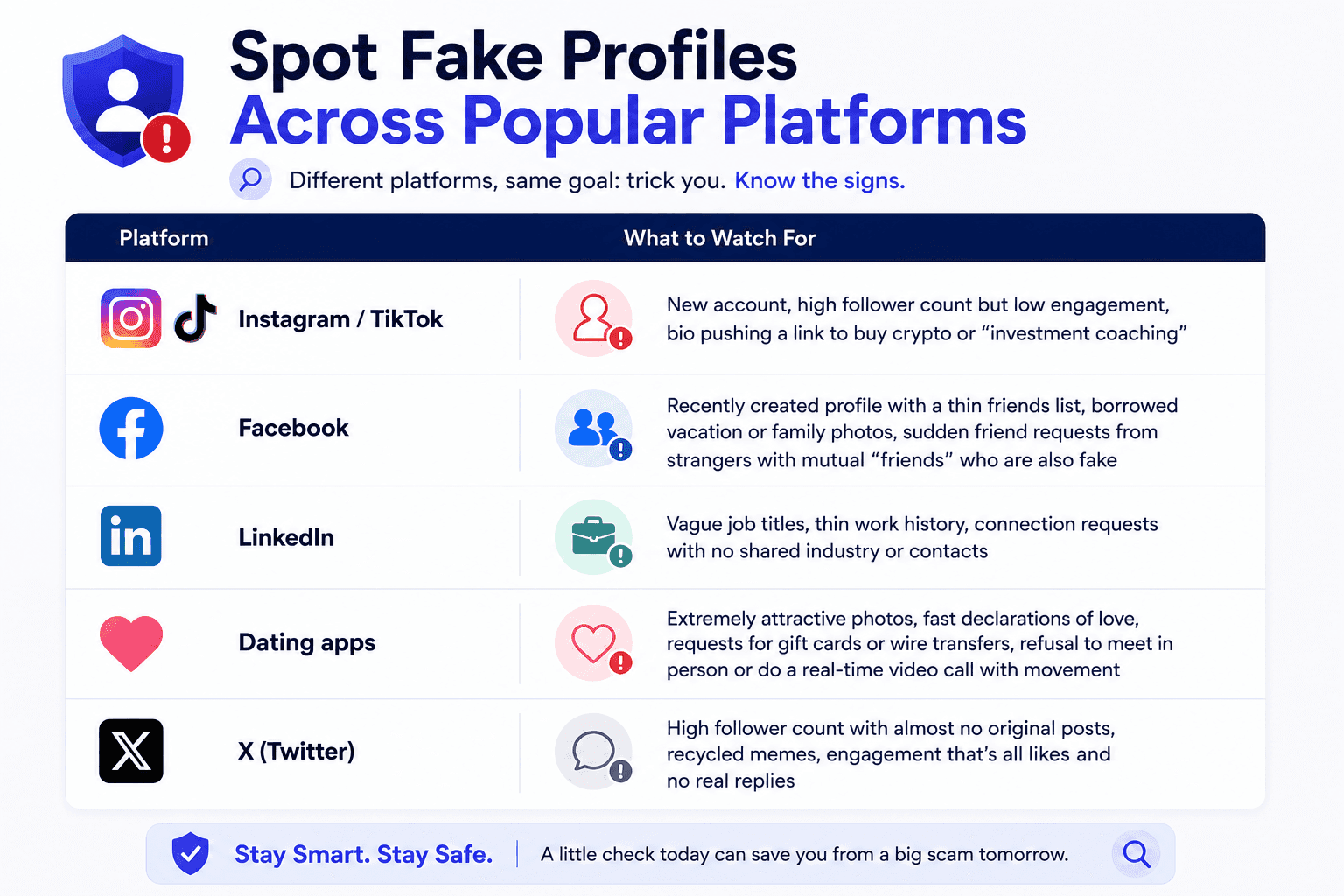
LinkedIn deserves a special mention, as some estimates suggest as many as 1 in 500 LinkedIn accounts may be fake profiles built specifically to harvest professional data, so even "safe" professional networks aren't immune.
Real Examples of What a Fake Profile Actually Looks Like
Checklists are useful, but they can feel abstract until you see how the red flags actually play out in a real conversation.
These four scenarios are composites built from common, well-documented scam patterns, not real individuals, so you can see exactly how the pieces come together in practice.
Example 1 — The Instagram "Investor."
A brand-new account, created two weeks ago, already has 40,000 followers. The bio promises "guaranteed" crypto returns and includes a link to an off-platform chat group. A reverse image search from your phone camera, in fact, shows that the profile photo belongs to a completely different person on a stock photography site.
Example 2 — The Dating App "Soldier."
Three days into chatting, he says he's falling for you. He's "deployed overseas" and can never video call because of "security restrictions." When money for an "emergency flight home" comes up, that's the moment to stop. This is one of the most common scripts scammers use, and it's been used for years because it still works.
Example 3 — The LinkedIn "Recruiter."
A recruiter reaches out about a dream remote job, with no formal interview, and asks for your ID and bank details "for onboarding" before you've even spoken to anyone else at the company. Real companies don't skip interviews, and they never need your bank login just to onboard you.
Example 4 — The "Too Perfect" Match.
Every reply arrives within seconds, at any hour, in flawless English, full of warmth and attention. A video call happens, but the person always keeps their head slightly turned and never makes any sudden movement.
Asked to wave quickly in front of their own face, the connection "drops." This pattern is consistent with a real-time deepfake filter breaking under fast motion rather than a technical glitch.
If you’re already here, you know all the signs of fake profiles already, so the following section is what you need as your last survival -
Your Full Verification Toolkit to Find Fake Profiles
You don't need to become an investigator. Real verification isn't about running every check in the book on every single person who messages you.
It's about knowing which two or three checks actually matter for the situation in front of you, and running them before, not after, you've invested time, trust, or money.
Think of this as a toolbox rather than a checklist to complete top to bottom. Pull out the tool that fits: a quick photo check for a new follower, the movement test for a video call that feels off, a public records search before you send anyone money.
A handful of checks cover almost everything:
CopyChecker's Reverse Image Search
Your fastest and most effective way to utilize reverse image search for any real (non-AI-generated) stolen photo. Upload any profile photo and see everywhere else it appears online.
Username or Handle Search
Search for the exact username across platforms to see if the same name appears attached to different photos or stories.
The Video Call Movement Test
Ask them to quickly wave a hand across their face or turn their head quickly. Glitching or flickering suggests a live deepfake filter.
The Specific-detail Test
Ask about something concrete and local (such as a nearby landmark or a small detail from an earlier conversation). Vague or dodged answers are a signal.
Basic Public Records Check
For anything involving money or a serious relationship, searching the person's full name plus their city can confirm, or contradict, what they've told you.
Meeting in Person
For anyone you've been talking to for weeks without meeting, this remains the single hardest thing for any scammer, human or AI, to fake.
Verify first, engage second. It takes a few minutes and can save you from a much longer, more painful cleanup later. It’s not that only individuals get scammed, but businesses also get scammed, so let’s check out what you can do for -
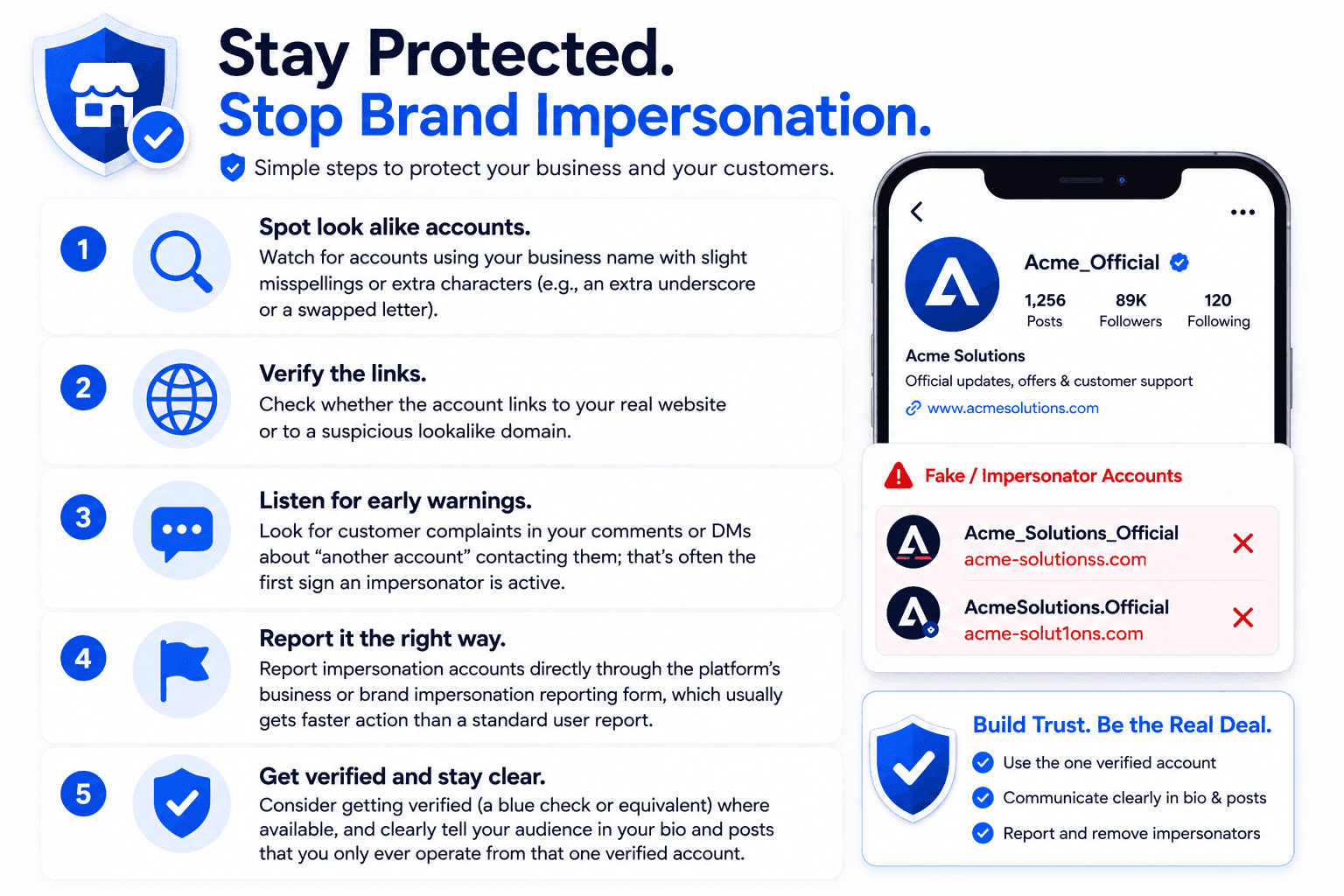
Protecting Your Business or Brand From Impersonation
In recent times, fake profiles not only target individuals looking for love or friendship but also impersonate businesses, often to scam their own customers or followers.
What to Do If You Confirm a Profile Is Fake
Once the checklist stops feeling like "maybe" and starts feeling like "definitely," what you do next matters. React too fast or in the wrong order, and you can lose evidence or tip the person off before you've protected yourself.
Follow these steps in order. It's a short process, but the sequence is what keeps you safe and gives the platform the best chance of actually removing the account.
- Stop Responding: Don't tip the scammer off that you're onto them; just go quiet.
- Save Evidence: Take screenshots of the profile, the messages, and your reverse image search results before you block or report.
- Report It: Use the platform's built-in "report fake account" option, as this helps get it removed for everyone else, too.
- Block the account: Cut off any connection with them so no further activity from their end can continue.
- Report Financial Loss: If money changed hands, report it to the FTC at ReportFraud.ftc.gov and contact your bank immediately.
- Tell Someone: Scammers count on isolation and secrecy. A trusted friend or family member catching this early can make all the difference.
FAQs about How to Find Fake Profiles
How Can You Tell If A Profile Picture is Fake?
Run it through a reverse image search first. If the exact photo appears under a different name, on a stock photo site, or on multiple unrelated profiles, it's very likely stolen. If it returns no matches at all, it may still be AI-generated, so pair this with a video call and the movement test before trusting it fully.
What Percentage of Social Media Profiles are Fake?
Estimates vary by platform, but Meta has reported that roughly 4–5% of its active accounts are fake, which still adds up to well over 100 million profiles.
Is There A Free Fake Profile Checker?
There's no single "fake profile score," but a free reverse image search like CopyChecker's tool is the fastest, most reliable free way to catch a stolen or duplicated photo.
Can You Reverse Image Search on Mobile?
Yes. Save the photo to your phone, open the reverse image search tool in your mobile browser, and upload it directly from your phone without a desktop.
Can AI-generated Fake Profiles Beat Reverse Image Search?
Sometimes, yes. A fully AI-generated photo that's never existed anywhere else online won't show up in a search. That's why it's worth combining a reverse image search with a video call and the "quick movement" test described above.
Are LinkedIn Profiles Less Likely to be Fake than Dating App Profiles?
No platform is fully safe. Some estimates suggest that around 1 in 500 LinkedIn accounts is fake, often created to harvest professional data rather than to run a romance scam.
Verify Before You Trust
Fake profiles rely on one thing, which is nothing but that you are definitely not checking. A single reverse image search takes less time than typing out a reply, and it can save you from months of manipulation or thousands of dollars in losses.
That’s why, above anything, learn what a reverse image really is and know everything about it.
So that before you message back, before you send anything, before you fall for the "we're perfect for each other" line, run the photo through CopyChecker's Reverse Image Search tool.
It's free, it's instant, and it might be the smartest thirty seconds you spend online today.
While you're cleaning up your online presence, it's worth double-checking your writing with tools like a grammar checker or a comma splice checker.
All these writing tools can help your bios and posts read clearly and authentically, so nobody mistakes you for a bot, either.
What are you waiting for? Try CopyChecker now!