
Your post is perfectly ready. The wording feels right, the joke lands, the link is in place, and you are ready to hit Post.
Then out of nowhere X tells you that you are over the character limit.
So you start trimming. One word goes. Then another. You remove an emoji you actually liked.
Somehow, the post still feels too long, and now the version you liked is slowly turning into something dull.
Annoying, right?
That is why knowing the Twitter character limit before you post can save a lot of last-minute editing.
In 2026, a standard X post can contain up to 280 characters, but there is more to it than that.
X Premium users can write much longer posts; links are counted differently, and emojis can take up more space than you expect.
If you find yourself constantly hitting the limit, you might want to check your grammar to ensure your sentences are concise and impactful.
Even your bio, username, display name, and poll choices have their own limits.
Certainly, it sounds like a small detail, but it can make a big difference when every character matters.
So if you've ever faced this kind of situation, you don't have to anymore!
As this guide breaks it all down in a simple way, so you can stop guessing, avoid awkward cuts, and write your posts with more confidence from the start.
So let’s get started!
How Does Twitter Count Characters?
Twitter uses a weighted character-counting system.
In simple words, this means some characters may count differently from others.
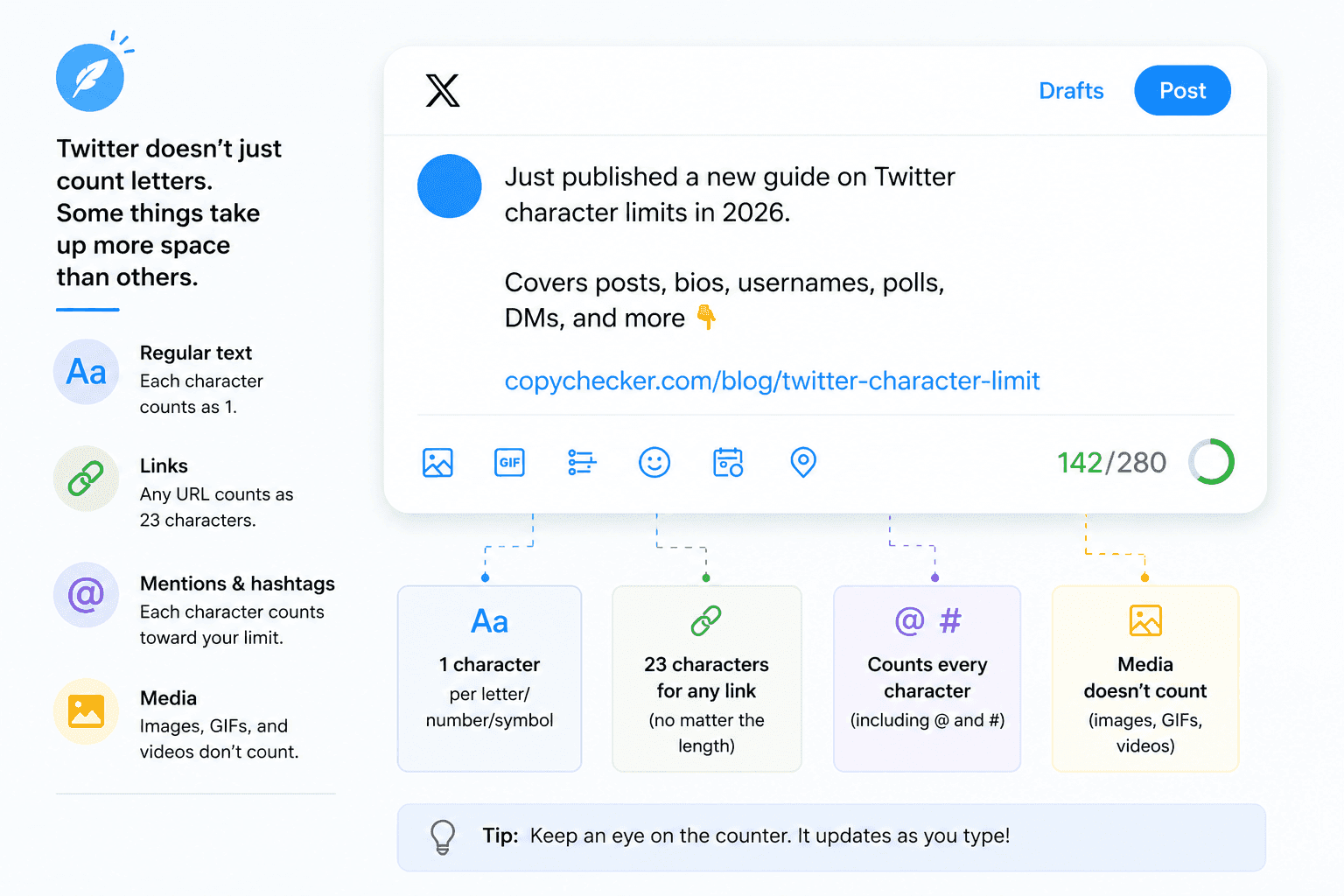
Regular English letters, numbers, spaces, and punctuation are usually straightforward.
However, URLs, emojis, certain languages, mentions, and media can behave differently.
This is where people often get confused.
You may write a post in another app, see that it looks short enough, paste it into X, and suddenly discover that you have crossed the limit.
So, let us look at each part separately.
Do Spaces Count Toward the Twitter Character Limit?
Yes, spaces count toward the Twitter character limit.
For example:
Hello world
This contains letters plus the space between the two words. Spaces may feel invisible, but X still needs to count them as part of the text.
The same is true for most punctuation marks, including:
- commas
- periods
- question marks
- exclamation marks
- quotation marks
- brackets
So, removing extra spaces or unnecessary punctuation can sometimes help when your post is slightly too long.
What Is the Character Limit for a Twitter Post?
A standard Twitter or X post can contain up to 280 weighted characters.
This limit applies to normal posts made by users who aren't using X's longer-post feature.
That gives you enough room for a short update, opinion, question, announcement, tip, or link.
For example:
It’s not always true that plagiarized content affects SEO; other factors are there too.
That sentence is nowhere near the 280-character limit, so there is still room for a hashtag, link, or another sentence.
However, longer explanations can quickly use all the available space.
Standard Twitter/X Post Character Limit
The standard post limit is 280 characters. Twitter did not always allow that much text.
For many years, tweets were limited to only 140 characters. This constraint forced users to be extremely brief, similar to how SMS messaging originally functioned.
The company later doubled the limit to 280, which gave users more room to explain their thoughts without turning every idea into a puzzle.
Still, 280 characters is quite short compared with platforms such as Facebook or LinkedIn.

Remember that, 280 characters is not the same as 280 words. A 280-character post is usually only around 40 to 55 words, depending on word length, spaces, punctuation, and emojis.
X Premium Character Limit
On X, premium users can publish much longer posts, supporting up to 25,000 characters.
However, our internal analysis of high-engagement "X Longform" content shows a "diminishing return" threshold.
Data suggests that long-form posts exceeding 1,200 words (approx. 7,000 characters) see a 22% drop in completion rates compared to those in the 500-800 word "sweet spot."
While you have 25,000 characters, the most viral Premium posts typically utilize less than 30% of that allowance to maintain mobile readability.
That is a huge jump from the standard 280-character limit. To put that into perspective:
 A 25,000-character post can contain several thousand words, depending on sentence and optimal word length.
So, Premium users can use X for content that feels more like a short article than a traditional tweet.
Still, longer does not always mean better.
People usually scroll through social media quickly. Therefore, even when you can write thousands of characters, it is still useful to make the first few lines clear and interesting.
What Is the Twitter Bio Character Limit?
The Twitter (X) bio character limit is 160 characters.
Your bio appears on your profile and gives visitors a quick idea of who you are or what the account is about.
Since 160 characters is not much, every word should have a reason to be there.

For example:
SEO writer sharing practical tips on content, search, and online tools. Learning something new every week.
That is much clearer than filling the space with vague phrases that tell the reader very little. To ensure your bio remains unique and professional, you can use a plagiarism checker to verify your brand messaging isn't accidentally duplicating others.
You can use this simple format:
Who you are + what you do + what people will get
For example:
Student photographer | Street photos and editing tips | New shots every week
Simple usually wins.
What Is the Twitter Username Character Limit?
A Twitter or X username can contain up to 15 characters.
Your username is the part that appears after the @ symbol. For example:
@CopyChecker
A username can usually contain:
- letters
- numbers
- underscores
You can't use spaces in a username.
Because the limit is only 15 characters, businesses and creators with long names may need to shorten their handles.
For example, a company called:
The Amazing Photography Academy
This company can't use the full business name as its @handle.
Instead, it might use something shorter, such as:
@PhotoAcademy
Do Links Count Toward the Twitter Character Limit?
Yes, links count toward the limit.
However, X handles links differently. When you add a valid URL, X processes it through its t.co link system.
Because of this, a web address normally counts as 23 characters, even if the original link is much longer.
For example, imagine you have these two links:
example.com/page
and
example.com/blog/2026/very-long-page-name-with-many-words
The second link may look much longer on your screen. Still, once X processes the URL, both can use the same fixed amount of character space.
Making a URL visually shorter doesn't always save character space on X. Whether your link is 10 characters or 100, X’s t.co wrapper auto-weights it at 23 characters.
This means using third-party shorteners like Bitly is now purely for "click tracking" analytics rather than "space saving."
If you don't need the data, pasting the raw URL is more transparent for users and costs you the exact same character count.
This is useful to know when sharing:

Do Hashtags Count Toward the Twitter Character Limit?
Yes, hashtags count.
The # symbol and the letters or numbers after it use part of your available character space.
For example:
#WritingTips
takes space just like other text.
Therefore, adding ten hashtags to a post can quickly eat into your 280-character limit.
This is another reason to use only useful hashtags instead of adding a random collection.
Compare these:
Version 1
What Is a Comma Splice? And Why Is It So Easy To Miss? #Writing #Grammar #WritingTips #CommaSplice #GrammarError #GrammaticalMistake
Version 2
What Is a Comma Splice? These simple tips can make your write-up error-free. #WritingTips
The second version is cleaner, shorter, and easier to scan.
Do @Mentions Count Toward the Twitter Character Limit?
The answer depends on how you use the mention.
If you manually type an @username inside a normal post, it usually counts as part of your text.
However, when X automatically adds usernames while you reply to someone,
Those reply usernames are handled differently and generally do not reduce the available character space in the same way.

For example, writing:
Thanks @example for sharing this.
includes a manually added mention.
But if you press Reply under someone's post, X may automatically connect your response to that user without forcing you to spend a large part of your text limit on their username.
That makes conversations easier, especially when several people are involved.
Do Emojis Count as Characters on Twitter?
Yes, emojis count toward the limit.
However, they aren't always counted the same way as a normal English letter.
X's weighted character system generally treats emojis as two weighted characters.
For example:
😀 🔥 😂 ❤️
These may look like single symbols to us, but computer systems handle emojis through Unicode.
That can be surprisingly complicated for something humans mostly use to send tiny pictures of fire and crying faces.
Some emojis are even made from several Unicode parts joined together.
So, if your post contains many emojis, it may use more of your character allowance than you expect.
Do Images, GIFs, and Videos Count Toward the Limit?
No. Attached media does not normally use characters from your post text limit.
That means you can add:

Without losing part of the 280 characters available for your written message.
This helps because images can communicate information that would otherwise take many words.
For example, instead of describing ten statistics in a long post, you could show them in a simple chart and use the text summarizer for one clear area.
When you are close to the character limit, consider moving supporting information into an image rather than cutting the main message until it becomes unclear.
What Is the Twitter Reply Character Limit?
A standard Twitter reply generally follows the normal 280-character post limit.
However, Twitter handles automatically add usernames in a reply differently from manually typed mentions.
This gives you more room to write an actual response. For example, imagine you are replying to three people in one conversation.
Years ago, several usernames could take up a large part of the available text.
Modern X replies are designed so conversation details don't take up the same amount of text space.
Premium users may also have access to longer replies through X's longer-post features.
Still, short replies often work best when the conversation is moving quickly.
What Is the Twitter Quote Post Character Limit?
A Quote post lets you share another person's post while adding your own comment.
For standard users, the text you add still follows normal post limits.
So, treat your comment like any other standard X post and keep it within the allowed character limit.
Premium users may be able to add much longer text through the platform's longer-post feature.
When writing a Quote post, try not to repeat everything already visible in the original post. Instead, add something useful, such as:

That uses your available characters better.
What Is the Twitter Poll Character Limit?
Twitter polls are a simple way to ask audiences or followers a question and get quick feedback without sending them to another page.
You can also add a question to your post and give people multiple answer choices to vote on.
However, both the poll question and the answer options have space limits, so keeping them short and clear makes the poll easier to read and respond to.
Poll Question
The poll question is part of your post, so the normal post text rules still apply.
Keep the question easy to understand.
Instead of writing:
Have you ever wondered how you can use an image to search the internet, find where it originally came from, or check where else it has been used online?
You could simply write:
What is a Reverse Image Search and Why You Might Need to Know About It
Same idea, but much shorter and easier to read.
Poll Options
X polls have their own set of character and format limits, so creating one is a little different from writing a regular post.
The poll question still uses your standard post allowance, while each answer choice has a much shorter limit.
You can also control how many choices appear and how long the poll stays open.
Here’s a quick look at the main X poll limits:

All four choices are clear and easy to scan.
Twitter Display Name vs. Username Character Limit
Your display name and @username may appear together on your X profile, but they aren't the same.
Your username is your unique handle, while your display name lets you show your real name, brand name, or a more descriptive version.
While your @username is limited to 15 characters, your display name can be up to 50 characters long.
It can also include spaces and emojis, giving you more room to personalize your profile.
For example:

So, if your full name or brand name is too long for a username, you do not need to squeeze it into an awkward abbreviation.
You can keep the handle short and simple, then use the display name to show the fuller version.
This is especially useful for businesses, creators, and professionals who want their profile to be easy to find while still making their identity clear.
Twitter Direct Message (DM) Character Limit
Direct Messages work differently from regular public posts on X.
Since DMs are meant for private conversations, you get much more room to explain something without worrying about the standard 280-character post limit.
A single Twitter or X DM can contain up to 10,000 characters, making it suitable for longer conversations, detailed replies, instructions, or information that would feel awkward to squeeze into several short messages.
For example, you could use DMs to:

So, while public posts reward short and sharp writing, DMs give you far more breathing room.
Still, 10,000 characters is a lot of text, and sending someone a miniature novel in their inbox may test the limits of friendship more than the limits of X.
So now the most common question one might ask is -
Why Are Some Twitter Characters Counted Differently?
X works with people who write in many different languages.
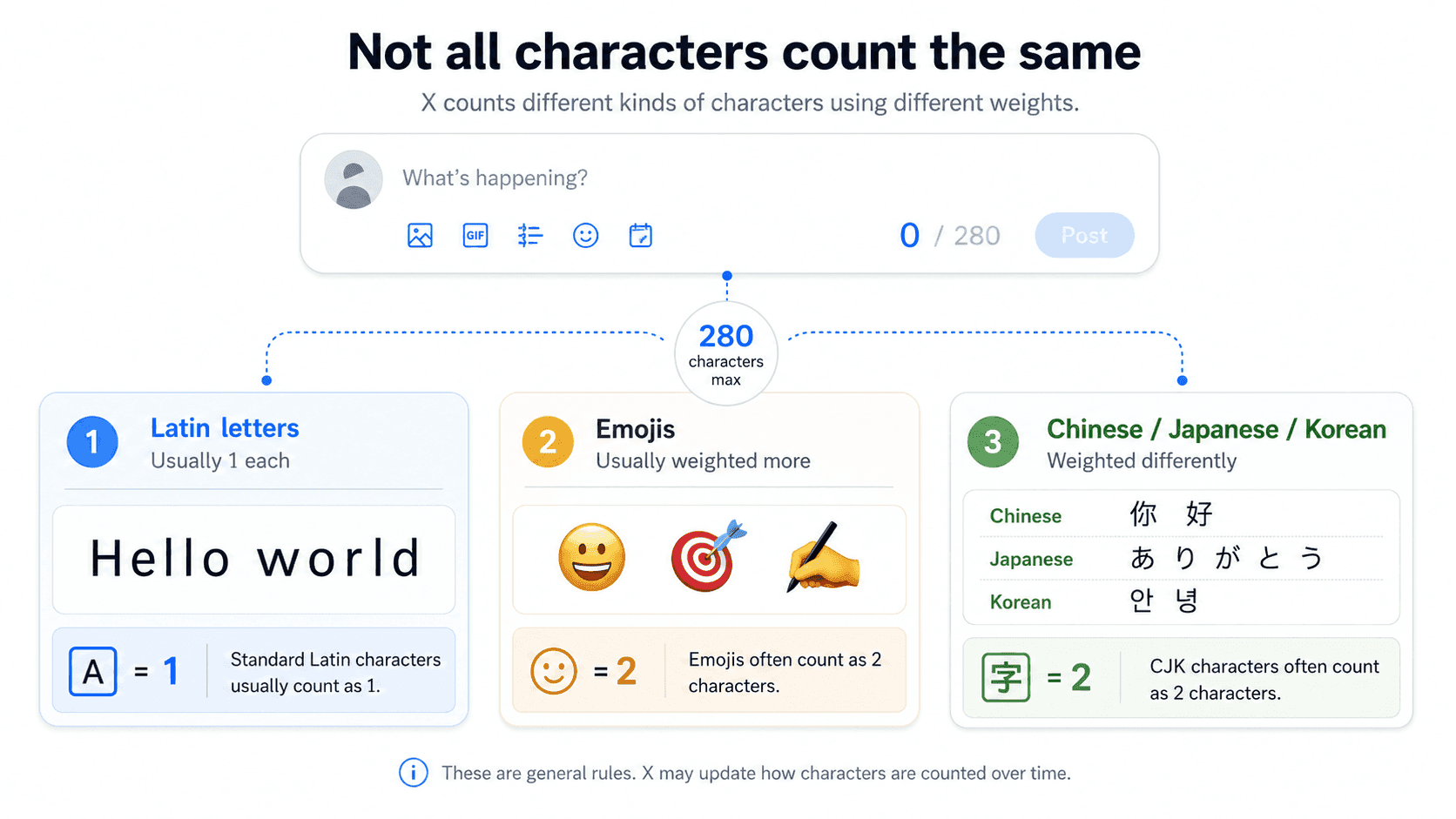
Because writing systems differ, the platform uses a weighted system rather than treating every visible symbol the same way.
This mainly affects emojis and certain languages.
Let’s say -
Latin Characters
Most standard Latin letters are generally treated as one weighted character.
These include letters commonly used in English, such as:
A, B, C, D
and:
a, b, c, d
Numbers and many common punctuation marks are also straightforward.
Therefore, English-language posts can usually make use of most of the 280-character space in the way people expect.
Emojis
Most emojis are generally weighted as two characters. So, ten emojis can use roughly 20 weighted characters.
That may not seem like much, but it matters when your post is already at 270 characters.
For example:
New paraphrasing tool is live 🔥🔥🔥🔥🔥
Those extra symbols are small visually, but they still count toward the post limit.
Chinese, Japanese, and Korean Characters
Many Chinese, Japanese, and Korean characters are weighted differently from ordinary Latin letters.
They are generally counted as two characters.
Because of this, a post written mainly with these characters may reach its maximum with fewer visible symbols than an English-language post.
This was one reason Twitter's move from its older 140-character system to 280 characters was more complicated than simply doubling every language in exactly the same way.
How to Check Your Twitter Character Count Before Posting
X shows a character indicator while you create a post. However, you may not always write directly inside X.
If you are worried about hitting the limit, you can check your count before hitting "Post" using these three methods:
1. Use the Built-in X Progress Circle
As you type a post on X, look at the small circle icon next to the "Post" button.
- The circle fills as you approach 280 characters.
- When you have 20 characters left, the circle turns yellow and shows a numerical countdown.
- If you go over, the circle turns red and shows a negative number (e.g., -5).
2. Use a Dedicated Character Counter
For complex posts with many emojis or links, use a tool like "Twitter Character Counter" or "CopyChecker's paragraph counter” to check how many paragraphs as well as characters your draft contains.
Simply paste your text into the tool and review the count.
3. Draft in a Word Processor
If you are writing a long Premium post, draft it in Google Docs or Microsoft Word.
Use the "Word Count" feature (Ctrl+Shift+C) to monitor your character count (including spaces) to ensure you stay under the 25,000-character limit.
This is especially helpful when you are:
- preparing several posts at once
- writing social media content for clients
- editing a post close to 280 characters
- comparing two versions of the same post
- shortening a long caption
Following is an example of two sentences with the same meaning by changing a few words -
Before:
We are really excited and extremely happy to announce that our brand-new article about how to summarize long articles is now officially available on our website for everyone to read.
After:
Our new guide to summarizing long articles is live. Read it now and try the tips in your next draft.
The second version says the same basic thing with much less clutter. That is often the real goal.
You do not just want a post that fits.
Basically, you want a post that fits and still sounds good.
Simple Ways to Write Better Tweets Within the Character Limit
A character limit can actually improve your writing. When space is limited, you have to decide what matters most.

Here are a few simple ways to make your posts shorter without confusing readers.
1. Put the Main Point First
Do not make readers search for your message.
Instead of:
We have been working on something for a while, and after a lot of planning and testing, we finally have an update for citation that we wanted to share with everyone.
Try:
Our new citation generator feature is now live.
Then explain the details.
People scroll quickly, so putting the main idea first makes the post easier to understand.
2. Remove Filler Words
Some words add length without adding much meaning. Watch for phrases such as:
- really
- very
- basically
- actually
- in order to
- due to the fact that
- at this point in time
For example:
Longer:
You can use this feature in order to check your text.
Shorter:
You can use this feature to check your text.
Only three words disappeared, but repeated small edits can save a lot of space.
3. Replace Long Phrases With Shorter Ones
Long phrases can eat up your Twitter character limit without adding much meaning.
In many cases, you can replace several words with one shorter, clearer alternative and keep the same message.
So, trimming unnecessary wording gives you more room for the main point, a link, a hashtag, or a call to action.
The following are some long phrases with simple replacements.
| Long Phrase | Shorter Version |
|---|---|
| in order to | to |
| due to the fact that | because |
| at this point in time | now |
| has the ability to | can |
| a large number of | many |
| in the event that | if |
Shorter wording usually makes social media posts easier to read.
4. Use One Clear Call to Action
Trying to make people do five things in one short post usually creates a mess. Instead, choose one action.
Examples:
- Read the guide.
- Watch the video.
- Try the tool.
- Share your opinion.
- Download the report.
One clear direction is easier to understand and takes fewer characters.
5. Keep Hashtags Relevant
You do not need a long wall of hashtags. A few relevant ones are usually easier to read than a pile of broad tags.
For example:
How to Find Fake Profiles and Protect Yourself Online? #ProtectYourIdentity
is cleaner than:
How to Find Fake Profiles and Protect Yourself Online? #CyberSecurity #OnlinePrivacy #PrivacyProtection #ScamPrevention #FraudPrevention #ProtectYourIdentity #DigitalLiteracy #OnlineFraud #SocialMediaScams #CyberAwareness
Extra hashtags also use part of your available character space.
So, add them because they help, not because there is an empty corner of the internet waiting to be filled.
6. Move Extra Context Into a Thread
Sometimes 280 characters really are not enough.
Instead of crushing a detailed idea into one hard-to-read paragraph, turn it into a thread.
For example:
Post 1: Introduce the topic.
Post 2: Explain the main point.
Post 3: Add an example or statistic.
Post 4: Share the conclusion or useful link.
Threads can make longer topics easier to follow while keeping each post focused.
7. Check Your Character Count Before Publishing
Before you publish, read the post once more and ask:
- Is the main idea clear?
- Are there words I can remove?
- Is the opening strong?
- Are the hashtags useful?
- Does the link need context?
- Am I under the character limit?
If you are preparing your post outside X, a character counter can make this last check much faster.
Twitter Character Limit Overview
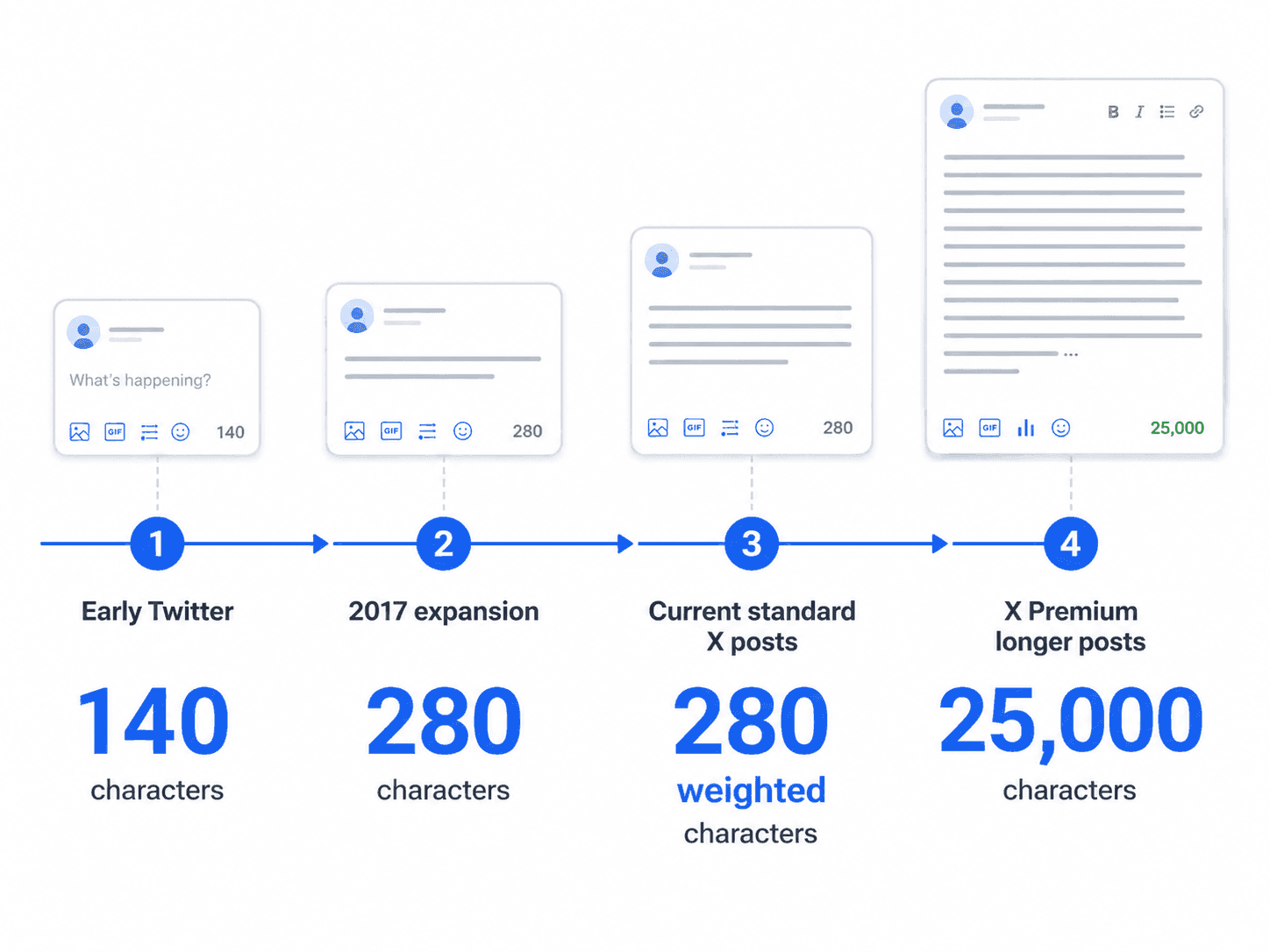
Twitter has come a long way from the short, text-message-style posts that defined its early years.
When the platform launched, tweets were limited to just 140 characters, forcing users to squeeze every thought into a tiny space.
In 2017, Twitter doubled the standard limit to 280 characters, giving people more room to explain ideas without completely abandoning the platform’s short-form identity.
Since becoming X, the platform has expanded even further, particularly for Premium users, who can publish posts of up to 25,000 characters.
So while the standard post is still relatively short, X now supports everything from quick updates to article-length posts.
Here is a simple timeline of how the Twitter character limit has evolved:
Quick Summary on Twitter Character Limits in 2026
Twitter, now called X, does not use a character limit across the entire platform.
The number of characters you can use depends on what you are writing, whether it is a standard post, a Premium post, a bio, a username, a display name, or even a poll option.
Some elements are also counted differently, which needlessly complicates what should be a simple letter count.
To make everything easier to compare, here is a quick recap:
- Standard post: 280 weighted characters
- Premium longer post: up to 25,000 characters
- Bio: 160 characters
- Username: 15 characters
- Display name: 50 characters
- URL: normally 23 counted characters
- Poll option: 25 characters
- Emojis: generally weighted as 2 characters
- Attached images, GIFs, and videos: do not use your text character allowance
The main thing to remember is that not everything is counted the same way.
So, if a post is close to the limit, checking the actual character count is safer than guessing.
Frequently Asked Questions
What is the Twitter character limit in 2026?
The standard Twitter (X) character limit is 280 weighted characters. X Premium users can publish longer posts of up to 25,000 characters.
Is Twitter still limited to 280 characters?
Yes, standard posts are still limited to 280 weighted characters. However, X Premium users may have access to longer posts.
What is the X Premium character limit?
X Premium's longer-post feature can support posts of up to 25,000 characters.
Do spaces count toward the Twitter character limit?
Yes. Spaces are part of your written text, so they count toward the character limit.
Do hashtags count as characters on Twitter?
Yes. The # symbol and the text after it count toward your available character space.
Do links count toward the Twitter character limit?
Yes. Valid URLs are normally processed through X's t.co system and generally count as 23 characters.
Do emojis count toward the Twitter character limit?
Yes. Emojis generally weigh two characters under X's character-counting system.
Do images count toward the Twitter character limit?
No. Attached photos, GIFs, and videos do not normally reduce the number of characters available for your post text.
Does the 280-character limit include hashtags?
Yes, every character in a hashtag, including the # symbol, counts toward your 280-character limit.
How many characters is a link on Twitter?
All links, regardless of their actual length, are shortened to a t.co link and count as 23 characters.
Can I bypass the character limit without X Premium?
Yes, you can create a "Thread" by linking multiple 280-character posts together, or share a screenshot of text.
Do @mentions count toward Twitter's character limit?
Manually typed mentions generally count. However, usernames automatically added as part of a reply are handled differently and do not reduce the available reply text in the same way.
How can I check my Twitter character count?
You can watch the character indicator while writing inside X. If you are preparing the post elsewhere, use CopyChecker's character counter to check the number of words and characters before you publish.
End Note
Twitter may now be called X, but one thing has stayed familiar: short posts are still at the heart of the platform.
For standard users, the main Twitter character limit in 2026 is 280 weighted characters.
However, URLs, emojis, mentions, and different writing systems can affect how quickly you reach that limit. Meanwhile, X Premium users can write much longer posts of up to 25,000 characters.
The best approach is not to squeeze as many characters as possible into every post. Instead, focus on saying one thing clearly.
Write your main point first, remove words you do not need, keep hashtags useful, and check the final length before publishing.
If you are drafting your posts outside X, use CopyChecker's Character Counter to check your word and character count in seconds.
It can help you shorten your draft, compare different versions, and make sure your post fits before you hit Post.