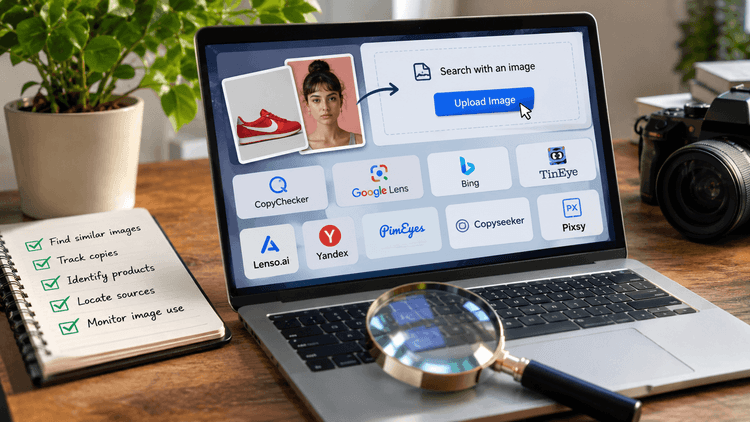
It's 11 p.m. Sarah's scrolling through a dating app when she stops on one profile. Something feels... off. The photo is too perfect. Model-level lighting, a stock-photo smile, zero tagged friends.
So she does something most people don't know they can do. She saves the photo, uploads it to a search engine, and hits search. Ten seconds later, the same face turns up on a stock photography site, under a completely different name.
Match dodged.
This is the quiet power of a reverse image search. It's not just for catching fake profiles, either. Maybe you spotted a jacket in someone's Instagram photo and need to know where to buy it.
Maybe your own picture showed up on a website you never gave permission to use.
Whatever the reason, there's one tool behind it all, and once you understand how it works, you'll wonder how you ever browsed the internet without it.
So, without further ado, let’s get down to the topic -
What Is a Reverse Image Search?
A normal search starts with words. You type "black leather boots" and Google hands you a list of results.
A reverse image search flips that around. Instead of typing words, you upload a picture, and the search engine tells you everything it knows about it: where else it appears online, similar images, the website it came from, and sometimes even who's in it.
In short, you search with a picture instead of a sentence.
No matter if the image is AI-generated or human-created.
That one small switch opens up a surprising number of uses, from catching fake dating profiles to finding the original source of a viral meme.
How Does Reverse Image Search Actually Work?
Here's the fun part. A reverse image search tool doesn't just "look" at a picture the way we do. It doesn't see a face, a jacket, or a sunset the way your brain does.
Instead, it reads the image like a fingerprint, turning it into data it can compare against billions of other images in seconds.
Let’s find out how the reverse image search works on different platforms, step by step -
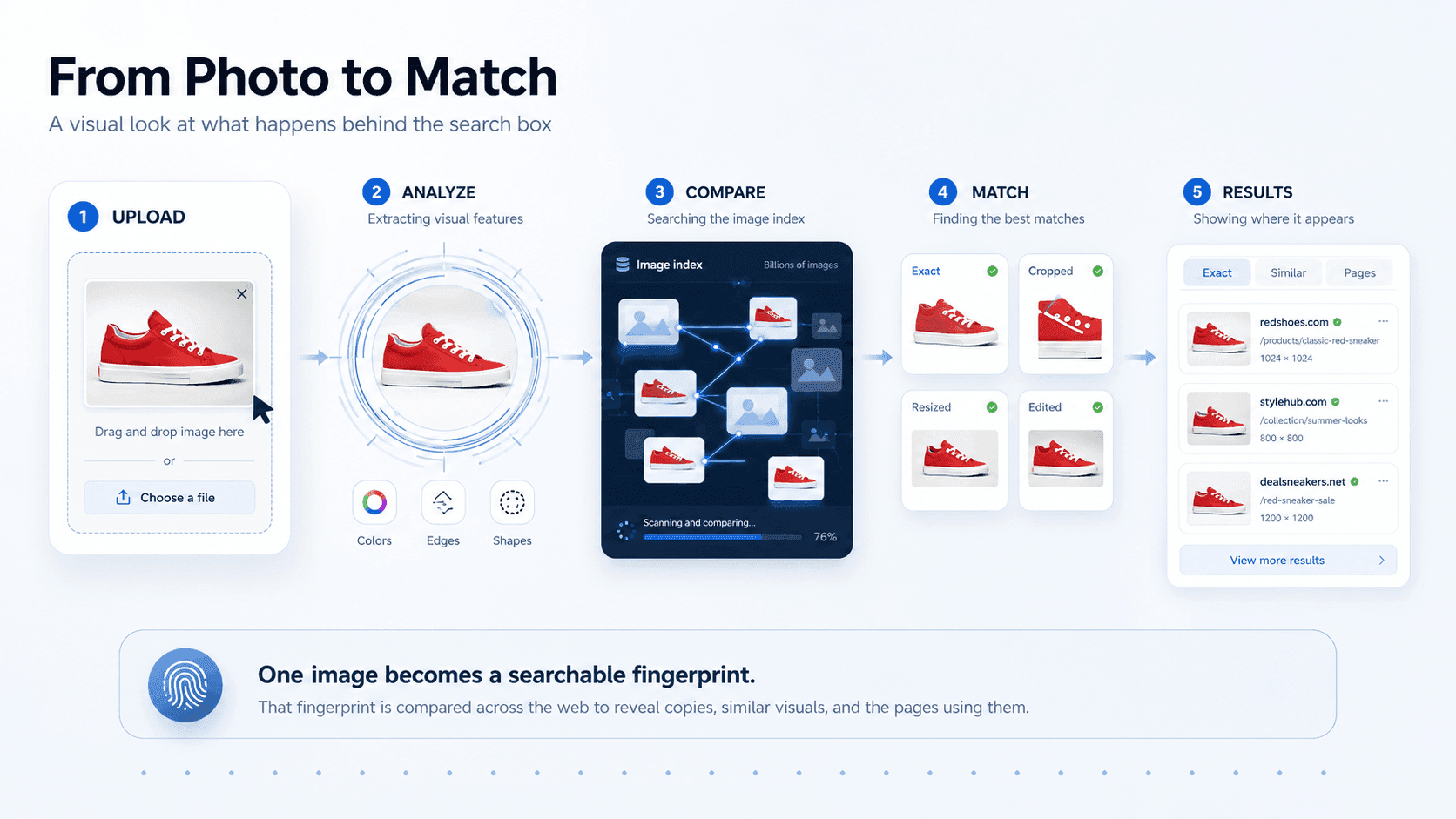
That "digital signature" idea is the real trick here. Instead of comparing whole pictures pixel-by-pixel (which would be painfully slow), the tool creates a compact summary of the image, kind of like a barcode, and matches that instead.
This is what lets it search billions of images in just a second or two.
It's also why these tools are so hard to fool. Someone can crop a photo, flip it, resize it, add a filter, or even change the color tone, and a good reverse image search tool will still recognize the core pattern underneath.
That's exactly how stolen or recycled photos get caught, even when someone tries to disguise them.
Not every tool scans the same amount of the internet. Some only check a small slice of indexed images, while more advanced tools reach deeper, including obscure sites, forums, and even flagged scam databases.
That difference is a big part of why results can vary so much from one tool to another.
What's the Purpose of a Reverse Image Search?
People assume this is just a tool for finding better prices on products. Just snap a picture of a gadget, and find it cheaper somewhere else.
That's a real use, sure, but it's honestly one of the smallest reasons people rely on it. The real value of a reverse image search runs a lot deeper, touching everything from online safety to fact-checking to just satisfying plain curiosity.
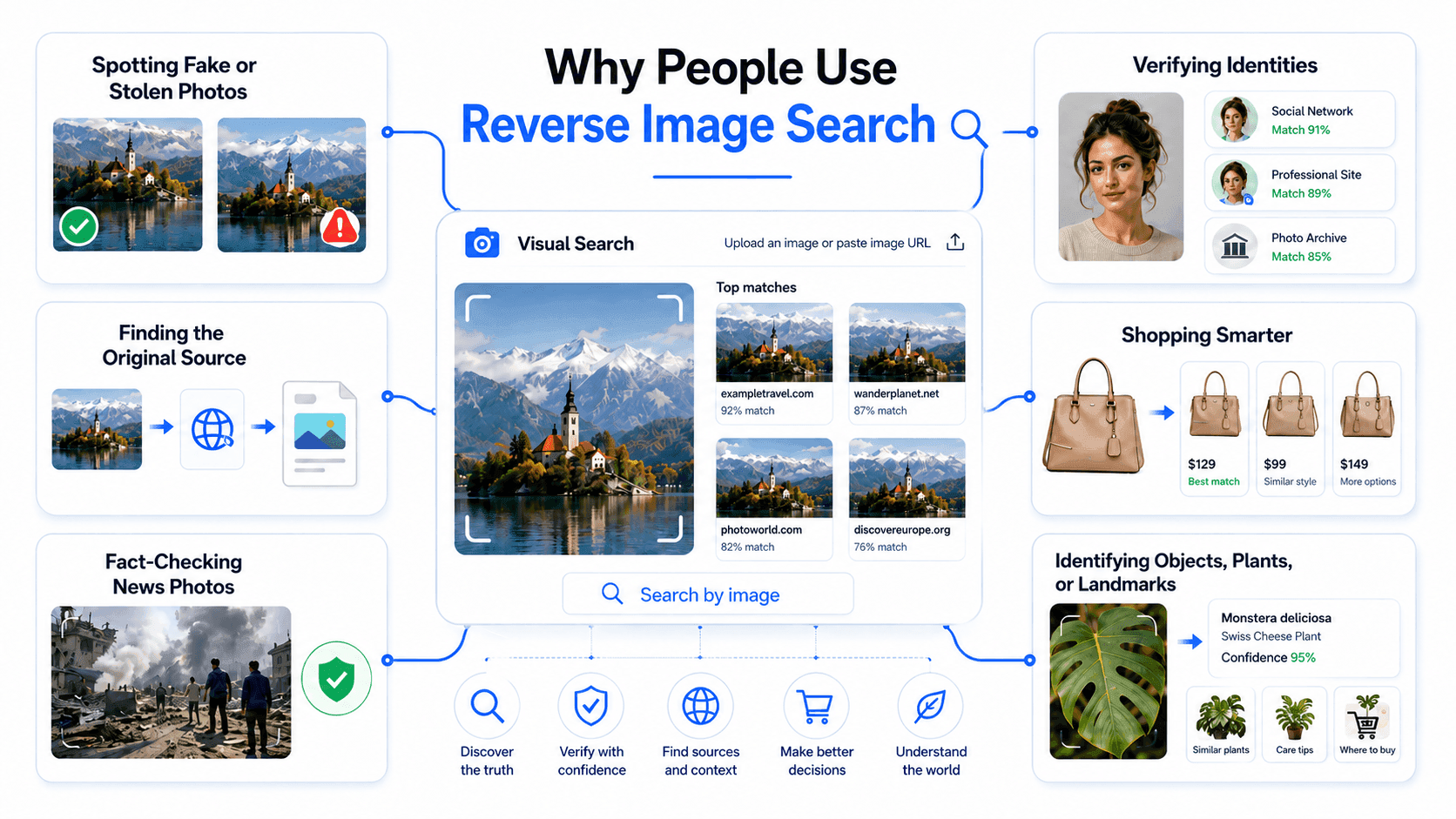
Here's what it's really good for -
Spotting Fake or Stolen Photos
Online photo theft is far more common than most people realize. Bloggers, small business owners, and everyday artists regularly find their images reposted without credit or permission. A quick search of your own photo every so often can reveal exactly where it's been used, and by whom.
Verifying Identities
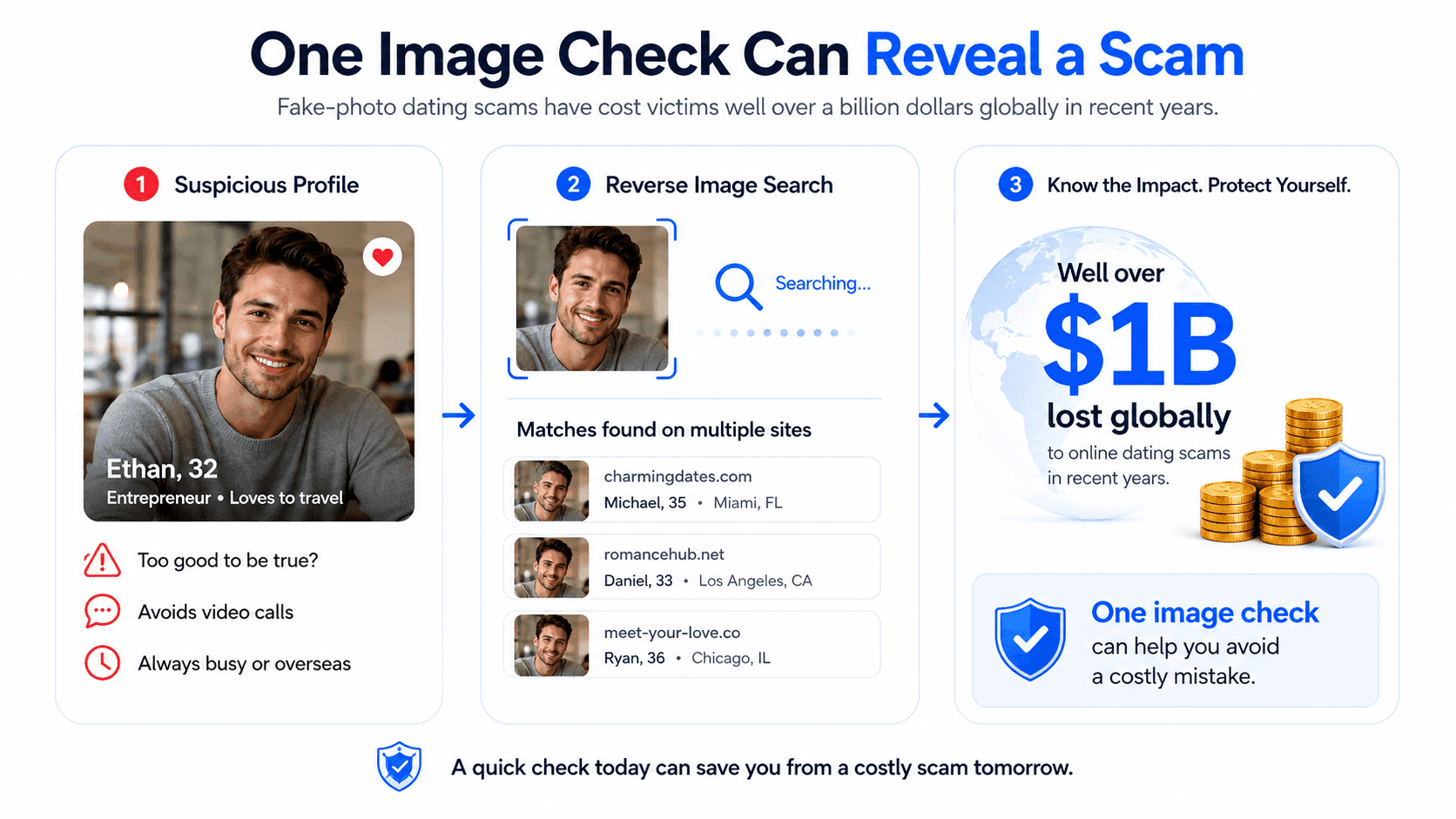
Romance scams built around fake photos have become a serious global problem, with reported losses running into the hundreds of millions of dollars each year, according to consumer protection agencies.
A simple example is this: if a "match" claims to be a local nurse but their profile photo appears on five different dating sites under different names, that's your answer before you invest any time or trust.
If you're concerned about someone's online identity, learning how to find fake profiles can help you investigate suspicious photos, recognize common warning signs, and avoid trusting an account based on its pictures alone.
Finding the Original Source
Ever seen a meme, quote graphic, or piece of art shared without any credit?
A reverse image search can trace it back to the original creator or the first place it was posted, which is simply helpful for giving proper credit or for confirming a story isn't being twisted out of context.
Shopping Smarter
Say you spot a pair of sneakers in an influencer's post, but there's no product tag.
Then just upload the photo, and a reverse image search tool can pull up the exact product or close matches across multiple retailers, sometimes revealing a better price than the one you'd have paid on impulse.
Fact-Checking News Photos
During breaking news events, old or unrelated photos often get recirculated and mislabeled as "happening right now." Journalists and fact-checkers regularly use reverse image search to confirm when a photo was actually taken and whether it's really connected to the story being told.
Identifying Objects, Plants, or Landmarks
Found a plant in your garden and have no idea what it is? Snap a photo and search it. Nowadays, many reverse image search tools can identify species, landmarks, or objects almost instantly, turning a random photo into a real answer.
What Is a Reverse Image Search Tool?
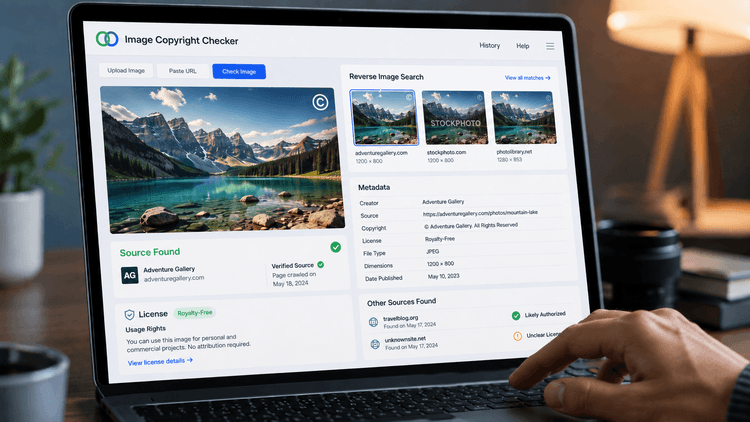
A reverse image search tool is simply a platform or website that does this matching for you. Some are built into search engines (like Google), some are standalone websites, and some are made for a specific job like sniffing out scam profiles or plagiarized images.
Not all tools are built the same, though. Some only scan a small slice of the internet. Others dig much deeper and even flag risky matches, like images linked to scam accounts.
For example, Google Lens is useful for identifying products, while CopyChecker specializes in finding exact or edited copies of photographs. To see how different services perform on real images, explore our comparison of the best AI reverse image search tools, including their results, free access, and limitations.
So what can a good reverse image search tool actually help you find out?
- Where an image first appeared — the original post, article, or profile it came from
- Every other place it's been used — helpful for spotting reposts, theft, or impersonation
- Whether a photo is genuine or recycled — is this a fake profile photo or a stock image pulled from elsewhere?
- Related or similar images — useful when you don't need the exact photo, just something close to it
- The context behind a photo — when it was likely taken, and whether it's being used the way it was originally intended
That's exactly the kind of gap CopyChecker's reverse image search tool is built to close.
Ultimately, going beyond a basic match helps you understand why an image might be suspicious, not just that it exists somewhere else online.
Can You Do a Reverse Image Search on Your Phone?
To be honest, nowadays almost nobody sits down at a laptop anymore to double-check a suspicious photo. It happens mid-scroll, thumb hovering over a screenshot, usually at the exact moment something feels a little too convenient to be true.
And that's exactly why reverse image search has quietly become a mobile-first habit. As most searches today happen on phones, not desktops, simply because that's where the questions come up in the first place.
The good news? Your phone doesn't need any extra apps or hacks to pull this off.
If a picture is already sitting in your gallery, uploading directly from your camera for reverse image search takes just a few taps: open Google, tap the camera icon in the search bar, select the photo from your gallery, and let it search.
That's it! No downloads, no complicated settings, no waiting around.
And it doesn't stop there. Most reverse image search tools work smoothly right through your phone's browser, which opens up a few genuinely handy tricks:
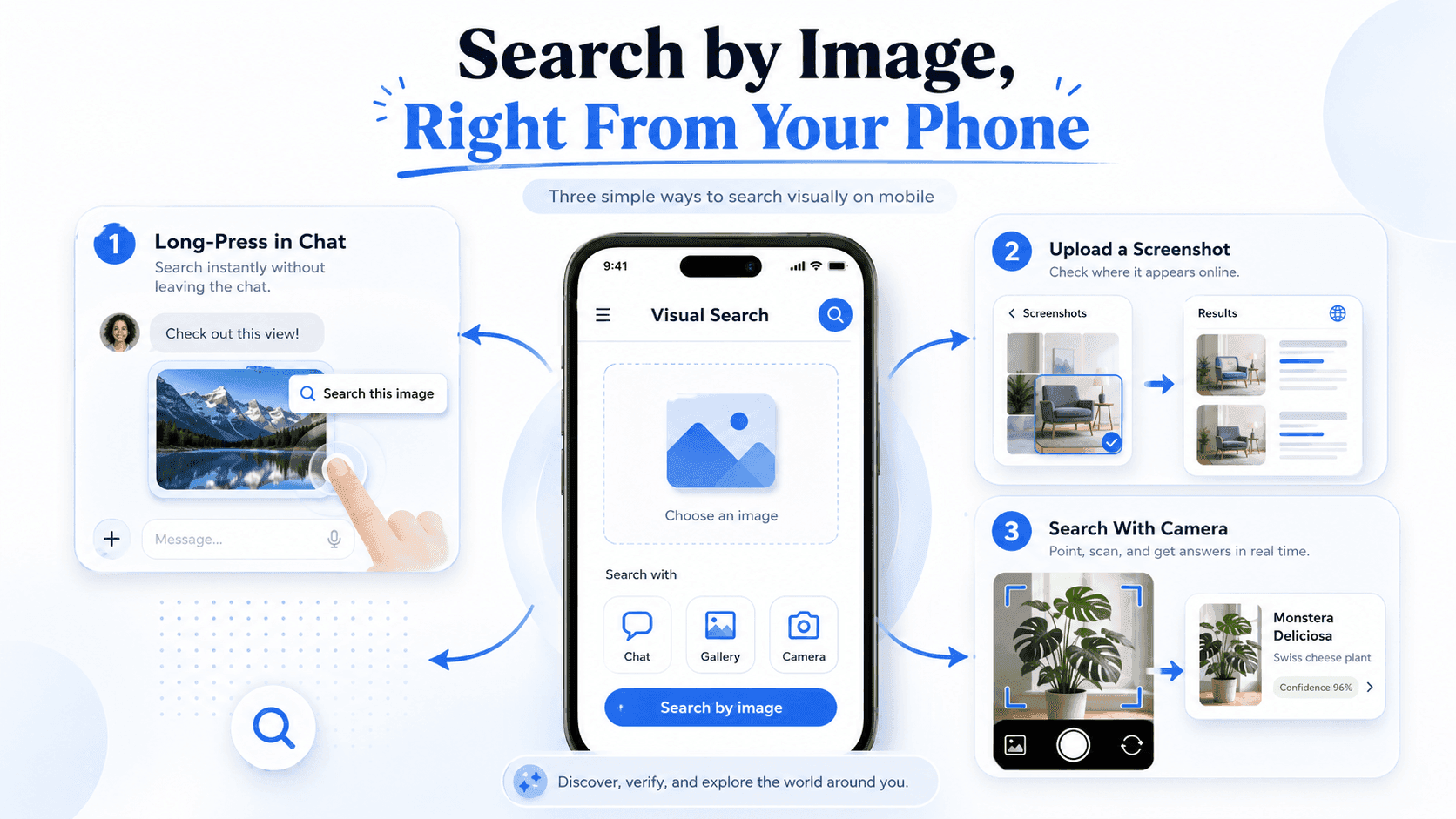
No laptop required, no waiting until you're "back at your desk." It's fast, it's free, and it fits perfectly into how people already browse: one thumb, one tap, one quick answer.
Simple Methods to Utilize Reverse Image Search
Here's the thing nobody tells you: having a great tool and actually using it well are two very different skills.
It's a bit like owning a really good kitchen knife; technically, anyone can pick it up, but knowing the right grip, angle, and technique is what separates a clean cut from a mess.
Reverse image search works the same way. Upload any photo, and you'll get some results. But upload it the smart way, in the right situation, and you'll get results that actually answer your question.
Following is a quick cheat sheet to make sure you're getting the most out of every search:
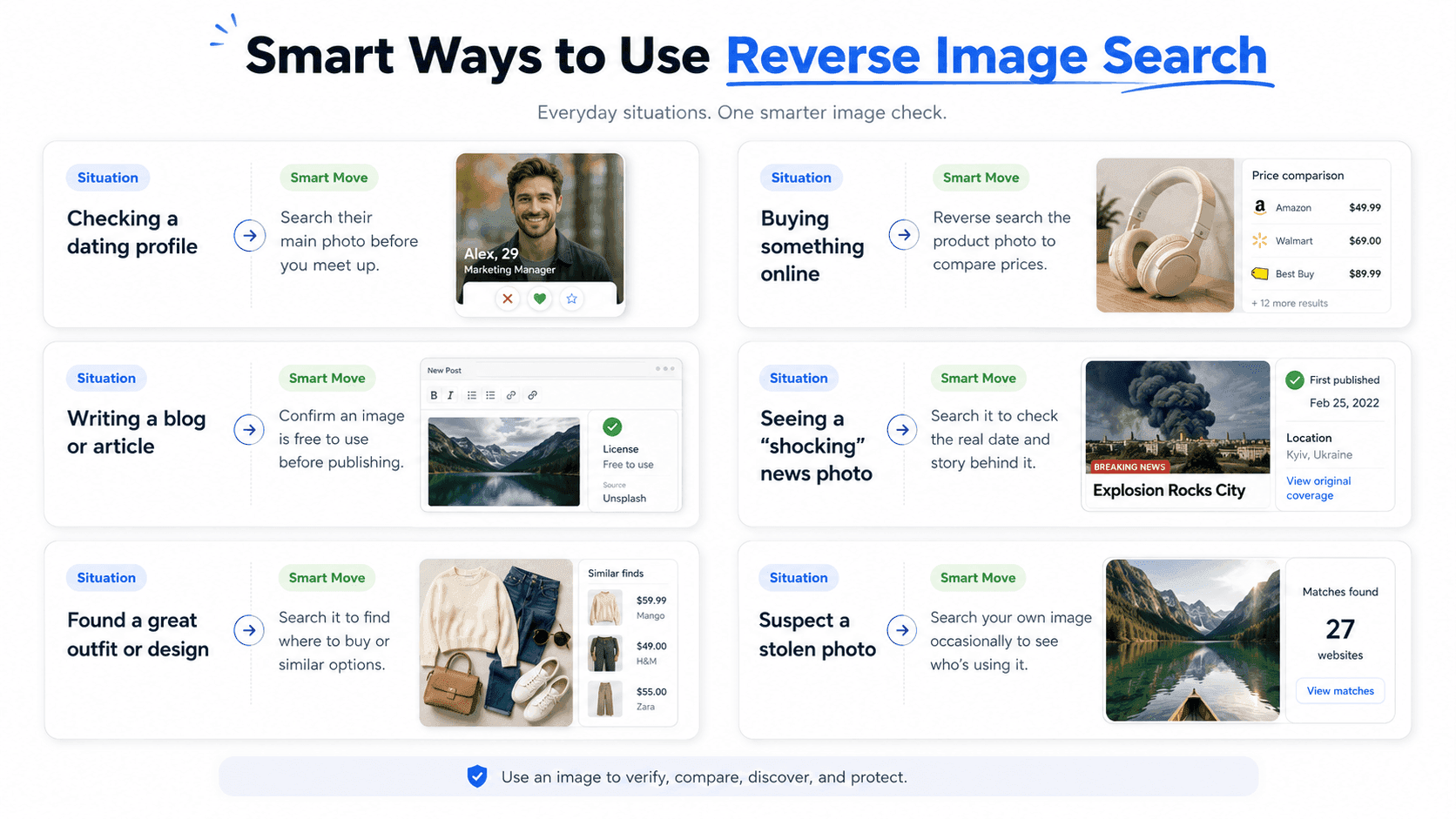
Pro Tip: For the best results, crop out extra background clutter before you upload. A tighter, cleaner image usually gives sharper, more accurate matches.
Limitations of Reverse Image Search with Ways to Work Around Them
As handy as this tool is, it's not magic. Reverse image search has a few real limitations, and knowing them upfront saves you from getting confused or trusting a result you shouldn't.
It Can't Always Identify People by Name
The tool matches images, not identities. If a photo has never been posted publicly anywhere else, there's simply nothing for it to match against, so it may come back empty even for a completely real, uploaded-once photo.
Heavily Edited Images Can Slip Through
While most tools can handle cropping, flipping, or filters, a photo that's been drastically altered with a different background, added elements, or run through an AI image editor can sometimes dodge detection entirely.
Results Depend on How Much of the Web is Indexed
Not every tool scans the same amount of the internet. A basic tool might only check a narrow slice of image databases, while a more thorough one reaches deeper, including forums, obscure sites, and flagged scam accounts. A "no matches found" result doesn't always mean a photo is safe; it might just mean the tool didn't look far enough.
Private or Restricted Images Won't Show Up
If a photo is locked behind a private account, a paywall, or app-only sharing, no reverse image search tool can reach it even if that's exactly where the real match is hiding.
Low-Quality or Blurry Photos Reduce Accuracy
A tool needs clear visual data to work with. A pixelated screenshot or heavily compressed image gives it less to match, which usually means fewer or weaker results. This is exactly why how you search matters just as much as whether you search.
Knowing the effective ways to use reverse image search by choosing the clearest version of a photo or picking a tool that scans deeper than the basics makes the difference between a dead-end search and one that actually gives you an answer.
How to Do a Reverse Image Search with CopyChecker
Most people give up on checking a suspicious photo simply because the tools feel like too much work with confusing settings, sign-up walls, or results buried under ads.
That's a real problem, considering online dating scams alone are estimated to cost victims well over a billion dollars a year worldwide, and a huge share of those scams start with nothing more than a stolen profile photo.
This reverse image search tool is built to remove that friction entirely. Here's exactly how CopyChecker’s reverse image search works:
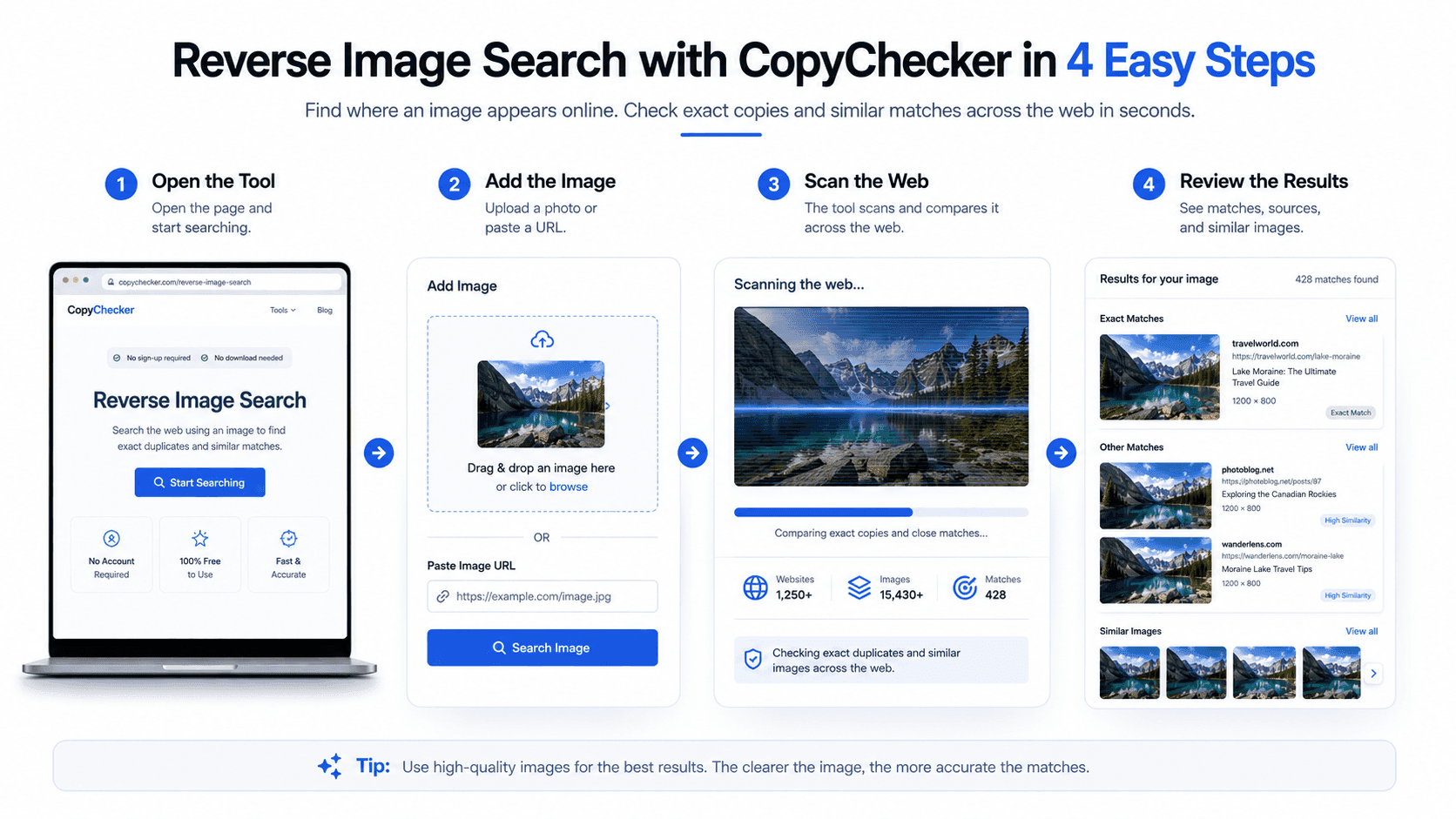
It's built for regular people who just want a quick, reliable check, whether that's confirming a dating profile photo is genuine, tracking down where an image first came from, or making sure a picture you plan to use isn't stolen from someone else.
FAQs About Reverse Image Search
What is a Reverse Search Image?
It's the same thing as a reverse image search using a picture instead of text to search the internet and find where else that image appears or what it shows.
Is Reverse Image Search Free to Use?
Yes, most reverse image search tools, including Google's and CopyChecker's, are completely free to use.
Can Reverse Image Search Find a Person's Name?
Not directly. It can show you where else a photo appears online, such as on social media profiles or in articles, which might help you identify who's in it, but it doesn't pull names out of thin air.
Does Reverse Image Search Work on Screenshots?
Yes. Screenshots work just as well as regular photos, as long as the image itself is clear enough to scan.
Can I Reverse Image Search More than One Photo at Once?
Most tools process only one image per search, so you'll need to check profile photos or product images one at a time for the most accurate results.
Is It Legal to Reverse-Image Search Someone's Photo?
Yes, searching for a publicly available image is legal. It's a common and accepted way to verify authenticity or catch scams.
Final Thoughts on What is A Reverse Image Search
A reverse image search is one of those tools that seems small until you actually need it, and then it feels like a superpower.
No matter if you're double-checking a match on a dating app, chasing down where a photo really came from, or just curious about that jacket someone's wearing in a picture, it takes the guesswork out of “who, what, and where.”
Ready to try it yourself? Head over to CopyChecker's AI Reverse Image Search tool and upload any photo you're curious about.
It's fast, free, and might just save you from a scam, a stolen photo, or a bad online decision.