You're almost done with your research paper when you remember an email your professor sent a few days ago.
It explained something you'd been struggling to understand, and now that explanation is exactly what you need to support your argument.
You add the information to your paper, but just as you're about to move on, a question pops into your head how do you cite an email?
You know how to cite books, websites, and journal articles.
But an email?
There's no publisher, no page number, and usually no link your readers can open.
So, does it belong in your reference list, or is mentioning the sender enough?
Well, that depends on the citation style you're using. APA, MLA, Chicago, and Harvard each have their own rules, and getting them mixed up can lead to unnecessary citation mistakes.
Don't worry, though.
Once you understand how each style handles personal emails, the process becomes much simpler.
We'll walk through the correct formats, practical examples, and a few situations you might run into along the way.
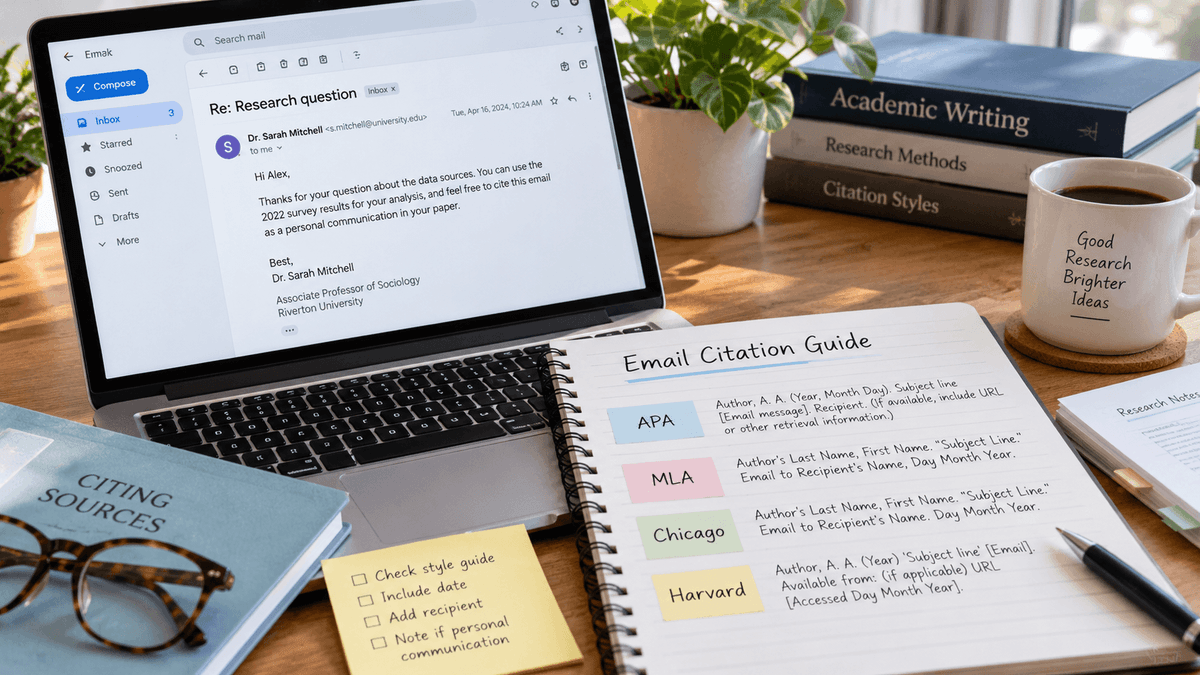
First, let's compare the four citation styles side by side so you can quickly see what your email citation needs -
Understanding Email Citation Formats
Before getting into the details, here's something important to understand: not every citation style treats emails the same way.
For example, APA requires an in-text citation for a private email but no reference-list entry.
MLA, on the other hand, generally includes the email in the Works Cited list.
Here's a quick comparison:
| Citation Style | In-text Citation | Reference List or Bibliography |
|---|---|---|
| APA 7th edition | Yes, as personal communication | No |
| MLA 9th edition | Yes, usually the sender's last name | Yes, in Works Cited |
| Chicago 18th edition | In the text or a footnote | Usually not required |
| Harvard | Yes, author and year | Depends on university guidelines |
Remember: These rules mainly apply to private emails. If a message has been published in an online archive or another accessible source, you may need to cite it differently.
Now, let's look at what information you'll need before creating your email citation.
What Information Do You Need to Cite an Email?
You don't need to copy an entire email into your assignment.
However, you should collect a few basic details so you can create an accurate citation.
These typically include:
- Sender's name: The person who wrote the email.
- Recipient's name: The person who received the message.
- Date sent: The day, month, and year the message was sent.
- Subject line: The email's subject, particularly when using MLA.
- Type of communication: Whether the source is a private email, email interview, or publicly available message.
Let's use one example throughout this guide to make the formatting differences easier to follow.
Sample email details:
| Detail | Information |
|---|---|
| Sender | Dr. Emily Carter |
| Recipient | Alex Morgan |
| Subject | Research Methodology Feedback |
| Date | March 14, 2026 |
| Message | Explains why documenting research decisions improves transparency |
This is a fictional email created for demonstration.
Notice that we haven't included either person's email address.
Most standard email citation formats don't require it, and leaving it out also helps protect personal information.
With those details ready, let's start with APA.
How to Cite an Email in APA Style (7th Edition)
If you're writing a psychology, education, or social science paper, there's a good chance you're using APA style.
According to APA 7th edition, private emails are considered personal communications because readers cannot retrieve them independently.
That's why APA uses an in-text citation instead of a full reference-list entry.
APA Email In-Text Citation Format
When citing an email in APA, include the sender's initials and last name, the words "personal communication," and the exact date.
Format:
(Sender's Initial. Last Name, personal communication, Month Day, Year)
Example:
(E. Carter, personal communication, March 14, 2026)
Now, imagine you're using Dr. Carter's email to support a statement in your research paper.
You could write:
Keeping detailed research notes makes it easier to explain how decisions were made during a study (E. Carter, personal communication, March 14, 2026).
This is called a parenthetical citation because the source information appears in parentheses.
However, you can also include the sender's name naturally within the sentence.
Narrative citation example:
E. Carter (personal communication, March 14, 2026) explained that documenting research decisions helps make the research process more transparent.
Both approaches are acceptable in APA. The best choice depends on how you want the sentence to flow.
Does an Email Go in an APA Reference List?
No. Private emails do not appear in an APA 7th edition reference list.
Here's why.
A reference list helps readers locate the sources you've used.
Since a private email usually exists only in the sender's and recipient's inboxes, your audience cannot retrieve it.
As a result, in-text citations provide the necessary credit.
This distinction matters when learning about bibliographic citations, because not every source mentioned in an academic paper needs a corresponding reference entry.
However, if you're citing a publicly available email newsletter or archived message, the rules may change.
In that case, cite the accessible publication using the appropriate source format.
So, in APA, the process is fairly simple: cite a private email in your text and leave it out of your reference list.
But what if your assignment requires MLA instead?
That's where things change. Unlike APA, MLA generally requires you to include an email in your Works Cited list, along with a brief in-text citation.
Let's see how that works -
How to Cite an Email in MLA Style (9th Edition)
MLA style is commonly used in literature, languages, and other humanities subjects.
Unlike APA, MLA generally requires a Works Cited entry for an email that you've quoted or paraphrased.
It also uses a different citation format that emphasizes the sender, subject line, recipient, and date.
MLA Email Works Cited Format
When citing an email in MLA 9th edition, you can include the subject line in quotation marks, followed by the recipient and date.
Format:
Sender's Last Name, First Name. "Email Subject." Received by Recipient's Full Name, Day Month Year.
Example:
Carter, Emily. "Research Methodology Feedback." Received by Alex Morgan, 14 Mar. 2026.
Notice a few differences from APA.
First, MLA writes the sender's last name before their first name.
Second, the date follows the day-month-year format. And finally, the subject appears in quotation marks.
According to Purdue OWL's MLA guidance, this is an accepted way to document emails, including email interviews.
But what if you'd rather identify the message by its recipient than its subject?
MLA also allows a descriptive approach.
Alternative example:
Carter, Emily. Email to Alex Morgan. 14 Mar. 2026.
This format is especially practical when the subject line is missing, vague, or unnecessary for identifying the source.
MLA Email In-Text Citation Example
Once you've created the Works Cited entry, referencing the email in your writing is much simpler.
MLA in-text citations generally use the sender's last name.
Parenthetical citation:
(Carter)
Example in a sentence:
Maintaining detailed research records can help others understand how a study was conducted (Carter).
You can also mention the sender directly:
Narrative citation:
In an email, Carter emphasized the importance of keeping clear records throughout the research process.
Both methods point readers toward the full email citation in your Works Cited list, so you can choose whichever fits your writing more naturally.
So far, we've used an example where Alex Morgan received an email from Dr. Carter.
But what happens when you're the one who received the email and want to cite it in your own assignment?
The process is almost the same, with one small adjustment to how you identify the recipient.
How to Cite an Email You Received
Suppose you personally contacted a researcher, and they replied with information relevant to your assignment.
In that case, you can identify yourself as the recipient or use “the author.”
Example:
Carter, Emily. Email to the author. 14 Mar. 2026.
This makes it clear that the message was sent directly to the person writing the paper.
Just remember to use one consistent approach throughout your Works Cited list.
It also helps to compare your final entry with the common citation mistakes students make, especially mismatched names and missing references.
By now, you've seen how MLA handles both the full email citation and the shorter reference within your writing.
But there's another citation style you might come across, especially if you're studying history or the humanities.
Chicago style handles private emails a little differently.
Instead of automatically adding them to a Works Cited or reference list, you can often cite them directly in your writing or through footnotes.
Let's look at how that works and when each approach makes sense.
How to Cite an Email in Chicago Style (18th Edition)
Chicago style is widely used in history, publishing, and some humanities disciplines.
However, there's one detail worth knowing before you begin: Chicago has two citation systems.
The first is Notes and Bibliography, which commonly uses footnotes or endnotes.
The second is Author-Date, which generally places citations in the text.
For private emails, Chicago usually recommends citing the correspondence in the text or a note rather than including it in the bibliography.
Chicago Email Citation in a Footnote
If you're following the Notes and Bibliography system, include the sender, type of communication, recipient, and date.
Format:
- Sender's Full Name, email message to Recipient's Name, Month Day, Year.
Example:
- Emily Carter, email message to Alex Morgan, March 14, 2026.
The footnote number corresponds to a superscript number placed after the relevant information in your paper.
For example:
Dr. Carter explained that maintaining detailed research records can strengthen transparency throughout a study.¹
The corresponding note provides the email's details.
If you cite the same email again, a shortened note may be enough.
Shortened note example:
- Carter, email message.
Chicago Email Citation in Text
You don't always need a footnote for personal correspondence.
Chicago also allows you to identify the communication directly in your sentence.
Example:
In an email to Alex Morgan on March 14, 2026, Emily Carter explained that keeping detailed research notes can improve transparency.
This approach is especially useful when a brief reference to the email is sufficient.
For Chicago's Author-Date system, private personal communications can also be described in the text or identified in a parenthetical note rather than being treated like an ordinary published author-date source.
For instance:
(E. Carter, email message to Alex Morgan, March 14, 2026)
Do Emails Belong in a Chicago Bibliography?
Usually, no.
The Chicago Manual of Style explains that personal communications, including emails and text messages, are generally cited in text or notes and rarely included in the bibliography.
The reason is similar to APA. Since private emails aren't publicly accessible, readers usually can't retrieve them independently.
So, in most cases, identifying the sender, recipient, and date in your text or footnote is enough.
However, if your instructor or publisher specifically asks you to include personal correspondence in your bibliography, follow their guidelines.
That covers Chicago, but there's still one popular referencing system worth exploring: Harvard.
Like Chicago's Author-Date system, Harvard often uses the author's surname and publication year in citations.
However, one key difference matters.
Harvard referencing rules can vary between universities, particularly when it comes to including personal emails in the reference list.
Let's see how to handle those differences without getting your citations mixed up.
How to Cite an Email in Harvard Referencing
Harvard referencing is another popular author-date citation system, especially at universities.
However, Harvard doesn't have one universally accepted referencing format.
Different institutions publish their own Harvard guidelines, and their rules for personal emails don't always match.
For example, University College London includes personal emails in its Harvard reference-list examples, while some other universities recommend in-text citations only.
So, before you format your email citation, check which Harvard version your institution requires.
Harvard Email In-Text Citation
In Harvard referencing, the sender's surname and year are commonly used in the text.
Format:
(Sender's Last Name, Year)
Example:
(Carter, 2026)
You could include it in a sentence like this:
Keeping clear records of research decisions can improve transparency (Carter, 2026).
Or use a narrative citation:
Carter (2026) emphasized the importance of documenting research decisions.
Harvard Email Reference List Example
For institutions following a version that requires personal emails in the reference list, such as UCL Harvard referencing, the entry can follow this format:
Format:
Sender's Last Name, Initial. (Year). Email to Recipient's Name, Day Month.
Example:
Carter, E. (2026). Email to Alex Morgan, 14 March.
This entry identifies who sent the message, who received it, and when it was sent.
However, don't automatically add it to your reference list.
If your university follows a Harvard version that treats private emails as personal communications cited only in the text, a separate reference entry may not be necessary.
Quick Tip: Check your university's referencing guide before submitting your paper. A citation that's correct under one Harvard system might not follow another institution's requirements.
And that brings us to something worth considering.
So far, we've looked at how to cite a standard email in four different citation styles.
But real emails don't always fit neatly into those examples.
What if the message came from your professor?
What if you interviewed someone by email, received several replies, or want to cite a message without a subject line?
The basic rules still apply, but a few details can change depending on the situation.
Let's walk through these common cases so you know exactly how to handle them.
How to Cite an Email in Different Situations
By now, you know how to cite a standard email in APA, MLA, Chicago, and Harvard styles.
But not every email you'll use in your research will be a simple message from one person to another.
Sometimes, the information comes from a professor answering your questions.
Other times, it might be part of an email interview, a long conversation with several replies, or even a message without a subject line.
So, does each situation need a different citation format?
Not necessarily.
The basic rules you've learned still apply, but you may need to adjust a few details depending on who sent the email and how you plan to use it.
Let's start with some of the most common situations -
How to Cite an Email From a Professor
Let's say you email your professor for clarification about an assignment, and their reply contains information you want to mention in your paper.
Because it's a private message, you can cite it as personal communication in APA.
APA example:
(M. Johnson, personal communication, April 8, 2026)
You could write:
According to M. Johnson (personal communication, April 8, 2026), the research design should clearly explain how participants were selected.
There's no need to include academic titles such as Professor or Dr. inside the parenthetical citation.
However, remember that a professor's email explaining an assignment doesn't automatically become a source for the academic claims in your paper.
If the professor points you toward a published study, it's usually better to read and cite that original research.
Giving credit to the original source is part of academic integrity, even when you first learned about the idea through an email.
How to Cite an Email Interview
Email interviews are useful when you're collecting expert opinions or firsthand insights.
For example, you might send questions to an environmental researcher and use their responses in an essay.
If you're following MLA, you can cite the email interview like this:
MLA Works Cited example:
Patel, Nina. "Re: Research Interview Questions." Received by Alex Morgan, 10 Apr. 2026.
In-text citation:
(Patel)
For APA, an unpublished interview conducted by email may be cited as personal communication when it is used as a source of information.
However, there's an important exception.
If you're conducting formal research with participants, APA generally treats participant responses as research data rather than requiring individual personal-communication citations for each response.
That's why it's worth checking your research methodology and institutional ethics requirements before naming interview participants.
If you summarize an expert's response in your own words, understanding how to paraphrase without plagiarizing can preserve the meaning while still crediting the source.
How to Cite an Email Thread or Multiple Emails
An email thread can contain several messages exchanged over multiple days.
For example, you might receive an initial reply from a researcher and then ask two follow-up questions.
If you're using information from different messages, cite the relevant communication so readers can identify which message supports your statement.
In APA, you can use separate personal communication citations with the appropriate dates.
Examples:
(E. Carter, personal communication, March 14, 2026)
(E. Carter, personal communication, March 18, 2026)
In MLA, you may need separate Works Cited entries, especially when the messages have different subject lines or contain distinct information.
If multiple messages from the same sender were sent on the same day, you may need their subject lines or timestamps to distinguish them.
The MLA Style Center provides guidance for handling this situation.
Keeping each reply tied to the correct source also helps prevent unintentional plagiarism when you work from several messages.
How to Cite an Email Without a Subject Line
Not every email has a useful subject line.
Sometimes it's blank. Other times, the sender leaves something vague like "Hello" or “Quick question.”
Fortunately, you don't need to invent a title.
In MLA, you can use a descriptive title instead.
Example:
Carter, Emily. Email to Alex Morgan. 14 Mar. 2026.
This identifies the communication without pretending the original email had a subject it didn't contain.
For APA and Chicago, the subject line generally isn't required when documenting an ordinary private email.
How to Cite a Publicly Available Email
Here's where things get a little different.
Suppose you find an email published in a university archive, a public document collection, or an accessible online database.
Because readers may be able to retrieve that message, it shouldn't automatically be treated like a private email.
Instead, cite it according to the relevant rules for the archive or publication where you accessed it.
Depending on the source, you may need information such as the author's name, document title, publication or archive name, date, and URL.
This distinction also applies to letters.
If you're working with historical correspondence, understanding how to cite a letter can help you reference both private messages and archived documents correctly.
The Main Thing to Remember: Always consider whether your reader can locate the original source.
Now that we've covered the different ways emails can be cited, you might be wondering how to put everything together when you're actually working on your paper.
After all, knowing the rules is one thing, but applying them correctly, especially when you're using several types of sources, can still get confusing.
Fortunately, you don't have to figure it out from scratch every time.
A few simple steps can help you create an accurate email citation, check the details, and avoid common formatting mistakes.
Let's walk through the process.
How to Create and Check an Email Citation
By now, you've seen how different citation styles handle emails, from private messages to publicly available correspondence.
But when it's time to create your own citation, remembering all those rules can feel a little overwhelming.
The good news is that you don't need to memorize every format.
You just need to know what to look for and how to put the information together.
Here's a simple five-step process to help you get it right.
Step 1: Check Whether the Email is Private or Publicly Accessible
Before creating your citation, ask yourself one question: Can other people access this email?
If it's a personal message sent directly to you, it's generally considered private communication.
However, if the email appears in a public archive, online collection, or published source, different citation rules may apply.
Knowing the difference helps you choose the correct format from the beginning.
Step 2: Collect the Email Details
Next, open the original email and check the sender's name, recipient, date, and subject line.
You might not need every detail, depending on your citation style.
For example, APA focuses on the sender and date, while MLA may also require the subject and recipient.
It's better to collect everything now than search through your inbox again when you're finishing your references.
Step 3: Choose the Correct Citation Style
Once you have the details, check which citation style your assignment requires.
If you're using APA, a private email needs an in-text personal communication citation.
MLA generally requires both an in-text citation and a Works Cited entry, while Chicago and Harvard follow their own rules.
If you're unsure, check your assignment instructions or your university's referencing guide before moving forward.
Step 4: Format Your Email Citation
Now it's time to put everything together.
Use the appropriate citation format and arrange the sender's name, date, and other details in the correct order.
Pay attention to punctuation, capitalization, and whether the style requires a reference list or bibliography entry.
For example, if you're using APA, don't add a private email to your reference list just because you've cited it in the text.
The goal is to follow the rules of your chosen style rather than force every source into the same format.
Step 5: Review Your Citation Before Submitting
Finally, compare your completed citation with the original email to make sure everything matches.
Check the spelling of the sender's name, the exact date, and any subject line you've included.
Then, make sure your in-text citation and reference entry follow the same style as the rest of your paper.
It only takes a moment, but this final check can help you catch easy-to-overlook mistakes.
For a broader review of the draft's clarity and structure, you can also try the Essay Checker, while verifying citations separately.
If your paper includes several types of sources, such as books, websites, and journal articles, a citation generator can make formatting supported references easier.
Just remember to check personal email citations against the relevant style guide, since some don't belong in the reference list at all.
Following these steps should make the process much easier.
Still, even when you've collected the right details and chosen the correct format, small citation mistakes can slip through.
Maybe you've added a private email to the wrong reference list, used an incorrect date, or followed a Harvard format that your university doesn't accept.
Fortunately, these are all mistakes you can catch before submitting your paper.
Let's look at the most common ones and how to avoid them.
Common Email Citation Mistakes to Avoid in 2026
Even a short email citation can go wrong if you overlook a small detail.
Fortunately, you can prevent most mistakes once you know what to look for.
| Common Mistake | How to Avoid It |
|---|---|
| Adding a private email to an APA reference list | Use an in-text personal communication citation instead. |
| Forgetting the MLA Works Cited entry | Add the appropriate email entry when citing a specific message. |
| Using the wrong email date | Check the date the original message was sent. |
| Including unnecessary email addresses | Use the sender's name and other required details instead. |
| Following the wrong Harvard format | Check your university's referencing guidelines. |
| Treating archived emails as private messages | Use the citation rules for the accessible source. |
| Combining several emails into one unclear citation | Identify the specific message supporting each claim. |
There's another detail worth considering: privacy.
An email may contain unpublished research, personal opinions, or information the sender didn't intend to share publicly.
Before quoting private correspondence, particularly in a published article or research project, consider obtaining the sender's permission.
If your work involves confidential research participants, follow the relevant ethics and privacy requirements.
After all, citing a source correctly doesn't automatically mean you have permission to publish everything it contains.
Before turning in a longer paper, checking a research paper for plagiarism can help you review quotations, paraphrases, and source attribution in context.
FAQs About Citing Emails
Can I Cite an Email as A Source in A Research Paper?
Yes. Emails can provide firsthand information or expert opinions. Cite them using your required citation style and follow any confidentiality rules.
Do I Need to Cite A Personal Email?
Yes, if you quote or paraphrase information from someone else's email. The citation format depends on the style you're using.
How do You Cite an Email in APA 7th Edition?
Use the sender's initials, surname, "personal communication," and date. For example: (E. Carter, personal communication, March 14, 2026).
How do You Cite an Email in MLA 9th Edition?
Include the sender, subject or email description, recipient, and date in Works Cited. Use the sender's surname for the in-text citation.
Do Email Citations Need A URL?
Private email citations normally don't need a URL. Publicly archived messages may require one, depending on the citation style and source.
Do I Need Permission to Quote Someone's Private Email?
It's wise to obtain permission before publishing private correspondence, especially
when it contains personal, sensitive, or confidential information.
Final Thoughts on Citing an Email
Learning how to cite an email becomes much easier once you understand one simple difference: private correspondence isn't always referenced like a published source.
APA uses personal communication citations without reference-list entries, while MLA generally includes emails in Works Cited.
Chicago usually relies on text or notes, and Harvard rules depend on your institution.
Whatever style you're using, take a moment to check the sender's details, confirm the date, and make sure your citation follows the correct format.
And if your paper includes other sources like books, websites, or journal articles, you can use CopyChecker's Citation Generator to help create and organize your references without having to format every supported source manually.
Just remember to check private email citations against your required style guide.
After all, a good citation isn't just about getting the punctuation right.
It's about giving proper credit to the people whose information helped shape your work.