A sentence can be grammatically perfect and still make someone read it three times.
You know the kind, right?
By the time you reach the period, you have forgotten how the sentence started, what the writer was trying to prove, and possibly why you opened the page in the first place.
Basically, that is a readability problem.
Improving readability means reducing the effort someone needs to understand your writing without stripping away its meaning, accuracy, or personality.
It involves more than shortening sentences or hunting down long words.
Certainly, vocabulary matters, but so do sentence structure, paragraph length, headings, formatting, flow, audience knowledge, and even what you choose to say first.
And online, that matters a lot.
A classic Nielsen Norman Group study found that 79% of test users scanned new web pages, while just 16% read them word by word.
The study dates back to 1997, so screens have thankfully improved since the era of beige computers, but scanning remains a fundamental part of web-reading behavior.
So, how do you make your own writing easier to read?
Let’s start from -
What Makes Writing Easy or Difficult to Read?
Readable writing does not necessarily mean simple writing.
It means the reader can follow your ideas without constantly stopping to decode the language.
Several things determine how difficult that journey becomes:
| Factor | Harder to Read | Easier to Read |
|---|---|---|
| Words | Unfamiliar, technical, unnecessarily complex | Familiar, precise, appropriate |
| Sentences | Long, overloaded, poorly connected | Focused and logically structured |
| Paragraphs | Dense blocks covering several ideas | Clearly grouped around one main idea |
| Voice | Indirect or vague | Direct where appropriate |
| Structure | Few headings and weak organization | Clear sections and descriptive headings |
| Formatting | Continuous blocks of text | Lists, spacing, tables and visual hierarchy |
| Audience fit | Assumes too much knowledge | Matches what the reader already knows |
This distinction matters because readability formulas only measure part of the picture.
The CDC notes that formulas based on sentence and syllable counts cannot account for audience, purpose, information design, and many other factors affecting comprehension.
There is even experimental evidence for that limitation.
A randomized study involving 2,235 adults compared health information written at Grade 8, 10, 12, and 14 reading levels.
Changing grade level alone did not produce meaningful differences in knowledge, perceived reading ease, acceptability, or trust.
The researchers concluded that lowering the grade level without considering broader health-literacy principles has limited value.
In other words:
Do not chase a readability number while making the actual writing worse.
A score is evidence. It is not your editor-in-chief.
So, now let’s find out about -
How to Improve Readability in Writing in 15 Simple Ways
Most unreadable writing is not ruined by one enormous mistake.
It becomes difficult through dozens of small decisions: an unnecessary word here, a 43-word sentence there, three paragraphs without a heading, an acronym nobody explained, and a conclusion hidden somewhere in paragraph six.
Fix those decisions one by one.
1. Know Who You're Writing For
Before simplifying anything, decide who needs to understand it.
Imagine these two readers:
- a cardiologist reading a medical research paper;
- a patient reading instructions before a heart test.
The word tachycardia may be perfectly appropriate for the first reader. For the second, writing an unusually fast heart rate may be far more useful.
Neither version is universally “better.”
They serve different audiences.
Ask yourself:
- What does my reader already know?
- Which terms will be familiar?
- What are they trying to accomplish?
- Are they reading carefully or scanning for an answer?
- What information do they need first?
The CDC's Clear Communication Index starts with audience questions for exactly this reason. Its guidance recommends using words the primary audience actually uses rather than simplifying language blindly.
Readable writing begins with reader awareness, not a formula.
2. Put the Most Important Information First
Do not make readers excavate the answer.
If somebody opens an article asking:
Can dogs eat blueberries?
They should not need to survive four paragraphs about the agricultural history of blueberries before discovering the answer.
Give them the answer.
Then explain it.
This approach is often called the inverted pyramid:
- lead with the main point;
- provide the most important explanation;
- add supporting details;
- finish with less essential context.
The CDC specifically recommends placing the main message at the beginning because readers can find it more quickly.
Compare:
Harder to read
Owners should consider ingredients, individual dietary needs, preparation methods, and portion sizes when deciding whether blueberries are appropriate for dogs.
Clearer
Yes, most dogs can eat blueberries in small amounts. They are generally safe, but portion size and preparation still matter.
The second version doesn't remove useful information.
It simply respects the reader's time.
A rare courtesy on the internet.
3. Shorten Overloaded Sentences
Long sentences are not automatically bad.
A carefully structured 30-word sentence can be perfectly clear.
A chaotic 17-word sentence can still feel like furniture falling down a staircase.
The real problem is cognitive load.
Watch for sentences carrying:
- several independent ideas;
- multiple examples;
- repeated conjunctions;
- long parenthetical interruptions;
- several conditions;
- too many commas.
Consider this:
Before
The marketing team reviewed the campaign after the results arrived, and although the overall traffic increased considerably, conversions remained lower than expected, which meant the team needed to examine the landing page again before deciding whether the campaign should receive additional budget.
There is nothing technically impossible to understand there.
It just asks the reader to keep too much information in working memory.
After
The campaign increased overall traffic, but conversions remained lower than expected. The marketing team decided to review the landing page before assigning more budget.
Same core idea.
Far less untangling.
If a sentence has become difficult to repair without changing what it means, know the way to rewrite a sentence without changing the meaning.
So, you can walk through restructuring clauses, removing redundant wording, and splitting sentences while preserving the original message.
And when several complete thoughts have accidentally crashed into one another, the problem may actually be a run-on sentence.
The run-on sentence examples guide shows how to distinguish those from other sentence-structure problems.
4. Use Familiar Words Instead of Needlessly Complex Ones
There is nothing inherently intelligent about choosing a longer word.
Sometimes a long word is exactly right. Sometimes it is just a shorter word wearing a necktie.
Compare:
| Instead of | Try |
|---|---|
| utilize | use |
| approximately | about |
| commence | begin |
| demonstrate | show |
| facilitate | help |
| numerous | many |
| in the event that | if |
| subsequent to | after |
But do not simplify technical language until it becomes inaccurate.
If you're writing for software developers, replacing application programming interface with computer connection thing does not improve readability.
It is vandalism.
A better rule is:
Use the simplest word that preserves the exact meaning your reader needs.
When jargon is unavoidable, explain it immediately.
5. Remove Words That Are Doing Nothing
Some sentences are difficult because the idea is complex.
Others are difficult because twelve unnecessary words have attached themselves to the idea and refuse to leave.
Look for phrases such as:
- in order to;
- due to the fact that;
- at this point in time;
- it is important to note that;
- in the event that;
- has the ability to;
- for the purpose of.
Many can be shortened instantly:
| Wordy | Clearer |
|---|---|
| in order to | to |
| due to the fact that | because |
| at this point in time | now |
| has the ability to | can |
| in the event that | if |
| a large number of | many |
Consider:
It is important to note that users have the ability to change the settings at any point in time.
Now remove the scaffolding:
Users can change the settings anytime.
Ten words disappeared.
Nothing of value was harmed.
6. Prefer Active Voice When It Makes the Meaning Clearer
Active voice usually tells readers immediately:
who did what.
The editor changed the headline.
Passive voice rearranges the focus:
The headline was changed by the editor.
The first is shorter and more direct.
That is why the CDC recommends active voice for many public-facing messages, describing it as more direct and precise.
But passive voice is not automatically wrong.
Compare:
Someone stole my bike last night.
What if you do not know who?
My bike was stolen last night.
Perfectly reasonable.
Passive voice also works when the action or result matters more than the actor:
Participants were randomly assigned to three groups.
So do not mechanically convert every passive sentence.
Instead ask:
Would naming the actor make this clearer?
If yes, change it.
A trustworthy Passive Voice Checker can highlight passive constructions so you can decide which ones actually need rewriting.
Any all-in guide to passive voice examples can also explain when passive voice is useful, rather than treating it as a grammatical felony.
7. Keep One Main Idea in Each Paragraph
Paragraphs give readers breathing room.
More importantly, they show which ideas belong together.
Consider this block:
Remote employees often communicate asynchronously, which gives teams more flexibility across time zones. Managers also need better documentation because decisions cannot always happen in meetings. Remote employees sometimes experience isolation. Companies are also reconsidering how often teams should meet in person.
Four related subjects.
Not one paragraph.
A clearer structure would separate them:
Remote teams often communicate asynchronously, giving employees more flexibility across time zones.
That flexibility makes documentation more important. Decisions and context must remain accessible even when people aren't online at the same time.
Remote work can also create social challenges, including isolation, so some companies hold occasional in-person meetings to strengthen team relationships.
Readers should be able to glance at a paragraph and understand what it does.
If the topic changes, the paragraph probably should too.
8. Use Headings That Actually Tell Readers Something
Compare these:
More Information
and:
How Sentence Length Affects Readability
Which one helps somebody scanning the page?
Exactly.
A heading should function like a road sign.
Good headings:
- describe the section;
- use meaningful language;
- help readers jump to the information they need;
- divide long content into manageable chunks.
The CDC's research-based communication criteria specifically look for information organized into chunks with headings.
This is also why overly clever headings can backfire.
“Words Gone Wild” might amuse the writer.
“Why Complex Words Make Text Harder to Read” helps the reader.
Choose accordingly.
9. Turn Dense Information Into Lists
Lists reduce the amount of structure a reader has to reconstruct mentally.
Compare:
Before submitting the report, check its grammar, spelling, punctuation, citations, formatting, headings and source references.
With:
Before submitting the report, check:
- grammar;
- spelling;
- punctuation;
- citations;
- formatting;
- headings;
- source references.
Same information.
The second version reveals its structure instantly.
Use:
Numbered lists when order matters.
- Upload the document.
- Run the check.
- Review the result.
Bullets when the items are related but sequence does not matter.
- reports
- articles
- emails
- essays
Again, this is not merely aesthetic advice. Lists are among the information-design elements included in the CDC Clear Communication Index.
10. Improve the Flow Between Sentences
A paragraph can contain perfectly readable individual sentences and still feel terrible as a whole.
Why?
Because readability is also about movement between ideas.
Consider:
Exercise can improve cardiovascular health. Many people work from home. Walking requires no gym membership. Cardiovascular disease affects millions of people.
Every sentence is simple.
Together, they wander around like strangers at a badly organized networking event.
Now give the ideas a relationship:
Regular exercise can improve cardiovascular health, but working from home can make it easy to sit most of the day. Walking offers a practical way to add more movement because it requires no gym membership or special equipment.
Better flow comes from:
- logical sequencing;
- clear pronoun references;
- useful transitions;
- repeating key concepts when necessary;
- removing sudden topic shifts.
Transition words help, but do not sprinkle however, moreover and therefore everywhere merely to create the appearance of logic.
The ideas still need to actually connect.
11. Explain Jargon, Acronyms and Technical Terms
Experts often forget which words became obvious only after years of working in their field.
Your reader may not know that:
- SERP means search engine results page;
- CTR means click-through rate;
- OCR means optical character recognition;
- API means application programming interface.
The solution is not to ban specialized language.
Explain it the first time.
Optical character recognition (OCR) converts text inside scans or images into machine-readable text.
After that, using OCR is perfectly reasonable.
The CDC similarly recommends limiting unfamiliar abbreviations and explaining terms where they appear.
This tiny habit can dramatically improve technical readability without dumbing anything down.
12. Write for Scanning, Not Just Reading
Readers do not approach every page like a novel.
They jump.
They skim.
They search visually for the sentence that answers their question.
That old Nielsen Norman Group study mentioned earlier found 79% of users scanned newly encountered pages. Its recommendations included meaningful subheadings, bulleted lists, highlighted keywords and one idea per paragraph.
You can make scanning easier by using:
- short sections;
- descriptive H2s and H3s;
- bullet points;
- numbered steps;
- comparison tables;
- strategic bolding;
- whitespace;
- concise summaries.
Notice the word strategic.
If every second sentence is bold, nothing is emphasized anymore.
You have merely made the page louder.
13. Make the Text Visually Easy to Read
Readability is not only about the words.
Take a beautifully written paragraph and display it in tiny pale-gray text across an 180-character line.
Congratulations.
You have made good writing miserable.
Visual readability depends on factors such as:
- font size;
- typeface;
- line spacing;
- line length;
- contrast;
- paragraph spacing;
- alignment;
- responsive mobile layout.
Left-aligned body text is generally easier to follow than large blocks of centered text because each new line begins from a predictable position.
Also avoid using ALL CAPS for long sections.
PEOPLE CAN READ IT.
THEY JUST SHOULD NOT HAVE TO LIVE LIKE THIS.
Use visual design to reduce effort, not decorate effort.
14. Read the Draft Aloud
This sounds suspiciously low-tech because it is.
It also works.
Reading aloud exposes things your eyes can glide past:
- repeated words;
- missing words;
- unnatural phrasing;
- sentences that refuse to end;
- abrupt transitions;
- accidental rhythm problems.
If you repeatedly run out of breath halfway through a sentence, inspect it.
That does not mean every long sentence should be split. It means your mouth has just performed a free usability test.
Reading aloud is particularly useful after grammar corrections. A sentence can be grammatically valid while still sounding awkward.
In this case, a consistent Grammar Checker can catch grammar, punctuation, spelling, and clarity issues, but the final judgment should still be yours.
15. Measure Your Readability, Then Revise
Once the draft feels clear, measure it.
A readability checker typically examines variables such as:
- average sentence length;
- syllables per word;
- difficult words;
- characters;
- sentence complexity;
- grade-level estimates.
It then applies one or more readability formulas.
Common examples include:
- Flesch Reading Ease
- Flesch-Kincaid Grade Level
- Gunning Fog Index
- SMOG Index
- Coleman-Liau Index
- Automated Readability Index
Any reliable source on how content readability checkers calculate scores explains what these formulas measure and why two formulas can rate the same paragraph differently.
So try to consume it.
The important part is what happens after you get the score.
Do not just stare at “Grade 11” with disappointment.
Look for the causes:
- Are sentences too long?
- Is vocabulary unnecessarily complex?
- Are several clauses stacked together?
- Are paragraphs dense?
- Does the text suit the intended audience?
Then revise.
And test again.
Now you must be thinking what you can do in advance to avoid all those mistakes.
So let’s know about -
How to Improve Your Readability Score Gradually in 2026
If your readability score is lower than you expected, resist the temptation to replace every three-syllable word and start chopping sentences indiscriminately.
Use a more controlled process.
Shorten the Sentences That Are Actually Difficult
Start with your longest sentences.
Then ask whether each one:
- contains several main ideas;
- changes direction halfway through;
- uses multiple dependent clauses;
- contains unnecessary detail.
Split only where doing so improves understanding.
If two independent clauses have been joined incorrectly, you may be dealing with a run-on or comma splice rather than simple sentence length.
A solid explanation of what a comma splice is shows the difference.
Reduce Unnecessarily Challenging Words
Readability formulas often treat longer or multisyllabic words as harder.
Replace them when a familiar alternative communicates the same meaning.
Do not replace them when precision would suffer.
“Photosynthesis” does not become clearer if you rename it “the plant sunlight thing.”
Context wins.
Fix Broken Sentence Structure
Sometimes poor readability comes from errors rather than complexity.
Common offenders include:
- sentence fragments;
- run-on sentences;
- comma splices;
- misplaced modifiers;
- vague pronouns;
- inconsistent verb tense.
Finding out about common grammar mistakes covers these patterns together.
For incomplete thoughts specifically, you can go through the sentence fragment examples guide, which explains why even a very long string of words can still fail to form a complete sentence.
Recheck the Revised Version
Now calculate the score again.
You are looking for improvement, not perfection.
A change from a difficult reading level to one better suited to your audience is useful.
A change that boosts the mathematical score while making the writing awkward is not.
That distinction becomes important because readability scores can be surprisingly easy to manipulate.
Shorten every sentence.
Replace every long word.
Score goes up.
Writing starts sounding like this.
Readers become annoyed.
Mission somehow accomplished.
Before and After Scenario of What Better Readability Actually Looks Like
Enough theory.
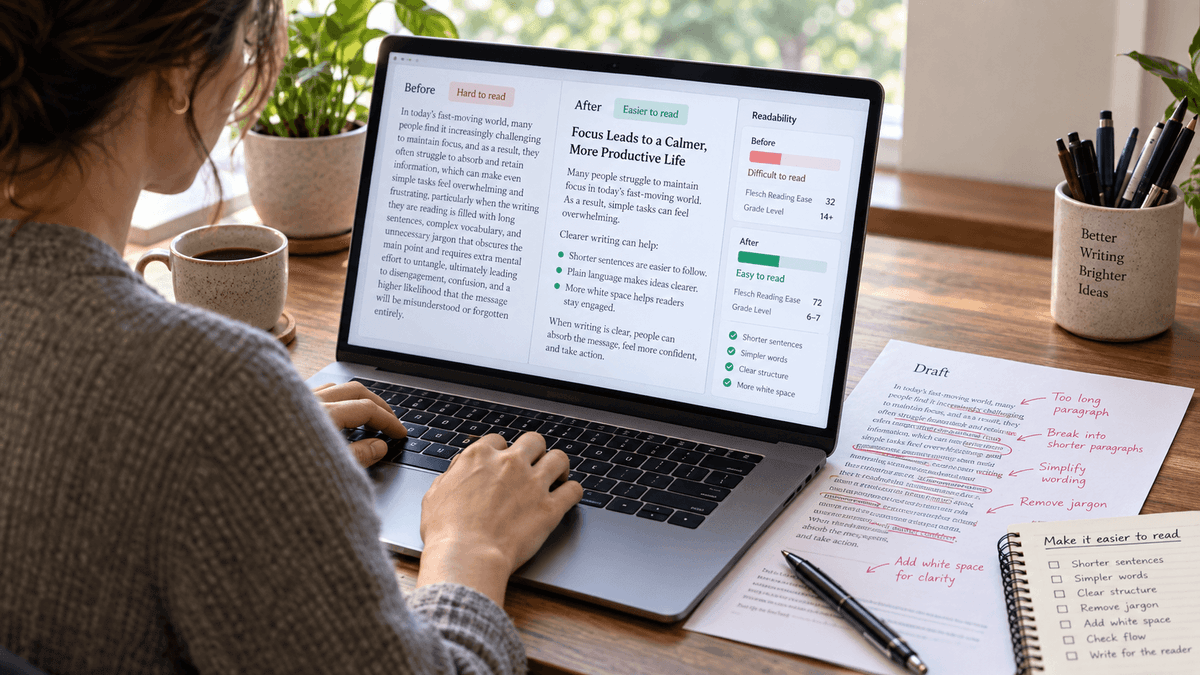
Here is a deliberately difficult paragraph:
Before
Due to the fact that organizations are increasingly implementing hybrid working arrangements across numerous operational departments, it is important to note that managers should facilitate communication processes that enable employees who may not be physically present at organizational premises to maintain sufficient levels of awareness regarding decisions that have been undertaken by leadership.
It sounds official.
That is about the nicest thing we can say about it.
After
As more organizations adopt hybrid work, managers need to keep remote employees informed. Important leadership decisions should be documented and shared so people do not miss key information simply because they were not in the office.
Now What Really Changed Here?
| Problem | Improvement |
|---|---|
| “Due to the fact that” | Changed to “As” |
| “organizations are increasingly implementing” | Simplified to “organizations adopt” |
| Main point buried | Moved the manager's responsibility forward |
| 50+ word sentence | Split into two |
| Abstract nouns | Replaced with direct verbs |
| Passive construction | Reduced |
| Repetitive corporate wording | Removed |
| Key outcome unclear | Explained why documentation matters |
Notice what we didn't do.
We did not remove the important meaning.
The final paragraph still says:
- hybrid work is increasing;
- managers need effective communication;
- remote employees must stay informed;
- leadership decisions should be documented.
Readability improved because the reader has less linguistic machinery to climb over before reaching those ideas.
Now one of the most common question that might arise is -
Does Readability Affect SEO?
There is no magic Flesch score that unlocks Google's first position.
If somebody promises one, guard your wallet.
Readability can still matter to SEO because it matters to the people using the page.
Clear content helps readers:
- locate answers;
- understand explanations;
- scan sections;
- follow instructions;
- move between related ideas;
- decide whether the page solves their problem.
Good information structure also makes topics and relationships easier to identify.
But avoid oversimplified claims such as:
“Google ranks articles higher if the Flesch score reaches 60.”
SEO does not work like a school teacher checking your worksheet.
Write for the actual search intent.
Organize the page logically.
Answer important questions clearly.
Use descriptive headings.
Remove wording that exists only because someone once said blogs need 2,000 words.
On that last point, ideal blog post word count makes the same useful distinction.
Word count should help you evaluate whether a topic is complete, not force you to inflate an article after the answer is already finished.
The same principle applies to readability.
Measure the writing. Don't let the measurement write it.
A Quick Readability Checklist for Your Next Writeup
Before publishing, give your writing one final readability check. You do not need to rewrite every sentence or chase a perfect score.
Instead, look for anything that could slow readers down, make an idea harder to follow, or bury important information.
Use this checklist to quickly review the clarity, structure, flow, formatting, and reading level of your content before it goes live.
Before publishing, ask:
- Is the main point clear near the beginning?
- Does the language match the intended audience?
- Have I explained unfamiliar terms?
- Are any sentences carrying too many ideas?
- Can I remove unnecessary words?
- Is active voice clearer in any passive sentences?
- Does each paragraph focus mainly on one idea?
- Have I broken up large walls of text?
- Do the headings explain what each section contains?
- Would any paragraph work better as a list or table?
- Do ideas flow logically from one sentence to the next?
- Is important information easy to scan?
- Is the text visually comfortable to read?
- Does the writing work on a phone screen?
- Have I checked sentence fragments, run-ons and comma splices?
- Have I read difficult sections aloud?
- Have I checked the readability score?
- Does the revised version still sound natural?
If you answered “no” to several of these, you do not necessarily need to rewrite the whole piece.
Fix the points creating the most friction first.
FAQs About Improving Readability
How Can I Improve the Readability of My Writing?
Use clear words, shorter sentences, logical paragraphs, descriptive headings, and formatting that makes the content easy to scan.
What Is a Good Readability Score?
For Flesch Reading Ease, 60–70 is generally considered suitable for standard or general-audience writing.
What Reading Level Should I Write For?
Choose a reading level that matches your audience's knowledge and the complexity of the subject.
Are Shorter Sentences Always More Readable?
No. Sentence clarity and structure matter more than length alone, so use a natural mix of short and longer sentences.
Does Active Voice Improve Readability?
Usually, because active voice makes it clearer who is performing the action and often produces more direct sentences.
Does Readability Affect SEO?
Not through a specific readability score, but clearer content can improve usability, scanning, comprehension, and overall search experience.
How Do Headings Improve Readability?
Headings break content into clear sections and help readers quickly find the information they need.
Can AI-Generated Text Have Poor Readability?
Yes. AI-written text can still be repetitive, wordy, overly formal, or poorly structured and should be edited like any other draft.
Make Your Writing Easier to Read
Good readability means readers understand your message without working harder than they need to.
Focus on clear words, well-structured sentences, useful headings, logical flow, and a reading level that fits your audience.
Check Your Readability With CopyChecker
With this amazing tool, you can check your content across multiple readability metrics, spot difficult sections, and see where your writing may need improvement.
Until then, use the techniques above to make every sentence clearer, easier to scan, and simpler to understand.