You sit down to finish an article, essay, or client draft, but before you can call it done, there are still a few things to fix.
Maybe one paragraph sounds awkward, so you open a paraphraser.
Then you notice a few grammar issues.
Before submitting the draft, you want to check it for plagiarism, and with AI-written content becoming harder to judge by eye, you might run it through an AI detector too.
Before you know it, one piece of writing has sent you bouncing between several different tools.
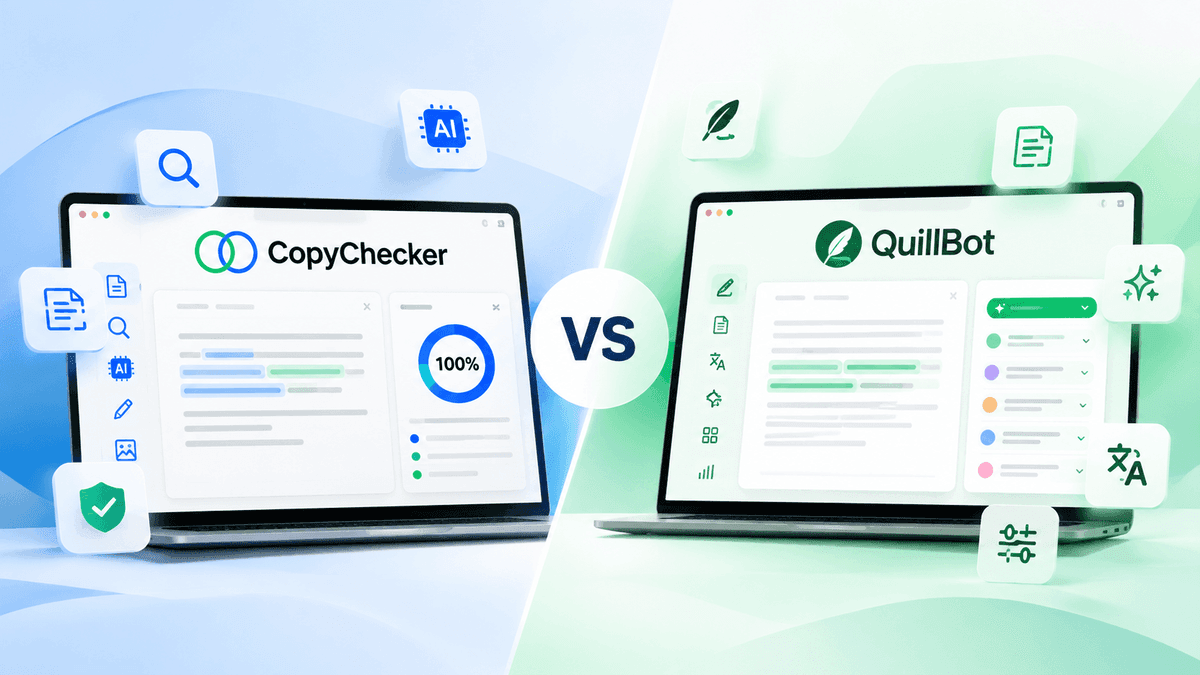
A few years ago, that was fairly normal. Today, both QuillBot and CopyChecker are trying to keep more of that workflow in one place.
QuillBot started primarily as a paraphrasing tool. But over time, it expanded into writing assistance, originality checking, AI-assisted creation, citations, images, presentations, and PDFs.
CopyChecker arrived at a similar place from the opposite direction.
It grew from plagiarism and originality checking into AI detection, paraphrasing, grammar checking, AI humanization, and a wider collection of writing, image, and PDF tools.
So while the two platforms started with very different purposes, they now overlap enough that choosing between them isn't as obvious as it once was.
And that's where the real CopyChecker vs QuillBot comparison begins.
Instead of simply asking which platform has more tools, the more useful question is:
Which one fits the way you actually write, edit, check, and finalize your work?
To answer that, we'll first look at what you get for free and what you have to pay for.
Then we'll compare their core writing tools and put their AI detectors through the same AI-written and human-written tests.
So let’s dive into -
CopyChecker vs QuillBot: Where Should You Start?
QuillBot makes more sense if paraphrasing and rewriting are central to your workflow and you're willing to pay for one subscription covering a large collection of writing and creation features.
Its free plan already provides basic access to several tools, while Premium removes or raises many limits.
In our September 2026 review, its annual Premium plan came to $4.17 per month, though QuillBot notes that pricing can vary by region and plan.
CopyChecker makes more sense if you want to use several originality and writing tools for free, particularly plagiarism checking, without immediately upgrading.
Its free Writing Suite currently gives you monthly allowances for plagiarism checking, AI detection, paraphrasing, AI humanizing, and grammar checking.
The biggest practical difference is this:
QuillBot gives free users more room in some individual writing tools, but plagiarism checking requires Premium.
CopyChecker gives smaller monthly allowances across several tools, including free plagiarism checking.
That difference can matter more than the length of either platform's feature list.
That's the short answer.
To see where those differences show up in everyday use, let's first put the two platforms side by side, then look more closely at their tools, pricing, and AI detectors.
CopyChecker vs QuillBot At A Glance
The quick answer gives you the general direction, but the differences become clearer when you put the two platforms side by side.
Both cover many of the same writing tasks today, including paraphrasing, grammar checking, AI detection, humanizing, citations, and PDF tools.
They differ most in how much you can do for free, which tools they prioritize, and what you get when you decide to pay.
Here’s the comparison at a glance before we break down those differences one by one.
| Feature | CopyChecker | QuillBot |
|---|---|---|
| Main historical focus | Plagiarism and originality tools | Paraphrasing and rewriting |
| Free plan | Yes | Yes |
| Free plagiarism checker | Yes, 1,500 words/month | No |
| Free AI detector | 500 words/month | Up to 1,200 words per scan, 10 scans/day |
| Free paraphrasing | 1,000 words/month | Up to 125 words at a time |
| Free grammar checking | 1,000 words/month | Available |
| AI Humanizer | Yes | Yes |
| Citation tools | Yes | Yes |
| PDF tools | Yes | Yes |
| Reverse image search | Yes | Not a core writing-suite feature |
| Entry paid option reviewed | $12.50/month billed at $150/year | $4.17/month billed annually at time of review |
| Best fit | Free multi-tool originality workflow | Paraphrasing-heavy, all-in-one paid workflow |
Pricing and limits can change. These details were checked in September 2026, so verify the live pricing pages before subscribing.
At first glance, the two platforms now look surprisingly similar.
But they didn’t start that way, and how each one expanded from its original purpose explains a lot about the experience you get today.
Let’s start with QuillBot, because calling it simply a paraphrasing tool no longer tells the full story.
What Has Changed About QuillBot?
Calling QuillBot a paraphrasing tool in 2026 is a bit like calling a smartphone a telephone. Technically correct, but increasingly unhelpful.
Paraphrasing remains an important part of the platform, but QuillBot now offers tools covering several stages of the writing and creation process.
Its current ecosystem includes tools for:
- Paraphrasing
- Grammar checking
- AI detection
- AI humanization
- Plagiarism checking
- Summarization
- Translation
- Citation generation
- AI chat
- Image generation
- Presentation generation
- PDF editing and conversion
QuillBot's free account currently allows paraphrasing of up to 125 words at a time using Standard and Fluency modes.
Free users also receive AI Detector access of up to 1,200 words per scan and 10 scans per day, along with limited access to several newer creation tools.
Premium substantially expands those limits and unlocks additional features.
That makes QuillBot increasingly useful as a single writing-and-creation workspace, rather than something you visit only when one sentence needs rewording.
CopyChecker has ended up covering many of the same writing needs, but it got there from a very different starting point.
While QuillBot expanded outward from paraphrasing and rewriting, CopyChecker built its broader toolkit around plagiarism and originality checking.
That difference becomes clearer when we look at -
What Does CopyChecker Offer?
CopyChecker has expanded in a different direction.
Its Writing Suite currently centers around five main tools:
- Plagiarism Checker
- Paraphrasing Tool
- AI Detector
- AI Humanizer
- Grammar Checker
But the broader CopyChecker platform extends beyond those five.
It also includes specialized writing utilities such as citation generation, readability checking, tone checking, sentence rewriting, proofreading, and tools for identifying issues such as sentence fragments, passive voice, comma splices, and run-on sentences.
Outside writing, CopyChecker also offers PDF utilities and reverse image search tools.
The important distinction for this comparison, however, is how CopyChecker packages its core writing tools.
Instead of concentrating most useful access behind one paid subscription,
CopyChecker gives free users a separate monthly allowance across its main Writing Suite tools.
That creates a different type of workflow.
Someone who needs a little plagiarism checking today, a grammar check tomorrow, and an occasional AI scan later in the week may be able to keep using the free tier without hitting a paywall right away.
But free access is only part of the comparison.
Once you need higher limits, the difference becomes much clearer in their pricing. So let’s talk about -
CopyChecker vs QuillBot Pricing
Pricing makes the difference between the two platforms much easier to see.
CopyChecker Pricing
CopyChecker currently offers a free Writing Suite with monthly allowances of:
- 1,500 Plagiarism Checker words
- 1,000 Paraphraser words
- 500 AI Detector words
- 500 AI Humanizer words
- 1,000 Grammar Checker words
No payment card is required to start.
Its Creator Suite costs $12.50 per month when billed annually at $150.
That plan currently includes:
- Unlimited Grammar Checker words
- 17,000 Plagiarism Checker words/month
- 10,000 Paraphraser words/month
- 10,000 AI Detector words/month
- 3,000 AI Humanizer words/month
CopyChecker also lists a customizable higher tier at $30.83/month when billed at $370 annually, with larger allowances.
QuillBot Pricing
QuillBot has both free and Premium access.
During our September 2026 review, the annual Premium option was displayed at an equivalent of $4.17/month.
QuillBot notes that pricing can vary according to region and subscription option, so the live checkout price should be checked before purchasing.
Premium unlocks or expands features across the platform, including unlimited paraphrasing, additional paraphrasing modes, unlimited AI Detector scans, advanced humanizing, and plagiarism checking.
Its Plagiarism Checker currently includes up to 25,000 words per month for Premium users.
So, once you're paying, QuillBot gives you considerably more room across its tools.
But that still leaves an important question for anyone who doesn't want another subscription, and that is -
Which Gives You More for Free?
This depends heavily on what you are doing.
If you primarily want to paraphrase, summarize, or run repeated AI checks, QuillBot's free access can be more useful in some areas.
But there is one particularly important difference:
QuillBot does not include plagiarism checking on its free plan.
CopyChecker does.
A CopyChecker free account currently provides 1,500 plagiarism-checking words every month, alongside separate allowances for grammar, paraphrasing, AI detection, and humanizing.
So someone who wants to perform several different checks without subscribing may find CopyChecker's free model more practical.
That's the broader difference between their free plans.
To see how the two compare in real writing tasks, let's look at their core tools individually, starting with the one QuillBot was originally built around: paraphrasing.
So, let’s talk about -
CopyChecker vs QuillBot for Paraphrasing
This is one area where QuillBot's history matters.
QuillBot has spent years developing its identity around paraphrasing and rewriting.
Its free version includes Standard and Fluency modes, while Premium adds more modes and features.
That makes it especially useful when rewriting without changing real meaning isn't an occasional task but a regular part of your workflow.
You might use it to:
- Rewrite awkward sentences
- Change wording without changing the core meaning
- Adjust tone
- Improve fluency
- Explore alternative sentence structures
- Rework sections of an essay or article
CopyChecker also includes a dedicated Paraphrasing Tool with modes designed for different rewriting needs.
Its free plan currently provides 1,000 paraphrasing words per month, while paid plans increase the allowance.
For occasional rewriting, that may be enough.
For someone who spends much of every day paraphrasing content, however, QuillBot's Premium model will likely fit that workflow more naturally.
But paraphrasing is only one side of the writing process.
Once the content is rewritten, checking its originality becomes another concern, and this is where the difference between CopyChecker and QuillBot shifts again -
CopyChecker vs QuillBot for Plagiarism Checking
Here the comparison reverses.
Both platforms have plagiarism checkers, but access is structured differently.
QuillBot Plagiarism Checker
QuillBot's Plagiarism Checker is a Premium-only feature.
According to QuillBot's current documentation, Premium subscribers can check up to 25,000 words per month.
The tool provides a plagiarism score, highlights potentially matching sections, and can connect identified similarities with its Citation Generator.
That combination is particularly useful for students, academics, writers, and professionals already paying for QuillBot Premium.
CopyChecker Plagiarism Checker
CopyChecker includes plagiarism checking even on its free plan.
Free users currently receive 1,500 words per month, while the Creator Suite increases this to 17,000 words per month.
So it creates a fairly simple distinction.
If you're already buying QuillBot Premium, its plagiarism checker becomes part of a larger subscription.
If you only need occasional plagiarism checks and don't want to subscribe, CopyChecker gives you a way to perform them for free.
Plagiarism limits are easy enough to compare on paper.
AI detection is less straightforward because a feature list can't tell us how the detectors will actually respond to the same piece of writing.
So instead of comparing limits alone, what we did is -
We Tested the CopyChecker vs QuillBot Head-to-Head
Feature tables tell you what a product claims to do.
We also wanted to see what happens when actual text goes through the detectors.
There is an important limitation to state upfront: this was a small practical comparison, not a scientific accuracy study.
A proper AI detector benchmark would require a much larger dataset containing verified human writing, AI-generated writing from multiple models, AI-edited text, paraphrased AI content, different genres, different lengths, and ideally non-native English writing.
So treat the following as observations from our test, not universal accuracy rates.
Test 1: An Obviously AI-Written Paragraph
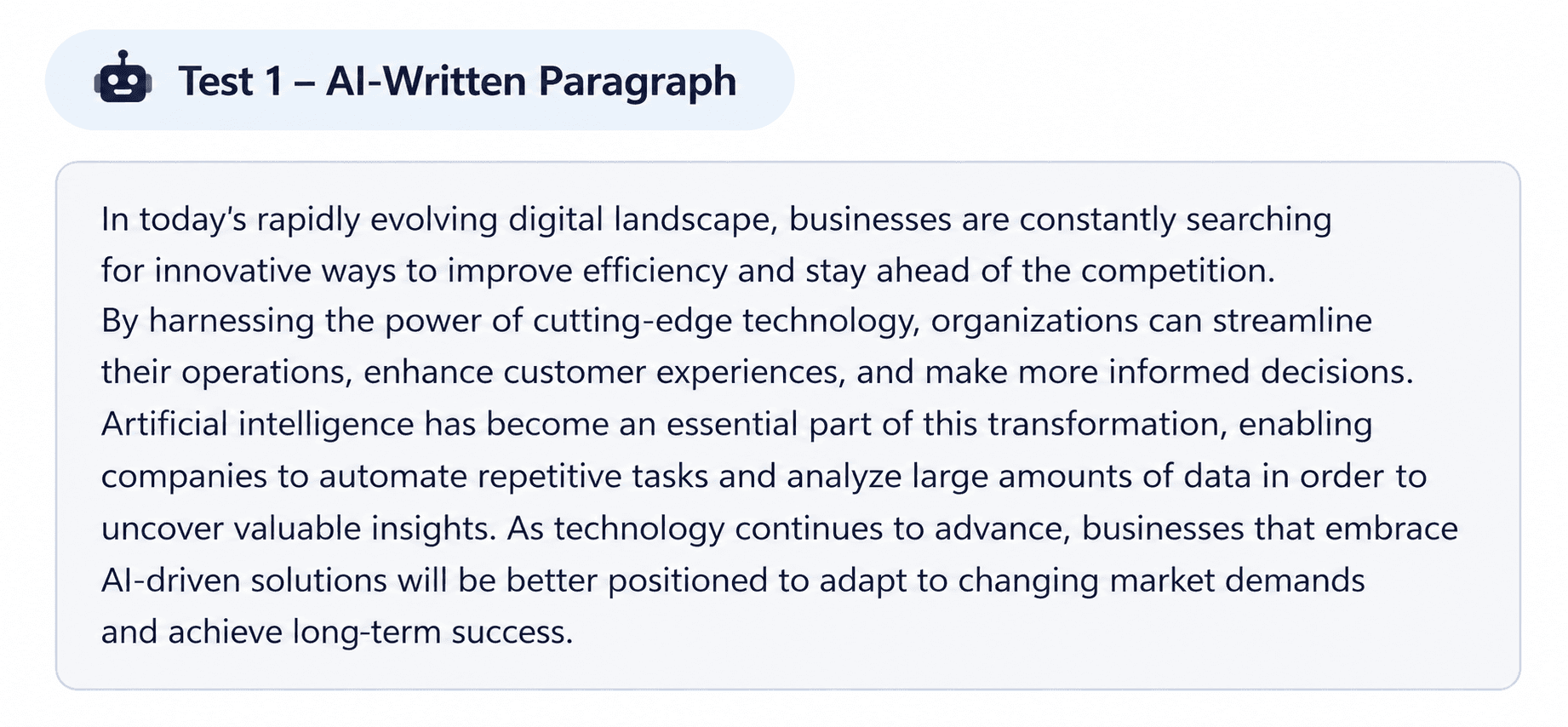
For our first test, we used a deliberately generic AI-generated paragraph with polished, predictable language and familiar AI-style phrasing.
Both detectors reached exactly the same conclusion.
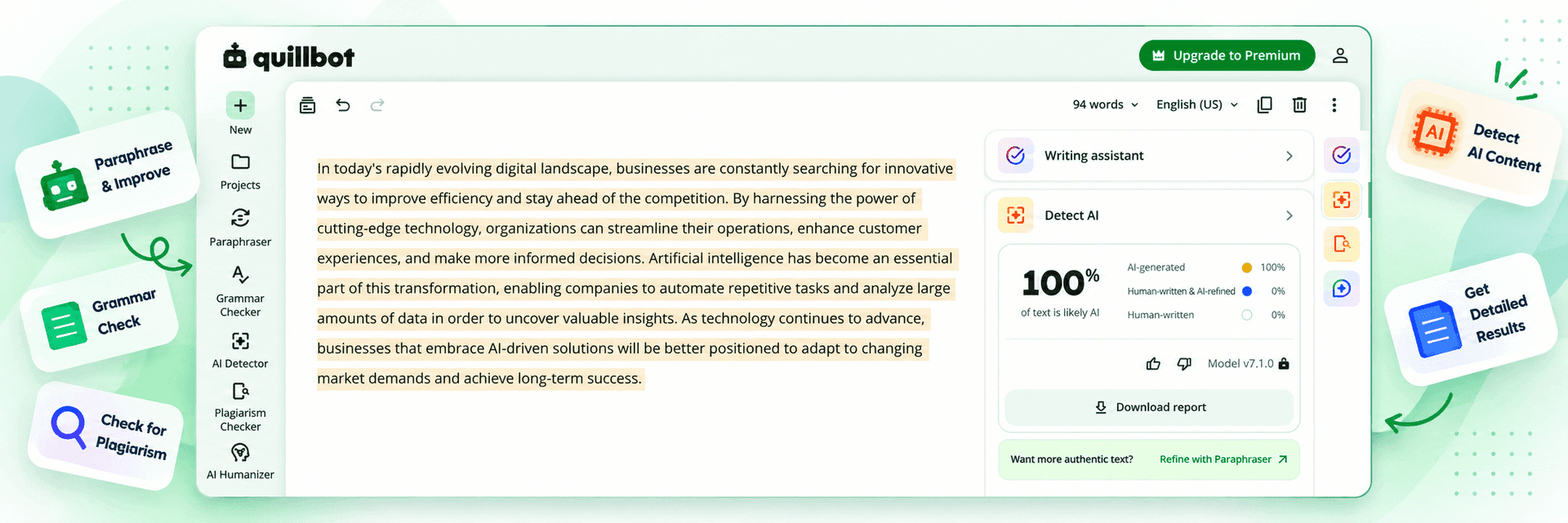
QuillBot's Result
QuillBot classified the sample as 100% AI-generated, with 0% marked as Human-written & AI-refined and 0% as Human-written.
It also highlighted the text it identified as AI-generated, making the result easy to see alongside the overall score.
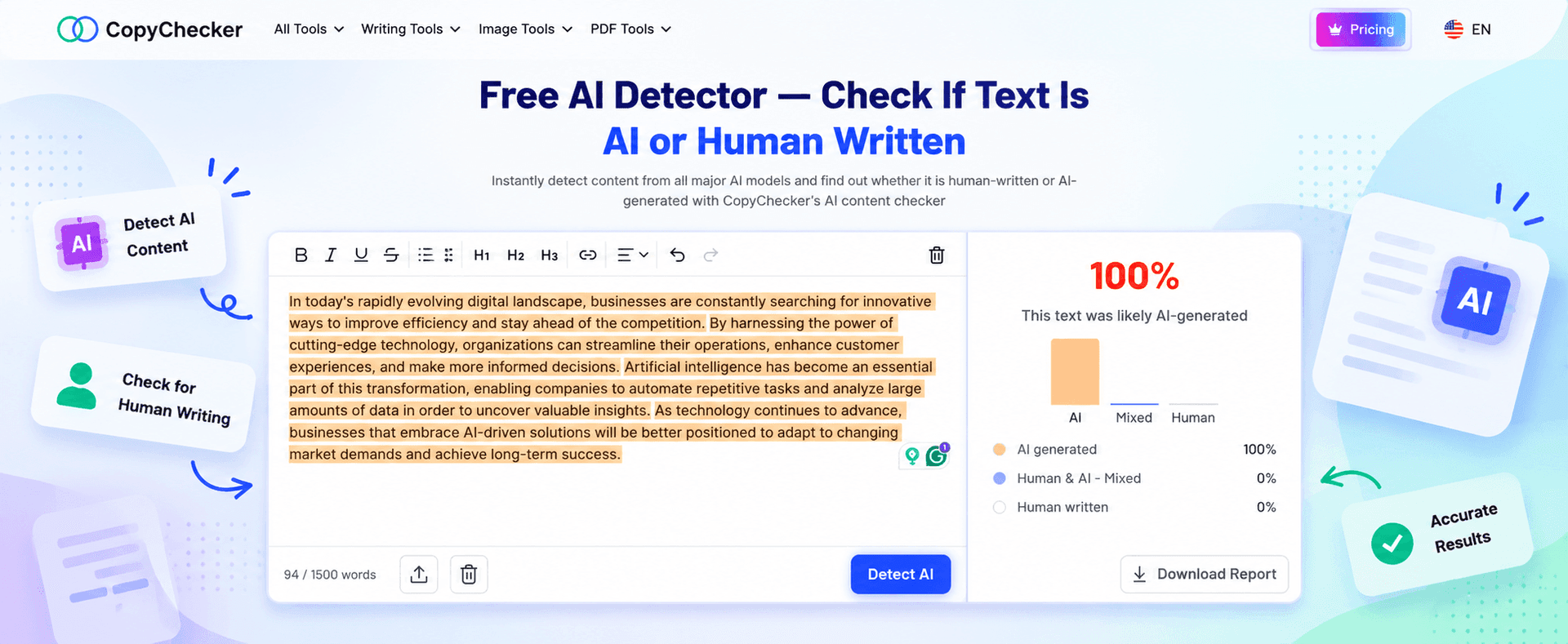
CopyChecker's Result
CopyChecker also classified the same paragraph as 100% AI-generated.
The full sample was highlighted, while the result panel showed:
- AI generated: 100%
- Human & AI - Mixed: 0%
- Human written: 0%
So, for this deliberately obvious AI sample, there was no disagreement between the two detectors.
Both returned a 100% AI result.
That gave us a useful baseline, but an obvious AI paragraph is also the easier test.
The more interesting question was what would happen when we gave both detectors something genuinely human-written.
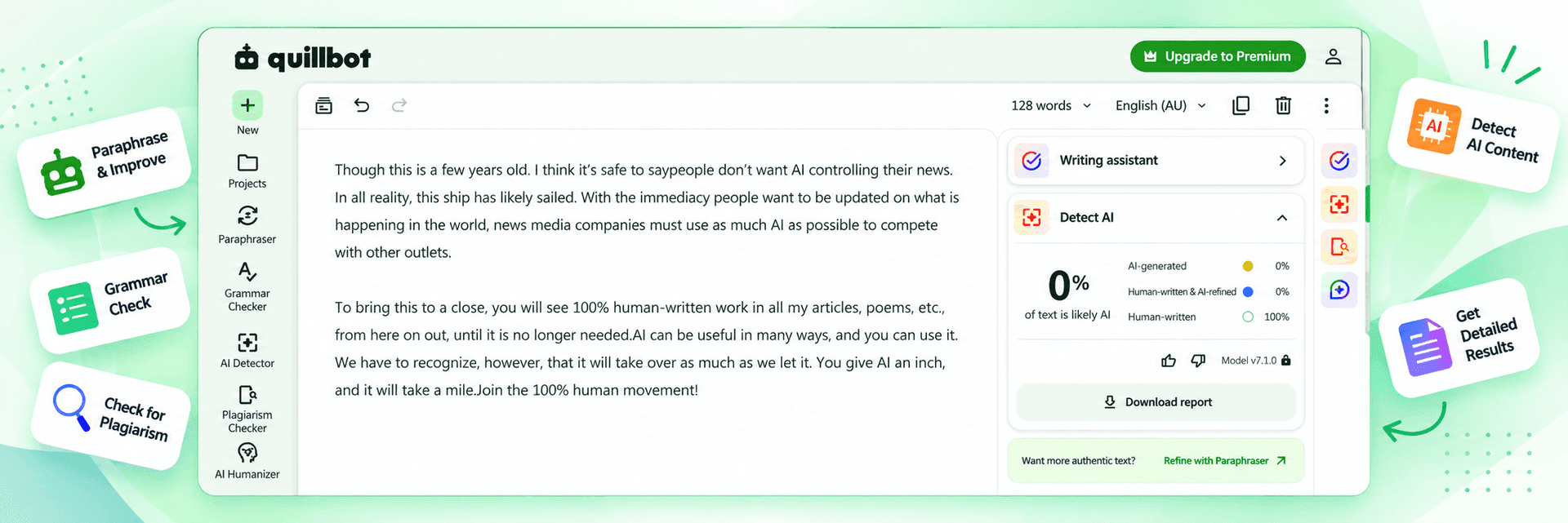
Test 2: A Short Human-Written Sample
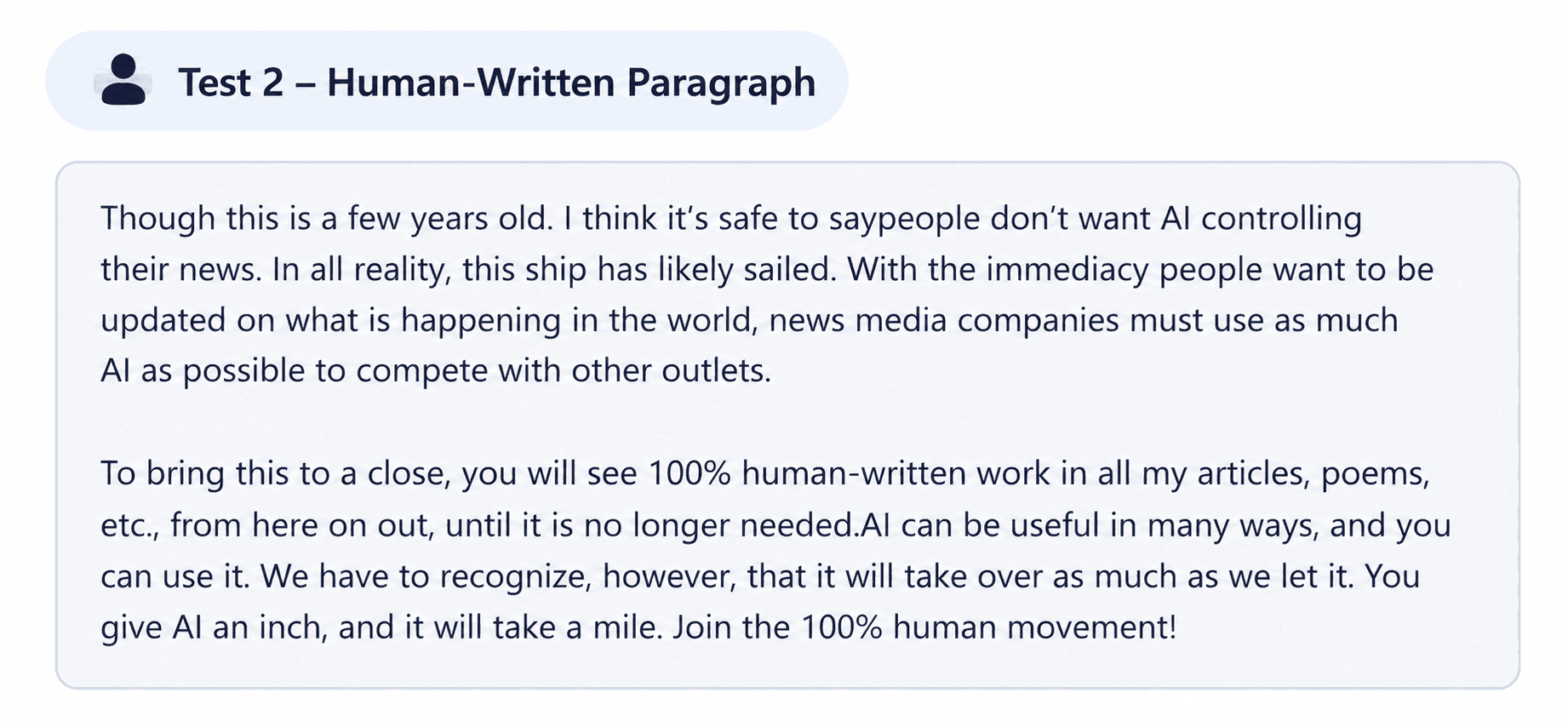
For the second test, we used a human-written passage with a much more personal and conversational style.
Once again, the two detectors agreed.
QuillBot's Result
QuillBot returned 0% AI-generated and classified the passage as 100% human-written.
Its breakdown showed:
- AI-generated: 0%
- Human-written & AI-refined: 0%
- Human-written: 100%
CopyChecker's Result
CopyChecker produced the same overall classification.
It returned 0% AI-generated, with its breakdown showing:
- AI generated: 0%
- Human & AI - Mixed: 0%
- Human written: 100%
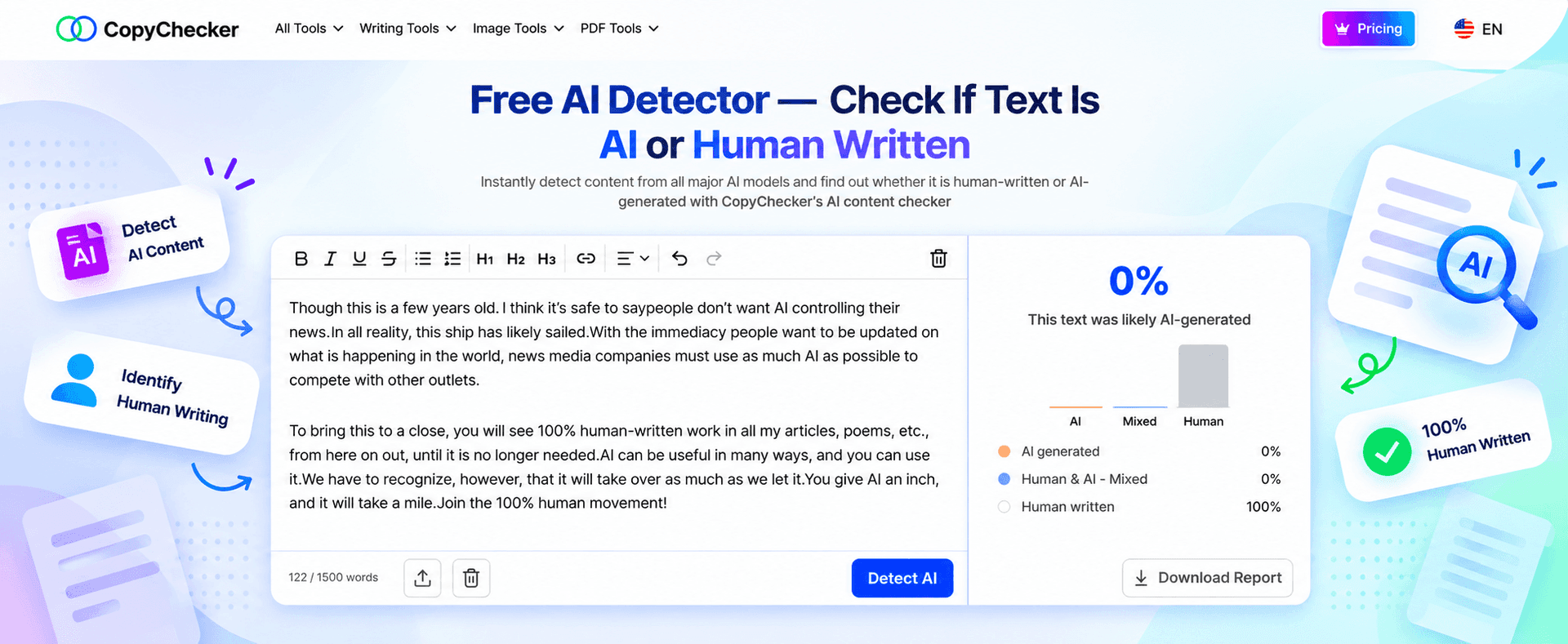
That means both detectors correctly separated our two test samples: the AI-written paragraph received a 100% AI result, while the human-written passage received a 100% human result.
What Our CopyChecker vs QuillBot Tool Testing Tells Us
For these two samples, CopyChecker and QuillBot produced identical classifications.
Both returned 100% AI for the deliberately AI-generated paragraph and 100% human for the human-written passage. Neither produced a mixed result in either test.
That's a cleaner result than we expected, but it shouldn't be stretched further than the evidence allows.
Two successful classifications do not establish that either detector is more accurate overall.
A meaningful accuracy comparison would require a much larger dataset covering different writing styles, AI models, text lengths, edited AI content, academic writing, and more difficult mixed-authorship samples.
So the practical takeaway from our test is simple: both detectors handled these two clear-cut samples correctly, and neither had an advantage in the final classification.
AI detectors can still produce false positives and false negatives, particularly with:
- Short passages
- Academic writing
- Highly formal writing
- Formulaic content
- Heavily edited AI text
- Human writing polished with AI tools
- Non-native English writing
Treat an AI detector as an investigation signal, not proof of authorship.
If a student's essay, employee's report, or freelancer's article receives a high AI score, the result should support further review rather than automatically deciding how the text was written.
And because the right way to use these tools depends heavily on who's using them, let's look at how the two platforms fit different workflows -
Which Is Better for Students between CopyChecker vs. QuillBot?
Students can find useful tools on both platforms, but their needs vary considerably.
A student who frequently rewrites sentences, summarizes readings, creates citations, translates material, and checks grammar may appreciate having those tasks inside QuillBot's ecosystem.
Its Citation Generator is particularly relevant to academic workflows, and QuillBot says it supports more than 1,000 citation styles.
The catch comes when plagiarism checking matters.
QuillBot's plagiarism checker requires Premium.
CopyChecker includes limited plagiarism checking on its free tier, alongside AI detection, grammar checking, paraphrasing, and humanizing.
So a student trying to avoid another subscription may get more mileage from CopyChecker's free combination of tools.
A student who regularly uses rewriting, summarization, citations, AI assistance, and other creation features may find QuillBot's broader ecosystem more convenient.
For content writers, though, the priorities shift from academic tasks to the everyday process of drafting, rewriting, checking, and polishing content.
So let’s talk about -
CopyChecker vs QuillBot: Which Is Best for Content Writers?
For content writers, the decision comes down to workflow.
Consider a writer who routinely does this:
Draft → Rewrite → Improve grammar → Adjust tone → Finalize
QuillBot fits naturally into that kind of creation and rewriting process, particularly if paraphrasing happens frequently.
Now consider a different workflow:
Draft → Check plagiarism → Check AI signals → Fix grammar → Rewrite sections →
Final review
CopyChecker's Writing Suite is structured more directly around that combination of originality and content-review tasks.
Neither workflow is inherently better.
They're simply solving different problems.
And once you move from an individual writer to a team handling content at scale, those workflow differences matter even more.
Let’s check them out -
Which Is Better from CopyChecker vs. QuillBot for Content Teams and Agencies?
Teams should look beyond the headline subscription price.
The more useful question is how much content passes through each tool every month.
If a team needs large amounts of paraphrasing plus AI-assisted creation, presentations,
images, citations, and other features, QuillBot's expanding platform gives one subscription considerable breadth.
If the team mainly needs originality checking, plagiarism scans, AI detection, grammar review, and occasional rewriting, CopyChecker's Writing Suite may map more directly to those tasks.
Volume matters too.
CopyChecker's Creator Suite currently limits plagiarism checking to 17,000 words and AI detection to 10,000 words per month.
QuillBot Premium currently includes up to 25,000 plagiarism-checking words per month and unlimited AI Detector scans according to its published plan documentation.
Teams processing hundreds of articles should therefore calculate actual monthly usage rather than comparing subscription prices alone.
The cheapest plan is not especially cheap if you exhaust the feature you actually bought it for.
Usage limits matter for teams, but they're only part of the picture.
So the next question is what else each subscription actually gives you beyond those core checks -
Which Platform Has More Tools between CopyChecker vs QuillBot?
This question has become surprisingly difficult because both platforms have expanded well beyond their original purposes.
QuillBot now covers writing, originality checking, AI creation, images, presentations, citations, translation, and PDFs.
CopyChecker also covers writing and originality tools, plus PDF utilities and image-search tools such as Reverse Image Search and AI Reverse Image Search.
There is therefore substantial overlap.
The difference is increasingly about how the tools are organized and monetized, rather than whether a particular category exists somewhere on the website.
QuillBot is moving toward an integrated creation platform.
While CopyChecker remains more modular, with individual tools you can use for specific tasks.
That difference matters most when deciding whether the free versions are enough or whether it's worth paying for broader access. So, let’s talk about -
Free Plan vs Paid Plan of CopyChecker vs QuillBot
If you're comparing these platforms because you don't want another subscription silently joining the small civilization already living on your bank statement, start with the free plans.
Choose based on what you repeatedly need.
CopyChecker's free plan makes sense when you need:
- Occasional plagiarism checks
- AI detection
- Grammar checking
- Paraphrasing
- AI humanizing
- Separate monthly allowances across those tasks
QuillBot's free plan makes sense when you need:
- Short paraphrases
- Grammar assistance
- AI detection
- Summarization
- Limited AI creation features
- Access to QuillBot's broader writing ecosystem
Once you're ready to pay, the equation changes.
At the pricing observed during this review, QuillBot Premium costs considerably less than CopyChecker's Creator Suite and unlocks a broad range of Premium functionality.
That makes QuillBot particularly compelling for someone who expects to use the paid features regularly.
CopyChecker's strongest pricing distinction remains its free access across several separate originality and writing tools, especially its inclusion of plagiarism checking.
Who Should Use QuillBot?
QuillBot is particularly well suited to someone whose workflow starts with creating, rewriting, or transforming text.
It makes sense if you:
- Paraphrase frequently
- Want multiple rewriting modes
- Regularly summarize content
- Need citation tools
- Want AI detection integrated with writing tools
- Prefer paying for one broad creation subscription
- Want access to newer tools such as AI presentations and image generation
- Already plan to pay for plagiarism checking
The platform has moved well beyond paraphrasing, but rewriting remains one of the clearest reasons to choose it.
Who Should Use CopyChecker?
CopyChecker is particularly useful when your workflow starts with checking and reviewing content.
It makes sense if you:
- Need free plagiarism checking
- Want AI detection and plagiarism checking together
- Only need occasional paraphrasing
- Want separate free allowances across several writing tools
- Need grammar and originality tools in the same platform
- Also use PDF or reverse image search utilities
- Don't want to subscribe immediately
Its free plan is especially relevant for users with relatively light monthly usage spread across several different tasks.
CopyChecker vs QuillBot - Which Fits Your Workflow?
There's little value in pretending every comparison has one universal winner.
The better fit depends on where your writing process spends most of its time.
If your workflow centers on paraphrasing, rewriting, summarizing, and AI-assisted creation, QuillBot offers a mature rewriting experience and an increasingly broad toolset.
Its Premium plan was also substantially cheaper than CopyChecker's Creator Suite at the time of our review.
If your workflow is more about checking originality, plagiarism, AI signals, grammar, and then occasionally rewriting content, CopyChecker offers a useful collection of tools and lets you access all five core Writing Suite tools without paying.
The clearest difference may be the simplest one:
QuillBot gives paying users a lot under one relatively inexpensive Premium subscription.
CopyChecker lets free users do a little across more of its core checking workflow, including plagiarism checking.
Choose based on the work you repeat every week, not the platform with the longest tools menu.
FAQs about CopyChecker vs QuillBot
Is CopyChecker better than QuillBot?
It depends on your workflow. QuillBot is stronger for frequent paraphrasing and rewriting, while CopyChecker suits users who want free access to plagiarism, AI detection, grammar, paraphrasing, and humanizing tools.
Is QuillBot cheaper than CopyChecker?
Yes, for the paid plans reviewed. QuillBot Premium was $4.17/month billed annually, compared with CopyChecker Creator Suite at $12.50/month billed annually as of September 2026.
Is CopyChecker free?
Yes. CopyChecker offers a free Writing Suite with monthly allowances for plagiarism checking, grammar checking, paraphrasing, AI detection, and AI humanizing.
Is QuillBot free?
Yes. QuillBot has a free plan with limited access to tools including paraphrasing, grammar checking, and AI detection, while some features require Premium.
Does QuillBot have a plagiarism checker?
Yes, but QuillBot's Plagiarism Checker is Premium-only. Premium users can currently check up to 25,000 words per month.
Does CopyChecker offer free plagiarism checking?
Yes. CopyChecker currently includes 1,500 plagiarism-checking words per month for free, while its Creator Suite increases the limit to 17,000 words.
Which is better for paraphrasing, CopyChecker or QuillBot?
QuillBot is more focused on paraphrasing, with multiple rewriting modes and expanded Premium features. CopyChecker offers 1,000 free paraphrasing words per month, making it suitable for more occasional use.
Which AI detector is more accurate, CopyChecker or QuillBot?
Our test wasn't large enough to determine an overall accuracy winner. Both detected our obvious AI sample, while QuillBot provided more detailed explanations for its result.
Can AI detectors falsely flag human writing?
Yes. AI detectors can produce false positives and false negatives, especially with short, formal, repetitive, or highly structured text. Their scores should not be treated as proof of authorship.
Can I use CopyChecker instead of QuillBot?
Yes, for tasks such as plagiarism checking, AI detection, grammar checking, paraphrasing, and AI humanizing. QuillBot offers a broader creation ecosystem, while CopyChecker provides free plagiarism checking and additional utilities such as reverse image search.
Upgrade Your Own Writing
By now, the difference between the two is fairly clear.
QuillBot makes more sense when rewriting and an all-in-one paid writing experience are the priority, while CopyChecker gives you more ways to check and improve content without paying upfront.
But feature lists, pricing tables, and our test samples can only tell you so much. The better test is the content you actually work with every day.
Take a recent essay, article, report, or draft and run it through CopyChecker's free Plagiarism Checker.
Then check the same text with the AI Detector to get another view of its originality.
Both are available on the free plan, so you can try the workflow with your own writing before deciding whether you need a paid writing suite at all.