Imagine an editor receiving ten articles from freelancers on Monday morning.
Before any of them can be published, there are several questions to answer: Is the writing original?
Does any of it appear AI-generated?
Are there copied passages?
And does anything need a closer human review?
Checking one article is easy.
Doing the same thing repeatedly across dozens of submissions turns AI and plagiarism detection into a workflow problem.
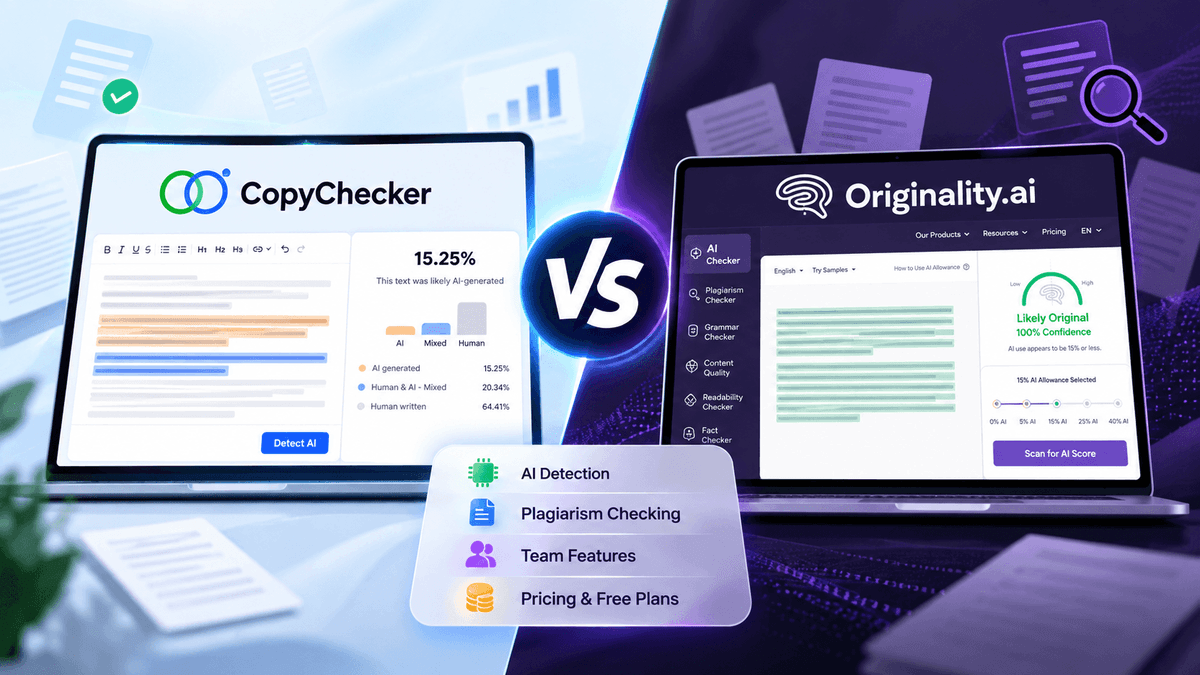
That is where CopyChecker and Originality.ai take noticeably different approaches.
Originality.ai is built heavily around professional content verification, combining AI detection and plagiarism checking with team features, site scanning, reporting, and other publishing-focused tools.
CopyChecker also provides AI detection and plagiarism checking, but places them inside a broader writing toolkit that includes grammar checking, paraphrasing, AI humanization, citation tools, readability tools, and other content utilities.
So the real question is not simply which AI detector is better?
Which approach makes more sense for the way your team actually reviews content?
To find out, we compared their features, free and paid plans, content-review workflows, and pricing models.
We also ran the same human-written, AI-generated, and human-edited AI samples through both detectors to see how their results compared in practice.
Here’s what we found -
CopyChecker vs Originality.ai At A Glance
Before we get into pricing and individual features, it helps to see how the two platforms differ overall.
Both cover AI detection, plagiarism checking, and grammar-related tasks, but they package those capabilities differently.
This quick comparison shows the main differences in free access, paid plans, scanning options, and additional tools.
| Feature | CopyChecker | Originality.ai |
|---|---|---|
| AI detection | Yes | Yes |
| Plagiarism checking | Yes | Yes |
| Ongoing free access | Yes | Yes |
| Free AI detection | 500 words/month | 3 scans/day, up to 2,000 words each |
| Free plagiarism checking | 1,500 words/month | Not included in Basic free plan |
| Paid pricing model | Monthly word allowances by tool | Credit-based |
| Entry paid plan | Creator Suite: $12.50/month billed annually | Pro: $14.95/month or $12.95/month billed annually |
| AI + plagiarism combined scan | Tools can be used separately | Available together in the same scan |
| Team management | Not a major focus of the standard Writing Suite | Yes |
| Site/URL scanning | No | Yes |
| API | Not listed as a standard Writing Suite feature | Enterprise |
| Grammar tools | Yes | Yes |
| Paraphrasing tools | Yes | Not the core workflow |
| AI humanizer | Yes | Detection-focused |
| Image/PDF/other tools | Yes, through wider CopyChecker platform | Mainly content-verification tools |
Pricing and features checked September 29, 2026. Plans can change, so verify current pricing before publishing or purchasing.
The table shows the broad differences, but they make more sense once we look at what each platform is designed to do.
Let’s start with Originality.ai and the type of content-review workflow it focuses on.
What Is Originality.ai?
Originality.ai is primarily a content-verification platform built for publishers, agencies, marketers, and other teams handling large amounts of written content.
Its workflow goes beyond pasting text into an AI detector.
Paid users can access features including:
- AI content detection
- Plagiarism checking
- Readability checking
- Grammar and spelling checks
- Fact-checking assistance
- Document uploads
- URL scanning
- Full-site scanning
- Scan history
- Team management
- Scan tags
- A Chrome extension
Enterprise customers also receive features such as API access, extended scan history, priority support, and additional reporting capabilities.
Originality.ai describes its Enterprise plan specifically as being intended for agencies and publishers working at scale.
That focus becomes important when comparing it with CopyChecker.
Originality.ai is not simply an AI detector with a plagiarism checker attached.
Much of the product is designed around managing a content-review process.
CopyChecker approaches content checking somewhat differently, with AI detection and plagiarism checking forming part of a broader collection of writing and document tools.
That difference in approach is easier to see by looking at what CopyChecker offers and how its tools are structured -
What Is CopyChecker?
CopyChecker approaches the same problem from a broader writing-tool perspective.
AI detection and plagiarism checking are two of its main writing tools, alongside:
- Grammar Checker
- Paraphrasing Tool
- AI Humanizer
- AI Citation Generator
- Readability Checker
- Tone Checker
- Sentence and paragraph analysis tools
The wider CopyChecker platform also includes PDF, reverse-image search, image, video, and text utilities.
For a content writer or smaller marketing team, that means the account can be used at multiple stages of content production, not just verification.
For example, someone could check a draft for plagiarism, scan it for AI patterns, correct grammar, review readability, and use other writing utilities without moving between separate subscriptions.
That is a different product philosophy from Originality.ai.
Originality.ai focuses heavily on content verification and publishing workflows.
CopyChecker focuses more broadly on writing, checking, editing, and related content tasks.
AI detection is one area where those two approaches overlap, so it makes sense to compare how each platform handles it before moving on to their other features.
How CopyChecker and Originality.ai Handle AI Detection
Both platforms provide a percentage-based assessment intended to help identify text that may have been generated by AI.
But there is an important point to establish before comparing them:
An AI-detection percentage is not proof of authorship.
AI detectors analyze patterns in text.
Human writing can sometimes be classified as AI-generated, while edited or heavily modified AI content can sometimes pass as human.
That means content teams should use detection results as part of an editorial review rather than automatically rejecting a writer because a detector produced a high AI score.
This matters particularly when managing freelancers.
A sensible workflow would be:
- Run the submitted article through an AI detector.
- Review any suspicious passages.
- Check plagiarism separately or simultaneously.
- Compare the work against previous submissions where appropriate.
- Ask the writer for clarification if something looks unusual.
- Make the editorial decision using the full context rather than a detector score alone.
This reduces the risk of treating probabilistic software as a digital lie detector.
With that limitation in mind, the next question is how each platform presents its detection results and fits them into a practical review process.
We’ll start with Originality.ai, which builds several review-oriented features around its AI detector.
Originality.ai's AI Detection Workflow
Originality.ai has developed AI detection as one of its central products.
Its current paid platform allows publishers to incorporate detection into larger workflows through features such as document uploads, URLs, site scans, scan history, team accounts, and reporting.
One useful difference is that AI detection and plagiarism checking can be enabled together in the same Originality.ai scan.
According to Originality.ai's documentation, one credit scans up to 100 words when you select either AI detection or plagiarism checking individually.
If both are enabled, one credit covers up to 50 words, meaning a 1,000-word combined AI-and-plagiarism scan would consume 20 credits.
This can be convenient when every freelancer submission needs both checks.
CopyChecker handles the same review process differently, so let’s see -
CopyChecker's AI Detection Workflow
CopyChecker provides AI detection as a separate tool.
Rather than calculating credits for each operation, users receive an AI-detection word allowance based on their plan.
The current free plan includes 500 AI Detector words per month.
Creator Suite includes 10,000 words per month, while the listed Pick Your Own Plan allowance is 15,000 words per month.
This is easier to understand if your main concern is simply:
How many words can our team check this month?
You do not have to calculate whether turning on an additional type of scan will consume another set of credits.
AI detection, however, is only one part of reviewing submitted content.
A completely human-written article can still contain copied passages, unattributed material, or wording that closely matches another publisher.
That brings us to the second major concern that both platforms share -
Originality.ai vs CopyChecker Pricing
Pricing is one of the bigger differences between CopyChecker and Originality.ai because the two platforms measure usage differently.
To be honest, comparing monthly subscription prices alone doesn't tell the whole story.
It is also important to look at how much content each plan lets you check, which features are included, and how quickly you can use up your available usage.
Let’s start with CopyChecker’s plan structure before looking at how Originality.ai’s credit system compares.
CopyChecker Pricing
CopyChecker currently lists three Writing Suite options.
Free
$0 per month.
Current monthly allowances include:
- 1,500 plagiarism words
- 500 AI-detection words
- 1,000 grammar-checking words
- 1,000 paraphrasing words
- 500 AI-humanizer words
Creator Suite
$12.50 per month when billed at $150 annually. It currently includes:
- 17,000 plagiarism words/month
- 10,000 AI-detection words/month
- Unlimited grammar checking
- 10,000 paraphrasing words/month
- 3,000 AI-humanizer words/month
Pick Your Own Plan
Currently shown from $30.83 per month, billed at $370 annually, with higher listed allowances for individual tools.
Originality.ai Pricing
Originality.ai currently offers a free Basic tier alongside Pro and Enterprise subscriptions.
Basic
Free.
It includes AI detection only, with:
- 3 scans per day
- Up to 2,000 words per scan
- Document uploads
Pro
$14.95 per month when paying monthly or $12.95/month when billed annually, with 2,000 credits renewing each month.
Enterprise
$179 per month when paying monthly or $136.58/month when billed annually, with 15,000 credits per month and additional enterprise features.
Originality.ai also supports additional credits and pay-as-you-go usage.
Pay-as-you-go credits expire after two years, while credits supplied through Pro and Enterprise subscriptions expire at the end of the monthly billing cycle.
These differences in how credits are purchased, used, and renewed make it difficult to compare Originality.ai and CopyChecker based on subscription price alone.
A lower monthly price doesn't necessarily mean lower costs for a particular team, just as a larger allowance doesn't necessarily provide more value if much of it goes unused.
A more useful comparison is to look at what each pricing model actually provides for how a team works.
Paid plans are only part of the comparison, though.
Both platforms now offer ongoing free access, so it's worth looking separately at what someone can actually do without subscribing.
CopyChecker vs Originality.ai Free Plans Comparison
The free-plan comparison has changed significantly because Originality.ai now offers ongoing free AI detection.
Originality.ai Basic
Originality.ai's current Basic plan provides:
- AI detection
- Three scans per day
- Maximum 2,000 words per scan
- DOC, DOCX, and PDF uploads
However, the free tier does not include its full plagiarism-checking workflow.
CopyChecker Free
CopyChecker's free account provides smaller AI-detection capacity but spreads its allowance across more tools.
Each month, users currently receive:
- 500 AI Detector words
- 1,500 Plagiarism Checker words
- 1,000 Grammar Checker words
- 1,000 Paraphraser words
- 500 AI Humanizer words
So the difference is fairly clear.
If you primarily want to perform free AI detection, Originality.ai's current Basic plan provides substantially more scanning capacity.
If you want to test AI detection, plagiarism checking, grammar mistakes, paraphrasing, and other writing functions without paying, CopyChecker spreads its free usage across more tasks.
Free allowances matter most when deciding what you can do without a subscription.
For agencies, publishers, and content teams, however, another question becomes just as important: how well does each platform support a workflow involving multiple writers, editors, or reviewers?
That brings us beyond individual tools and usage limits to the team and workflow features built into each platform.
Which Has Better Features for Teams?
This is one area where Originality.ai has a clearer specialization.
Its Pro plan includes team-management functionality, scan tagging, site scanning, URL scanning, a Chrome extension, and other features designed around recurring content-review workflows.
Additional team seats are available for paid plans, with the price varying by plan.
Originality.ai also allows account administrators to control individual team members' credit allowances.
Enterprise adds capabilities including API access, 365-day scan history, priority support, and a dedicated customer-success manager.
For a publisher receiving dozens or hundreds of articles from writers, those workflow features may matter as much as the detector itself.
CopyChecker's current Writing Suite pricing is more focused on access to individual tools and their word limits.
That can work well for an individual marketer, editor, blogger, or smaller team whose priority is performing the checks rather than managing a sophisticated verification workflow across many users.
AI Detection Test between CopyChecker vs Originality.ai
Feature lists can tell us how the two AI detectors work, but they do not show how differently the tools may respond to the same piece of writing.
So, we tested CopyChecker and Originality.ai using the same text samples under the same conditions.
The goal was not to determine which detector is universally more accurate.
AI detection results can vary by writing style, AI model, editing, and content type.
Instead, this test looks at a simpler question:
How do CopyChecker and Originality.ai classify content when we already know how each sample was created?
How We Tested the CopyChecker vs Originality AI Detectors
We prepared three types of samples:
| Test | Sample Type | What It Tests |
|---|---|---|
| Test 1 | Human-written content | Whether either detector incorrectly flags human writing as AI |
| Test 2 | AI-generated content | Whether each detector clearly identifies AI-generated writing |
| Test 3 | Human-edited AI content | How the detectors respond after AI-generated text has been substantially edited by a person |
The exact same version of each sample was submitted to CopyChecker and Originality.ai.
We recorded each detector's results without changing the text between scans.
This matters because even small wording changes can affect an AI detector's score.
Test 1: Human-Written Content
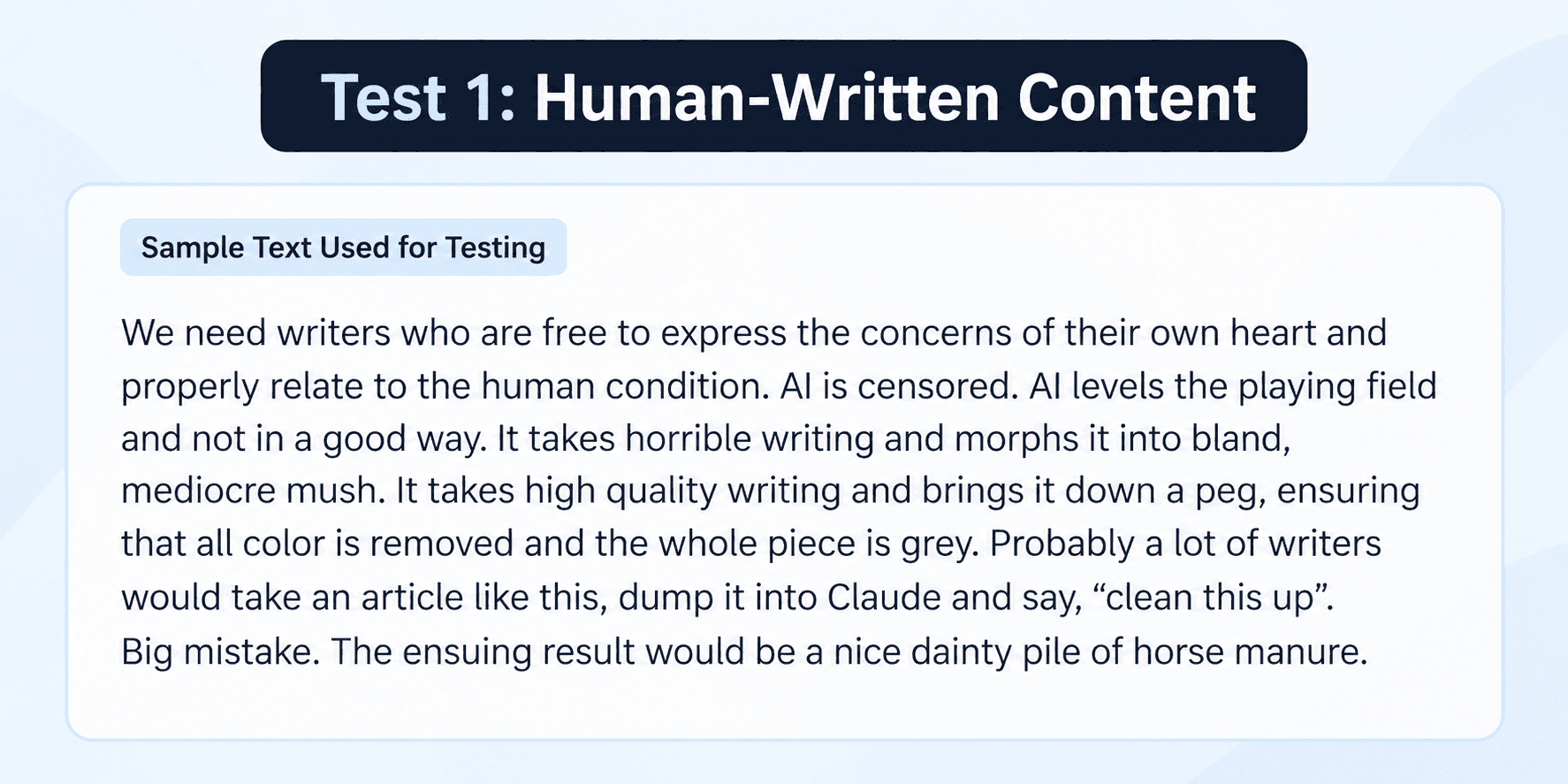
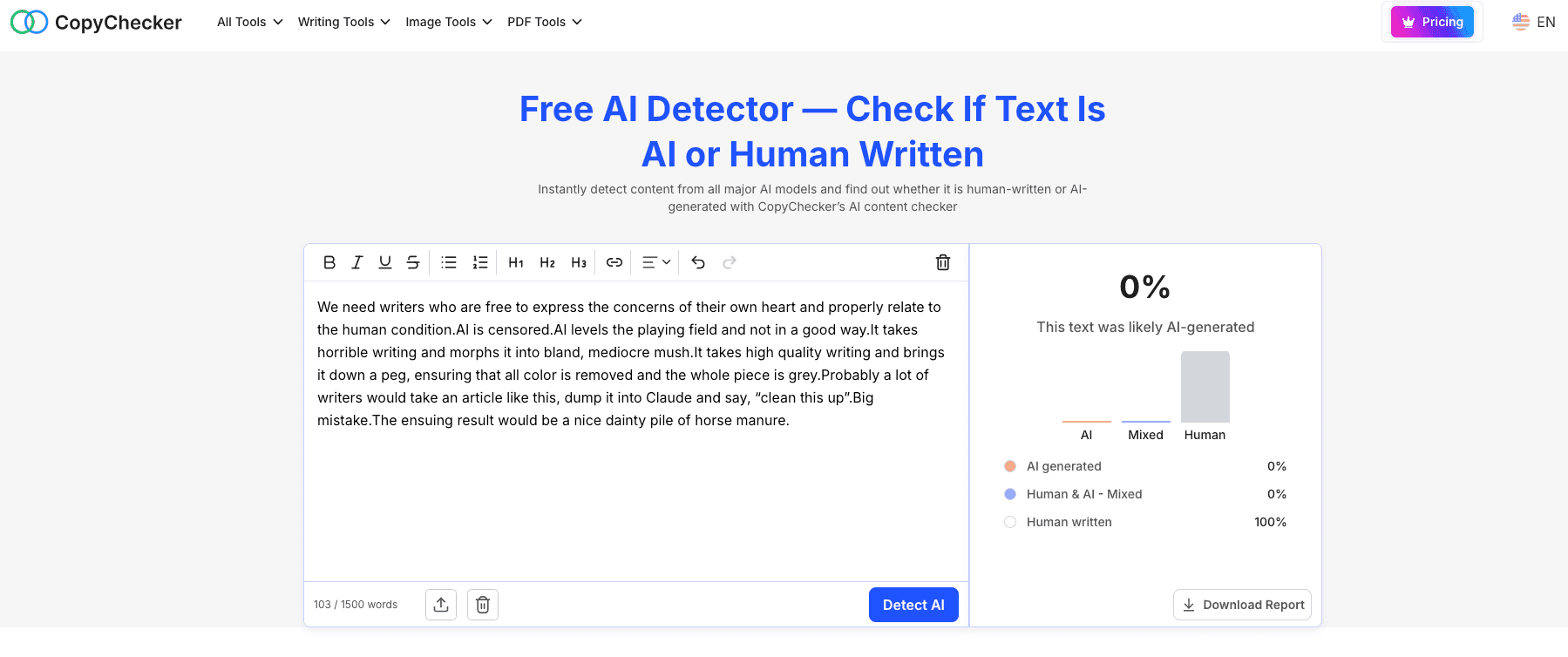
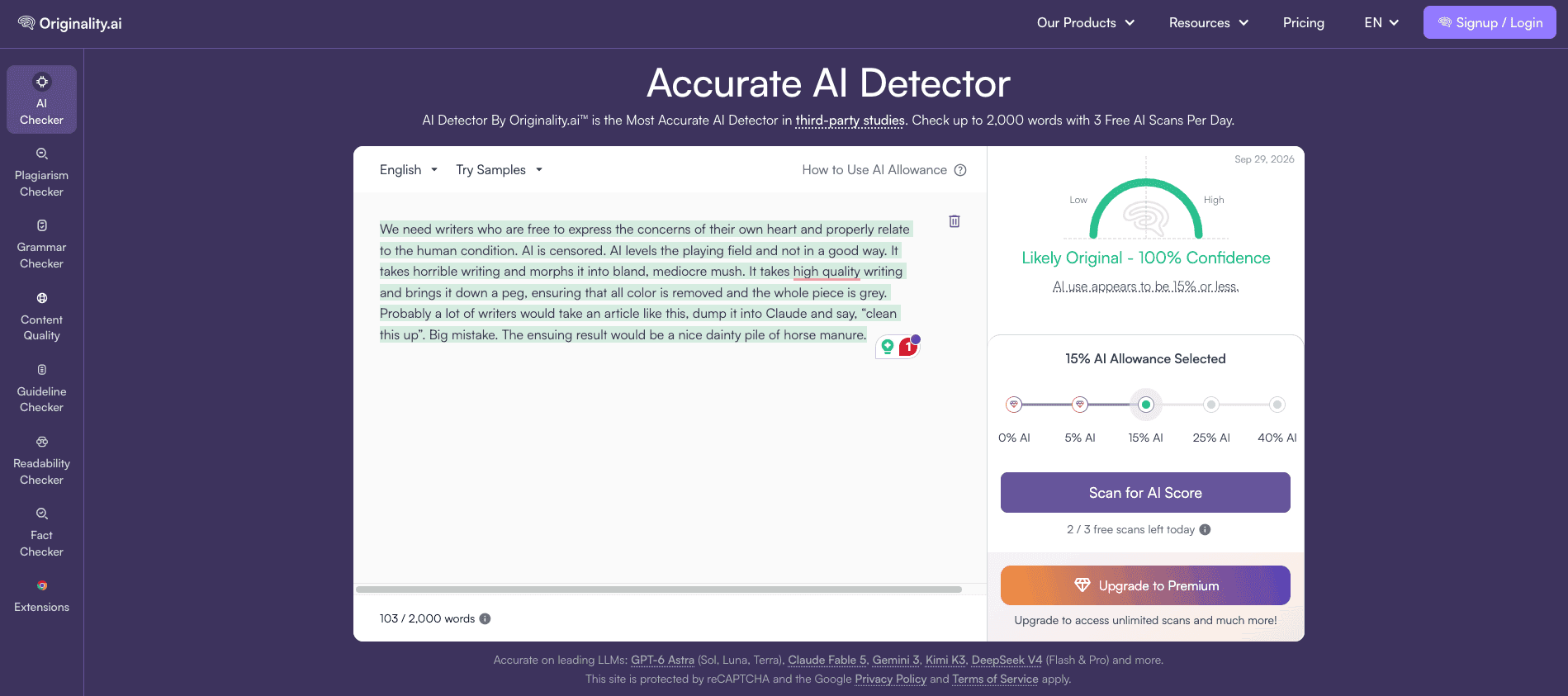
For the first test, we used a 103-word sample from an existing human-written article.
The passage was taken from the original content without AI rewriting or paraphrasing so that we could see how each detector handled writing whose origin was already known.
We removed formatting elements such as headings and links and submitted the same plain-text sample to both CopyChecker and Originality.ai.
Known origin: Human-written
Sample length: 103 words
Content type: Informational blog content
CopyChecker result: 100% Human Written, 0% AI Generated
Originality.ai result: Likely Original, 100% confidence
What Happened?
Both detectors correctly recognized the human-written sample.
CopyChecker classified the text as 100% human-written, with 0% AI-generated and 0% mixed content.
Originality.ai also returned a strongly human result, labeling the passage “Likely Original” with 100% confidence. Its interface additionally indicated that the apparent AI use was within the selected 15% AI allowance.
So, for this first sample, the two detectors reached the same practical conclusion despite presenting their results differently: neither flagged the known human-written passage as AI-generated.
That gives us a useful baseline. The next test is more challenging: what happens when the same two detectors are given content that we know was generated entirely by AI?
Test 2: AI-Generated Content
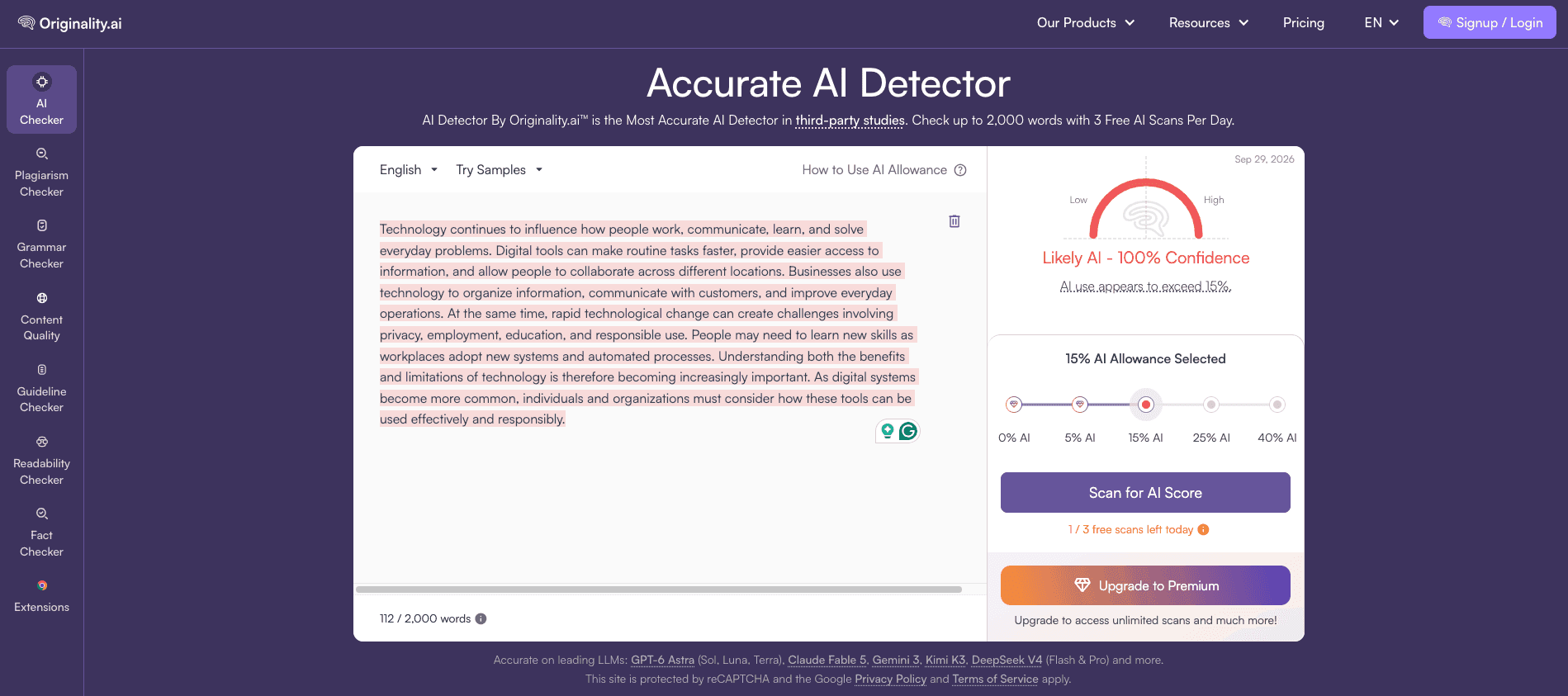
Next, we tested content generated entirely by an AI model without manually rewriting or editing the output. The same text was submitted to both detectors without any changes between scans.
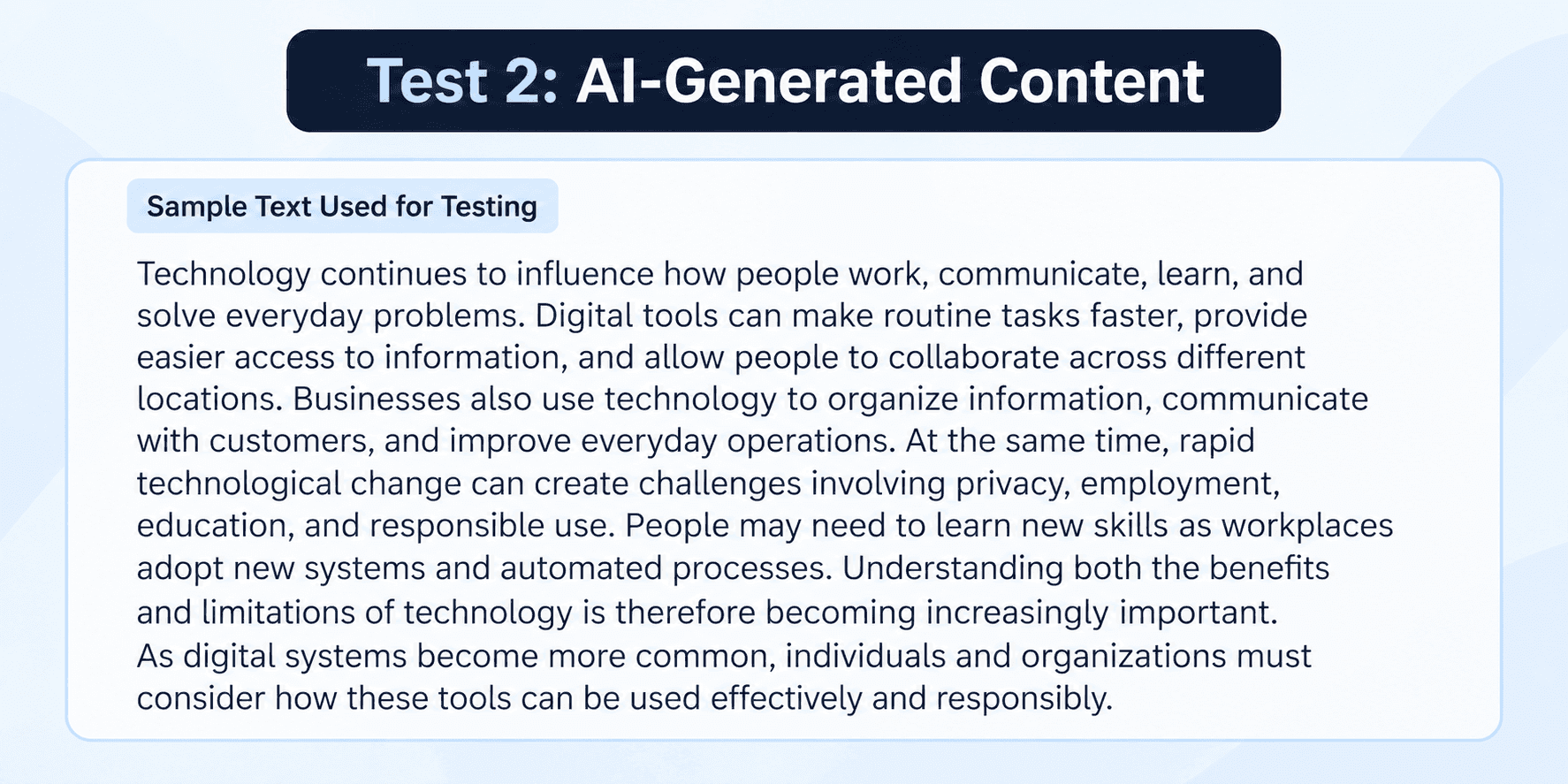
AI model used: GPT-5.6 Sol (ChatGPT)
Sample length: 112 words
Content type: Informational blog content
Human editing: None
Prompt: “Write approximately 100–120 words of neutral informational blog content about how technology affects everyday life.”
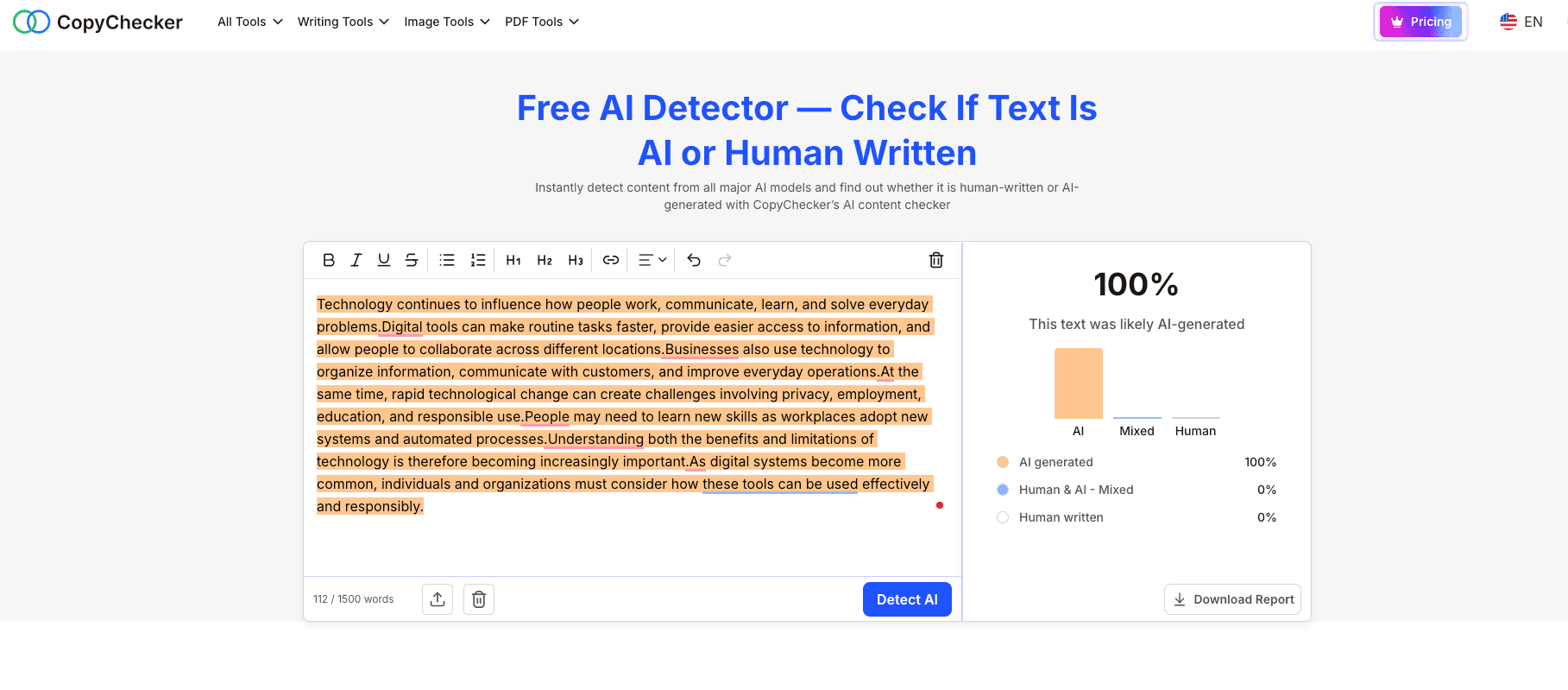
CopyChecker result: 100% AI-generated, 0% mixed, 0% human-written
Originality.ai result: Likely AI, 100% confidence
What Happened?
Both detectors correctly identified the known AI-generated sample, and their assessments were very similar.
CopyChecker classified the passage as 100% AI-generated, with 0% mixed and 0% human-written content.
Originality.ai reached the same overall conclusion, labeling the sample “Likely AI” with 100% confidence.
In other words, the two detectors did not meaningfully disagree in this test.
Despite using different labels and interfaces, both strongly classified the same AI-generated passage as AI-written.
Together with Test 1, we now have two straightforward results: both detectors recognized the known human-written sample as human and the known AI-generated sample as AI.
The next test makes that distinction less clear by introducing human editing into AI-generated content.
Test 3: Human-Edited AI Content
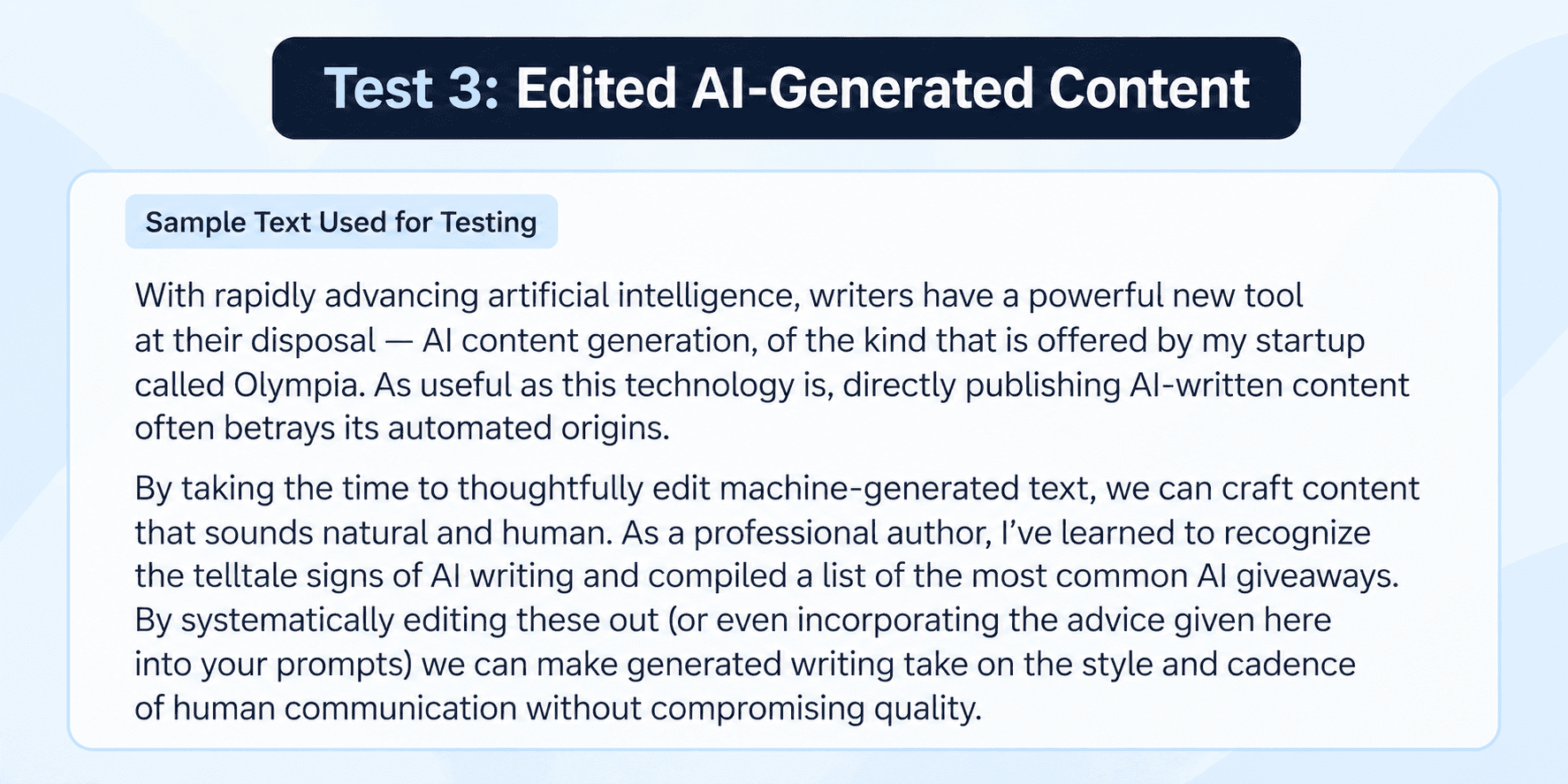
The third test is closer to a situation content teams may encounter in practice. Instead of testing clearly human-written or untouched AI-generated text, we used a passage that had undergone human editing after AI generation.
This makes the sample more difficult to classify because the final text contains characteristics of both machine-generated and human-shaped writing.
Original AI source: Not independently verified for this test
Sample length: Approximately 115 words
Content type: Informational blog content
Editing method: The AI-generated text was manually edited to make the wording, sentence structure, flow, and overall style sound more natural.
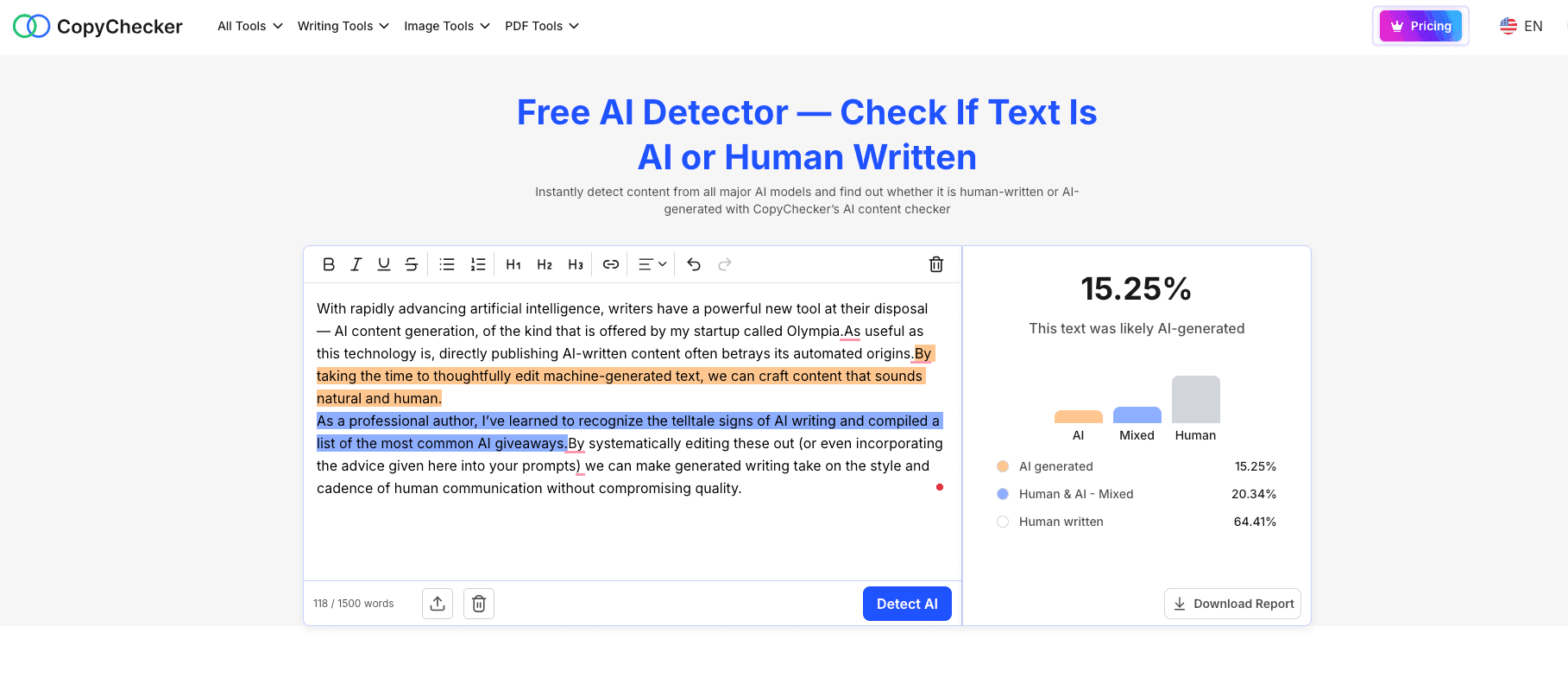
CopyChecker result: 15.25% AI-generated, 20.34% Human & AI Mixed, 64.41% Human-written
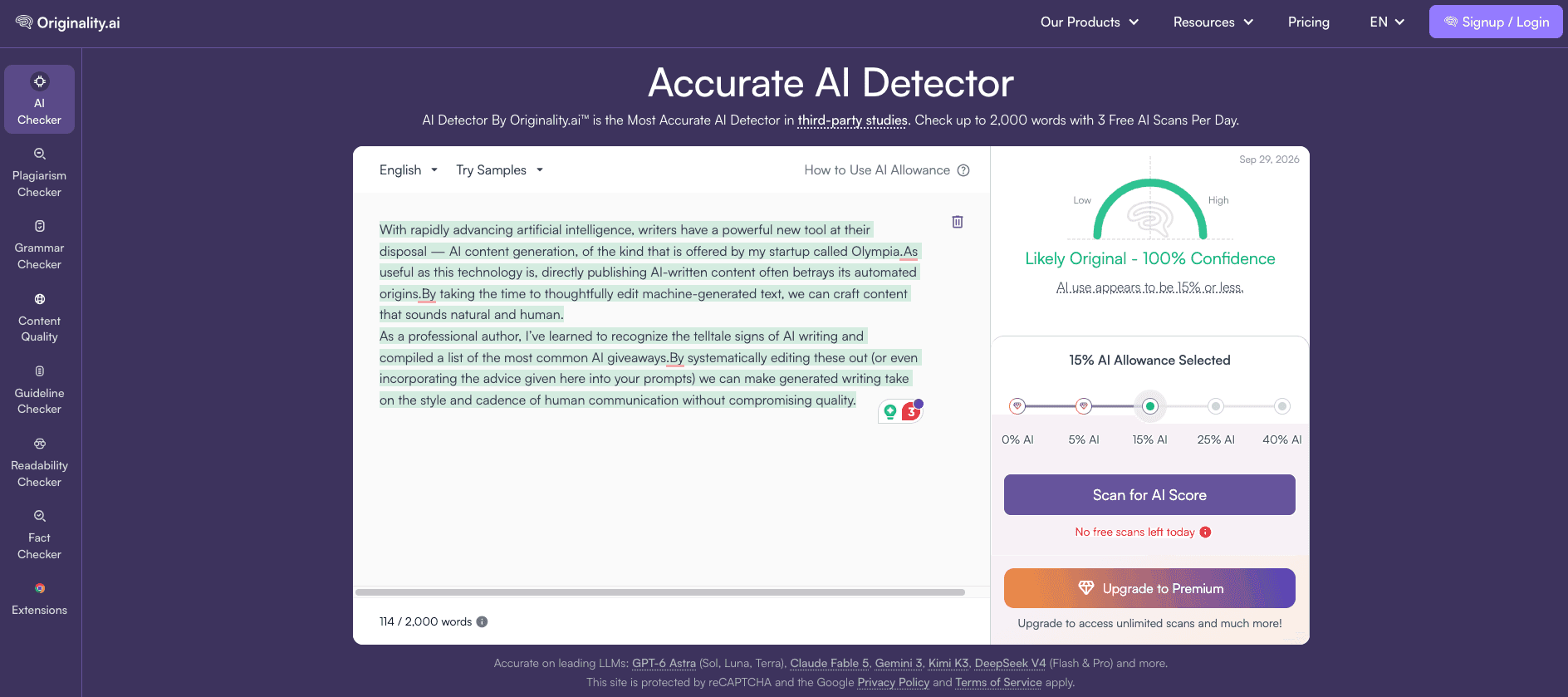
Originality.ai result: Likely Original, 100% confidence
What Happened?
This test produced a more nuanced result than the first two.
CopyChecker did not classify the edited passage as entirely human or entirely AI-generated.
Instead, it identified 64.41% as human-written, 20.34% as mixed human-and-AI content, and 15.25% as AI-generated.
Originality.ai responded differently.
It classified the same passage as “Likely Original” with 100% confidence, indicating that the edited version fell on the human/original side of its assessment.
The contrast with Test 2 is particularly noticeable. Both detectors had strongly identified the unedited AI sample as AI-generated.
After human editing, however, their assessments shifted substantially toward human writing.
What Did the Test Show?
Across the three tests, CopyChecker and Originality.ai agreed on the two clear-cut samples but responded differently when AI-generated content had been edited by a human.
Here are the results side by side:
| Sample | Known Origin | CopyChecker Result | Originality.ai Result |
|---|---|---|---|
| Human-written | Human | 100% Human Written | Likely Original, 100% confidence |
| AI-generated | AI | 100% AI Generated | Likely AI, 100% confidence |
| Human-edited AI | Mixed | 64.41% Human, 20.34% Mixed, 15.25% AI | Likely Original, 100% confidence |
The first two tests produced very similar outcomes. Both detectors recognized the known human-written sample as human or original, and both strongly identified the unedited AI-generated sample as AI.
The third test is where the results became more interesting.
After AI-generated content had been edited by a human, CopyChecker returned a mixed assessment. It classified 64.41% as human-written, 20.34% as mixed, and 15.25% as AI-generated.
Originality.ai gave the same passage an overall “Likely Original” result with 100% confidence.
So, in our small test, both tools handled the clear human and AI samples similarly, but they interpreted the human-edited AI sample differently.
CopyChecker retained signals of both AI and human involvement, while Originality.ai classified the finished passage as original.
These results should be interpreted as a small practical comparison, not a comprehensive accuracy study.
Three samples cannot establish the overall accuracy rate of either detector or show how they would perform across different AI models, topics, writing styles, languages, and levels of editing.
They do illustrate something important for content teams, though: AI detection becomes less straightforward once human editing is involved.
Who Should Use Originality.ai?
Originality.ai is particularly suited to:
- SEO agencies managing multiple writers
- Publishers reviewing large amounts of outsourced content
- Content operations teams
- Agencies that need multiple reviewer accounts
- Teams that want AI and plagiarism checking in one scanning workflow
- Businesses that need scan history and reporting
- Enterprise users that need API integration
- Publishers that want URL or full-site scanning
Its biggest distinction is not simply the AI detector.
It is the infrastructure surrounding content verification.
Who Should Use CopyChecker?
CopyChecker is particularly suited to:
- Individual writers
- Bloggers
- Freelance editors
- Small marketing teams
- Students and researchers
- Teams that need plagiarism and AI checking without a credit calculation
- Users who want multiple writing tools under one account
- People who want free monthly plagiarism checks
- Users who also need citation, rewriting, grammar, PDF, or image-related tools
Rather than being primarily a content-verification platform, CopyChecker functions as a broader collection of tools used throughout the content workflow.
CopyChecker vs Originality.ai: Which Should You Choose?
For professional publishing operations with multiple writers and editors, Originality.ai provides a more dedicated team and content-verification infrastructure.
Features such as team management, scan tagging, URL scanning, site scanning, report sharing, longer scan history, and API access make its intended audience fairly clear.
For individuals and smaller teams that want several writing and checking tools without managing credits, CopyChecker takes a simpler approach.
It measures AI detection and plagiarism limits separately in words, and its free plan includes both types of checking instead of limiting free usage to AI detection.
The choice therefore comes down to workflow.
Consider Originality.ai if your main problem is managing content verification at scale.
Consider CopyChecker if AI and plagiarism checking are part of a broader writing and editing workflow and you want those tools available from the same account.
And whichever platform you use, AI-detection results should remain one piece of evidence, not the final verdict on whether someone wrote a piece of content.
FAQs about CopyChecker vs Originality
Does Originality.ai Have a Free Plan?
Yes. Originality.ai offers a free Basic plan with three AI-detection scans per day, with up to 2,000 words per scan. Plagiarism checking is not included in the Basic free plan.
Is CopyChecker Free?
Yes. CopyChecker has an ongoing free Writing Suite plan with monthly allowances for AI detection, plagiarism checking, grammar checking, paraphrasing, and AI humanization.
Is Originality.ai More Accurate Than CopyChecker?
Our three-sample test was too small to establish which detector is more accurate overall. Both correctly classified the human-written and AI-generated samples, while their results differed on the human-edited AI sample.
Can Originality.ai Check AI and Plagiarism at the Same Time?
Yes. Originality.ai can run AI detection and plagiarism checking in the same scan. Enabling both checks consumes more credits than running either one individually.
Does CopyChecker Check Both AI and Plagiarism?
Yes. CopyChecker provides separate AI Detector and Plagiarism Checker tools, each with its own word allowance.
How Do CopyChecker and Originality.ai Differ for Teams?
Originality.ai includes features such as team management, site scanning, reporting, and Enterprise API access. CopyChecker combines AI and plagiarism checking with a broader collection of writing, editing, PDF, image, and other content tools.
Which Is Better for Occasional Use?
Both offer ongoing free access. Originality.ai provides more free AI-detection capacity, while CopyChecker spreads its free allowances across AI detection, plagiarism checking, grammar, paraphrasing, and AI humanization.
End Note
CopyChecker and Originality.ai cover many of the same core tasks, but they take different approaches.
Originality.ai is more focused on content verification and team workflows, while CopyChecker combines AI detection and plagiarism checking with a broader set of writing and content tools.
Our three-sample test also showed why detector results need context.
Both tools correctly classified the clear human and AI samples, but they responded differently to human-edited AI content.
That small test cannot establish which detector is more accurate overall, but it does show that results can become less straightforward once human editing is involved.
The best way to judge either detector is therefore to test it with content whose origin you already know.
You can start with CopyChecker's free AI Detector and free Plagiarism Checker, both of which include ongoing free allowances.
Whichever tool you use, treat AI detection as a signal for editorial review, not proof of authorship.
That is ultimately more important than any single AI score.