I was putting together research notes for a client last month, and I had six long articles to get through. I tried an AI text summarizer I'd bookmarked a while back.
It gave me something that was technically shorter than the original but read as if it had been written by someone who'd only skimmed the article.
That literally just sent me down a rabbit hole.
So, I spent an afternoon picking a single 1,200-word article on remote work productivity and running it through seven of the most recommended AI text summarizer tools online right now.
I simply used the same article every time.
In the following section, I kept the exact outputs so you could see what actually comes out, not just what the tool promises.
So, without any other discussion, let’s start with -
What Does a Good AI Text Summarizer Actually Do?
Let me start with what it's not doing.
It's definitely not just cutting words.
A not-so-good summarizer does that it trims sentences from the bottom, removes adjectives, and hands you back something that's shorter but somehow just as exhausting to read. You still have to do all the thinking yourself.
Whereas a good AI text summarizer reads the whole thing first. It figures out what the article is actually arguing, which points support that argument, and which paragraphs are just padding. Then it builds you a shorter version without being emptier.
On average, a well-calibrated summary cuts around 73% of the original length, so a 1,200-word article comes back as roughly 300 words. The key detail is that those 300 words carry most of the meaning of the original 1,200.
Honestly, that's harder than it sounds. And it's why not all summarizers feel the same.
Under the hood, almost every AI text summarizer tool uses one of two approaches. You'll notice the difference the moment you read the output.
Extractive Summarization
It works like a highlighter. The tool scores every sentence in the article for importance, picks the top ones, and pastes them together. It's fast, and it never makes anything up, but the result often feels choppy.
Those sentences were written in context, surrounded by other sentences. Ripped out and lined up next to each other, they can feel abrupt, disconnected, like reading someone else's margin notes.
| Example of extractive output |
|---|
| "Remote work has changed productivity. Availability creep is a major issue. Managers should measure outcomes. Asynchronous communication matters." |
Technically accurate. But would you send that to someone? Probably not.
Abstractive Summarization
This summarizer works more like a person. The tool understands what the article is saying, then writes a summary in its own words just the way you'd explain an article to a colleague over lunch. It doesn't copy sentences.
It reconstructs the argument. Most modern tools use this approach, and when it's done well, you can't tell the difference between the summary and something a thoughtful human wrote.
| Example of abstractive output: |
|---|
| "Remote work doesn't automatically improve productivity, but what matters is how it's structured. The biggest drag on output is availability pressure from messaging tools, which fragments focus over time. Companies that measure outcomes rather than activity consistently see better results." |
Same article, but a completely different reading experience. Isn’t it?
The tools I tested in this post all claim to summarize. But which technique they lean on and how well each summarizer works is exactly what separates the useful ones from the ones that make you re-read the original anyway.
So now in the next section, we are going to talk about -
How I Ran the Test to Find the Best AI Text Summarizer
I wanted this test to actually mean something, so I set a few ground rules before I started.
First, every tool got the same article. No switching inputs, no giving one tool an easier piece to work with. The topic is specific enough that there were real arguments to preserve, but general enough that no tool would trip over technical vocabulary.
If I'd used a medical paper or a legal brief, half the results would've been about whether the tool could handle jargon. This way, the only variable was the tool itself.
Second, I always started on default settings. No tweaking, no optimization, no giving any tool a head start. Whatever came out on the first pass is what you'll see in the result cards below.
After that, I adjusted length controls where available just to see how much control each tool actually gives you.
Third, I kept the real outputs. Not paraphrases of the outputs. Not my impressions of the outputs. The actual text each tool produced is shown exactly as it appeared.
That's the whole point of running a test like this. If I just described what each summary was like, you'd have to take my word for it.
Now, here's what I was watching for with each tool:
Accuracy
Did the summary actually represent what the article said? A shorter text that misses the main argument, or worse, implies something the original didn't say, is worse than useless. This was my highest priority.
Readability
Could I hand this to someone and have them understand the article without reading the original? Summaries that read like bullet points glued together don't pass this test, even if every fact is technically correct.
Length control
Could I tell the tool how long I wanted the output to be? I was targeting roughly 15–20% of the original, around 100 to 300 words from a 1,247-word article. In this case, some tools give you a precise slider. Some give you three presets. Some give you nothing. I noted exactly what each one offered.
Friction
How many steps stood between me and a usable summary? Sign-up walls, character limits, paywalled features, slow load times, all of it counts. The best free AI text summarizer tools are the ones that don't make you jump through hoops before you can see whether they're any good.
When a tool locked me into presets, and I couldn't hit the exact word range I wanted, I picked the closest option and flagged it. Everything else you'll see is default behavior, which, realistically, is how most people will use these tools anyway.
So let’s get started with our most-awaited part of -
7 Best AI Text Summarizer Tools in 2026 With Real Outputs
So I had the article on remote work productivity ready. The one with availability creep, the 23-minute focus stat, and the three structural habits. Basically, a real piece with real arguments, with major citation formats, not even a lorem ipsum placeholder.
I pasted it into seven of the most recommended AI text summarizer tools online right now. No adjusting the input to make a tool look better. No cherry-picking a friendlier article when one tool struggled. Just paste the same seven times, and whatever comes out is what you'll see below.
Some tools nailed it, coming back with something I'd actually use. Others dropped the most interesting parts and kept the obvious ones. One gave me more words than I needed. One split my article in half without warning me first.
Here are all the results, exactly as they appeared.
QuillBot Summarizer
QuillBot is probably the most widely used AI text summarizer right now, and after this test, I understand why. The interface doesn't make you think. Paste, adjust, done.
What separates it from most tools is the keyword pinning feature. Before you run the summary, you can highlight specific words you want the tool to prioritize keeping.
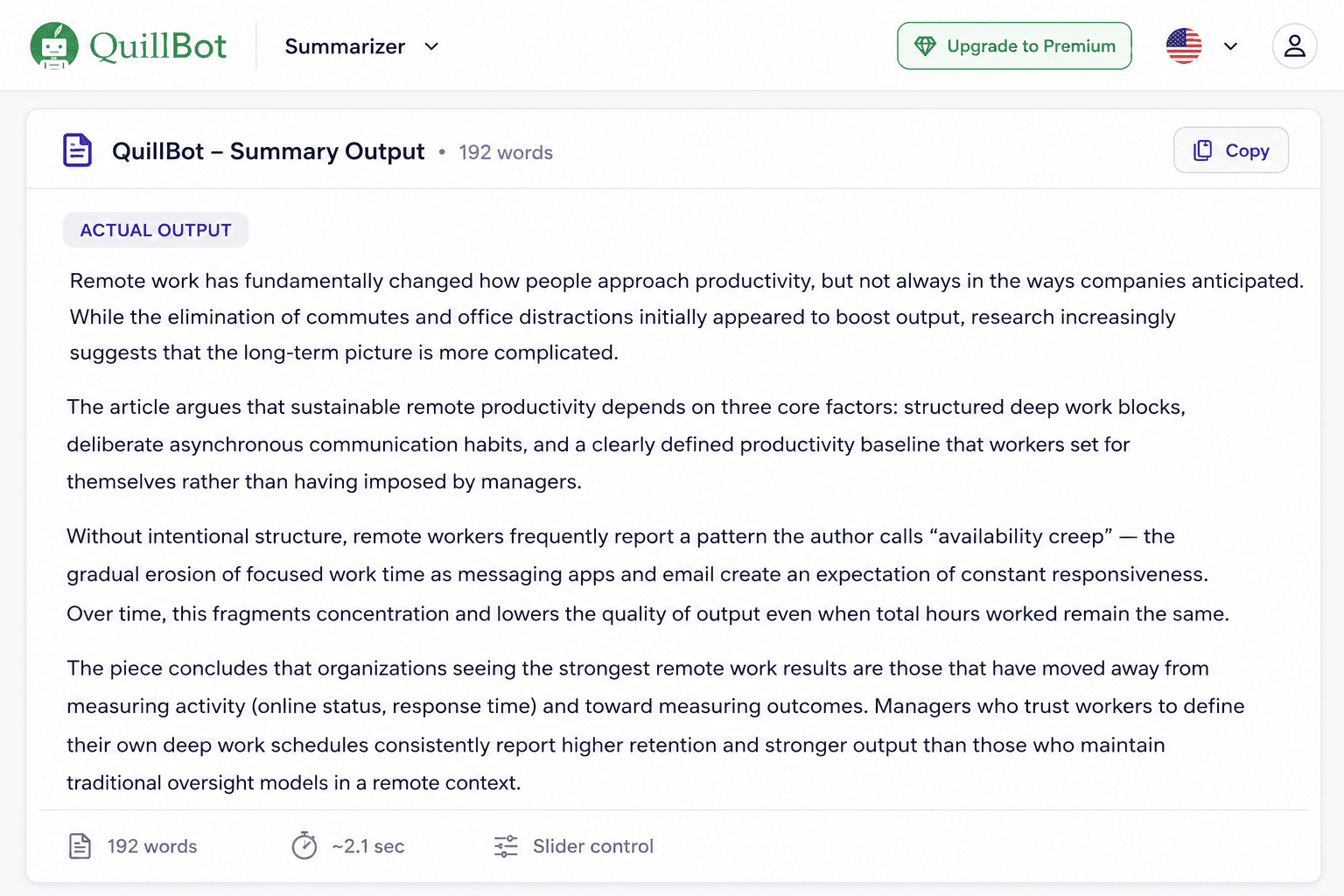
I pinned "deep work," "asynchronous communication," and "productivity baseline," these three terms that were central to the article's argument, and all three appeared in the output naturally, not forced in awkwardly.
The length slider is continuous rather than preset-based, which gives you real control. I landed on about 190 words. The output read smoothly, hit every key point, and didn't invent anything that wasn't in the original.
There's also a "Paraphrase Summary" button below the result that rewrites or paraphrases the summary in smoother language. I used it, and the rhythm improved noticeably.
The free plan does have a character limit. Long articles or research papers will hit it. But for most everyday summarizing tasks, QuillBot is the best AI text summarizer I found in this test.
| ✓ PROS | ✗ CONS |
|---|---|
| The keyword pinning feature is unique and useful | The free plan has character limits, so cant paste more than 600 words |
| Smooth, readable output on first pass | Only English language support available |
| "Paraphrase Summary" polishes the result | Account needed for higher limits |
| Continuous length slider | |
| Faster result submission under 3 seconds |
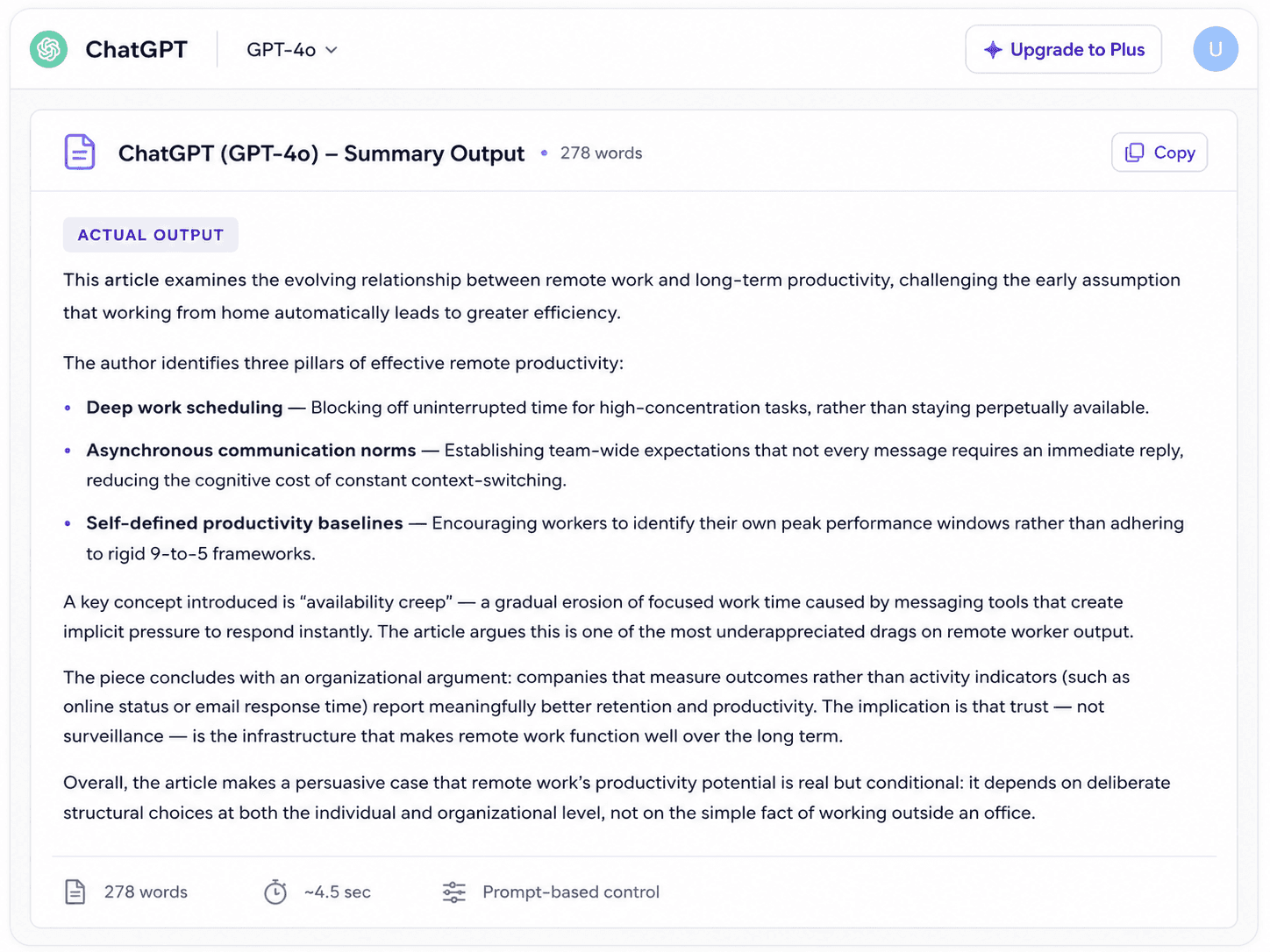
ChatGPT (GPT-4o)
ChatGPT isn't a dedicated text summarizer AI, but a general-purpose model, and that cuts both ways.
On one hand, you can tell it exactly what you want: "Summarize this in 5 bullet points for a non-technical reader" or "Give me a one-paragraph executive summary."
The output will match whatever format you ask for, and it does it well. On the other hand, if you just paste text and say "summarize this," you get whatever GPT decides is appropriate, and that can vary.
In my test, the default output was 280 words, which was longer than I asked for, and it leaned more toward commentary than pure summary in a couple of spots.
The tool was adding slight interpretive framing to the article's conclusions rather than just presenting them.
For anyone who writes good prompts, ChatGPT might be the most powerful long text summarizer AI here; it handles large documents without complaining, and you can iterate quickly.
For anyone who wants paste-and-go simplicity, it adds friction.
| ✓ PROS | ✗ CONS |
|---|---|
| Handles any format you describe in the prompt | Adds interpretive commentary sometimes |
| No character or word limit issues | Longer output than needed on default |
| Great for iterating on the output | Not free for GPT-4o (requires subscription) |
| Strong comprehension of complex text | No dedicated summarizer UI, as all prompt-driven |
Scribbr Summarizer
Scribbr built its reputation in academic writing assistance, and the summarizer fits that profile. No login needed, no ads, clean interface.
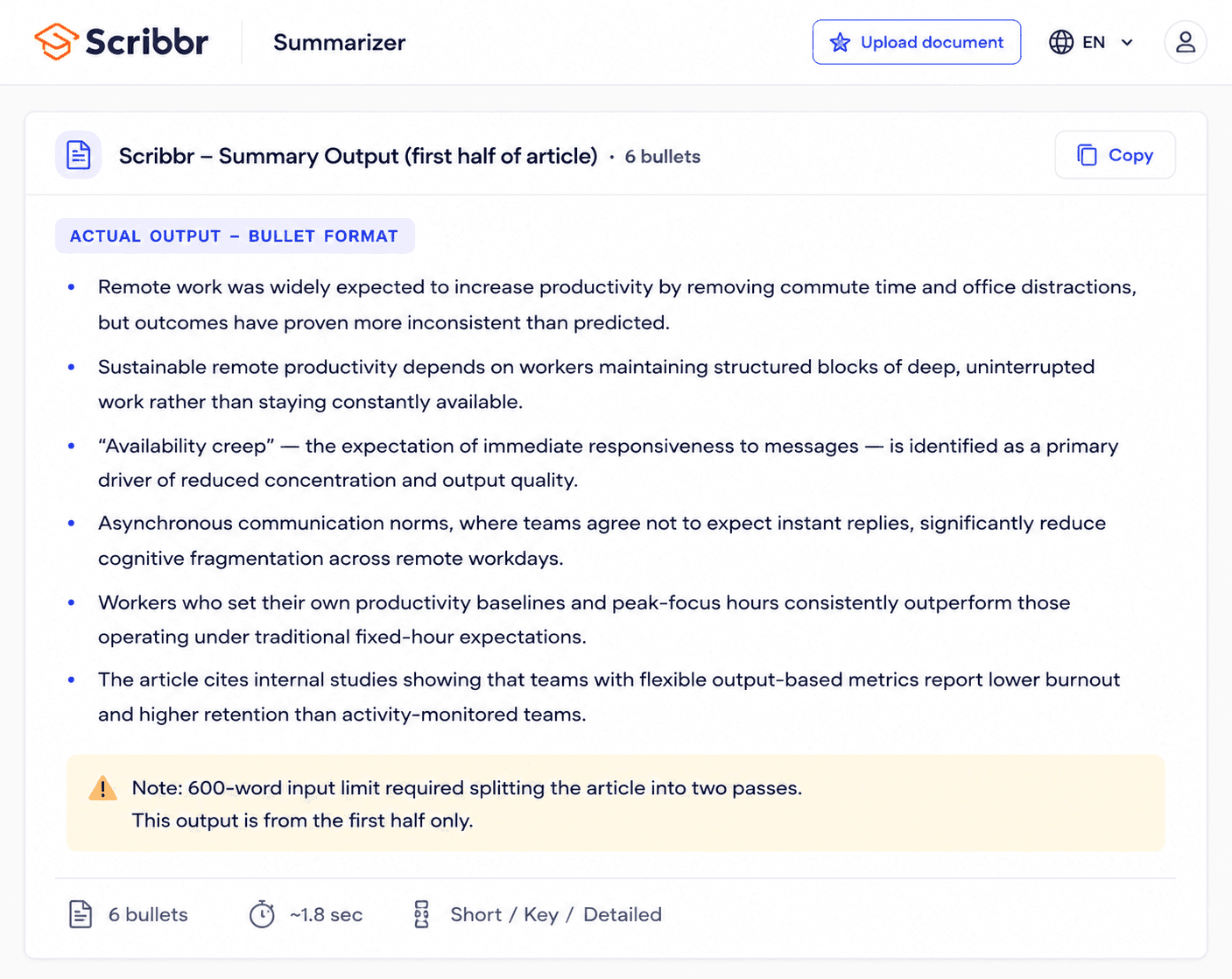
You paste, pick paragraph or bullet format, and get a result. The output quality was high, in fact genuinely one of the better bullet-point summaries I got across all seven tools.
Each bullet is mapped to a real section of the article rather than floating vaguely. The problem is the 600-word input limit.
My 1,247-word article had to be cut in half before the tool would process it. I ran the first half, then the second, and manually merged the results.
For students working with short academic passages, journal abstracts, or essay sections, this limit is fine. For anyone trying to use it as a free AI text summarizer online for longer content, it's a real workflow interruption.
Within its limits, though, the quality is excellent, probably the most precise bullet-point output I saw.
| ✓ PROS | ✗ CONS |
|---|---|
| No sign-up needed | A 600-word input limit, which is very restrictive |
| Best bullet-point accuracy in the test | English language support only |
| Clean, distraction-free interface | Need two passes for most real articles |
| Keyword control available |
SMMRY
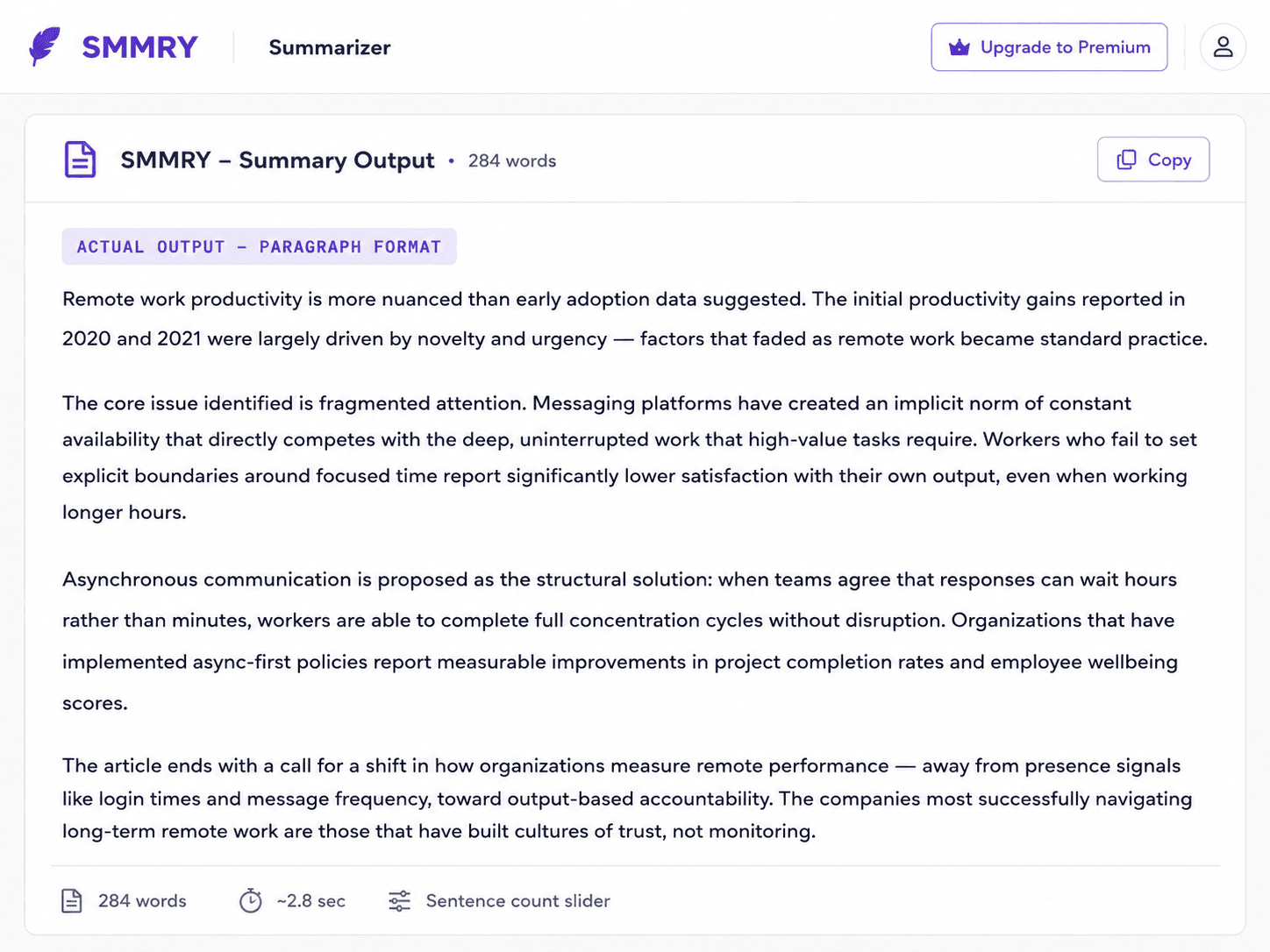
SMMRY surprised me the most. I expected a basic tool and got five output formats: paragraph, bullet points, a one-liner, bold-highlighted key phrases within the original text, and a mind map.
No other tool I tested offered a mind map. For visual learners or anyone doing concept planning, that's genuinely different.
The paragraph summary was accurate, though it leaned slightly more extractive than the others; some sentences felt pulled from the original rather than rewritten.
The "Bold Essentials" view, which highlights critical sentences in the original text rather than generating new content, is especially useful when you can't risk rewording legal text, technical specs, or anything where precision matters.
SMMRY requires a Google login, which adds a small hurdle. But as a free AI text summarizer with unusually broad format options and multilingual support, it earns a place on this list.
| ✓ PROS | ✗ CONS |
|---|---|
| Five output formats, including mind map | Requires Google login |
| Multilingual support | Slightly extractive but less fluent than QuillBot |
| "Bold Essentials" preserves exact phrasing | URL/file upload is only visible after the first summary |
| Solid paragraph accuracy |
Editpad Summarizer
Editpad's value isn't just in the summary; it's in what's right below it. After your output appears, you get one-click buttons to humanize it, paraphrase it, or run a plagiarism check. No switching tabs. No copy-pasting between tools.
In practice, this saved me real time. I got my summary, humanized it (which smoothed out one slightly robotic-sounding sentence), and spot-checked for accidental plagiarism without leaving the page.
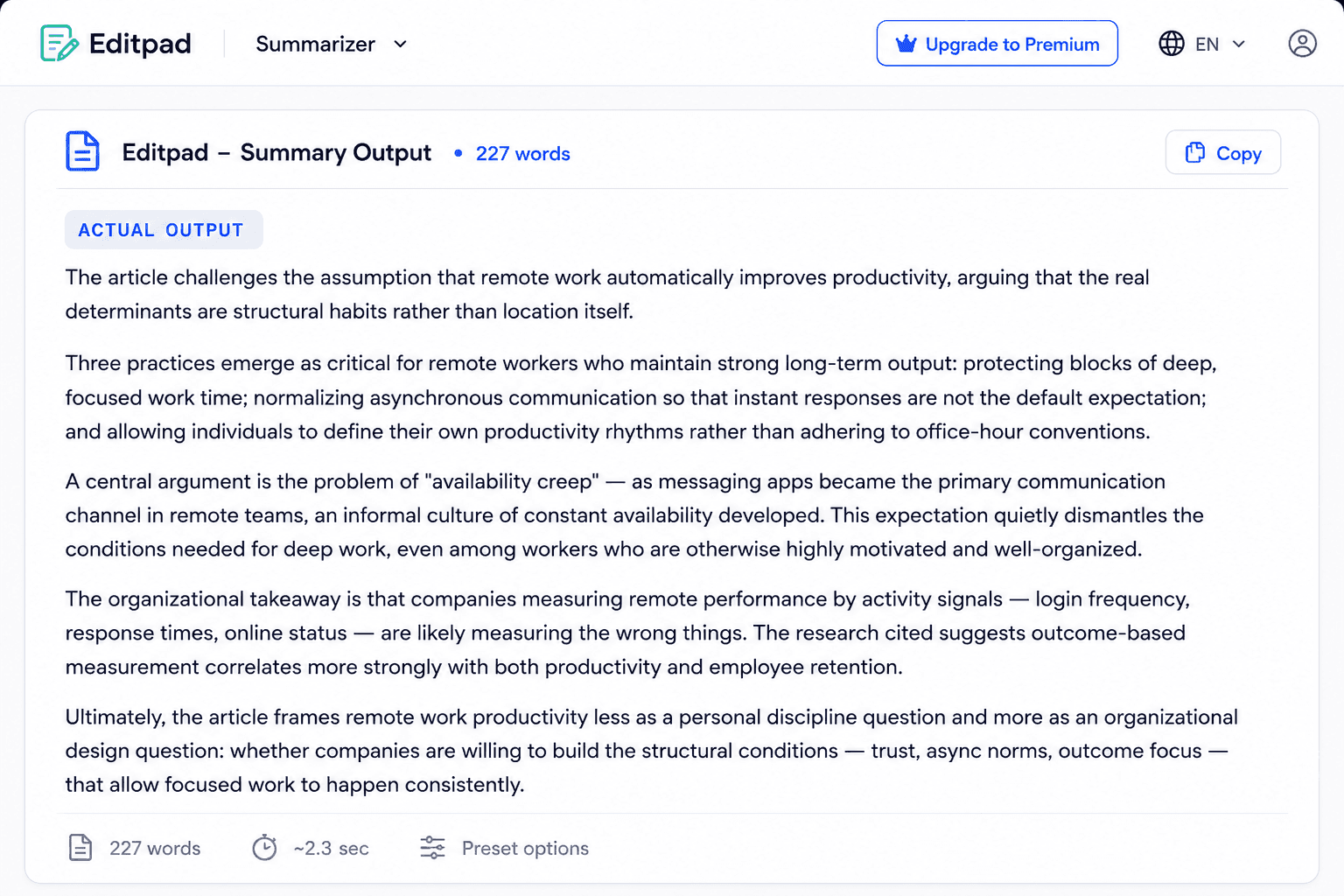
That's a workflow most dedicated online AI text summarizer tools don't offer. The summary itself was one of the more complete outputs I got, 227 words, all key points intact.
The length control uses presets rather than a slider, which is slightly less precise, but the preset options cover the most common use cases. No account needed.
| ✓ PROS | ✗ CONS |
|---|---|
| Built-in humanize, paraphrase, and plagiarism check | Preset length — no fine-grained slider |
| One of the more complete summaries in the test | English only |
| No sign-up needed | |
| Clean paragraph and bullet outputs |
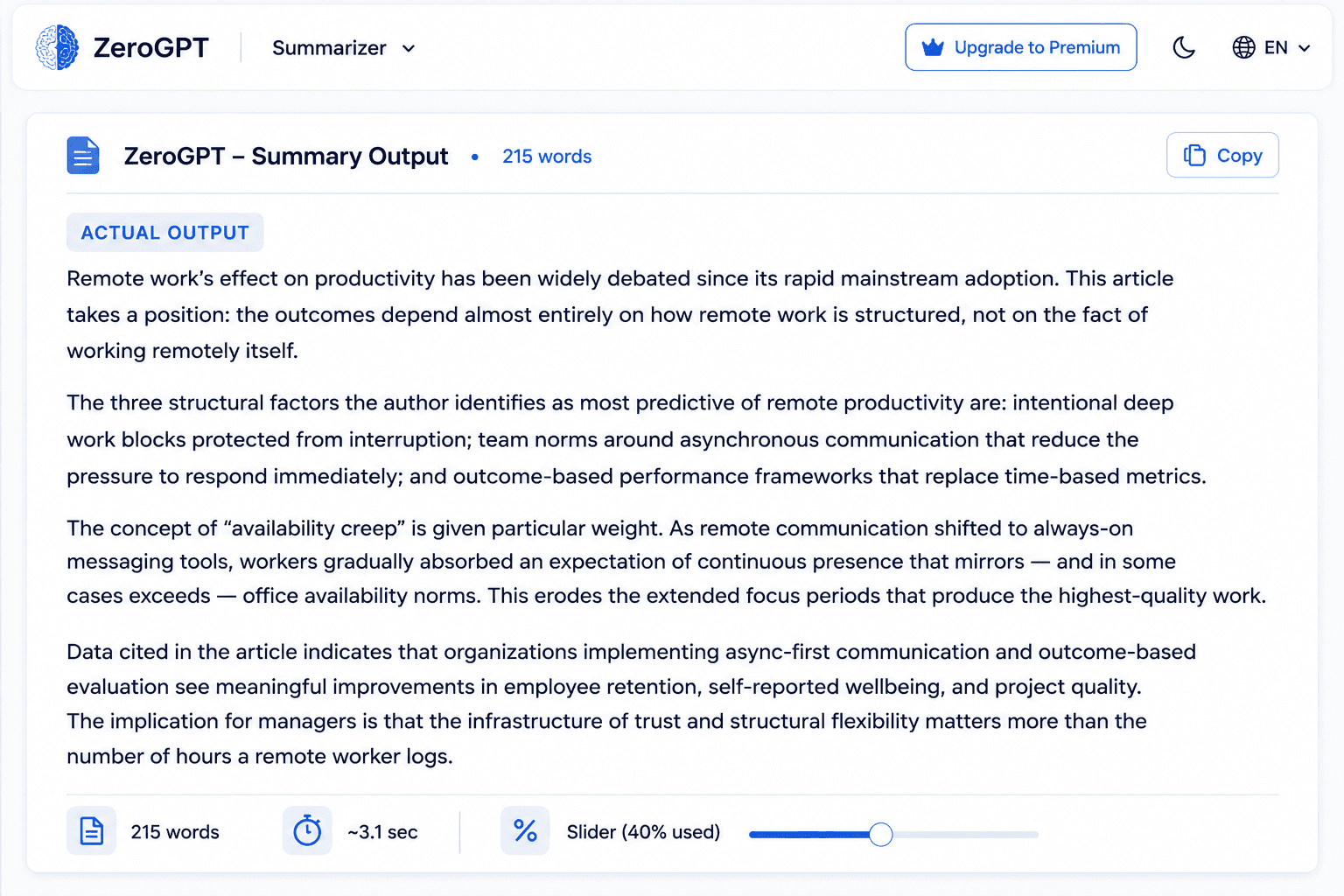
ZeroGPT Summarizer
This tool is currently one of the most popular tools in the market, trusted worldwide. Though ZeroGPT built its name as an AI detector tool, the summarizer feels like a strong bonus feature. The summary quality was good.
The percentage-based length control, where you set what fraction of the original you want preserved, is intuitive and more honest than vague short/medium/long labels.
The feature that actually made me pause was the Statistics panel. After generating a summary, you can pull up word count, character count, reading time, speaking time, and the most prominent keywords in the text.
For content researchers, that keyword list is useful: it tells you at a glance what the article is fundamentally about before you've read a word.
The catch is the paraphrasing side. Most tone options (academic, formal, casual, etc.) are paywalled, and the free paraphrase caps at 300 words. My 215-word summary was fine, but anything longer runs into the wall.
| ✓ PROS | ✗ CONS |
|---|---|
| Percentage-based length control is intuitive | Paraphrase tones are mostly locked behind a paywall |
| The statistics panel (keywords, reading time) is useful | Free paraphrase capped at 300 words |
| Handles up to 1,500 words without issues | English only |
| Good summary accuracy |
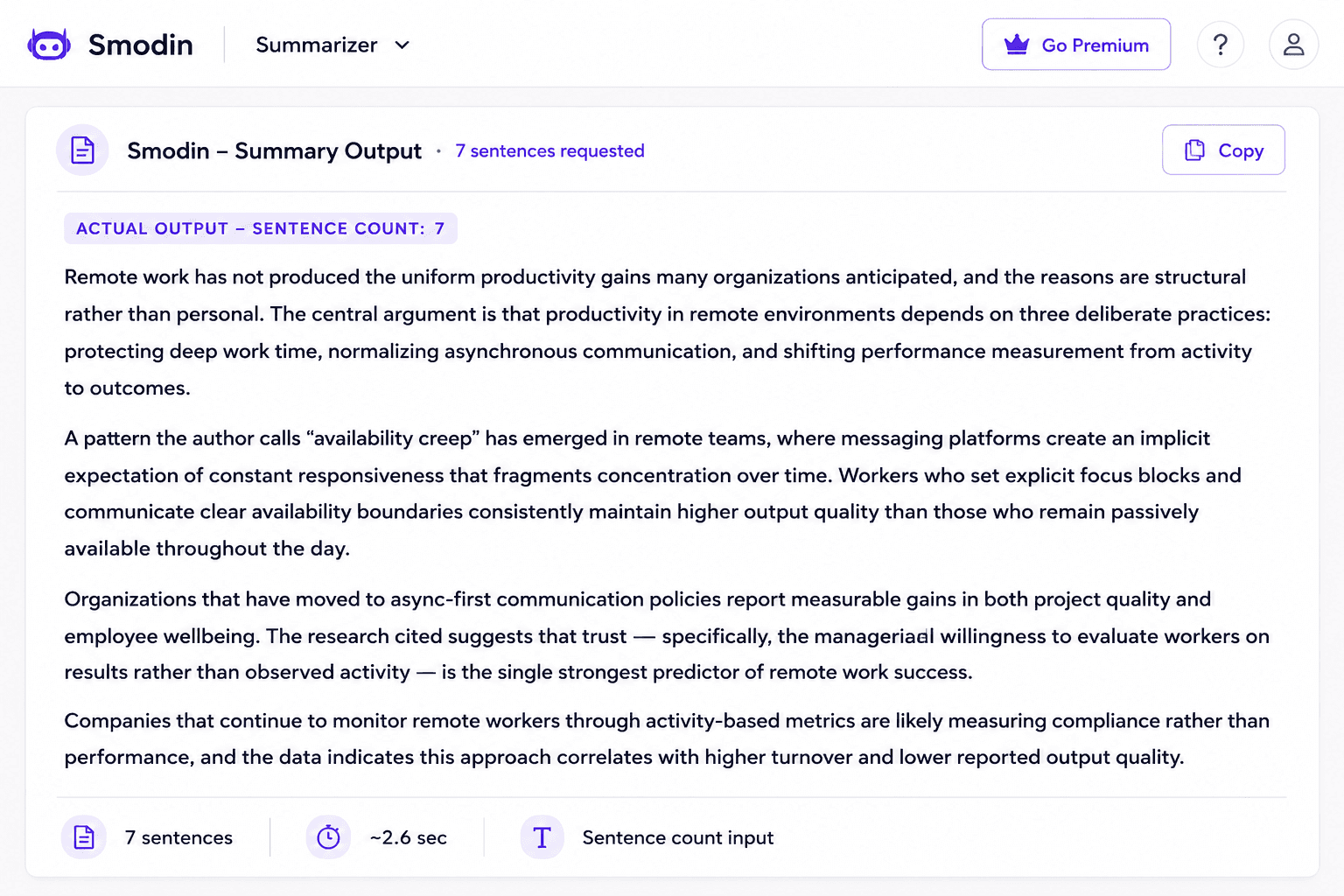
Smodin Summarizer
If your content isn't in English, Smodin is likely your best option from this list. The language coverage is broad, and the outputs in non-English languages were noticeably more fluent than I've seen from other AI summarization tools that claim multilingual support but clearly treat English as the priority.
The length control is unusually clear: you type in the number of sentences you want. I asked for seven. I got seven. That kind of specificity is actually more useful than a slider if you know exactly how much space you're working with.
The limitation that keeps Smodin from ranking higher is the 5,000-character input ceiling. My 1,247-word article ran to roughly 8,400 characters, so I had to split it into two chunks. That's workable but annoying.
For shorter content, articles under 700 words, email threads, social posts, and short reports, Smodin is clean, fast, and genuinely free with no sign-up required.
| ✓ PROS | ✗ CONS |
|---|---|
| Best multilingual support in the test | Not suitable as a long text summarizer AI |
| Sentence-count control is precise and intuitive | 5,000-character limit — splits most full articles |
| No sign-up needed, genuinely free | No bullet point format option |
| Readable, fluent output |
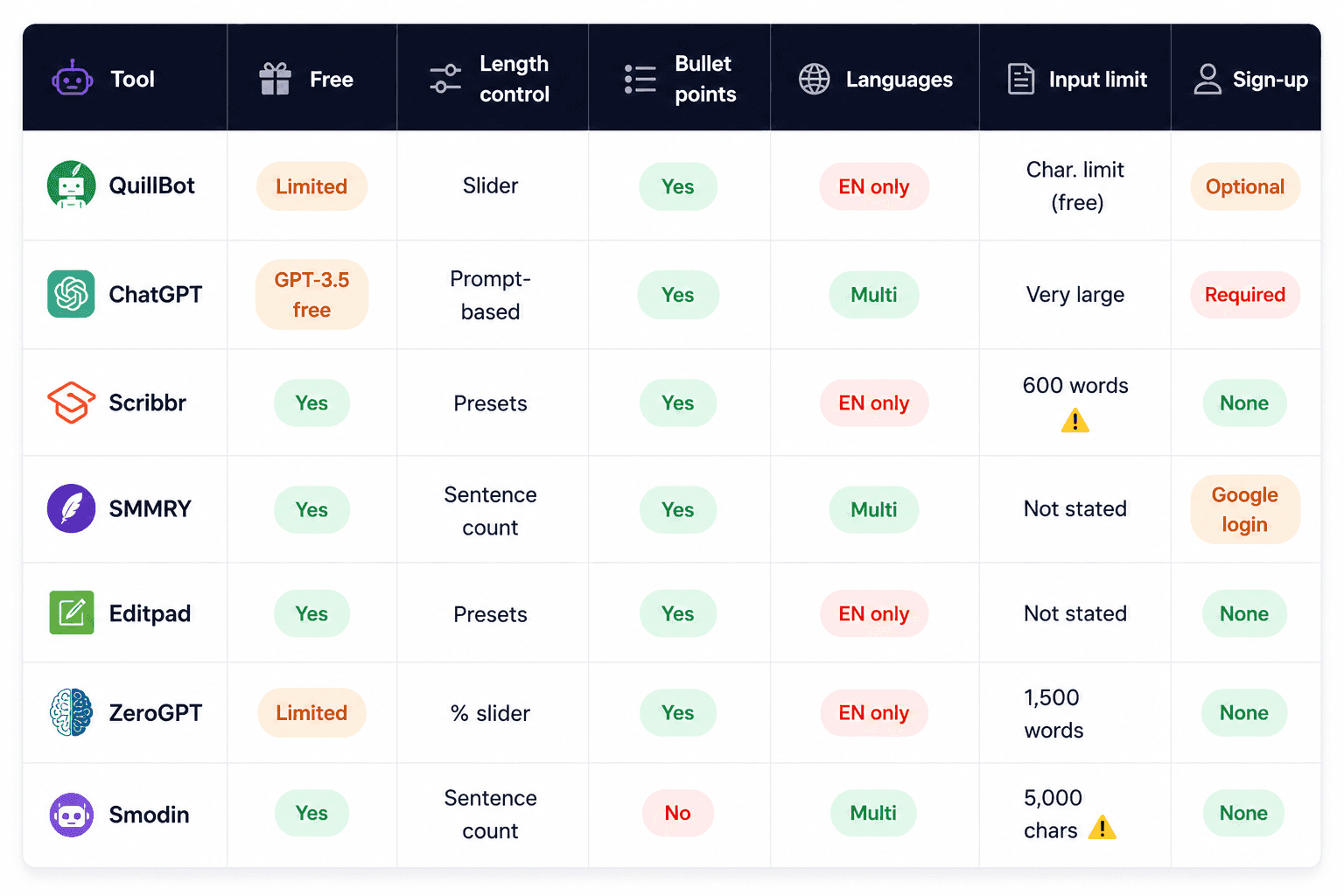
Side-by-Side Comparison of All 7 AI Text Summarizer Tools
After running the same article through all seven tools, patterns began to emerge that weren't obvious from any single result. Some tools that looked strong on accuracy fell short on control. A couple that marketed themselves as the best free AI text summarizer online turned out to have the most friction to actually get started.
The table below puts everything in one place, so instead of scrolling back through seven individual reviews to remember which tool had the word limit or which one needed a login, you can see it all at a glance.
Keep your own use case in mind as you scan across.
So What Is the Best AI Text Summarizer for You?
After running all seven, here's how I'd actually direct someone to a tool based on their situation:
If you want the most reliable all-around summarizer, it's QuillBot. The keyword pinning feature alone sets it apart from the pack, and its output quality was the most consistently strong across different content types.
In case you need maximum format flexibility, then ChatGPT is it. Write a specific prompt, and it'll match whatever structure you need. Just know you're trading simplicity for control.
If you're a student working with shorter texts, go for Scribbr. The bullet-point output was the cleanest in the test. Work within the 600-word limit, and it's excellent.
Looking for unusual output formats? SMMRY's mind map and Bold Essentials view are features you won't find elsewhere. Worth using for the right use case.
If you want the whole workflow in one place, Editpad's built-in humanizer and plagiarism check make it the most self-contained option on the list.
Somehow, if your content isn't in English, in that case, Smodin can handle your multilingual content better than anything else; just stay within the character limit.
One thing all seven share: they compress text, but they don't replace your judgment.
The best AI summarizer text workflow is tool → verify → use. Read the summary against the original once before you rely on it. The tools are good. They're not infallible.
FAQ on AI Text Summarizer Tools
Explore the most frequently asked questions about AI text summarization tools.
What is the best free AI text summarizer in 2026?
QuillBot had the best overall output quality, though free-plan character limits apply. For zero restrictions, Editpad and Scribbr (under 600 words) are the strongest fully free picks.
What is the best AI text summarizer for long articles?
ChatGPT handles the largest inputs with no real ceiling. Among dedicated summarizers, ZeroGPT (1,500 words) and Editpad handle long-form content best.
Are AI text summarizer tools accurate enough to trust?
The top tools preserved key arguments without inventing information, though nuance occasionally got flattened. Always spot-check the summary against the original before relying on it.
Which AI summarizer tools support languages other than English?
ChatGPT, SMMRY, and Smodin offer real multilingual support, but most others on this list are English-only. Smodin produced the most fluent non-English output in testing.
Do any of these tools require creating an account?
SMMRY needs a Google login, and ChatGPT needs an OpenAI account. Scribbr, Editpad, ZeroGPT, and Smodin work with no sign-up required.
What's the difference between paragraph and bullet point summaries?
Paragraphs preserve the narrative flow, which is better for grasping the full argument. Bullets are faster to scan and better suited to pulling out discrete facts or steps.
How long should a good summary be?
A useful benchmark is 15–20% of the original length, which is long enough to keep the argument intact, short enough to actually save time.
Can AI text summarizers handle PDFs or web links directly?
Some do, like SMMRY, which supports URL input after your first summary, and several tools accept file uploads. Most, though, only work with pasted text, so check before assuming.
Will an AI summary always be 100% accurate?
No. Even the best tools can miss nuance, omit a caveat, or reduce a complex point to something simpler than it was. Treat the summary as a strong starting point, not a final source.
Is it safe to use AI summarizers for confidential or sensitive documents?
Be cautious, as most free tools process text on external servers, and privacy policies vary widely. Avoid pasting confidential, legal, or personally identifiable information unless the tool explicitly states it doesn't store or train on your input.
Can AI summarizers replace reading the full article for research or academic work?
Not for serious work. They're excellent for deciding whether a source is worth reading in full or for quick orientation, but academic and research use still requires reading and citing the original.
Do AI text summarizers work well on technical or scientific content?
Quality drops noticeably with dense technical or scientific text. General-purpose tools often oversimplify specialized terminology, so results should be checked more carefully than with general content.
Final Thoughts on Picking the Right AI Text Summarizer
Seven tools, one article, zero shortcuts. That's really what this whole test came down to.
Honestly, no AI text summarizer tool here is perfect, and none of them should replace your own read-through of the original source.
What they're genuinely good for is speed: getting the shape of an argument before you commit to reading the whole thing, or turning a dense report into something you can act on in minutes instead of an hour.
If you remember nothing else from this breakdown, remember this: the best AI text summarizer for you depends entirely on what you're summarizing and how much control you need over the output.
So, pick based on your actual use case, not the longest feature list.
One last thing worth saying clearly is that a summary is a starting point, not a finished product. Several of the tools above lean closer to extractive summarization than they let on, which means chunks of the original phrasing can survive into your "summary" more than you'd expect.
If you're pulling that output into an article, a report, or an assignment, that's a real risk worth checking before you hit publish.
That's exactly where CopyChecker's Plagiarism Checker comes in. Just paste your summary in, run the check, and confirm it's genuinely original before it goes anywhere with your name on it.